CallApp: Caller ID & Block
- 49.21K
- 4.3
- Installs
- 100.00M
- Price
- Free

Screenshots



Analysis by Reviewed
When an unknown number interrupts dinner or rings while I am sorting out something important, I want a useful clue before I answer—not another reason to hand over more access than I’m comfortable with. That balance is what I would weigh most carefully with CallApp: Caller ID & Block: it aims to make incoming calls easier to judge, while its call-related tools make it worth paying attention to the choices you make during setup.
Start with the permissions, not the promises
CallApp is a free communication app from CallApp Caller ID, Call Recorder & Spam Blocker. It has been available since September 13, 2012, and works on Android 8.0 and later. Its age and reach may make it feel familiar, but popularity alone does not answer the practical trust question: what access are you comfortable granting so its features can work on your phone?
I would review each permission prompt in context rather than tapping through automatically. Caller identification and call management are closely tied to phone activity, so consider whether a requested access is necessary for the function you want to use. If you only want to screen unfamiliar callers, you may not need to enable every optional tool. Revisit your phone’s app-permission settings if your needs change.
Make the controls work for your routine
A useful way to judge a caller-ID app is to test it against your actual week. If unwanted calls tend to arrive during work, blocking can reduce interruptions; if they are occasional, identifying a number before answering may be enough. I’d start with the least disruptive option and block a number only when I’m confident I don’t want it reaching me again.
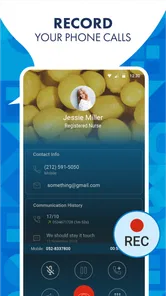
Call recording deserves more thought than a quick toggle. Rules about recording differ by location, and the other person’s expectations matter too. I would use it only for a clear purpose, check the applicable local requirements, and avoid recording sensitive conversations casually. If you do not need that feature, leaving it unused keeps your call routine simpler.
Discovering the World of Call Management
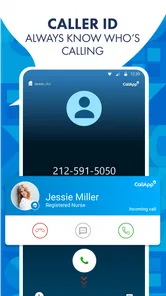
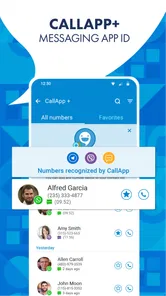
Let’s dive into what makes CallApp: Caller ID & Block a must-have for anyone who owns a smartphone. This app is not just any caller ID service; it’s like having a superpower in your pocket. Imagine being able to see who’s calling, even if they’re not in your contact list. That’s right! With its extensive database, CallApp identifies millions of unknown numbers, so you never have to play the guessing game again.
Features That Stand Out
One of the features I absolutely love is the call blocking option. You know those annoying telemarketers that call at the most inconvenient times? Well, with CallApp, you can block them with just a tap. It’s like having your own personal bouncer for your phone calls.
More From Our News Desk

 Remini - AI Photo Enhancer
Remini Is Our App of the Week for Bringing Old Photos Back to Life
A quick AI restoration tool earns its place by making faded portraits and soft, older photos feel vivid again—provided you know where its polish ends.

 PayPal - Pay, Send, Save
PayPal Reviewed: Who Benefits from Its Reach, and Who Should Skip It
PayPal is most useful when its reach and familiar checkout solve a real payment problem. These reader-by-reader recommendations show where it earns a place—and where friction wins.

 Millionaire 2026 Quiz & Trivia
 Makes Every Answer Count
A familiar quiz-show format succeeds or falters on tiny design decisions: how clearly the game guides a first answer, handles hesitation, and invites one more round.

 Decor Life - Home Design Game
Decor Life Turns Short Breaks Into Bite-Sized Decorating Jobs
A room-by-room decorating game built for quick sessions gains from modern phone habits, but its gentle pace still depends on patience, repetition, and a steady stream of design jobs.

 Sniper 3D:Gun Shooting Games
Sniper 3D’s Quick-Shot Appeal Faces the Upgrade Treadmill
The appeal is immediate: line up a target, steady your aim, and fire. The harder question is whether Sniper 3D can keep players returning after the first rush.

 Blockudoku®: Block Puzzle Game
Blockudoku vs. the Puzzle Pack: A Quick Puzzle With a Repetitive Edge
Blockudoku turns a clean grid into a quiet test of foresight. Against match-three polish and head-to-head simplicity, its lasting appeal is also its biggest limitation.
Latest News



Moreover, the app offers a unique feature where you can record your calls. This can be incredibly useful for those important business conversations or when you simply want to keep a record of your chats. Just make sure you’re respecting privacy laws in your area!
A User-Friendly Experience
Now, I’ll be honest, I’m not the most tech-savvy person out there, but navigating through CallApp is a breeze. The interface is clean, intuitive, and everything is right where you’d expect it to be. In just a few taps, you can manage calls, block numbers, and access all of the app’s features.
One of the things I appreciate is its integration with social media. It pulls information from platforms like Facebook and LinkedIn, giving you a richer profile of the person calling. This is perfect for avoiding those awkward "Who is this?" moments.
Ending the Call on a High Note
In conclusion, CallApp: Caller ID & Block is a fantastic tool for anyone looking to take control of their phone calls. Whether it’s identifying unknown numbers, blocking spam, or recording important calls, this app has got you covered. It’s more than just a caller ID; it’s a full-fledged call management system that’s easy to use and incredibly effective.
So, the next time your phone rings, let CallApp give you the peace of mind you deserve. It’s a small download that makes a big difference in how you handle calls. Trust me, once you try it, you won’t look back!
Where it fits—and where it doesn’t
For someone who gets frequent calls from customers, delivery drivers, or numbers that are not saved in their contacts, the main appeal is a chance to make a more informed answer-or-ignore decision. Picture a busy afternoon when you are expecting a courier but also receiving repeated sales calls: an identification cue can help you prioritize without interrupting every task to search the number manually. It is still a clue, not a guarantee, so I would avoid treating a displayed identity as proof and would verify sensitive requests independently.
Compared with the basic caller screen built into a phone, CallApp brings caller identification, blocking, and recording together in one place. That can be convenient if you want those tools under one roof. The trade-off is that a native phone app may be the better fit if you prefer fewer permissions, fewer settings, or a simpler experience. Likewise, someone who rarely receives unfamiliar calls may get little practical benefit from installing a separate call-management app.
Small habits that make a difference
I would begin by deciding what problem I want solved: unknown callers, repeat nuisance numbers, or keeping a record of particular conversations. Then I’d enable only the tools relevant to that goal and check the app’s controls before relying on them. A conservative blocking habit is especially useful: block clear repeat nuisances, but let uncertain numbers ring through or go to voicemail until you have a reason to act. This avoids turning a helpful filter into a source of missed legitimate calls.
There are also practical limits to caller identification. A number may be unfamiliar because it belongs to a legitimate person or business, and a label should not replace common-sense checks. For account, payment, or personal-information requests, I would end the call and contact the organization using a number I already trust. That workflow is safer than relying on any caller-ID label, no matter how convenient it looks.
Cost, scale, and the final choice
CallApp is free to install, with in-app purchases ranging from $0.99 to $149.99 per item, so I would check what a paid option includes before buying anything. It is rated for Everyone, has an average rating of 4.3 from around 1.7 million ratings, and has been installed over 100 million times. Those figures show broad adoption, but they do not tell me whether its specific permissions or optional tools suit my own privacy preferences.
My cautious verdict is that CallApp makes most sense for people who regularly deal with unknown or disruptive calls and are willing to review access settings instead of accepting every prompt by default. If your priority is minimal data exposure or you only need the phone’s built-in call screen, stick with the native option. If you try CallApp, begin with identification and selective blocking, keep recording for situations where it is lawful and genuinely useful, and reassess the permissions and purchase choices as your needs change.
Decide what a useful caller label means to you
I find caller identification most valuable when it changes a small decision, not when it invites me to trust a stranger. A likely business name can help me decide whether to answer while I am waiting for a repair appointment, but I would still ask the caller to identify themselves before sharing anything personal. If the call is unexpected and asks me to act urgently, I would treat that urgency—not just the displayed label—as a reason to slow down.
This distinction also helps set realistic expectations. An identification service can make an unfamiliar number less mysterious, but it cannot guarantee that a call is welcome, legitimate, or relevant. I would use the information as a screening hint, then rely on my own judgment. That approach keeps the convenience while avoiding the risky assumption that a name on screen is proof of who is speaking.
A practical setup for mixed personal and work calls
If I used the app on a phone that receives both work and personal calls, I would first keep a short mental list of people or services I am currently expecting. Then, when an unfamiliar number appears, I could compare the timing and context with that list before deciding whether to answer. If I miss the call, I would check for a voicemail or follow up through a trusted contact channel rather than calling back automatically when the number looks suspicious.
For repeated nuisance calls, I would also avoid blocking a whole pattern too quickly if the number might be shared by a legitimate service. Blocking is most useful when I have seen enough to be confident about the caller; when I am uncertain, silencing the interruption by letting it go unanswered is a less permanent choice. This small distinction matters for people who depend on calls from clinics, schools, couriers, or new clients, where an unfamiliar number can be important.
What to consider before using recording
Call recording can be useful for remembering instructions, but it changes the nature of a conversation. Before using it, I would ask whether a written note or follow-up message would do the job with less privacy impact. If recording is genuinely needed, I would check the rules that apply where I am and consider the other person’s expectations rather than treating the feature as an ordinary default.
I would also keep the purpose narrow. A recording made to retain a specific work detail should not become a habit of capturing every call simply because the option exists. If I do not have a clear reason to save audio, leaving that function unused is the simpler choice. This is a useful example of how a feature can be valuable to one person and unnecessary friction for another.
Who is likely to get the most from it
The app is a stronger fit for someone whose phone regularly rings with unfamiliar numbers and who wants identification, blocking, and call recording available in one call-management tool. It may also suit a person who is comfortable adjusting permissions and checking which optional functions they actually use. The combination is more compelling when call screening is part of everyday life than when unknown calls are rare.
I would skip it if I wanted the smallest possible app footprint, prefer not to grant call-related access, or already feel well served by the phone’s built-in caller screen and blocking controls. It is also not the right answer for anyone expecting caller labels to authenticate a caller or guarantee that every nuisance call will be caught. In those situations, basic phone controls and a cautious verification routine are more appropriate.
My measured recommendation
CallApp’s broad appeal is understandable: it brings several call-handling jobs together, and its long-running presence and large audience make it easy to see why people consider it. Still, the right choice depends less on popularity than on whether its tools solve a recurring problem for you. I would install it with a specific goal, review prompts one by one, and keep only the features that earn their place in my routine.
For me, the best way to use it is as a filter rather than an authority. Let identification help decide which calls deserve attention, use blocking selectively, and keep recording tied to a clear and lawful need. If that balance matches how you handle calls, it is worth considering; if you value minimal access above extra call tools, the simpler option already on your phone may be the better fit.
CallApp: Caller ID & Block Frequently Asked Questions
Is CallApp easy to set up, and what permissions should I expect?
CallApp is designed to help identify callers and manage unwanted calls, so setup may involve granting permissions related to calls and contacts. Review each permission request on your device and allow only what you are comfortable sharing. Taking a moment to check these settings can help you decide whether the caller identification and call-management features fit your preferences.
How popular is CallApp among users?
CallApp has an average rating of 4.3 from around 1.7 million ratings, with about 49,000 written reviews and over 100 million installs. Those figures suggest that many people have tried the app, although individual experiences can differ depending on preferences, device settings, and how they use caller ID and call blocking.
What does CallApp do, and who might find it useful?
CallApp is a communication app designed for people who want to identify callers and manage unwanted calls. Its store summary highlights caller ID and spam call blocking, so it may be useful if you often receive calls from unfamiliar numbers or want more control over incoming calls. The app is free to download, with optional in-app purchases.
Is CallApp available for my phone, and what age group can use it?
CallApp is available for Android devices running version 8.0 or later, and it is rated Everyone. It has been available since September 13, 2012, and has reached over 100 million installs. Check that your phone meets the minimum Android requirement before downloading so you can install and use the app.
What features does CallApp: Caller ID & Block offer?
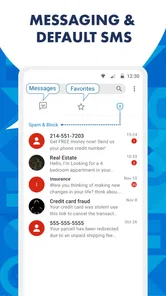
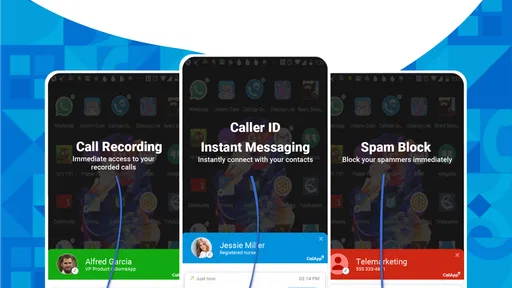
CallApp: Caller ID & Block provides a comprehensive suite of features including advanced caller identification, call blocking, and call recording. It also offers contact management, personalized call screens, and an integrated social media feed for contacts. The app's robust database supports these features, ensuring users can effectively manage and control their incoming and outgoing calls.
Pros
- Accurate caller ID recognition
- Comprehensive call blocking features
- User-friendly interface
- Integration with social media
- Frequent updates enhance app
Cons
- Occasional ads disrupt usage
- May drain battery quickly
- Premium features require payment
- Some contacts may not sync
- Limited international support