Boat AI Browser: Web & Tools
- 990.00
- 3.9
- Installs
- 1.00M
- Price
- Free

Screenshots


Analysis by Reviewed
If you’re trying Boat Browser for the first time, the simplest way to judge it is to use it for one small, familiar task before changing anything. Open a site you visit often, find a page you need, and notice whether the controls feel natural on your phone. That gives you a more useful first impression than spending the first session adjusting every option.
What to expect from this mobile browser
Boat Browser is a free business-category app from Adblock – Rocketshield Browser Technology Limited, though its everyday role is straightforward: browsing the web on a mobile device. It is rated for Everyone, has reached over one million installs, and holds an average rating of 3.9 from around 5,400 ratings. The current version is 1.3.9.1012, and it runs on Android 7.0 or later.
Those details give a useful sense of its audience, but they do not tell you whether its style suits you. I would approach it as a browser to try alongside your usual one, rather than immediately moving every bookmark and routine over. Its appeal is the promise of a simpler, more adjustable browsing experience; the right test is whether those controls help with the pages you actually visit.
Get comfortable before customizing
When you first open it, resist the urge to adjust everything at once. Start with your regular destination and learn where the basic navigation controls sit. Then try one change at a time, such as rearranging a toolbar or setting up the home screen. This makes it easier to tell which customization is genuinely useful and which only adds another choice to manage.
Gesture support is another option worth testing gradually. Try a swipe for a familiar action, such as going back or refreshing, and keep using it only if it feels more natural than tapping. Gestures can make one-handed browsing easier, but they are not automatically faster for everyone. If you often browse while carrying something or using your phone in an awkward position, reliable on-screen controls may matter more than a clever shortcut.
Your first useful browsing session
A practical first run might be checking a work message, opening a linked reference page, and returning to the original without losing your place. That small loop tests navigation, page loading, and whether the interface stays out of your way. For a quick search while commuting or looking up a detail during a conversation, a browser that feels responsive can be a real convenience. I would also try a page with a lot of images or embedded material, since that is where heavier sites are more likely to expose slowdowns.
A low-pressure way to test it
You do not need to make Boat Browser your default on day one. I would give it a few short sessions focused on different tasks: a quick search, a site you use for work, and a page you regularly revisit. That reveals more than browsing randomly because it tests whether the app fits your actual habits, not just whether its first screen looks appealing.
More From Our News Desk

Clash of Clans Is Won Between the Battles

Android Auto Makes the Case for Quieter Car Software

MobiOffice: Transforming Mobile Productivity with Seamless Integration

EA SPORTS FC™ Mobile Soccer: Redefining Mobile Sports Gaming

How Microsoft OneDrive Became a Mobile Productivity Giant

How Google Translate Breaks Language Barriers Effortlessly
For a first-time user, the most useful early decision is whether to keep the layout close to its starting arrangement or personalize it. If a control is already easy to reach, leave it alone. Move or adjust something only when you can name a real inconvenience it solves. This keeps the browser from becoming a small project before it has proved useful.
Choosing what to keep in your routine
Boat Browser makes most sense for someone who enjoys tailoring a mobile browser and is willing to spend a little time learning a different arrangement. It can also suit a person who wants a separate browser for casual searches, work links, or pages they do not need to manage alongside their main browsing setup. If you depend on the same account, bookmarks, and open tabs across several devices, though, the browser you already use may be more convenient.
That comparison is worth making before you switch. A phone’s built-in browser usually wins on familiarity and being ready to use, while large established browsers are often chosen for their existing account-based routines. Boat Browser’s draw is a more customizable feel and gesture-based navigation. I would compare the actions you perform most—opening a new page, returning to a search, and reaching a favorite site—rather than judging the apps by a general claim of speed.
Setting Sail with Boat Browser
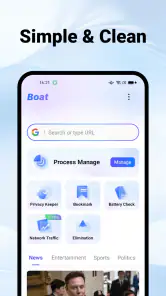
The first thing that caught my attention with Boat Browser was its sleek and minimalist design. It doesn’t bombard you with flashy ads or unnecessary clutter, which is a breath of fresh air. The interface is clean, making navigation a breeze. You can easily access your favorite websites and settings without getting lost in a sea of tabs.
Features That Make Waves
One of the standout features of Boat Browser is its ability to customize almost everything. From the toolbar to the home screen, you can tailor it to your liking. This is particularly useful for users who want a personalized browsing experience. Another cool feature is the gesture support, which allows you to perform actions like refreshing a page or moving back and forth between sites with simple finger swipes. It feels like magic!
Speed is another area where Boat Browser excels. Pages load quickly and efficiently, even with multiple tabs open. I found that it performs exceptionally well compared to some of the other big-name browsers. It’s perfect for those on-the-go moments when you need information in a snap.
Make the first setup work for you
Rather than trying to build an elaborate home screen, I’d begin with just the destinations you genuinely return to. A useful setup is one that gets you from opening the browser to the next task with fewer taps; anything you rarely use is just visual noise. If you are unsure whether a toolbar change helps, use the browser for a day before deciding. Familiarity can make a control feel easier to find than it did in the first few minutes.
Gestures also benefit from a little deliberate practice. Try one action at a time on a low-stakes page, then repeat it until you can tell whether the motion is reliable for your hand and grip. A swipe that works well while sitting may be awkward when walking or holding a bag. Keeping an on-screen route available, when that suits your setup, is a sensible fallback rather than forcing yourself to use every shortcut.
When the experience gets less smooth
While Boat Browser is packed with features, it’s not without its hiccups. Occasionally, I noticed minor lags when loading very content-heavy websites. However, these instances are few and far between. Another point to consider is that while the customization options are extensive, they might be overwhelming for those who prefer a straightforward, out-of-the-box experience.
Despite these minor setbacks, the app’s performance remains impressive overall. It’s clear that a lot of thought has gone into making Boat Browser not just functional, but enjoyable to use. If you’re someone who values speed and customization, this app could be your next best friend.
What to do when a page feels heavy
If an image-rich page hesitates, I would not immediately assume that every site will behave the same way. Try the same page again after closing tabs you no longer need, and compare it with a simpler page you know well. That is a practical way to distinguish a demanding site from a general browsing issue. For an urgent task, it is also reasonable to open the page in your established browser rather than lose time troubleshooting.
Another useful habit is to treat customization as a tool, not a scorecard. More available choices do not automatically make a browser better for you. If you find yourself repeatedly changing the same controls, settle on the arrangement that supports your common actions and stop tuning it. The point is to make browsing easier, not to spend each session managing the browser itself.
Who it suits, and what to try next
Boat Browser is a good candidate if you like shaping a browser around your habits and want gestures and adjustable controls available in the same place. It may be less appealing if you prefer a familiar, fixed layout, or if your priority is seamless continuity across several devices. In that case, the browser already built into your phone, or a mainstream alternative you already use, may be the easier fit.
One useful trade-off is to keep your current browser for important sign-ins and use Boat Browser for everyday lookups until you are confident with its navigation. That lets you compare how each handles the same pages without making a disruptive switch. If a busy page stutters, close tabs you no longer need and retry it; if customization starts to feel like work, return to the simplest layout that still makes common actions easy to reach.
A realistic day-to-day test
Imagine you are between meetings and need to check a message, open a web reference someone sent, and then return to your original search. Boat Browser’s gestures and adjustable controls may make that sequence feel quick once you know where things are. The useful test is not whether the browser has a long menu of options, but whether the second and third steps are as straightforward as the first. If you routinely lose your place or reach for your old browser, that is a meaningful sign that its workflow is not the right match.
For a small business owner or someone who handles occasional web research on a phone, keeping work lookups in a separate browser can also make a session easier to mentally distinguish from personal browsing. That is a practical organizational choice, not a substitute for a dedicated work profile or a guarantee of privacy. If you need strict separation of accounts or managed work data, use a solution designed for that requirement instead.
Questions worth settling before you switch
Is it free to try? Yes: Boat Browser is free, so you can test it alongside your current browser without paying to find out whether the controls suit you. Is it meant for younger users? Its content rating is Everyone, although parents should still use their own judgment about the sites a child visits. The app’s age rating describes the app, not the material that can be reached on the web.
Will it replace your usual browser automatically? I would not plan on that. A browser can feel pleasant on its own and still be less convenient if your everyday bookmarks or multi-device habits are tied to another app. Try a few repeat tasks before deciding where to keep important routines. And if you are wondering whether it is primarily a business tool, its business category is less important to daily use than the fact that it functions as a mobile web browser.
Final Thoughts
To wrap it up, Boat Browser is a strong contender in the mobile browser arena. Its speed, customization options, and user-friendly interface make it a great choice for anyone looking to enhance their browsing experience. Sure, it has a few minor drawbacks, but they’re far outweighed by the benefits. Give it a try and see how it fits into your digital lifestyle. You might just find yourself setting sail on a new browsing adventure.
My advice is to give it a short, practical trial rather than expecting a browser to transform every part of your phone routine. If the gestures save effort and the layout feels right after a few ordinary searches, keep it in your rotation. If you find yourself constantly hunting for familiar controls, switching back is a sensible choice. That is the best way to decide whether its particular mix of speed and customization earns a place on your home screen.
Boat AI Browser: Web & Tools Frequently Asked Questions
Is Boat AI Browser: Web & Tools free to download?
Yes. Boat AI Browser: Web & Tools is free to download, so you can try it without paying for the app itself. It is described as a private, fast, and simple all-in-one privacy app. As with any browser, consider whether its features and browsing experience fit your needs before making it your main app.
Is Boat Browser available for both Android and iOS platforms?
Boat Browser is primarily designed for Android devices and is available for download on the Google Play Store. Unfortunately, as of now, it does not support iOS platforms. Users looking for similar functionalities on iOS might need to explore alternative browsers tailored for Apple's ecosystem.
What unique features does Boat Browser offer compared to other mobile browsers?
Boat Browser is celebrated for its high customization options, allowing users to personalize their browsing experience with various themes, plugins, and gestures. It also features a built-in video player and supports voice command browsing, making it a versatile choice for users seeking a tailored and interactive browsing experience.
How does Boat Browser ensure user privacy and security?
Boat Browser incorporates various security measures to protect user data, such as private browsing mode to ensure no history is recorded during sessions. It also supports secure connections with HTTPS and has an inbuilt ad-blocker to prevent tracking by advertisers, enhancing overall user privacy and security while browsing.
Can I synchronize my bookmarks and settings on Boat Browser across multiple devices?
Currently, Boat Browser does not support synchronization of bookmarks and settings across different devices. Users need to manually set up their preferences on each device. This limitation might affect users who frequently switch between devices and prefer a seamless browsing experience across platforms.
Pros
- Fast and smooth performance.
- Highly customizable interface.
- Supports Flash content.
- Built-in download manager.
- Multiple tabs and incognito mode.
Cons
- Occasional ad pop-ups.
- No longer updated.
- Limited add-ons support.
- May drain battery quickly.
- Some security concerns.
- Category
- Business
- Version
- 1.3.9.1012












