Blood Pressure Log - MyDiary
- 2.84K
- 4.6
- Installs
- 1.00M
- Price
- Free
Screenshots
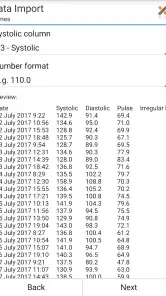
Analysis by Reviewed
For keeping a useful record of blood pressure readings, I value an app that makes routine entries easier without pretending to replace medical advice. Blood Pressure Log - MyDiary is a medical app from Blip Software LTD, and its focus is practical: save measurements, review how they change, and share a record when needed. I’d consider it for someone who already takes readings at home and wants a clearer history than scattered notes or memory can provide.
Who benefits from a dedicated log
A tracking app is most useful when you have a reason to collect readings over time: perhaps a clinician has asked you to monitor at home, or you want to arrive at an appointment with a record rather than a vague impression. The benefit is not that an app makes a reading more accurate. It is that a repeatable record can help you and your clinician discuss what has been happening between visits.
I’d also consider the shape of your routine before installing it. If you take readings at planned times, reminders and a consistent place for notes can reduce the small friction that makes a habit fade. If you only check occasionally, a dedicated log may be more setup and maintenance than you need. In that case, a short note in a general health journal could be enough, especially if you are not looking for charts or a shareable history.
What to expect from the cost
The app is free to install, while in-app purchases are listed at $4.00 per item. I see that as a low-commitment way to test the basic workflow, not as proof that every feature is free or that a purchase is necessary. Before paying for anything, I’d check what it unlocks in the app and decide whether that specific addition would improve the way I record or review readings.
That distinction matters because the value here depends less on owning another health app and more on whether its routine fits your actual measurements. A paid extra is worthwhile only if it solves a concrete annoyance, such as a limitation you encounter while maintaining or sharing your record. If the free experience already covers your needs, there is no reason to spend just because a purchase is available.
Getting Started with Ease
First off, downloading the Blood Pressure Log - MyDiary was a breeze. Whether you're on Android or iOS, you just hop onto your app store, type it in, and boom – it’s ready to be installed. The app interface greets you with its minimalist design, which I absolutely appreciate. No fuss, no muss, just straight to the point.
What the free access gets you
The app is free to install, with in-app purchases listed at $4.00 per item. That makes it easy to try without paying upfront; I’d treat any optional purchase as a separate decision rather than assume every extra is included at no cost. It’s rated for Everyone, runs on Android 6.0 and up, and its current version is 1.8.b53. The app has a 4.6 average from around 14,000 ratings, with over 1 million installs. Those figures suggest an established audience, though they don’t tell me whether the app suits an individual’s routine.
More From Our News Desk

Clash of Clans Is Won Between the Battles

Android Auto Makes the Case for Quieter Car Software

MobiOffice: Transforming Mobile Productivity with Seamless Integration

EA SPORTS FC™ Mobile Soccer: Redefining Mobile Sports Gaming

How Microsoft OneDrive Became a Mobile Productivity Giant

How Google Translate Breaks Language Barriers Effortlessly
Features That Stand Out
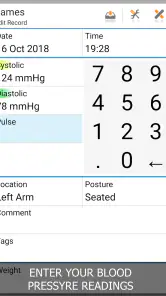
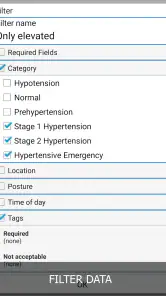
The app isn’t just about logging your daily readings; it’s like having a mini health assistant in your pocket. You can record your systolic and diastolic pressures, pulse, and even add notes about how you’re feeling or any medications you’ve taken. It’s pretty cool how it also gives you the option to categorize your readings with tags like “morning” or “evening” – helps me see patterns over time.
Another nifty feature is the reminder setting. Let’s face it, we all have busy lives, and remembering to take your readings isn’t always top of mind. The app sends you friendly nudges, so you never miss a beat – literally!
Making reminders and notes work together
A reminder is most useful when it points toward a routine you can actually keep. I’d choose a time that fits the measurement schedule recommended by my clinician, then use the same broad time label consistently. That way, a morning entry is easier to compare with another morning entry than with a reading taken after a hurried commute or late in the day. The app can organize what I enter, but it cannot make different circumstances equivalent.
Notes are easy to underuse because the pressure numbers feel like the main event. I’d keep them brief and selective: a relevant medication note, how I felt, or an unusual circumstance is more helpful than writing a diary entry after every measurement. That makes the record easier to scan later and helps keep the task manageable. If noting details starts taking longer than the measurement routine itself, I’d simplify rather than abandon the log.
A Friend to Your Physician
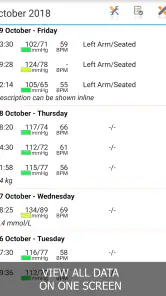
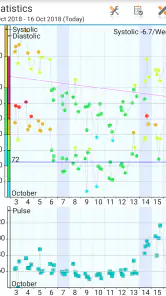
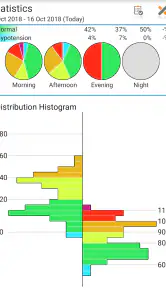
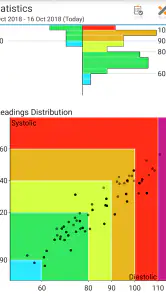
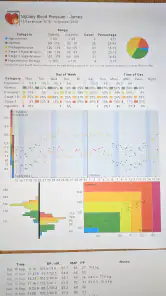
One of the things I really love is how the app allows you to export your logs. You can simply share your progress with your doctor during visits. It’s like having a report card for your blood pressure health. Plus, the charts and analytics provided are super easy to understand.
A practical way to get more from those charts is to keep your routine consistent: record readings at comparable times and use the notes to flag anything that could help explain an unusual result, such as how you felt or medication you took. That context can make a history more useful in a conversation with a clinician than a sequence of numbers alone. I’d still follow the measurement guidance from a healthcare professional and use the app to organize readings, not to diagnose a problem or change treatment.
Preparing a useful appointment record
Before an appointment, I’d look over the log and make sure I can explain how I collected the readings: roughly when I took them, whether the routine was consistent, and what any notes mean. An export is a convenient handoff, but the most useful record is one I can discuss, not simply a file I send and forget. If a particular result concerns me, I would contact a healthcare professional rather than wait for the next visit just to show a chart.
It is also worth deciding how much personal detail belongs in a note. A short entry that helps explain a reading can be useful, while unrelated private information may make the record harder to review without adding anything to the clinical conversation. I’d keep the log focused on blood pressure and context that matters to interpreting the measurement. That small bit of discipline makes sharing feel more purposeful.
Making a record useful day to day
Imagine taking a reading before breakfast, then realizing at an appointment that you can’t remember what it was or whether it was typical. A reminder and a quick entry can make that routine easier to sustain; later, tags and notes help distinguish one kind of reading from another. Before a visit, exporting the log gives you a focused record to discuss instead of trying to reconstruct weeks from memory. This workflow is especially useful for people who have been asked to monitor at home, or who want to notice recurring patterns over time.
One realistic trade-off is that a reminder can prompt the entry but cannot guarantee that the measurement is taken under comparable conditions. If you are travelling, unwell, or following a changed schedule, I’d note the context instead of treating the resulting number as directly comparable with an ordinary day. Likewise, if you miss an entry, I would not fill in a guessed value later. An honest gap is more useful than a tidy-looking but unreliable history.
Compared with a paper notebook, the app offers charts, reminders, and a shareable log, which can save effort when reviewing a longer history. A basic notes app is more flexible for mixed health information, but it may take more work to sort readings into a clear timeline. If you already use a blood pressure monitor with its own dependable history and sharing tools, keeping everything there may be simpler; a second log is worthwhile only if it adds organization you actually need.
Choosing between this and other tracking methods
The usual alternatives each suit a different kind of user. Paper is dependable when you want a simple record with no learning curve, though comparing a long run of entries or sharing them neatly can take extra effort. A general notes app can hold readings alongside other health details, but you may need to create your own structure and remember to keep it consistent. A monitor’s own record can be the least repetitive option if it already stores and presents what you need.
This app makes more sense when you want a dedicated place for measurements, context, reminders, charts, and an exportable log. I would not maintain two parallel records just for the sake of having a backup routine; duplicated entry creates more opportunities for mistakes. If you decide to move to this app from paper or another tracker, pick a clear start date and keep the older record available for context rather than trying to recreate every old entry from memory.
Where the convenience has limits
Logging is only helpful when entries are accurate and consistent, so a phone record can’t fix rushed or incorrectly taken measurements. Notes and tags also depend on remembering to use them; if you prefer a fully automatic process, manual tracking may feel like extra work. I’d test whether reminders fit your schedule rather than letting them become background noise, and I’d bring questions about concerning readings to a medical professional rather than relying on a chart for reassurance.
There is a second limitation in the way any personal log can be read: a chart makes change visible, but a visual pattern is not an explanation. A shift could invite a useful question, yet the app cannot establish its cause or tell me what treatment to take. I’d use the trends to prepare a clearer conversation, not to make medication decisions on my own. That boundary is especially important if checking the graph repeatedly makes me anxious rather than better prepared.
Keeping the record manageable
To avoid turning tracking into another chore, I’d start with only the fields I can reliably maintain. The pressure readings and a useful time label are the core; notes should be added when they clarify something, not because every line must be filled with commentary. After a week or so of ordinary use, I’d ask whether the reminders are helping and whether the tags make later review easier. If not, adjusting the routine is better than keeping a complicated system out of obligation.
I’d also check an export before relying on it for a particular appointment: confirm that the record is readable and that the time period I want to discuss is represented. That is a practical habit, not a reason to assume the app’s sharing function will answer every clinician’s preferred format. If a clinic asks for a specific kind of record, I’d follow that request and use the app as the place to maintain my measurements in the meantime.
Why It Stands Out
The app isn’t just another digital notebook; it’s a comprehensive tool aimed at helping you maintain and improve your health. With its user-friendly interface and robust features, it makes monitoring your blood pressure a stress-free experience. Plus, being able to back up your data on the cloud means you won’t lose your history even if you switch devices.
With a 4.6 average and about 2,800 written reviews, the app has earned a positive response from many users, but popularity isn’t a substitute for checking that its workflow suits you. I’d also make sure the export and backup options match how you want to keep or share personal health records. For me, its strongest value is the combination of reminders, notes, trend views, and a record I can take to an appointment; its main trade-off is the effort required to enter readings carefully.
When a different choice is better
I’d skip a dedicated log if my monitor already keeps an accessible history, offers the comparisons I need, and makes sharing straightforward. In that situation, entering each measurement again would add work without clearly improving the record. I’d also choose a paper notebook or a simple note if I only need to capture a few occasional readings and do not care about reminders or visual review.
On the other hand, someone who values a focused record but tends to forget entries may find the prompt useful, provided it fits rather than interrupts the day. A caregiver helping a family member could also find an organized history easier to discuss at an appointment, as long as the person taking the readings remains involved and the record is handled thoughtfully. The right choice depends on whether the app makes an existing health routine clearer, not on how many features it appears to offer.
Having used this app for a while now, I’ve noticed how much more informed I am about my health. It’s empowering to see trends and take action before things get out of hand. If you’re looking for a simple yet effective way to keep tabs on your blood pressure, give this app a whirl. It just might become your new best friend in health management!
Who I’d recommend it to
I’d recommend it to someone who takes regular home readings, wants to add useful context, and would rather bring an organized log to a clinician than rely on memory. It’s less compelling for someone who only needs an occasional note, already has a monitor that handles tracking well, or expects automatic measurement and medical interpretation. Released on July 9, 2014, and developed by Blip Software LTD, it offers a focused way to maintain a personal record. My verdict: try the free app if reminders and an exportable history solve a real problem for you, and consider a different approach if manual logging feels like more burden than benefit.
Blood Pressure Log - MyDiary Frequently Asked Questions
Can I use Blood Pressure Log - MyDiary without a blood pressure monitor?
The app is intended for recording readings, so you will need to obtain your blood pressure measurements separately and enter them in your log. It does not replace a blood pressure monitor or measure your blood pressure by itself. Once you have readings, the app can help organize them alongside pulse information and notes, making your record easier to revisit.
Who develops Blood Pressure Log - MyDiary, and is it intended for children as well as adults?
Blood Pressure Log - MyDiary is developed by Blip Software LTD and is rated for Everyone, so its content rating does not restrict it to adults. Its main purpose is logging health readings, which may be useful to people who want an organized personal record. For a child’s health monitoring, a parent or caregiver should follow guidance from a healthcare professional.
Is Blood Pressure Log - MyDiary suitable for keeping a personal record between medical appointments?
Yes. Blood Pressure Log - MyDiary is a medical app for recording blood pressure readings, pulse rate, and notes, so it can help you keep a personal history to review later or discuss with a healthcare professional. Its charts and statistical analysis make changes easier to view over time. It is a tracking tool, not a substitute for professional medical advice or diagnosis.
What operating system does Blood Pressure Log - MyDiary require, and what does it cost to download?
Blood Pressure Log - MyDiary is free to download and is suitable for users of all ages. On Android, it requires version 6.0 or later, so check your device’s software before installing. Optional in-app purchases are available for $4.00 per item. The app is developed by Blip Software LTD and has been available since July 9, 2014.
What features does the Blood Pressure Log - MyDiary app offer?
Blood Pressure Log - MyDiary provides an easy-to-use platform for tracking your blood pressure readings over time. Users can log their systolic and diastolic pressures, pulse rate, and any relevant notes. The app features charts and statistical analysis to help you visualize trends and patterns in your blood pressure data. Additionally, reminders can be set for regular monitoring, ensuring you never miss a scheduled check.
Pros
- User-friendly interface for easy tracking.
- Customizable reminders for BP checks.
- Secure data backup and sync option.
- Comprehensive health insights provided.
- Supports multiple user profiles.
Cons
- Ads can be intrusive for free users.
- Limited features in the free version.
- Requires manual data input.
- No integration with wearable devices.
- Some users report occasional bugs.
- Category
- Medical
- Version
- 1.8.b53