Blood Pressure Diary
- 4.81K
- 4.7
- Installs
- 1.00M
- Price
- Free

Screenshots
Analysis by Reviewed
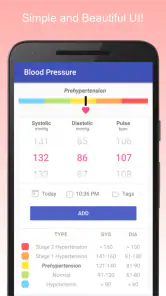
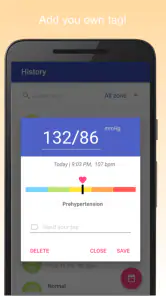
When one person in a household is keeping an eye on blood pressure, the routine can affect everyone: someone remembers the monitor, another asks when the last reading was taken, and a clinician may want a clear record at the next appointment. I see Blood Pressure Diary as a way to make that record-keeping less scattered. It is a free medical app from Health & Fitness AI Lab, and its appeal is straightforward: a place to log blood pressure and pulse and review the history.
A shared routine works best with clear boundaries
The app can accommodate multiple users, which is useful when more than one person in a home tracks readings. I would treat that as a reason to keep each person’s entries clearly separated, not as a reason to assume everyone should use one profile. Before sharing a phone or tablet, decide who is entering each reading and check the selected user each time. That small habit can prevent one person’s record from becoming mixed with another’s.
For a practical routine, the person taking a reading can enter it promptly, while another household member can help remember the schedule or prepare the record for an appointment. The app can support that coordination, but it should not replace a conversation about who is responsible for logging and checking readings. If privacy between users matters, consider whether a shared device is appropriate before putting personal health information on it.
Useful for tracking, not for interpreting symptoms
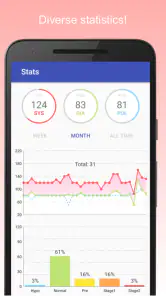
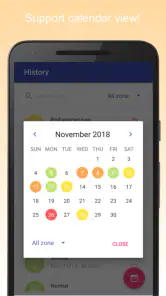
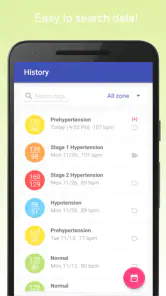
The graphs and charts can make a series of entries easier to review than a loose collection of notes. I find that most useful when preparing for a healthcare visit: instead of relying on memory, you can bring a record and discuss it with a professional. A reminder may also help someone build a consistent habit, especially when readings are easy to put off during a busy day.
Still, a chart is a view of recorded information, not a diagnosis. A missed entry can make a timeline incomplete, and a visual trend should not be treated as medical advice. I would use the app alongside a suitable blood pressure monitor and follow the measurement instructions given by a healthcare professional. If a reading or symptom feels urgent, logging it is not a substitute for seeking appropriate care.
A Handy Tool for Your Health
When I first downloaded the Blood Pressure Diary, I was immediately impressed by its user-friendly interface. It's not just another app cluttering my phone; it's a genuine tool that helps me stay on top of my health game. The setup was a breeze, and within minutes, I was logging my readings with ease.
Features That Stand Out
One of the features I absolutely love is the data visualization. The app transforms my blood pressure readings into easy-to-understand graphs and charts. This visual representation helps me quickly spot trends and patterns, which is crucial for anyone managing their health. Plus, it accommodates multiple users, so your whole family can benefit from it.
More From Our News Desk

Weather by Xiaomi Review: Clear at a Glance, Less Clear Up Close

X Under Pressure: Can It Recover When Posting Goes Wrong?

Clash of Clans Is Won Between the Battles

Android Auto Makes the Case for Quieter Car Software

MobiOffice: Transforming Mobile Productivity with Seamless Integration

EA SPORTS FC™ Mobile Soccer: Redefining Mobile Sports Gaming
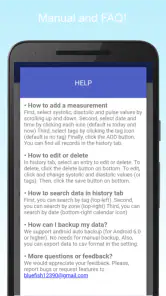
The app also offers reminders, which are lifesavers for the forgetful ones among us. You can set it to nudge you for your next reading, ensuring you never miss a beat. It's like having a personal assistant who cares about your well-being.
Seamless Data Management
Another noteworthy feature is the seamless data synchronization across devices. Whether I'm on my tablet or phone, my information is always up-to-date. This flexibility means I can track my health no matter where I am, which is perfect for my on-the-go lifestyle.
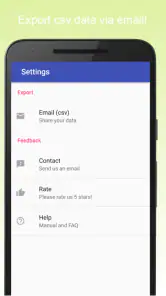
Sharing my data with my doctor has never been easier. With just a few taps, I can export my readings in a format that’s easy for my healthcare provider to review. This feature has truly enhanced my doctor's visits, making them more productive and informed.
Overall, the Blood Pressure Diary is more than just an app; it's a partner in health. It's intuitive, comprehensive, and incredibly supportive for anyone looking to keep an eye on their blood pressure without the hassle. If you're aiming for a healthier lifestyle, this app is definitely worth checking out.
Choosing it over notes or a monitor’s memory
Compared with jotting readings in a notebook or relying on a monitor’s built-in history, I like having entries presented as a visual record that can be reviewed and shared. The trade-off is that an app depends on someone entering information consistently; it cannot capture a reading on its own. A simple paper log may suit someone who prefers not to use a phone, while this is more convenient for people who already carry a device and want reminders and charts in one place.
A realistic household workflow
For example, imagine a person taking a morning reading before work and entering it right away, while a relative helps check that the correct user is selected on a shared tablet. Before an appointment, they can look over the history and export it for the clinician. That workflow is useful only if everyone agrees on whose information is being recorded and takes readings consistently; otherwise, the charts can look tidy while telling an incomplete story.
Age, trust, and practical limits
The app is rated for Everyone, but that age label does not make blood pressure tracking a child’s independent responsibility. I would have an adult guide any younger user and make sure a healthcare professional is involved when readings are being monitored for a medical reason. It is also a sensible choice for an adult who wants an organized log, but less suitable for someone who needs automated measurement, clinical interpretation, or a tool that replaces medical care.
It has a 4.7 average from around 117,000 ratings and more than a million installs, which suggests broad interest, though popularity alone cannot tell you whether its workflow fits your household. The current version is 0.1.20, and it requires Android 10 or later. I would check that compatibility before planning to use an older device; the app is free, so trying its logging routine is a low-commitment way to see whether it fits.
My household verdict
I would recommend it to people who already measure their blood pressure and want a clearer personal or household record, especially if reminders and visual history help them stay consistent. I would skip it if the household cannot keep profiles and device access suitably separate, or if the main need is medical guidance rather than record-keeping. Used with careful entry habits and clinician advice, it can make everyday tracking easier without pretending to do the measurement or the medical thinking for you.
Making each entry useful later
A log becomes more helpful when the person entering readings follows the same routine each time. I would keep the monitor and phone close together, take the measurement according to the clinician’s instructions, then record it before moving on with the morning. Waiting until evening to enter several readings from memory creates an avoidable risk of mixing up values or times. This is a small workflow choice, but it matters because the charts can only reflect what was entered accurately.
It can also help to agree on a simple household handoff. If one person takes the reading and someone else later reviews the history, they should know whether the entry has already been logged. A quick verbal check is often more reliable than assuming that another person has seen the app. This is especially useful when a family member is helping an older relative: support with remembering or entering information does not require taking over the person’s health decisions.
What the charts can—and cannot—settle
When a graph looks different from what someone expected, I would treat that as a prompt to check the entries and discuss the pattern with a healthcare professional, not as a reason to change treatment. A chart can make repeated information easier to notice, but it cannot explain why a reading changed or determine what action is appropriate. That distinction is important for anyone who tends to look for a quick answer in a visual summary.
For appointment preparation, I would review the record beforehand and make sure the clinician understands how the measurements were taken and whether any entries are missing. An exported history can save time compared with trying to recall weeks of readings, but it is still a record created by the user. If the clinician prefers a particular measurement schedule or a different way of presenting readings, follow that guidance rather than forcing the routine to fit the app.
Where this fits among everyday alternatives
Compared with a general health journal, this app has a narrower purpose: it is centered on blood pressure and pulse rather than notes about every aspect of wellbeing. That focus can make it easier to return to the same kind of record, while a broader journal may be preferable if someone wants to combine readings with symptoms, medication notes, or other daily details. I would choose based on what the clinician wants to review and what the user can maintain without turning tracking into a chore.
A monitor with stored readings can be simpler for someone who does not want to type values into a phone. On the other hand, the app’s charts, reminders, and export option can be useful when the monitor’s own history is awkward to review or share. Neither approach is automatically more accurate: the key trade-off is whether the person will reliably capture and retain the readings. If phone use is uncomfortable or distracting, paper may be the more dependable choice; if a visual history keeps someone engaged, the app may be easier to sustain.
Choosing it for the right person
I think it suits adults who already have a blood pressure monitor, want an organized record, and are comfortable entering readings themselves. It may also work well for a household where one person helps another keep a routine, provided the users pay attention to whose profile is selected and who can access the shared device. The multi-user arrangement is useful for organization, but it should not be mistaken for a complete privacy or account-management system.
I would look elsewhere if the main expectation is automatic data capture, medical interpretation, or a detailed record that combines many kinds of health information. Someone who needs a clinician-approved tracking method should ask which format is best before settling on any app. And if a person is likely to forget manual entry, a tool that relies on consistent logging may create an incomplete history rather than solve the problem. In that case, a paper routine, support from a caregiver, or a monitor workflow that better matches their habits could be more practical.
Keeping the routine manageable
Reminders are most useful when they support a measurement schedule already chosen with appropriate medical guidance. I would avoid setting prompts simply to collect more readings without a clear reason; frequent checking can become stressful, and the app is not a substitute for advice about when to measure. A reminder should make the agreed routine easier to remember, not decide the routine for the user.
For a shared household, it is also worth deciding where the device stays and who helps with entries before the first week becomes busy. If the phone or tablet is passed among several people, pause at each entry to verify the user. That simple check is more useful than trying to untangle mixed records later. People should also be comfortable with the fact that health details may be visible to others who can access the shared device.
Who should keep looking
The app is not the right fit for someone seeking an answer to whether a particular reading is safe, a diagnosis, or instructions about medication. Those questions belong with a qualified healthcare professional, especially when symptoms or concerning readings are involved. Its value is in organizing measurements that have already been taken, not deciding what they mean.
Likewise, someone who does not want to use a smartphone for personal health information may prefer a paper log or another arrangement recommended by a clinician. A shared tablet can make household coordination easier, but it can also blur boundaries if users do not agree on access. I would make that conversation part of the setup rather than treating convenience as the only consideration.
For a free medical app rated for Everyone, the practical question is less whether it can replace anything and more whether its manual logging, charts, reminders, and export fit the household’s habits. Its 4.7 average and broad adoption may reassure some readers that many people use it, but those figures do not tell you whether its workflow is right for your family. I would try it only with a clear plan for who records each person’s readings and how the record will be reviewed.
Blood Pressure Diary Frequently Asked Questions
What kind of app is Blood Pressure Diary?
Blood Pressure Diary is a medical app focused on recording blood pressure and pulse readings. It is intended for people who want a straightforward place to keep track of measurements taken with a blood pressure monitor. If you are looking for a way to measure blood pressure directly with your phone, this app’s stated purpose is logging readings rather than replacing a monitor.
Who developed Blood Pressure Diary, and how widely is it used?
Blood Pressure Diary is developed by Health & Fitness AI Lab. It has a 4.7 average from around 117,000 ratings and over 1 million installs, giving prospective users a sense of its reach and reception. Those figures do not determine whether it will suit your needs, so consider whether a simple blood pressure and pulse log fits the way you want to track your health.
Does Blood Pressure Diary measure blood pressure using a phone?
No. Blood Pressure Diary is a tracking app, not a measuring device. You need a suitable blood pressure monitor to obtain readings, then you can record them in the app for reference. Treat the log as a way to organize information and discuss patterns with a healthcare provider; do not use app entries or interpretations to diagnose a condition or change treatment without professional guidance.
Can Blood Pressure Diary help me keep a consistent record of readings?
The app’s focus is to track and log blood pressure and pulse, making it suitable for keeping readings together over time. A consistent record can be useful when you want to review measurements or discuss them with a healthcare provider. For useful entries, take readings with an appropriate monitor and record them carefully; the app itself does not take measurements.
Does Blood Pressure Diary provide medical advice or treatment recommendations?
Blood Pressure Diary is a tracking app, not a medical professional. Its role is to help you keep a record of blood pressure and pulse readings, not to diagnose a condition or determine treatment. Use your readings as information to discuss with a healthcare provider, and ask a qualified professional before making changes to medication or care based on your measurements.
Pros
- Easy to track daily blood pressure.
- User-friendly interface for all ages.
- Graphical history for trend analysis.
- Customizable reminders for readings.
- Secure data backup and export options.
Cons
- Ads can be intrusive at times.
- Limited free features available.
- No integration with fitness devices.
- Requires manual data entry.
- Occasional syncing issues reported.
- Category
- Medical
- Version
- 0.1.20











