BioLife Plasma Services
- 11.13K
- 3.9
- Installs
- 1.00M
- Price
- Free
Screenshots
Analysis by Reviewed
Imagine walking into a world where you can earn extra cash while helping save lives. That's exactly what you get with BioLife Plasma Services, an app that's shaking up the way we think about plasma donation. I recently took a deep dive into this app, and let me tell you, it's as intriguing as it sounds.
Getting Started
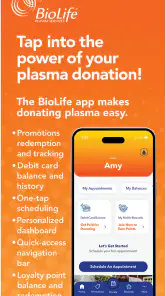
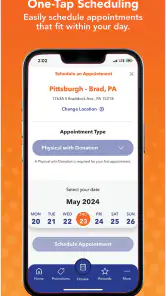
Setting up with BioLife Plasma Services is a breeze. You just download the app, sign up, and you're off to the races. The interface is super friendly, like having a buddy walk you through the plasma donation process step-by-step. Once you've got your account all set up, you can easily find donation centers and book appointments with just a few taps. No more endless phone calls or waiting in line, which is a huge plus in my book!
Features You’ll Love
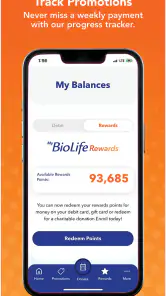
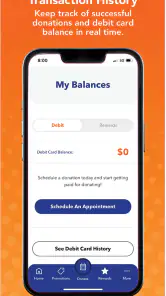
This app isn’t just about scheduling your next donation. It’s packed with features that make the whole experience smoother. For starters, it keeps track of your donation history and rewards, so you can see exactly how much you've contributed. Plus, you can earn points which can be redeemed for some pretty sweet rewards. It’s like getting a little thank you for your good deed.
Another thing that stood out is the notifications feature. The app sends you reminders about upcoming appointments or when it’s time to donate again. It’s like having a personal assistant who’s got your back, ensuring you never miss a chance to donate.
User Experience
Let’s talk about the user experience a bit more because it’s truly top-notch. Navigating through the app is as smooth as butter. The designers clearly knew what they were doing, as everything is laid out intuitively. From finding a donation center to checking out your rewards, everything is just a tap away. The color scheme and layout are easy on the eyes, making the whole experience pleasant.
Plus, the app provides a bunch of educational resources. Whether you're a first-timer or a seasoned pro, there’s always something new to learn. It’s like having a mini-library right in your pocket.
Final Thoughts
In the end, BioLife Plasma Services is more than just an app; it’s a gateway to making a real difference. It’s perfect for anyone looking to donate plasma efficiently and effectively while reaping the benefits. I found the app to be incredibly user-friendly and packed with features that make the whole donation process hassle-free. So if you’re thinking about donating plasma, this app is definitely worth checking out. It makes the whole process not just easy, but rewarding in more ways than one.
Pros
- User-friendly interface for easy navigation.
- Comprehensive information on plasma donation.
- Real-time updates on donation centers.
- In-app appointment scheduling feature.
- Loyalty rewards for regular donors.
Cons
- Limited to specific geographic locations.
- Requires account creation for full access.
- Frequent app updates needed.
- Occasional technical glitches.
- No offline access to information.
- Category
- Medical
- Version
- 3.1.4