BCBSTX
- 1.94K
- 4.6
- Installs
- 1.00M
- Price
- Free

Screenshots
Analysis by Reviewed
I tend to notice an insurance app most when I need it in a hurry, not when I’m calmly browsing at home. That is where BCBSTX can earn its place: it brings member information and practical insurance tasks onto a phone, so I can check details without first digging through papers. Blue Cross and Blue Shield of Texas makes this free medical app for its members. I’d see it as a useful companion to a health plan, rather than a substitute for speaking with a person when a coverage question needs careful explanation.
When a reliable connection matters
Several of the app’s most useful moments depend on being able to reach current information. Checking a claim, looking up coverage, searching for a provider, or contacting customer service is most helpful when the relevant details load while I need them. I would open the app before leaving home if I expected to need a provider’s address or wanted to review a claim, rather than waiting until I was standing at a reception desk with a weak signal.
The digital insurance ID card is especially practical in that situation: it can save a scramble through a wallet, but I would not make the phone my only preparation. If I know I’ll be somewhere with unreliable reception, I’d check ahead of time and keep another way to access the information I may need. That is a sensible precaution for any phone-based insurance tool, not a claim that the app works without a connection.
A useful fit for everyday member tasks
A realistic use case is an appointment day: I can check the provider search before setting out, bring up the ID card when asked for insurance details, then look at a claim later when I have time to read it properly. Splitting those tasks is more comfortable than trying to research a plan, choose a doctor, and interpret claim information while rushed. The app is most valuable when I already know which task I need to do and can go straight to it.
It is aimed at people covered by Blue Cross and Blue Shield of Texas, especially members who prefer a phone for routine account checks. If I were choosing a plan, comparing insurers, or looking for broad medical advice, I’d use other resources; this is a member tool, not an insurance marketplace or a clinician. The usual alternative is a provider’s website, phone support, or physical paperwork. The app can make repeat checks more convenient, while a call may be better when a claim or coverage rule needs a detailed explanation.
Recovery, privacy, and practical trade-offs
If a screen does not load, I would first check the connection and try again later rather than assume that a claim or member record is missing. For an urgent question, customer service is a more sensible next step than repeatedly refreshing the same page. Before an appointment, checking the card and provider details in advance also leaves time to switch to another way of getting help if the phone or network lets me down.
I’d also be deliberate about where I open insurance information. A quiet moment is better than reading personal details over someone’s shoulder, and a secure phone matters when an app contains member information. For data-conscious use, I’d avoid leaving screens open longer than needed and use the app for a specific task instead of browsing on a connection I’m trying to conserve. Those habits make the convenience feel more worthwhile without assuming anything about the app’s data use or offline behavior.
More From Our News Desk

 Block Blast!
 Makes Every Clear Feel Like One More Turn
A clean little block puzzle becomes a study in space, risk, and self-control. Its best moments come from one satisfying clear; its toughest test is knowing when to stop.

 Super Stylist Fashion Makeover
Super Stylist Turns Dress-Up into a Runway Career
Its makeover-to-client loop turns quick outfit decisions into shareable style theater. The question is whether the closet keeps giving players a reason to return.

 Block Craft 3D:Building Game
Block Craft 3D Under Pressure: How Well Does It Recover When Building Goes Wrong?
A failure-focused look at Block Craft 3D’s forgiving building loop, its uncertain recovery edges, and the moments that demand more than a cheerful village.

 Woodturning
 Trades Creative Freedom for a Satisfying Carving Loop
If your usual creative game is about building, decorating, or styling, Woodturning trades open-ended projects for a tactile, tightly guided carving loop. Here is what that switch really costs.

 PUBG MOBILE
 Shows What Battle Royale Must Get Right
PUBG MOBILE shows how battle royale has matured: bigger systems matter less than meaningful choices, readable fights, and a reason to return after every loss.

 Braindom: Brain Games Test
Braindom’s Social Life Happens Between Puzzles
Braindom turns quick logic traps into a personal ritual, but its community value is more about comparing answers than building together.
Latest News



First Impressions and Interface
Upon opening the BCBSTX app, the first thing that caught my attention was its clean and intuitive interface. It’s like the app developers knew exactly what I wanted—a straightforward and user-friendly experience. The color scheme is easy on the eyes, and navigating through different sections is a breeze. You won’t find yourself lost, even if you’re not the most tech-savvy person.
Features That Stand Out
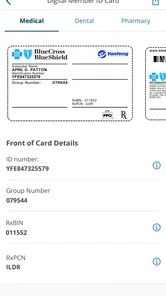
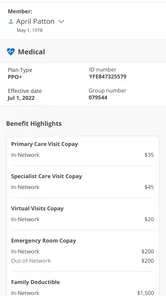
Now, let’s talk about features. The app is packed with functionalities that make managing your health insurance more convenient than ever. One of the standout features is the ability to access your insurance ID card digitally. Say goodbye to scrambling through your wallet at the doctor's office! With just a few taps, you can pull up your card and have all your details ready.
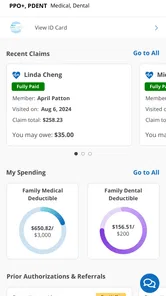
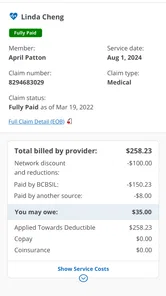
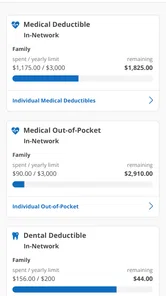
Another feature I found incredibly useful is the ability to track claims and view your coverage details. It’s all laid out in a simple format, so you’re never left wondering what’s covered and what’s not. Plus, the app sends you notifications about your claims' status, which is super handy.
Finding Healthcare Providers
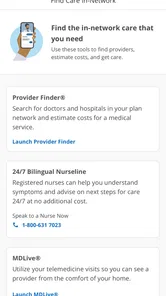
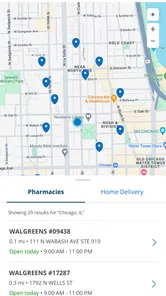
Finding a healthcare provider can sometimes feel like searching for a needle in a haystack. Thankfully, the app comes with a built-in search function that lets you find doctors, specialists, or facilities covered by your plan. You can filter the search results based on your preferences, making it easier than ever to find the right match for your healthcare needs.
As a practical tip, I’d use the provider search to make a shortlist rather than treating the first result as a final choice. Confirming the appointment details directly with the office is still a sensible step, since an app search helps narrow options but does not replace checking that a particular provider can see you for your needs. This is especially useful when arranging care for a family member or trying to fit an appointment around work: doing the comparison before calling makes the conversation more focused.
Additional Perks
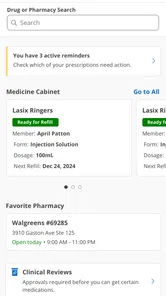
One of the unexpected but delightful features of the app is the wellness resources it offers. From health tips to fitness tracking, the app encourages users to lead a healthier lifestyle. It’s like having a little health coach right in your pocket. Not to mention, the app’s integration with customer service is seamless, allowing you to get in touch with a representative whenever you need assistance.
The app has a 4.6 average from around 5.7 thousand ratings, and more than a million installs, which suggests many members have found a reason to keep it around. It is free, rated for everyone, and its current version is 7.11.0; it has been available since December 17, 2010, and requires Android 9 or later. Those details make it easy to judge whether it suits your device, but the key question for me is still whether I’m a Texas plan member who will use its member tools often enough to justify keeping it installed.
For a member who checks claims, needs the digital card, or searches for in-network care, I’d keep it as a handy first stop. Someone who rarely uses a phone for insurance tasks may prefer the website or a call, and anyone needing a careful explanation should not expect a screen to replace a representative. I also would not rely on a wellness section as medical advice. The app’s best role is narrower and more useful: putting routine plan information within reach, while leaving complex decisions to the right person.
Making appointment-day searches more useful
Provider search is most useful when I treat it as preparation, not a final clinical decision. Before searching, I’d note the kind of care I need, the area I can travel to, and any practical limits such as appointment timing. That gives me a more meaningful shortlist than tapping the first nearby result. I’d then call the office to check availability and confirm that it can handle the specific reason for my visit. This extra step matters because an insurance directory helps with the plan question, while the office is the place to settle scheduling and visit details.
For someone arranging care for a parent or child, the same workflow can prevent a hurried search from becoming a rushed choice. I’d look up options when I have enough time to compare them, keep the most relevant details together, and make the call separately. The app can reduce the effort of finding potential in-network options, but it cannot decide which clinician is the right fit. That distinction is easy to overlook when a directory looks authoritative, and it is one reason I see the app as a starting point rather than the whole appointment process.
What a phone can and cannot replace
The digital card is a good example of the app’s practical value: it puts member information within reach when a provider asks for it. Still, I would not assume a phone is always the best or only way to present insurance details. A low battery, a damaged device, or a poor connection can turn a convenient shortcut into a delay. Keeping another access method available is a modest bit of planning, especially for an appointment where checking in quickly matters.
Compared with carrying paperwork, the app is easier for routine access and may be more convenient when I need to revisit a claim or coverage detail. Compared with the member website, the phone is handy when I am away from a desk, while a larger screen can feel better for reading a complicated explanation carefully. A customer-service conversation is still preferable when the answer depends on context or when I need to ask follow-up questions. I would choose the channel based on the task rather than expect one tool to handle every insurance question equally well.
Handling slow or interrupted sessions
When a page stalls, I’d avoid making several quick attempts that leave me unsure whether anything has changed. I would give the connection a moment, reopen the relevant screen, and check the information again before acting on it. If the issue is time-sensitive, switching to customer service or another established way of contacting the plan is more useful than spending the appointment window refreshing. The same approach applies to claim details: a display problem is a reason to verify, not evidence that a claim has disappeared or been decided.
It also helps to separate preparation from the moment of need. I’d review the card and search for a provider before travelling, then use the app at check-in only for the immediate task. That reduces the amount I have to do in a noisy waiting room or on a weak mobile connection. It is a small change in habit, but it makes the phone feel like a support tool instead of something I have to troubleshoot while other people are waiting.
Using member information thoughtfully
Insurance details are personal, so I would use the app with the same care I use for other sensitive account information. I’d avoid opening claim screens where someone nearby can read them, and I would not leave the phone unattended with member details visible. These are ordinary precautions, but they matter more in places such as a clinic lobby, public transport, or a shared workplace than they do at home.
There is also a practical difference between checking one thing and browsing without a purpose. If I am trying to conserve mobile data or battery, I’d decide what I need before opening the app, complete that task, and close it rather than repeatedly checking screens. I would do a detailed review of coverage or claims when I have a stable connection and enough attention to read the information. That makes the experience less hurried and helps me avoid treating a quick glance as a full understanding of a plan decision.
Who is likely to get the most from it
I’d recommend keeping it in mind if I were a Blue Cross and Blue Shield of Texas member who regularly needs an ID card, checks claim progress, or looks for providers. Those are concrete reasons to have member tools on a phone, and the convenience becomes more noticeable when the same tasks come up repeatedly. A person who is comfortable with apps but wants help with plan administration may find it a useful everyday companion, particularly when managing appointments alongside work or family responsibilities.
It is less compelling for someone who is not a member, is comparing health plans, or mainly wants medical guidance. Those needs call for other sources: insurer comparisons for choosing coverage, a provider or clinician for care questions, and direct support for a complicated insurance issue. Likewise, a person who prefers to handle every account task on a computer may find the website more comfortable. I would not install it expecting a general health app or a replacement for a human explanation; its value is tied to the member tasks it brings together.
Where I land on connectivity
My overall view is that BCBSTX is most dependable as a planned convenience: use it to prepare for an appointment, retrieve member details, or review a claim when a connection is available and there is time to read. It can make routine access less cumbersome, but its usefulness naturally depends on reaching current information. I’d keep a backup route for urgent questions and avoid relying on a live search at the last second in a place where reception may be poor.
That balance is why I’d call it a practical companion rather than an all-in-one answer. It brings a member’s routine insurance tasks closer, while provider offices and customer service remain important for confirmation and explanation. If I were a Texas plan member who handles these details on the go, I’d give it a try and build the habit of checking important information ahead of time. If I rarely need phone-based insurance access, the website or a direct call may suit me better.
In conclusion, the BCBSTX app is a game-changer for anyone looking to simplify their health insurance management. With its user-friendly design, comprehensive features, and added perks, it’s hard not to give this app a big thumbs up. Whether you’re tech-savvy or a complete novice, managing your health insurance has never been this easy or efficient. So, if you’re still on the fence, I’d say give it a try and experience the convenience for yourself!
BCBSTX Frequently Asked Questions
Is BCBSTX free to download, and which devices can run it?
BCBSTX is a free medical app from Blue Cross and Blue Shield of Texas for members who want to access their insurance information on a mobile device. It is available for Android and iOS, with Android support beginning at version 9. Before downloading, check that your device’s operating system meets the requirement and that you can install apps from your platform’s official app store.
Who is the BCBSTX app intended for?
The app is designed for people who use Blue Cross and Blue Shield of Texas member services. Its purpose is to bring insurance-related information and tools together in one place, including plan details, claims, benefits, and provider search. It may be useful if you prefer to check those details on your phone, but having the app does not itself provide insurance coverage or replace your health plan.
What is BCBSTX and what services does it offer?
BCBSTX, or Blue Cross and Blue Shield of Texas, is a health insurance provider that offers a variety of health plans to individuals, families, and businesses. The app provides users with access to their insurance details, claims, coverage information, and wellness resources. Additionally, it offers tools to find in-network doctors and hospitals, pay bills, and review benefits, making it a comprehensive tool for managing health insurance needs.
How do I register and login to the BCBSTX app?
To register for the BCBSTX app, you need to download it from either the Google Play Store or Apple App Store. Once installed, open the app and follow the on-screen instructions to create an account using your member ID and personal information. If you're already a member, simply log in using your existing credentials. Ensure you have your member ID handy for streamlined registration.
Does BCBSTX offer any features for managing claims and benefits?
Yes, the BCBSTX app allows users to easily manage their claims and benefits. Users can view detailed claims information, including status updates and payment details. Additionally, the app provides a breakdown of benefits, allowing users to understand their coverage and out-of-pocket costs. This functionality ensures users have real-time access to their health insurance information for better financial planning and management.
Pros
- Comprehensive health coverage options.
- User-friendly interface for easy navigation.
- Access to virtual healthcare services.
- Real-time claim tracking feature.
- Wide network of healthcare providers.
Cons
- Limited availability in some regions.
- Occasional app crashes reported.
- Slow response from customer service.
- Complexity in understanding policy details.
- Login issues reported by some users.