BCBSIL
- 1.59K
- 4.4
- Installs
- 500.00K
- Price
- Free

Screenshots
Analysis by Reviewed
I found BCBSIL most useful as a practical member companion rather than a general health app. It comes from Blue Cross and Blue Shield of Illinois and is aimed specifically at people who use that insurer’s services. That focus matters: instead of trying to be a medical encyclopedia, it puts member-related information in one mobile place. I would recommend it to BCBSIL members who regularly need to check plan details or manage health-related errands from a phone, while people outside the BCBSIL system will have little reason to install it.
The app is free, available for Everyone, and belongs to the Medical category. It has been around since December 17, 2010, which gives it a longer history than many newer healthcare tools. Its current version is 7.29.0, and it works on devices running iOS 9 or later. The listing shows more than 500,000 installs, with an average rating of 4.4 from about 6,700 ratings and roughly 1,600 written reviews. Those figures suggest a well-established member app, although they do not remove the need to judge it by your own insurance needs.
How quickly it fits into everyday member tasks
My first impression is that BCBSIL is designed around short visits. You open it because you need to find or confirm something connected with your coverage, not because you intend to spend a long time browsing. That makes its perceived speed especially important: an insurance app earns its place when it reduces the number of steps between a question and an answer.
For routine use, I would approach it with a simple goal in mind. Before opening the app, decide whether you are checking member information, preparing for a healthcare appointment, or trying to understand what to do next with your plan. This sounds obvious, but it prevents the common frustration of wandering through insurance menus without knowing which section is relevant. A focused workflow usually feels faster than treating the app like a full health dashboard.
The developer’s identity is also clear, which is reassuring when dealing with sensitive member matters. Blue Cross and Blue Shield of Illinois is not presented as a third-party search tool or an unrelated wellness service. The app’s purpose is tied directly to BCBSIL member information, so its value depends less on variety and more on whether it gives members a convenient mobile route to the information they already need.
I would not judge it by the same standard as a fitness tracker or a symptom-checking app. Those tools may be opened several times a day and are often built around live charts, sensors, or content feeds. BCBSIL has a narrower job. If it helps me confirm an insurance detail before making a call or visiting a provider, a short, uneventful session is a success.
What to do before you need it
The best time to install and explore the app is before an appointment, prescription question, or billing concern becomes urgent. A calm first visit lets you learn where your member information sits and whether your account access is ready. That preparation is a genuinely useful advantage over waiting until you are standing at a clinic desk with a phone in one hand and paperwork in the other.
I also recommend keeping the app in a clearly named folder rather than burying it among entertainment or shopping apps. Healthcare tasks are often occasional, so it is easy to forget where a member tool lives. A small organizational step can make the next visit feel much quicker, especially when you need information while traveling between home, work, and a provider’s office.
How it holds up during heavier moments
The more demanding test is not ordinary browsing; it is the moment when several questions arrive at once. Imagine discovering an unexpected healthcare charge, needing to check your member information, and trying to prepare for a conversation with a provider on the same day. In that situation, the app’s usefulness depends on how clearly it separates member information from the action you need to take next.
I would use BCBSIL as an organizing tool before making a phone call. First, I would review the information available in the app, then write down the exact point that remains unclear. This avoids calling without context and also avoids assuming that a mobile display explains every insurance decision. The app can help me prepare, but it should not replace careful reading of a statement or a direct conversation when the issue is complicated.
That distinction is one of the most important trade-offs here. A member app can reduce friction for basic information, yet insurance questions often involve details that are personal and situation-specific. If the screen does not make the answer obvious, I would treat that as a signal to contact the appropriate BCBSIL support channel rather than repeatedly refreshing or searching through unrelated sections.
Another realistic scenario is an appointment away from home. I might want to check my member information shortly before arriving, especially if I have not used the app for several weeks. The practical benefit is not that the app transforms healthcare; it is that I can prepare from the phone I already carry. That is a modest benefit, but it is exactly the kind of convenience that makes a dedicated insurer app worthwhile.
Where the focused design helps
The narrow purpose can make the app less mentally demanding than a broad healthcare platform. I am not asked to compare exercise plans, read a stream of health articles, or manage unrelated wellness goals. For a BCBSIL member, that focus may make the experience easier to understand because the app is connected to one insurance relationship.
At the same time, the same focus limits its usefulness during a complex care journey. Someone looking for medication reminders, symptom guidance, appointment scheduling across several providers, or detailed personal health tracking may prefer a separate healthcare application. BCBSIL should be viewed as one piece of a larger set of tools, not as a replacement for every medical or administrative service on a phone.
Reliability, stability, and recovery after interruptions
For a medical member app, reliability is more important than visual novelty. I care about whether I can return to the app after days away and still understand what I am looking at. I also care about whether an interrupted session leaves me confused about what was saved, what was only displayed, and what still needs attention. Those are the moments that determine whether an app feels dependable.
BCBSIL benefits from being an established application rather than a brand-new experiment. Its release history reaches back to 2010, and the presence of a current 7.29.0 version indicates ongoing versioning. That does not guarantee a perfect experience on every device, but it gives me more confidence than an app with no visible history or a single early release.
My recovery advice is straightforward: after reopening the app, return to the specific member-information task you were performing instead of assuming the previous screen tells the whole story. If you were reviewing something important, compare what is now displayed with your notes or paperwork. This is not unnecessary caution; insurance information can affect real decisions, and a mobile session should be treated as a convenient view rather than the only record in your possession.
When an app is used occasionally, stability also includes remembering how to get back in. I would avoid leaving setup until an urgent moment. A first visit when there is no immediate pressure gives you time to identify any access friction and decide whether the app is comfortable enough for your routine. If returning users can reach their member information without repeated confusion, that is more valuable than a crowded collection of extra tools.
What reliability should not be confused with
A stable app does not mean every insurance answer will be simple. A smooth screen can still lead to a question that requires human clarification. I would separate technical reliability from coverage certainty: the first concerns whether the app behaves consistently, while the second depends on the details of your plan and situation.
This is also why I would keep other records available for important matters. If I am dealing with a payment, a provider visit, or a question that could affect treatment, I would use the app to orient myself and then verify the final detail through the relevant official communication. That workflow gives the app a useful role without asking it to carry more responsibility than a mobile member-information tool should.
Device constraints and practical expectations
The stated minimum operating-system requirement is iOS 9 or later, so the app is positioned to support older Apple devices as well as newer ones. That is helpful for members who do not replace their phone frequently. Still, an older operating system can bring its own limitations, such as a less comfortable interface or broader device-level slowdowns unrelated to the app itself.
I would keep expectations realistic on an older phone. If other applications already open slowly or the device is short on available storage, BCBSIL may not feel as immediate as it does on newer hardware. That is not a reason to blame the app automatically. A medical utility does not need gaming-level performance, but it does need to remain usable when the phone is not at its best.
On a newer device, the main constraint is likely to be context rather than raw power. The app’s value comes from member access and information, so a faster processor will not make an unclear insurance question disappear. The best performance improvement may come from opening it with a specific purpose, keeping your account details organized, and avoiding last-minute setup.
Resource demands matter in another way too: I would not expect a member app to replace a browser, a phone call, or provider communication in every situation. If I need a broad search across health services, a general web browser may be more flexible. If I need a definitive answer about a personal case, speaking with BCBSIL may be more appropriate. The app is strongest when the task is narrow enough to benefit from a dedicated mobile entry point.
Who should install it
BCBSIL is a sensible choice for current members who want their insurer’s information available on a phone. It is especially useful for people who attend appointments away from home, manage healthcare paperwork for a family, or prefer checking member information digitally before calling support. The free price removes a financial barrier, and the Everyone age rating makes it broadly accessible from an age-classification standpoint.
I would be more hesitant to recommend it to someone who is not a BCBSIL member. The developer and the app’s purpose make the audience clear, and installing it without that relationship is unlikely to provide meaningful value. I would also not choose it as my primary tool if my main goal were symptom diagnosis, exercise coaching, medication tracking, or a unified record spanning multiple insurers and providers.
Compared with a general health app, BCBSIL trades breadth for insurer-specific relevance. Compared with using a mobile browser, it offers a more direct place to begin member-related tasks, though a browser may still be better for open-ended research. Compared with calling customer service, it can save time when the information you need is already available digitally, but a call remains the better route when the situation needs explanation, judgment, or personal assistance.
My performance verdict after regular use
I see BCBSIL as a focused utility that succeeds when I use it for the job it was built to handle: reaching BCBSIL member information from a mobile device. Its long availability, current version, free access, and strong average rating give it a credible foundation, while the install base shows that it has reached a substantial number of members and other users.
Its perceived speed is best understood as workflow speed rather than benchmark speed. The app can be useful because it shortens the path to a member-related task, but I still need to know what I am looking for. During heavier moments, it helps me prepare and organize questions; it does not turn complicated insurance decisions into instant answers. Its established release history supports a reasonable expectation of maturity, while older devices may still affect the overall experience.
The most valuable habit is to explore it before an urgent healthcare situation, keep a clear note of unresolved questions, and use the app alongside—not instead of—official explanations when the stakes are high. That approach makes its limits manageable and highlights its real strength: convenience for BCBSIL members who want a dedicated mobile starting point.
My recommendation is simple: if you are a BCBSIL member, BCBSIL is worth trying as a free, focused companion for everyday insurance administration. If you want a complete personal health system, choose a broader tool and keep this one for member-specific needs. It is not the right app for everyone, but for the audience it serves, its focused design is more useful than a collection of unrelated medical features.
Pros
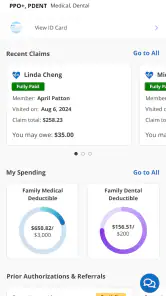
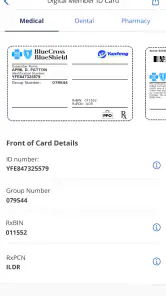
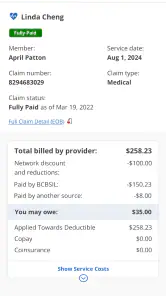
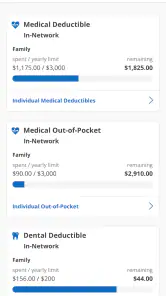
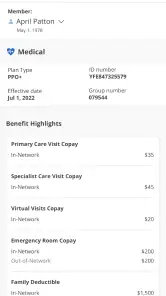
- Easy access to member ID cards
- claims
- and coverage details
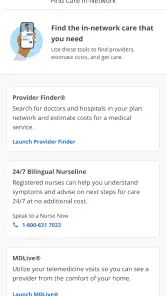
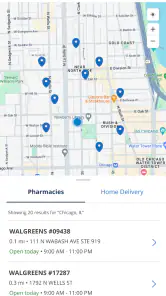
- Finds nearby in-network doctors
- hospitals
- and pharmacies
- Secure login helps protect sensitive health insurance information
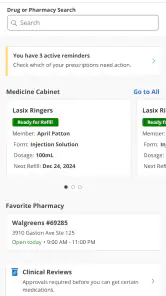
- Digital tools can simplify prescription and appointment planning
- Useful for managing health benefits while traveling or away from home
Cons
- Some features may require an active BCBSIL member account
- Coverage and claims information may not update immediately
- Provider search results can vary by location and network details
- Certain services may redirect users to external websites or apps
- Login or verification issues may prevent access when urgently needed

- Category
- Medical
- Version
- 7.29.0