Baritastic - Bariatric Tracker
- 13.44K
- 4.6
- Installs
- 500.00K
- Price
- Free

Screenshots
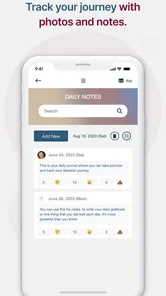
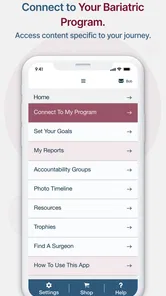
Analysis by Reviewed
Sharing a home with someone who has had bariatric surgery can make everyday routines easier to coordinate, but health tracking still needs clear personal boundaries. I see Baritastic - Bariatric Tracker as most useful when the person recovering uses it for their own records and chooses what, if anything, to discuss with family. A shared kitchen or a supportive partner does not mean everyone needs to handle the same account or see the same information.
Make room for separate routines
On a household tablet or phone, I would treat the app as personal rather than a family food diary. Before logging anything, agree on who is using the device and avoid entering one person’s meals or weight in another person’s records. That small habit matters: after surgery, portions, hydration, and progress are individual, even when meals are prepared together.
For a couple, a practical routine might be one person logging their own intake after dinner while the other helps keep meal ingredients or water nearby. The app can support that personal habit, but it should not become a way for relatives to police portions or comment on every entry. If privacy is a concern, using a personal device is a better fit than leaving a health app open on a shared screen.
Getting to Know Baritastic
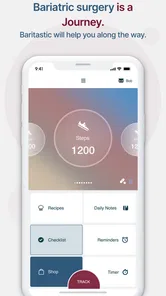
So, what exactly does Baritastic - Bariatric Tracker do? Essentially, it’s designed to help those who have undergone bariatric surgery keep tabs on their nutritional intake, exercise, and overall progress. It’s like having a dietitian, a fitness coach, and a motivational buddy, all rolled into one neat app.
Features You'll Love
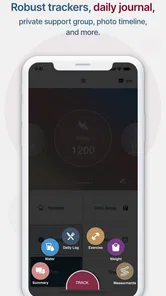
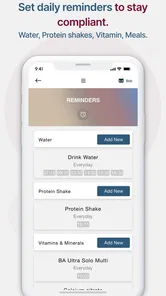
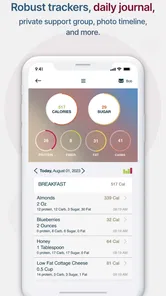
One of the coolest features of Baritastic is its meal planning capabilities. You can log your meals, track your calorie intake, and even set reminders to stay hydrated. Plus, it offers a barcode scanner to make logging meals easier and faster than ever. No more manually entering every single ingredient!
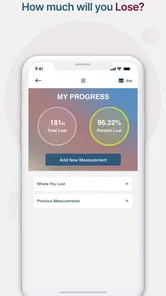
Another feature that I find incredibly useful is the progress tracker. It allows you to input your weight loss goals and track your progress with visual charts. This makes it super easy to see how far you’ve come, and it’s a great motivational tool when you need that extra push.
Keeping tracking useful, not burdensome
One detail I would keep in mind is that a barcode scan is a shortcut, not a substitute for checking what you actually ate. A packaged item can be easy to record, while a homemade meal may take more effort to enter consistently. If logging every ingredient starts to feel like a chore, I’d prioritize the details that help me follow my care team’s plan rather than chasing a perfect diary.
More From Our News Desk

 Block Blast!
 Makes Every Clear Feel Like One More Turn
A clean little block puzzle becomes a study in space, risk, and self-control. Its best moments come from one satisfying clear; its toughest test is knowing when to stop.

 Super Stylist Fashion Makeover
Super Stylist Turns Dress-Up into a Runway Career
Its makeover-to-client loop turns quick outfit decisions into shareable style theater. The question is whether the closet keeps giving players a reason to return.

 Block Craft 3D:Building Game
Block Craft 3D Under Pressure: How Well Does It Recover When Building Goes Wrong?
A failure-focused look at Block Craft 3D’s forgiving building loop, its uncertain recovery edges, and the moments that demand more than a cheerful village.

 Woodturning
 Trades Creative Freedom for a Satisfying Carving Loop
If your usual creative game is about building, decorating, or styling, Woodturning trades open-ended projects for a tactile, tightly guided carving loop. Here is what that switch really costs.

 PUBG MOBILE
 Shows What Battle Royale Must Get Right
PUBG MOBILE shows how battle royale has matured: bigger systems matter less than meaningful choices, readable fights, and a reason to return after every loss.

 Braindom: Brain Games Test
Braindom’s Social Life Happens Between Puzzles
Braindom turns quick logic traps into a personal ritual, but its community value is more about comparing answers than building together.
Latest News



The charts are most useful as a record of trends, not a verdict on a particular day. Weight can fluctuate, and a goal tracker cannot explain why. I’d use the visual history to prepare questions for a clinician, not to change eating or exercise instructions on my own. That distinction is especially helpful during recovery, when professional guidance matters more than an app’s prompts.
Community and Support
Let’s talk about the community aspect for a second. Baritastic offers a platform where you can connect with others who are on the same journey. There’s something really reassuring about sharing experiences, tips, and encouragement with folks who understand exactly what you’re going through. It’s like having a support group in your pocket!
I’d treat peer conversation as encouragement rather than medical advice. People can have different procedures, recovery timelines, and recommendations, so what worked for another member may not suit you. If you use the community, a useful boundary is to take personal treatment questions back to your own care team and keep the app’s social side focused on feeling less alone.
The Little Extras
I also appreciate the little extras that Baritastic includes, such as the ability to sync with fitness devices. This feature really helps in keeping all your health data in one place, making it much easier to manage your health journey holistically. And for those who love customization, the app allows you to personalize your dashboard to focus on what matters most to you.
That flexibility can help when your priorities change: hydration may feel central at one stage, while keeping an eye on activity or progress may matter more later. I’d start with a small set of useful dashboard items rather than trying to monitor everything at once. More tracking is not automatically better if it creates stress or distracts from the routine you can realistically maintain.
Starting with a manageable setup
I would begin by choosing one or two tracking habits that answer a real need, rather than filling the app with every possible detail on day one. For example, someone who regularly forgets to drink might begin with hydration reminders, while a person preparing for follow-up appointments may find a consistent record more useful. The point is to make the app fit a routine, not to let the setup become another task to perfect.
Before using it on a shared device, I’d also agree on a simple handoff: close the app when finished, avoid leaving personal information visible, and make sure the next person starts with their own records. These are ordinary privacy habits, not a substitute for checking the app’s account and device settings. If a household cannot reliably keep profiles separate, a personal phone is the safer and less confusing choice.
Coordinating without taking over
There is a useful difference between helping and monitoring. A partner can ask whether a reminder would be welcome or help prepare a meal, but the person using the tracker should decide what gets recorded and when to share it. That distinction makes coordination less likely to feel like judgment, especially when weight or food entries are emotionally sensitive.
For appointment preparation, I’d use the record as a prompt for a focused conversation: what pattern have I noticed, what was difficult to maintain, and what should I ask my clinician? That is more constructive than presenting a chart as proof that someone is succeeding or failing. The app can help organize observations; interpretation and medical decisions belong with the care team.
Who it suits, and where another tool may win
Baritastic is a strong match for someone who wants several surgery-related tracking tasks in one place, especially if reminders and a visual progress record help build a routine. BariApps developed this free medical app, which is rated for Everyone; it has a 4.7 average from around 25,000 ratings and over 500,000 installs. Version 2.3.0 requires Android 8.0 or later. Its focus also covers gastric bypass, sleeve, band, and balloon procedures, so it is not limited to one kind of bariatric journey.
Compared with a basic notes app or a general food diary, its appeal is the combination of bariatric-focused tracking, community, and device syncing. A plain notebook may be better if you want no reminders or social features, while a clinician’s own tracking system is preferable when your care team asks you to use a specific method. For someone who dislikes regular logging, an app cannot make that habit effortless; the best choice is the one that supports care without adding pressure.
Everyday trade-offs and who may want to skip it
The main trade-off is that a tracker is only useful when the effort of keeping it current feels reasonable. Barcode scanning can make packaged foods quicker to enter, but it does not remove the work of recording meals cooked from several ingredients or deciding how much detail is helpful. If that friction leads you to abandon logging altogether, a brief handwritten note or a simpler routine may be more sustainable.
I would also think carefully about the social side. Community can ease the feeling of going through recovery alone, but it may not suit someone who prefers private support or finds other people’s progress hard to compare with their own. In that case, using the tracking tools without leaning on peer discussion—or choosing a more private tool—may be a better fit. A person whose clinician requires a particular record should follow that requirement rather than assuming this app is interchangeable.
A realistic day and household verdict
Picture a busy weekday: breakfast is rushed, lunch comes from a package, and dinner is cooked for the household. I’d scan the packaged item when convenient, note the meal in a way I can sustain, and use a hydration reminder if it helps me remember to drink. Later, I could check the chart before an appointment and bring a clear question rather than trying to recall the whole week from memory. That is a practical use of tracking, not a demand to record every bite perfectly.
For households, my verdict is to make coordination supportive and low-pressure. One person can keep their own entries while others help with routines or meal planning, but the app should not be treated as a shared medical record or a replacement for professional follow-up. If the user is a younger family member, an adult should help them follow their clinician’s guidance and protect their privacy; the Everyone age rating does not make the app a substitute for adult support or medical supervision.
Trust, age, and the right expectations
An Everyone content rating describes the app’s audience classification; it does not mean that bariatric tracking is appropriate for every age or health situation. I would not treat the rating as medical guidance. For a younger person or anyone whose care involves family oversight, an adult and the clinical team should decide what support is appropriate, while preserving the user’s dignity and privacy as much as possible.
It is also worth keeping the app’s role modest. Reminders, charts, logging, and community can support habits, but they do not diagnose symptoms, tailor a recovery plan, or replace follow-up with a clinician. If a new concern arises, I would contact the care team rather than waiting for a pattern in the app to make it obvious. That boundary helps keep tracking useful without giving it authority it does not have.
Overall, Baritastic - Bariatric Tracker is a robust tool for anyone navigating life after bariatric surgery. It's user-friendly, feature-rich, and offers a community of support that's both welcoming and encouraging. If you’re looking for an app to help you stay on track, this just might be your new best friend.
Baritastic - Bariatric Tracker Frequently Asked Questions
Is Baritastic free to download, and is it available to everyone?
Baritastic is free to download, and its age classification is Everyone. It is a medical app for people interested in tracking aspects of bariatric care, including gastric bypass, gastric sleeve, lap band, and balloons. The app’s free price can make it easy to try, while your care team can help you decide whether its tools suit your individual treatment plan.
Who develops Baritastic, and how widely is it used?
Baritastic is developed by BariApps and has been available since September 4, 2014. It has over 500,000 installs, around 25,000 ratings, and around 12,000 reviews, with an average rating of 4.7. These figures offer a sense of its reach and user feedback, though individual experiences can vary depending on a person’s needs and expectations.
What is Baritastic’s current version, and what should I check before installing it?
The current version is 2.3.0, and the Android version requires Android 8.0 or later. Before downloading, check that your device meets the operating-system requirement and has room for the app. Baritastic is also available for iOS users. Choosing a compatible device helps avoid installation problems and gives you a better chance of using the tracker as intended.
Is Baritastic suitable for people preparing for bariatric surgery, or only for those who have already had it?
Baritastic is described as a bariatric surgery tracker for procedures such as gastric bypass, gastric sleeve, lap band, and balloons. Its tracking tools may also be useful while preparing to build routines around meals, hydration, and activity, but the app is not a substitute for instructions from a bariatric care team. Ask your clinician which features fit your stage of treatment.
What is Baritastic - Bariatric Tracker and who is it for?
Baritastic - Bariatric Tracker is a comprehensive app designed for individuals who have undergone bariatric surgery. It helps users track their weight, meals, hydration, and exercise to ensure a successful post-surgery journey. The app is particularly useful for those looking to maintain healthy habits and monitor their progress effectively after surgery.
Pros
- Comprehensive diet tracking tools.
- Customizable meal plans.
- Sync with fitness devices.
- User-friendly interface.
- Community support for motivation.
Cons
- Limited free features.
- Occasional sync issues.
- Ads in the free version.
- Requires account registration.
- Some features need internet.