Baby + | Your Baby Tracker
- 805.00
- 4.7
- Installs
- 5.00M
- Price
- Free

Screenshots



Analysis by Reviewed
Those first weeks with a baby can make even simple routines blur together. I find a tracker most helpful when it reduces the mental effort of remembering what happened, rather than turning care into a list of targets. Baby + | Your Baby Tracker is a parenting app from Philips Electronics UK Limited that brings everyday notes about feeds, sleep, and changes into one place. Its value is less about telling me what to do and more about helping me recall details when I need them.
A record that can help you notice patterns
The useful idea behind a baby tracker is continuity: a quick note made at the time can be easier to trust than a tired guess later. If you are keeping an eye on breastfeeding, for example, recording sessions can help you discuss the routine with another caregiver or bring a clearer account to a health appointment. I would treat those notes as a memory aid, not as medical advice or proof that a baby is meeting a particular milestone.
That distinction matters because babies do not follow tidy schedules every day. A tracker is most helpful when it accommodates an irregular afternoon without making you feel that you have failed to keep up. I would log the details that answer a real question for my family and leave the rest alone; the app should serve the routine, not become another task demanding attention.
Choose a small, useful record
Before logging everything, I would agree with anyone sharing care on a short list of details that actually help: perhaps the last feed, a sleep note, and anything unusual that might matter later. That makes a handoff useful without asking a tired parent to document every moment. It also gives you a simple test after a few days: if an entry has not helped you remember, coordinate, or ask a clearer question, it may not need to become part of your routine.
For breastfeeding notes in particular, consistency is more valuable than elaborate commentary. A brief entry made close to the event can be easier to use than a detailed reconstruction at the end of the day. I would avoid turning a gap in the log into a reason to worry; a tracker can only reflect what someone chose to record, not the whole picture of a baby’s wellbeing.
Tracking Made Easy
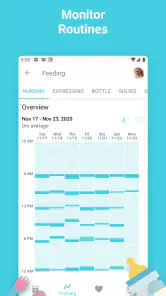
Okay, so the first thing I noticed about Baby + | Your Baby Tracker is how incredibly user-friendly it is. Right off the bat, the app greets you with a clean and intuitive interface. It’s almost like the developers knew that parents don’t have time to mess around with complicated settings. You’ve got everything you need right at your fingertips, from tracking feeds to monitoring sleep patterns.
Features to Love
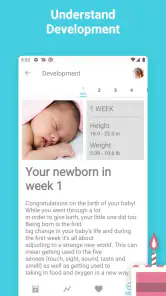
One of the coolest features is the daily journal. You can jot down little notes or milestones, and it’s perfect for those days when your memory is a bit foggy (thanks, sleep deprivation). Plus, there’s a section for adding photos, so you can look back and see just how much your little one has grown. And let's not forget the growth tracker, which allows you to record your baby’s height and weight over time, giving you peace of mind that they’re developing nicely.
More From Our News Desk

Weather by Xiaomi Review: Clear at a Glance, Less Clear Up Close

X Under Pressure: Can It Recover When Posting Goes Wrong?

Clash of Clans Is Won Between the Battles

Android Auto Makes the Case for Quieter Car Software

MobiOffice: Transforming Mobile Productivity with Seamless Integration

EA SPORTS FC™ Mobile Soccer: Redefining Mobile Sports Gaming
Another feature that had me hooked is the community support. The app has a built-in section where you can connect with other parents. Whether you’re seeking advice or just need to vent, it’s like having a supportive community in your pocket. You can share experiences, tips, and even funny stories that only other parents would understand.
Using it in an ordinary day
Imagine a morning when one parent is heading out and the other is taking over. A brief note about the last feed or a sleep stretch can make that handoff less reliant on memory. Later, if a caregiver asks what the baby’s routine has looked like, a few entries in the journal may be more useful than trying to reconstruct the day from scattered messages. I would keep entries short and consistent, then add fuller notes only when something seems worth remembering.
For a practical workflow, decide with anyone sharing care which details matter most: perhaps feeds and sleep, plus a note when something unusual happens. Use the journal for context that a simple log would miss, and photos for memories rather than as a substitute for written observations. This keeps tracking manageable and makes it easier to find the detail you actually need instead of filling the app with entries that no one will revisit.
A handoff that does not depend on memory
A realistic example is a caregiver arriving while you are trying to get out the door. Instead of explaining the whole morning from memory, you can use the recent notes to remind yourself what happened and pass along the essentials. I would still say the important information aloud—especially anything that needs attention—because an app entry is easy to overlook when someone is busy. The log is a back-up for recall, not a substitute for a clear conversation.
There is also a useful distinction between a routine note and a milestone. A routine note helps with the next few hours; a milestone or photo is something you may want to revisit much later. Keeping those purposes separate in your mind makes the journal less cluttered. When a moment matters, add enough context to recognize it later rather than assuming a photo alone will explain why it was memorable.
How it compares with simpler options
Compared with a paper notebook or notes app, a dedicated baby tracker groups routine records with growth notes and milestones, which can make the information easier to keep together. A notebook may still suit you better if you prefer writing by hand, want to avoid using a phone during care, or need something that does not depend on opening an app. A general notes app can be more flexible, but it may take more effort to keep entries organized as the baby’s routine changes.
The trade-off is that a dedicated tracker asks you to maintain one more digital habit. If you already have a reliable system, switching may not be worth the friction. Nor would I treat recorded height or weight as an interpretation of a child’s health: the app can preserve what you enter, while questions about growth belong with a healthcare professional. The same restraint applies to community advice; other parents can offer companionship, but their experience is not a replacement for professional guidance.
What the record can—and cannot—tell you
A run of entries may make a routine easier to describe, but it should not be mistaken for a diagnosis or a verdict on whether a baby is developing as expected. Growth records are useful as a place to keep measurements you have taken; deciding what they mean is a different job. If a pattern worries you, I would bring the information to a healthcare professional and explain the context, rather than relying on an app or comparing a child with another family’s account.
The community can have a different role: it may make the experience feel less isolating, especially when you want to hear how other parents handle ordinary challenges. I would use it for shared experience and encouragement, while checking health questions with a qualified professional. That boundary lets the social side be supportive without asking it to provide certainty it cannot offer.
Who will get the most from it
I’d recommend it most to parents who share caregiving, want a single place for feeding and sleep notes, or like keeping a record of milestones alongside photos. It can also help someone who wants to arrive at a conversation with a clearer recollection of recent routines. If tracking makes you anxious, however, or you prefer to keep baby information off your phone, a simple paper log—or no log at all—may be the kinder choice.
The app is free, has an Everyone age rating, and is on version 3.2, with a minimum operating-system requirement of 8.0. Its 4.7 average from around 95,000 ratings and more than five million installs suggest it has reached many families, though popularity alone cannot say whether its approach will suit yours. I’d try it with a small set of entries first and keep only the parts that genuinely make daily care easier.
When I would choose another approach
If you prefer a paper record, need to avoid having a phone nearby during care, or already have a dependable way to share notes, there may be little benefit in changing your routine. A notebook can be quicker to open and does not invite you to switch between screens; a basic notes app may work if you want to write freely rather than sort information into a parenting-focused record. The dedicated app makes most sense when its grouping of feeds, sleep, growth, and memories saves you effort you would otherwise spend organizing details yourself.
I would also skip detailed tracking if it makes ordinary variation feel like a problem to solve. Babies have uneven days, and a missing entry does not mean something has gone wrong. Starting with one or two practical categories is a gentler way to find out whether the app helps. If it becomes another source of pressure, stopping is a reasonable choice, not a failure to use it properly.
Why It Stands Out
What really sets this app apart from other baby trackers is its customization options. You can personalize the app to suit your specific needs. Whether you want to track breastfeeding, bottle feeding, or both, Baby + | Your Baby Tracker has got you covered. The flexibility to add or remove features ensures that the app grows with your baby’s needs.
Moreover, the reminders feature is a lifesaver. Let’s face it, when you’re running on little sleep, it’s easy to forget things. The app gently reminds you of feeding times, nap schedules, and even doctor’s appointments. It’s like having a personal assistant who’s always got your back.
Make the routine fit your family
Even with reminders available, I would use them selectively. A prompt can be handy for a task you genuinely want to remember, but setting too many can turn a helpful record into a stream of interruptions. The same goes for customization: adjusting what you track is most useful when it removes clutter, not when it encourages you to record every possible detail. A small, repeatable routine is more likely to survive a tiring week than an ambitious setup.
For families sharing care, it is worth agreeing on how much detail is enough. One person may want a quick record of a feed, while another may value context about how the baby settled. A short shared convention can prevent entries from becoming confusing or inconsistent. If you are the only caregiver using the app, the benefit may be less about coordination and more about having your own memory aid for appointments or looking back on milestones.
Final Thoughts
In a world where parenting can feel like an uphill battle, having an app like Baby + | Your Baby Tracker is a game changer. It simplifies the chaos and helps you stay on top of your baby’s needs. Plus, it’s pretty reassuring to know you’re not alone on this wild ride called parenthood. If you’re a new parent or even a seasoned one looking for some help, I’d say give this app a try. It just might become your new best friend.
My practical recommendation is to begin with the use that matters most to you: a handoff between caregivers, a record of breastfeeding, or a place to keep growth notes and memories. Give that routine a fair try, then keep only the parts that make the next conversation or decision easier. Baby + is most useful as a calm aid to remembering—not as a scorecard, schedule you must obey, or replacement for professional advice.
Baby + | Your Baby Tracker Frequently Asked Questions
Is Baby + suitable for parents who want to keep baby-care information organized in one place?
Baby + brings several kinds of baby-care tracking and parenting content together, which can be appealing if you want fewer separate notes or records to manage. Its focus includes growth, milestones, and breastfeeding, as well as features for everyday care. Whether it fits your routine depends on the information you want to track and how often you prefer to update it.
Can I use Baby + to follow breastfeeding and other daily care routines?
Yes. Baby + is intended to support tracking around breastfeeding and everyday baby care. The app also includes logging for feedings, sleep, and diaper changes, so parents can keep routine details together. This can be useful when you want to look back at patterns or maintain a record to discuss with a caregiver, while remembering that an app is an organizational aid rather than medical advice.
Is Baby + free to download, and what devices can run it?
Baby + is a free parenting app from Philips Electronics UK Limited, and it is available for Android and iOS. On Android, the minimum operating-system requirement is version 8.0, so it is worth checking your device before downloading. The app is rated for Everyone, making it suitable for a broad audience, including parents and caregivers looking for baby-tracking tools.
Who is Baby + designed for, and what can I use it for?
Baby + is intended for parents and caregivers who want practical help keeping track of a baby’s early development and everyday care. Its focus includes growth, milestones, and breastfeeding, alongside tools for organizing information about your child. It can be useful if you prefer having parenting resources and tracking features together in one app rather than relying on separate notes or records.
What features does Baby + offer to support new parents?
Baby + is packed with features designed to support new parents, including a baby tracker for feedings, sleep, and diaper changes. Additionally, it provides growth charts, milestone tracking, and parenting guides. The app also offers a community forum where parents can connect and share experiences. These features aim to make parenting a smoother and more organized journey.
Pros
- User-friendly interface for easy navigation.
- Tracks baby's growth and milestones.
- Offers personalized parenting tips.
- Includes feeding and diaper logs.
- Supports multiple baby profiles.
Cons
- Can be overwhelming with too many features.
- Some features require in-app purchases.
- Limited customization for notifications.
- Occasional syncing issues reported.
- Requires constant internet connection.
- Category
- Parenting
- Version
- 3.2












