B-hyve
- 12.31K
- 4.6
- Installs
- 1.00M
- Price
- Free

Screenshots
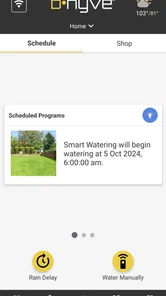
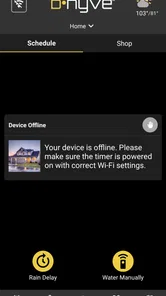
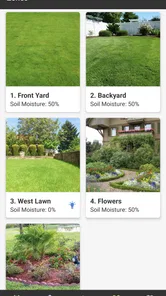
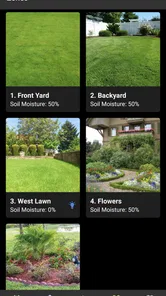
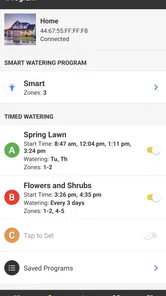
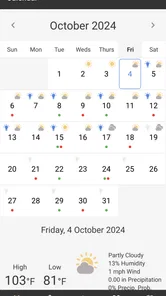
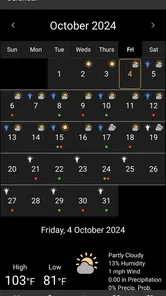
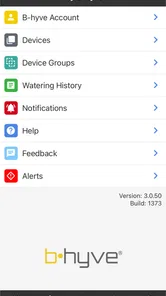
Analysis by Reviewed
I tend to trust a home-control app more when it makes its purpose clear and keeps the important choices understandable. B-hyve is built around managing sprinkler watering, rather than trying to become a general smart-home dashboard. That narrow focus is useful if you want to deal with irrigation from your phone, but it also means the experience depends on having a compatible sprinkler controller and a reliable connection between the app, controller, and home network.
What to check before relying on it
Before building a routine around remote watering, I’d first confirm that the sprinkler controller is set up correctly and that each watering area behaves as expected. A schedule that looks sensible on a screen still needs a real-world check: run a short cycle, look for missed patches or overspray, and adjust the timing to suit the plants and soil. This small test is more useful than assuming an automated schedule will fit every part of the yard.
That matters especially if different areas have different needs. A sunny lawn, shaded beds, and newly planted shrubs may not benefit from the same watering pattern. I would treat automation as a starting point, then observe the results and refine the schedule rather than expecting the app to make every gardening decision for me.
Trust, control, and practical limits
The app is free, intended for everyone, and developed by B-hyve. Its average rating is 4.7 from around 76,000 ratings, with more than 500,000 installs, which suggests that many people use it for this specific home task. The current version is 3.0.51, and it has been available since February 23, 2016. Those figures give useful context, but they don’t replace checking how the app works with your own controller and household routine.
I would also make a habit of reviewing the schedule after changing it, especially before leaving home for several days. Remote access is convenient, but it is not a substitute for checking that the controller is online and that the planned watering still makes sense. If you prefer to make every decision at the valve or use a basic timer without phone-based management, this app may add more setup than value.
Ever wondered how much easier life could get with a smart irrigation system? Well, let me introduce you to the B-hyve app. It's like having a personal rain god in your pocket, minus the thunder and lightning!
Getting Started with B-hyve
First off, setting up the B-hyve app was a breeze. I mean, even if you're not tech-savvy, you can handle this. The app guides you through each step, ensuring your smart sprinkler controller is up and running in no time. You just need to connect your device to the Wi-Fi, and voila, you're in control!
More From Our News Desk

 Block Blast!
 Makes Every Clear Feel Like One More Turn
A clean little block puzzle becomes a study in space, risk, and self-control. Its best moments come from one satisfying clear; its toughest test is knowing when to stop.

 Super Stylist Fashion Makeover
Super Stylist Turns Dress-Up into a Runway Career
Its makeover-to-client loop turns quick outfit decisions into shareable style theater. The question is whether the closet keeps giving players a reason to return.

 Block Craft 3D:Building Game
Block Craft 3D Under Pressure: How Well Does It Recover When Building Goes Wrong?
A failure-focused look at Block Craft 3D’s forgiving building loop, its uncertain recovery edges, and the moments that demand more than a cheerful village.

 Woodturning
 Trades Creative Freedom for a Satisfying Carving Loop
If your usual creative game is about building, decorating, or styling, Woodturning trades open-ended projects for a tactile, tightly guided carving loop. Here is what that switch really costs.

 PUBG MOBILE
 Shows What Battle Royale Must Get Right
PUBG MOBILE shows how battle royale has matured: bigger systems matter less than meaningful choices, readable fights, and a reason to return after every loss.

 Braindom: Brain Games Test
Braindom’s Social Life Happens Between Puzzles
Braindom turns quick logic traps into a personal ritual, but its community value is more about comparing answers than building together.
Latest News



Features that Make a Splash
Once you're all set up, prepare to be amazed by the features. The app allows you to schedule watering times, which is a lifesaver during those hot summer months. You can set it and forget it, knowing that your garden will be in tip-top shape.
One of the standout features is the weather intelligence. This thing is smart! It adjusts watering schedules based on real-time weather data, ensuring that you’re not watering your plants during a rainstorm. Talk about efficiency!
Why You'll Love It
Now, I know what you're thinking, "Do I really need another app?" Trust me, this one's worth it. The convenience factor is off the charts. Imagine being away on vacation and still being able to manage your garden’s watering schedule. You can even manually start watering with just a tap, no matter where you are.
Plus, the app provides detailed reports on water usage. So, if you're eco-conscious or just want to save on your water bill, this feature will be your best friend. It’s like having an accountant for your garden!
My Personal Experience
Personally, I found the app to be incredibly user-friendly. The interface is clean, and navigation is intuitive. It didn't feel like a chore to use, which is something I can’t say for all smart home apps. And let's be honest, if an app makes life easier, it’s a winner in my book.
In terms of performance, the app didn’t disappoint. The connection between the controller and the app was seamless, with no noticeable lag. My garden has never looked better, and I barely had to lift a finger!
Where it fits among watering options
Compared with a basic mechanical timer, the main appeal here is being able to review and change watering from the app, rather than walking to the controller each time. A manual routine can still be the better choice if your garden is small, your schedule rarely changes, or you want the fewest connected devices possible. I see B-hyve as most useful when remote adjustments and scheduled watering solve a real recurring problem, not simply because smart control is available.
A practical routine is to use the schedule for ordinary weeks, then check it when the weather shifts or your plans change. If a dry spell arrives, you can consider whether a manual start is appropriate; if rain is expected, the weather-based adjustment may help avoid unnecessary watering. I’d still look at the soil and plants before making a change, since weather information cannot tell you exactly how every corner of your yard is doing.
Who benefits most from the extra control
I’d recommend considering it if you already have a compatible controller, travel often, or manage several parts of a garden and want to adjust watering without making a trip outside. It can also be handy for someone who is learning how a regular schedule affects the lawn: usage reports offer a way to review water use instead of relying entirely on memory. They are useful context, not a guarantee that a particular schedule is ideal or that a bill will fall.
For a household where several people might change watering, agree on who will make schedule edits before relying on automation. A simple shared routine can prevent one person’s adjustment from clashing with another’s expectations. I would also keep the physical controller’s location and basic operation familiar to anyone who may need to check the system when phone access is inconvenient.
Everyday checks that make automation safer
Picture leaving for a weekend after setting the sprinklers for the week. Before you go, I’d glance at the upcoming schedule, confirm the controller is connected, and make sure a recent change has not left an unexpectedly long run. When you return, checking the garden and water-use report can help you decide whether the routine needs trimming or whether one area needs attention. That quick before-and-after habit is more dependable than treating “set it and forget it” as literal.
Weather-based adjustments are a convenience, but I wouldn’t use them as the only safeguard. Local conditions can vary across a property, and a forecast does not reveal whether a sheltered bed has dried out or a low spot is already wet. If watering has consequences for delicate plantings or a water-sensitive area, inspect those spots and make a deliberate choice instead of assuming the automatic schedule is always right.
Questions worth answering before setup
Does it suit someone without much technical experience? The setup felt approachable in my use, but you still need a compatible controller and a working Wi-Fi connection, so it is not a standalone replacement for sprinkler hardware. Can you manage watering while away? The app’s remote controls are useful for that, provided the controller remains connected. Should you expect it to choose the perfect schedule? No: treat its weather response and scheduling tools as assistance, then adjust based on your yard.
Privacy-conscious users should make their own check of the permissions and account choices shown during installation and use, and read the relevant privacy information before connecting a home device. I wouldn’t assume that a convenient remote-control feature tells the whole story about data handling. The sensible approach is to grant only the access you understand and need, and to keep account access limited to the people who should control the watering.
Choosing a routine that fits the yard
One useful way to judge whether this setup is earning its place is to compare what the app lets you manage with what you actually need to manage. If your lawn is watered on the same simple pattern all season, a standard timer may be easier to understand and maintain. If rain, travel, or changing garden needs regularly make you revisit the plan, an app-based controller gives you a more convenient place to make those adjustments.
I would avoid changing several parts of a schedule at once when trying to solve a dry or soggy patch. Change one relevant setting, observe the result, and then decide whether another adjustment is needed. That makes the water-use reports more useful as a reference: you can connect a change in the routine with what happened, instead of guessing which of several edits made the difference.
There is also a practical distinction between managing irrigation and diagnosing it. A phone can help you choose when watering is scheduled, but it cannot make a blocked sprinkler head distribute water evenly. If a section looks unhealthy while the rest of the garden is fine, I would inspect the physical coverage before extending the whole schedule. Otherwise, a longer run could waste water in areas that are already receiving enough.
Where convenience has limits
The best fit is a household that already has compatible sprinkler hardware and wants a clearer way to manage it from indoors or while away. It is less compelling for renters or anyone who cannot install or configure a controller, and it may be unnecessary if a simple timer already handles a small, uniform garden. The app’s value comes from making irrigation adjustments easier, not from removing the need to understand the yard.
For someone deciding whether to invest time in setup, I’d start by asking how often watering plans change. A frequent traveler may appreciate being able to check and adjust a schedule remotely. Someone who rarely leaves home and prefers a fixed routine may get little benefit beyond moving familiar timer controls onto a phone. In either case, the controller and connection remain part of the experience, so the app should be considered alongside the hardware rather than on its own.
On a busy weekday, for example, I might notice that a bed is drying faster than expected while the lawn looks fine. The useful response is not necessarily to add time to every watering area; it is to review the relevant part of the routine, make a targeted change if appropriate, and check the result later. That kind of deliberate adjustment is where app control can save a trip outside without encouraging me to treat one observation as a reason to overwater everything.
Making a cautious choice about access
Because irrigation control affects a physical system at home, I’d treat account access as part of setup rather than an afterthought. I would use the permission prompts and account settings as the decision points: consider what access the app asks for, whether each choice is necessary for the way I plan to use it, and who else should be able to change watering. If I’m unsure about a permission or data practice, I would pause and check the relevant explanation before proceeding instead of guessing.
That caution need not make the app difficult to use. It simply means separating the convenience of remote control from assumptions about privacy. A household can decide who manages the schedule, keep those choices consistent, and still use the app for routine adjustments. For people who do not want an account-based or connected approach at all, a local timer remains the more straightforward alternative.
In conclusion, if you're looking for a way to make your garden maintenance a little less hands-on and a lot more efficient, the B-hyve app is definitely worth considering. It's smart, efficient, and incredibly easy to use. So go ahead, give it a try and let your garden flourish without the fuss!
B-hyve Frequently Asked Questions
What should I check before setting up B-hyve with my sprinkler equipment?
B-hyve is intended for smart sprinkler control, so the first step is to identify the irrigation equipment you plan to manage and confirm that it works with the app. The app is compatible with most Orbit sprinkler systems, but compatibility can vary by setup. Check the app’s compatibility list or contact customer support before relying on B-hyve to operate your existing equipment.
Can I use B-hyve if I don’t have a smart sprinkler system?
B-hyve is designed to control smart irrigation equipment, rather than serve as a general-purpose home or gardening app. Without compatible sprinkler hardware, its central purpose—managing watering from your phone—may not be useful to you. If you are considering the app for a particular system, check compatibility first; otherwise, you may prefer an app that fits the equipment and tasks you already have.
Is B-hyve available in my language and region?
Language and regional support can affect how comfortable an app is to use, particularly when setting schedules or reviewing watering information. Before downloading, check the app’s store page on your device for the languages and availability shown for your region. Also consider whether its smart sprinkler controls fit your local setup and the irrigation equipment you want to manage.
Can I use B-hyve on my phone’s operating system?
B-hyve is available for Android and iOS, and the Android version requires Android 7.0 or later. Before downloading, check that your device meets the operating-system requirement and has enough space for the app. B-hyve is a free House & Home app focused on smart sprinkler control, so its usefulness will depend on whether you want to manage compatible irrigation equipment from your phone.
Is B-hyve free to download, and what is its age rating?
B-hyve is free to download and is rated Everyone, making it suitable for a general audience. That does not mean every feature is relevant to every user: the app is intended for people who want smart sprinkler control. Its usefulness depends on having compatible irrigation equipment and wanting to manage watering through a mobile app. Review any purchase or service prompts shown in the app before proceeding.
Pros
- Easy to set up and configure.
- Smart watering schedules save water.
- Integrates with smart home devices.
- User-friendly app interface.
- Remote control of irrigation system.
Cons
- Requires stable Wi-Fi connection.
- Initial setup can be confusing.
- Some features need subscription.
- Limited support for older devices.
- Notifications can be inconsistent.