Authenticator App - SafeAuth
- 1.69K
- 4.3
- Installs
- 10.00M
- Price
- Free

Screenshots
Analysis by Reviewed
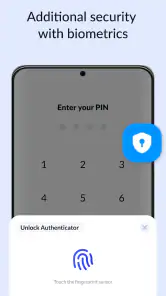
I see a two-factor authenticator as a practical way to make account sign-ins harder to steal without asking me to remember another password. Authenticator App - SafeAuth focuses on that second step: it creates sign-in codes and lets me protect access to the app itself with a PIN or biometric check. That extra phone-level lock is useful when my device is shared or left on a desk, although it does not replace a strong screen lock or careful account security.
Why the app lock matters in everyday use
The central benefit here is straightforward: a code generator can reduce the risk of someone signing in with only a stolen password, while the PIN or biometric barrier helps keep those codes out of casual reach. I find that combination most useful for accounts I rely on often, such as email or services that can reset other passwords. The app is a free Tools app from SafeAuth Services, and its 4.3 average from around 129,000 ratings suggests many people find this kind of routine security step worthwhile.
What a code changes at sign-in
After an account has been set up to use an authenticator, signing in usually means entering the password and then the current code shown in the app. That small extra action is the point: a password exposed through reuse or a breach is less likely to be enough on its own. It is not a cure-all, though. I would still use unique passwords and treat unexpected sign-in requests with caution, because an authenticator cannot make a weak password or a careless approval safe.
For a realistic everyday example, imagine logging into your email on a new laptop while travelling. You enter your password, open SafeAuth, unlock it, and use the code to finish the sign-in. The process takes an extra moment, but it can be a reasonable trade for an account that may control password resets elsewhere. If you are in a hurry, having your phone charged and accessible matters more than any claim of convenience.
Choosing it over other sign-in methods
Compared with relying only on text-message codes, an authenticator can be a useful alternative when you want a code generated on your device rather than delivered through your phone number. It also differs from passkeys, which can make sign-in feel simpler when a service supports them but work through a different process. I would not treat these options as identical: an authenticator is a practical fit for services that offer code-based two-factor sign-in, while a passkey may be smoother where it is available and set up across your devices.
One habit I recommend is checking the account’s recovery options before turning on two-factor authentication. Keep any recovery codes the service provides somewhere separate from your phone, and make sure you know how you would regain access if the device is lost or replaced. That planning is easy to overlook because the code works so smoothly day to day, but it is what can prevent a security improvement from becoming a lockout.
What to expect from the setup
The basic workflow is to enable authenticator-based sign-in in the account you want to protect and follow that service’s instructions to connect an authenticator. Once it is configured, the app becomes part of the sign-in routine. I would start with one important account, test the full login and recovery process, then add others. This gradual approach makes it easier to spot a setup mistake before you depend on the app for several accounts.
More From Our News Desk

Weather by Xiaomi Review: Clear at a Glance, Less Clear Up Close

X Under Pressure: Can It Recover When Posting Goes Wrong?

Clash of Clans Is Won Between the Battles

Android Auto Makes the Case for Quieter Car Software

MobiOffice: Transforming Mobile Productivity with Seamless Integration

EA SPORTS FC™ Mobile Soccer: Redefining Mobile Sports Gaming
SafeAuth has over 10 million installs and is rated for Everyone. It was released on June 21, 2023, and its current version is 1.6.5, with Android 6.0 as the minimum operating system. The app is free to install, with in-app purchases ranging from $4.99 to $99.99 per item. I would check the purchase details in the app before buying anything; the core decision for most people is whether its code-based sign-in workflow suits the accounts they use.
Who benefits most—and who may prefer something else
I think this app is most relevant if you have several accounts that support authenticator codes and want a dedicated place to handle that second sign-in step. It is also a reasonable choice if you value a PIN or biometric barrier before someone can view the codes. On the other hand, if you only use services that offer passkeys and you prefer their passwordless flow, a separate code generator may add friction without helping your routine. People who rarely have their phone nearby should also weigh that inconvenience before moving important accounts to an app-based method.
There is a trade-off in concentrating account access on one device: losing it or being unable to unlock it can interrupt sign-ins. Before relying on any authenticator, I would make a recovery plan for each account rather than assume the app alone can restore access. This is especially important if your primary email is protected by the same phone, since that email may be needed to recover other services.
Getting started with SafeAuth
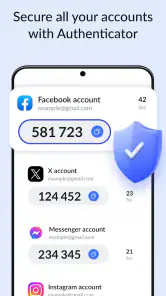
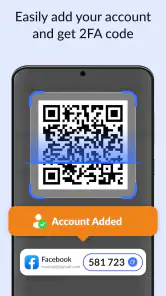
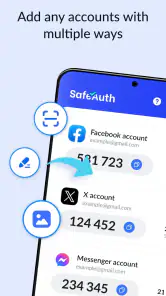
First things first, setting up the Authenticator App - SafeAuth is a breeze. You simply download it from your app store, and within minutes, you're good to go. The user interface is incredibly intuitive, making it easy even for those who aren't tech-savvy. You just scan a QR code from your account settings page of any service you want to protect, and SafeAuth generates a secure, time-based code for you to use. It’s like having your own personal bodyguard for your digital life!
Features that stand out
One of the cool things about SafeAuth is its versatility. Not only does it support a wide range of popular services like Google, Facebook, and Dropbox, but it also offers offline functionality. Yes, you heard it right! You don’t need an internet connection to generate your codes, which is perfect for those moments when you're off the grid.
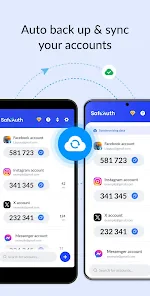
Moreover, SafeAuth comes with a backup feature. You can store your codes securely in the cloud, ensuring that you never lose access even if you change devices. This feature alone gives me peace of mind, knowing that I can always recover my accounts without a hitch.
Why choose SafeAuth?
Let’s talk about the elephant in the room - security. SafeAuth uses industry-standard algorithms to keep your data safe. The app itself is protected by a PIN or biometric authentication, adding an extra layer of security. So, even if someone gets their hands on your phone, they won't be able to access your codes. This is a massive win for anyone concerned about privacy and security.
Another aspect worth mentioning is the seamless integration with wearables. If you own a smartwatch, you can receive your codes directly on your wrist. It's super convenient and makes the whole process of two-factor authentication feel less of a chore.
Making the routine work for you
A useful way to judge an authenticator is not just by how quickly it displays a code, but by whether the extra step fits the moments when you actually sign in. If you regularly use a laptop alongside your phone, keep the phone where you can reach it before starting a login. That sounds obvious, yet it avoids the common annoyance of entering a password and then having to search through a bag or another room for the second factor.
I would also add accounts in a deliberate order rather than trying to secure everything in one sitting. Begin with an account whose recovery route you understand, complete a test sign-in on a separate device, and only then move to accounts that depend on it. This is especially sensible for email: if it is both a protected account and the address used to recover other services, you want to be certain you can still get back in before changing more settings.
When a service presents a setup code or QR code, I would finish the enrollment while that setup screen is still available and confirm the authenticator code is accepted. A code appearing in the app is not, by itself, proof that the account has completed setup. This small check catches a missed step early, when it is easier to correct than during a later login away from home.
Everyday convenience has boundaries
Offline code generation is particularly handy in places with unreliable connectivity: the code can still be available when a hotel network is awkward or mobile reception drops. That does not mean every part of account sign-in works offline. The service you are accessing still needs to accept the login, and you may need a connection for other steps such as opening its website or completing a recovery flow. I see offline access as a practical backup for the code itself, not a promise that the whole account is usable without internet.
The phone lock also has a specific job. A PIN or biometric check can add a pause before someone casually opens the authenticator, but it should sit alongside the device’s own lock, not replace it. If another person already knows your phone passcode or can use your unlocked phone, the app barrier has less value. I would treat the app lock as one layer in a sensible setup, not as a reason to leave a device unattended.
The same care applies to cloud backup. It can make changing phones less stressful, but storing authentication material in another place changes what you need to protect. I would use only a backup route I understand, protect the account that controls it, and check that I can still access recovery information independently. Convenience is worthwhile when it reduces the chance of losing access without quietly creating a single weak point.
Where alternatives may be a better fit
For a service that supports passkeys and works well across the devices you use, a passkey can remove the need to open a code app and type a changing number. I would choose that route when it is supported and its recovery arrangements suit me. SafeAuth makes more sense for services that offer authenticator codes, or for people who want one familiar code-based routine across accounts that do not share the same sign-in options.
Text-message codes can be easier for someone who does not want to install another app, but they depend on receiving a message and keeping access to the phone number. An authenticator avoids waiting for that message, yet it puts more responsibility on the phone and on planning for device loss. Neither choice is universally best; the better one is the method the service supports and the user can recover from safely.
There is also a difference between a basic code generator and a broader password manager that includes authentication tools. If you already rely on a password manager and prefer keeping sign-in details together, adding a separate app may not suit your habits. I would avoid putting every security tool in one place simply for convenience without considering the consequences if that one account or device becomes unavailable. SafeAuth is most appealing when a dedicated authenticator feels clearer and easier to manage.
Questions worth settling before relying on it
Will it work when the phone has no internet connection? The code-generation workflow can be useful offline, which helps when connectivity is poor. Still, I would test the actual sign-in method with an account I can recover before depending on it during travel or another time-sensitive situation.
What happens if the phone is lost or replaced? The answer depends on the recovery options available for each account and on whether you have configured a backup route. I would save service-provided recovery codes separately and make sure the email or other account needed for recovery is itself accessible. Do not assume installing the app on a replacement phone will automatically restore every account.
Does the app lock make account access completely safe? No single lock can do that. It can make casual access to codes harder, but it cannot protect against every situation involving a compromised device, exposed recovery details, or a weak password. Keeping the phone locked, choosing unique passwords, and being alert to suspicious sign-in prompts still matter.
Is it a good choice for someone who signs in only once in a while? It can be, especially for an important account, but the extra step and the need to keep the phone available may feel unnecessary for low-value services. I would prioritize accounts that could expose personal information or help reset other passwords rather than adding every account just because the option exists.
Final thoughts
In a world where cyber threats are becoming increasingly common, having a reliable authentication app is not just a luxury but a necessity. The app not only keeps your accounts secure but also provides a user-friendly experience that anyone can navigate. Whether you're a tech enthusiast or just someone who wants to keep their digital life secure, SafeAuth is definitely worth considering.
So, if you’re looking to beef up your security game, give SafeAuth a try. It's robust, reliable, and most importantly, it keeps your online presence safe from prying eyes. Trust me; you won't regret making this small yet significant change to your digital routine.
Authenticator App - SafeAuth Frequently Asked Questions
What should I check before adding an account to SafeAuth?
Before setting up an account, make sure you can access its security settings and follow the service’s instructions for adding an authenticator. Keep any setup or recovery details somewhere safe, and confirm that you can complete a sign-in with the new code before relying on it. SafeAuth is intended to support two-factor authentication, so setup involves both the app and the account you want to protect.
Does SafeAuth require a particular Android version?
SafeAuth is available for Android devices running version 6.0 or later. Check your device’s operating system before downloading so you can confirm compatibility. The app is a Tools app for authentication, and its PIN and biometric protection are intended to help secure access to the app itself. A compatible operating system is the first practical check before installing it.
Is Authenticator App - SafeAuth free to download, and are there optional purchases?
SafeAuth is free to download, so you can try its authentication tools without an upfront app price. It also offers in-app purchases, giving users the option to consider paid items within the app. Before making a purchase, check the details shown on the purchase screen so you understand what it includes and whether it suits your needs.
What does SafeAuth protect, and what does its PIN and biometric protection do?
SafeAuth is a Tools app focused on protecting accounts with two-factor authentication. Its PIN and biometric protection add a lock to the authenticator app itself, helping restrict access to the codes stored there. This is separate from the extra verification step used when signing in to an online account, so it is useful to understand both layers before relying on the app.
What features does the Authenticator App - SafeAuth offer?
The Authenticator App - SafeAuth provides a range of features designed for enhanced security and user convenience. It supports two-factor authentication (2FA) for a variety of online accounts, offers a user-friendly interface, and provides a secure environment for storing and managing authentication codes. Additionally, it supports backup and recovery options to ensure you don't lose access to your accounts.
Pros
- Strong encryption for secure data storage.
- User-friendly interface with easy navigation.
- Supports multiple accounts for flexibility.
- Quick setup with minimal configuration.
- Two-factor authentication enhances security.
Cons
- Limited cloud backup options available.
- No desktop application version provided.
- Occasional sync delays with server.
- Requires internet for authentication.
- Lacks biometric login support.
- Category
- Tools
- Version
- 1.6.5








