athenaPatient
- 4.64K
- 4.8
- Installs
- 1.00M
- Price
- Free

Screenshots
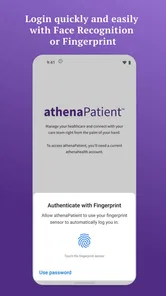
Analysis by Reviewed
I find athenaPatient most useful as a practical companion to care you already receive, rather than a replacement for a clinic’s other systems. It is a free medical app from athenahealth, and its central appeal is having a place to check health information and contact a care team. That can make routine follow-through less scattered, especially if your provider uses athenahealth. The important caveat is that its value depends on how your care team works with it: an app cannot make every office workflow instant or put every part of your medical life in one place.
What makes a patient portal worth keeping
With an average rating of 4.8 from around 51,000 ratings, more than a million installs, and an Everyone content rating, it has clearly found an audience. Those figures are reassuring context, not a guarantee that it will fit every practice or every patient. The current version is 1.23.4, and it runs on operating systems from version 11 onward. I would check that compatibility before relying on it as my main way to manage appointments or messages.
One useful way to think about a portal like this is as a working notebook for care, not merely a digital filing cabinet. Before an appointment, I would review available results and prescriptions, then write down questions while the details are fresh. Afterward, I could use the information available in the app to keep track of what I need to follow up on. That habit is more valuable than opening the app only when something goes wrong: it turns scattered bits of medical information into a more usable conversation with a clinician.
Making records useful between visits
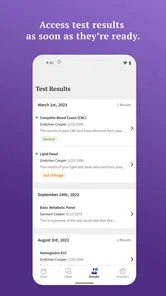
One of the standout features of athenaPatient is its ability to neatly organize all your medical records in one place. Whether it's your recent lab results, past prescriptions, or immunization history, you can find it all within a few taps on your phone. No more flipping through piles of papers or digging through emails to find that elusive test result. Plus, the app ensures that your data is secure, so you can have peace of mind knowing your personal information is protected.
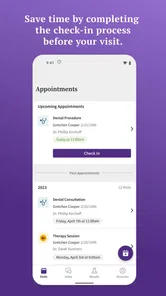
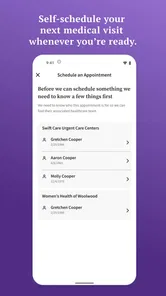
Appointment tools matter most when plans change, not just when a reminder arrives. If I needed to move a visit, being able to handle the request in the app would be more convenient than searching for a phone number during office hours. Still, I would not assume that every appointment can be changed immediately or that an in-app action means a new time is confirmed; I would check for a clear confirmation and contact the office if the timing is urgent. A portal is helpful for routine scheduling, but a direct call remains the safer route when a delay could affect care.
Messages need the right expectations
Gone are the days of forgetting appointments or struggling to remember which specialist you're supposed to see next. With athenaPatient, you can schedule, reschedule, or cancel appointments with ease. You even get reminders, so there's no chance of missing that crucial follow-up appointment. Trust me, it's like having a personal assistant dedicated to managing your healthcare schedule.
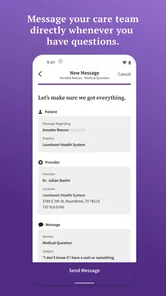
Ever wished you could just text your doctor a quick question without having to book an appointment? athenaPatient has got your back. The app facilitates seamless communication with your healthcare providers, allowing you to send messages and receive responses in a timely manner. It's like having a direct line to your doctor's office, minus the hold music.
More From Our News Desk

 Block Blast!
 Makes Every Clear Feel Like One More Turn
A clean little block puzzle becomes a study in space, risk, and self-control. Its best moments come from one satisfying clear; its toughest test is knowing when to stop.

 Super Stylist Fashion Makeover
Super Stylist Turns Dress-Up into a Runway Career
Its makeover-to-client loop turns quick outfit decisions into shareable style theater. The question is whether the closet keeps giving players a reason to return.

 Block Craft 3D:Building Game
Block Craft 3D Under Pressure: How Well Does It Recover When Building Goes Wrong?
A failure-focused look at Block Craft 3D’s forgiving building loop, its uncertain recovery edges, and the moments that demand more than a cheerful village.

 Woodturning
 Trades Creative Freedom for a Satisfying Carving Loop
If your usual creative game is about building, decorating, or styling, Woodturning trades open-ended projects for a tactile, tightly guided carving loop. Here is what that switch really costs.

 PUBG MOBILE
 Shows What Battle Royale Must Get Right
PUBG MOBILE shows how battle royale has matured: bigger systems matter less than meaningful choices, readable fights, and a reason to return after every loss.

 Braindom: Brain Games Test
Braindom’s Social Life Happens Between Puzzles
Braindom turns quick logic traps into a personal ritual, but its community value is more about comparing answers than building together.
Latest News



I would use messaging for a focused, non-urgent question: for example, clarifying what to bring to a follow-up or asking the office to explain the next step after a visit. Keeping one topic per message makes it easier for staff to respond clearly, and including the relevant appointment or result in the wording can reduce back-and-forth. The trade-off is that messaging is not a live conversation. If symptoms are worsening or a response is needed right away, calling the care team—or seeking urgent help when appropriate—is a better choice than waiting for a portal reply.
Telehealth is one option, not a fit for every visit
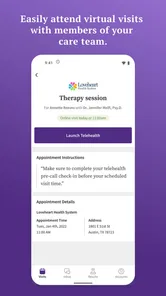
Moreover, the app supports telehealth appointments, which means you can consult with your doctor without leaving the comfort of your home. This is not just convenient but also a game-changer, especially in times when in-person visits are challenging.
For a realistic everyday case, imagine noticing a question about a new prescription the evening before a scheduled remote visit. I would use the portal to keep the question and any relevant record close at hand, then raise it during the appointment rather than trying to solve it through a string of messages. That is where a connected portal can help: records, communication, and a visit belong to the same care relationship. But telehealth is not automatically the right format for every concern; when an examination or hands-on test is needed, an in-person appointment is the more sensible option.
How it fits alongside other ways of managing care
Compared with a general health diary or a phone’s notes app, a provider-linked portal is more useful for information and communication tied to a participating care team. A paper folder can still be better when you need to carry documents to an unaffiliated clinic, and a separate calendar may be easier if you are coordinating family commitments alongside appointments. I would not treat any one portal as a universal record across every provider. If your care is spread among offices that do not use the same system, keeping a personal list of clinicians, medications, and questions can fill the gaps without assuming the app contains everything.
This distinction matters if you see several clinicians. Before depending on the app for a specialist visit, I would check whether that provider is part of the same care setup and whether the details I need are available there. If not, a short personal summary of current medications, allergies, and recent care can prevent the awkward assumption that one portal has followed you everywhere. The portal can be a useful home base for participating care, but it should not become the only place you keep information that another clinic may need.
There is also a practical choice between a portal and a general-purpose calendar. The portal is better suited to care-related tasks and communication with its connected team; a calendar is often better for coordinating transport, work, childcare, and appointments across different organizations. I would use both if a medical visit involves several moving parts, rather than expecting a healthcare app to handle household planning. That small division of labor makes each tool more dependable.
A simple interface still depends on the clinic
Now, let's talk about the user experience. The app boasts a clean and intuitive interface, making navigation a breeze. Whether you're tech-savvy or someone who struggles with technology, you'll find athenaPatient easy to use. The design is straightforward, with clear labels and a logical flow that ensures you find what you're looking for without any hassle.
That simplicity is a genuine advantage for someone who wants to check a result or send a message without learning a complicated health platform. It does not remove every source of friction, though: a useful portal still relies on the care team’s workflow, and digital messages cannot replace a conversation when the issue is complicated or time-sensitive. I would recommend it most to patients whose clinicians use athenahealth and who want a convenient way to stay involved between visits. Someone who prefers phone calls, needs a single system spanning unrelated providers, or expects immediate clinical advice may be better served by other methods alongside—or instead of—the app.
For someone new to patient portals, the key question is not simply whether the app is easy to install. It is whether the people involved in your care actually use it for the things you need. I would ask the office how it handles appointment changes and messages, and whether it expects patients to use the portal for routine follow-up. That quick check can save frustration: a clean interface cannot compensate for a clinic that directs patients to call for most requests.
I would also be selective about what I expect from digital messaging. It works best when a question is clear, brief, and suitable for an asynchronous reply. A complicated history, a concern that needs careful discussion, or a decision that depends on several details is often easier to resolve by phone or during a visit. In practice, the portal is most helpful when it reduces small administrative interruptions, not when I try to turn it into a substitute for a full clinical conversation.
My take for everyday care
In conclusion, athenaPatient is a must-have for anyone looking to streamline their healthcare management. Its comprehensive features not only save you time but also provide a sense of control over your medical journey. So, if you're ready to ditch the chaos and embrace simplicity, give athenaPatient a try. Your future self will thank you!
My recommendation is more specific: try it if your care team is available through the platform and you want records, appointment tasks, and routine communication close together. The app is free, but the real cost is the attention needed to keep track of messages and confirmations; it works best when you check it deliberately rather than expecting it to manage care on your behalf. For those patients, it can make the administrative side of healthcare feel more manageable. If your providers are not connected to it, or you need urgent answers, the clinic’s usual direct contact options remain essential.
Who is likely to get the most from it
I see the strongest fit for people who already receive care from a participating practice and want a steadier way to handle the routine work around visits. That includes patients who like to review available information before an appointment, keep follow-up questions organized, or avoid calling the office for every simple administrative matter. It may also help a caregiver who is supporting someone else, provided the care relationship and access arrangements are handled through the clinic in the appropriate way.
On the other hand, I would not choose it as a universal health organizer if my clinicians were spread across unrelated systems. Nor would I recommend relying on it as the sole channel for urgent problems, time-critical medication concerns, or anything that needs immediate back-and-forth. In those situations, a phone call or the appropriate urgent-care route is more suitable. That is not a flaw unique to this app; it is the limit of an asynchronous patient portal, and it is worth understanding before a stressful moment.
My practical tip is to make a brief routine of checking the portal after a visit and before the next one. I would note what still needs action, verify appointment details, and keep any follow-up question focused. This turns the app into a small part of a care routine instead of another notification stream to ignore. If the office’s process is unclear, asking how it wants patients to use messages and appointment tools is more useful than guessing from the interface.
Overall, athenaPatient is most convincing when it connects a patient to a care team that already uses the platform. Its advantage over paper notes or a generic health app is that the information and communication relate to that care relationship; its limitation is the same dependence on that relationship. I would try it when that connection exists, keep direct contact options available, and treat it as a helpful companion rather than the complete record of every part of my health.
athenaPatient Frequently Asked Questions
Can I access athenaPatient without a smartphone?
athenaPatient is a mobile app for Android and iOS, so it is intended to be used on a compatible mobile device. If you do not have access to one, you will need another way to manage your care with your provider. The app’s purpose is to make health information and communication with your care team available through a mobile experience.
Who develops athenaPatient, and what kind of app is it?
athenaPatient is a medical app developed by athenahealth. It is built around access to health information and communication with your care team, helping patients use a mobile device to stay connected with their healthcare. The app is free to download and has an Everyone age rating, making its store classification suitable for a broad audience.
Is athenaPatient free to download, and who is it intended for?
athenaPatient is a free medical app developed by athenahealth. It is intended for people who want to access health information and communicate with their care team through a mobile device. The app has an Everyone age rating, so its store classification is not limited to adults. Whether its features are useful to you will depend on your healthcare needs and access to a participating care team.
What devices and operating systems can run athenaPatient?
athenaPatient is available for Android and iOS devices, giving patients a choice of the platform they already use. The current version is 1.23.4, and the minimum operating system requirement is version 11. Before downloading, check that your device meets that requirement and has enough available storage. Keeping your operating system and the app up to date can also help you use the current experience.
What is athenaPatient and what are its main features?
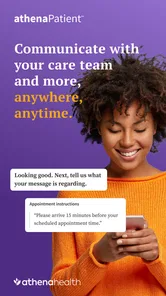
athenaPatient is a comprehensive mobile application designed to enhance patient engagement and streamline healthcare management. Its main features include appointment scheduling, access to personal health records, communication with healthcare providers, and prescription refills. The app also offers reminders for upcoming appointments and medication intake, ensuring users stay on top of their health care routine. Its summary focuses on access to health information and communication with your care team anytime, anywhere.
Pros
- Easy-to-use interface for all users.
- Comprehensive health tracking features.
- Seamless integration with wearables.
- Customizable alert settings.
- Secure data storage and sharing.
Cons
- Limited offline functionality.
- Subscription required for premium features.
- Occasional slow sync with devices.
- Complex setup for first-time users.
- Lack of multi-language support.