Applock Pro - App Lock & Guard
- 11.94K
- 4.4
- Installs
- 100.00M
- Price
- Free
Screenshots
Analysis by Reviewed
I judge an app lock by a practical question: does it protect the few places on my phone I actually want to keep private without making ordinary use annoying? Applock Pro - App Lock & Guard is aimed at that narrow job. It is a free productivity app from App Lock LLC, with optional in-app purchases, and its appeal is the mix of per-app locks, customization, and ways to keep the lock itself less obvious. I would consider it when a shared phone or an unexpected hand-off is the main concern, rather than as a replacement for the phone’s main security.
Start with what you need to protect
Before choosing any app lock, I would make a short list of the apps that could expose private conversations, work material, saved accounts, or personal photos if somebody picked up my unlocked phone. Locking everything can sound safer, but it may turn routine tasks into a sequence of extra checks. With this kind of tool, selective protection is usually the more usable choice: secure the sensitive apps and leave everyday utilities alone.
That distinction matters because an app lock protects access to selected apps after the phone itself has been opened. It does not replace a strong device passcode, and it should not be treated as a complete answer to account security or someone who already has broad access to the phone. I see it as an additional boundary for casual access, especially when I lend my device briefly or leave it on a table in a shared space.
Where this app earns its place
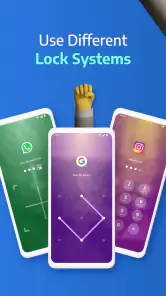
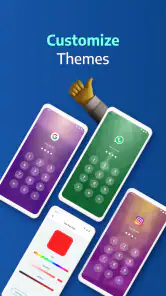
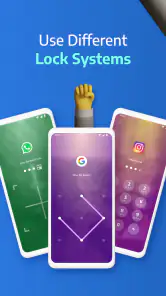
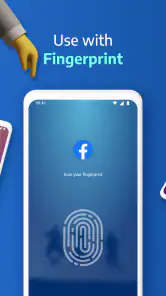
The useful part of Applock Pro - App Lock & Guard is that it offers more than one way to make that boundary feel personal. PIN, pattern, and fingerprint options give people different ways to unlock protected apps, while themes and lock-screen disguises let them change how the prompt appears. In my view, these choices are most valuable when they make protection easier to live with, not when they encourage locking every app just because the option exists.
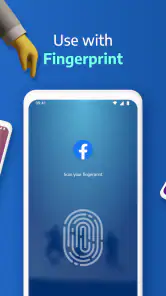
For example, a fingerprint can make repeated access less fiddly on a compatible phone, while a PIN or pattern may suit someone who prefers not to rely on that method. The practical tip is to choose the method you can use reliably when you are in a hurry, then test it on the apps you use most. A lock that feels awkward can tempt you to disable protection altogether, which defeats the point.
Different passwords for different apps and a security question offer extra customization, but they also create a small memory burden. I would only use separate credentials if I had a clear reason and a dependable way to remember them. Otherwise, an elaborate setup can make it harder to get back into your own apps than it makes things for a casual snooper. The best configuration is the least complicated one that still addresses your specific concern.
A realistic shared-phone routine
Imagine I am showing a friend a photo or handing my phone to a relative to make a call. The phone is already unlocked, so the risk is not that they need to break into the device; it is that a curious swipe might lead somewhere else. Protecting a messaging app, a work app, or a personal gallery can give me a useful pause point in that moment. I can hand over the phone for the task without needing to hover over every tap.
More From Our News Desk

Weather by Xiaomi Review: Clear at a Glance, Less Clear Up Close

X Under Pressure: Can It Recover When Posting Goes Wrong?

Clash of Clans Is Won Between the Battles

Android Auto Makes the Case for Quieter Car Software

MobiOffice: Transforming Mobile Productivity with Seamless Integration

EA SPORTS FC™ Mobile Soccer: Redefining Mobile Sports Gaming
That routine works best when I decide in advance which apps truly need a barrier. If the person needs to use a protected app, I may have to unlock it for them, so an app lock is not a substitute for choosing what to share. For a one-time hand-off where I need the recipient to stay within a single screen, the phone’s own screen-pinning or guided-access style tools may be a better fit, depending on the device. App locking is more useful for recurring privacy boundaries across selected apps.
Customization has trade-offs
Disguising the lock screen as a system error or a random pop-up may make the protection less conspicuous to someone casually exploring the phone. I would treat that as a concealment feature, not stronger encryption or a guarantee that a determined person will be fooled. It can also confuse me if I forget which appearance I chose, so I would test the presentation myself and keep the unlocking method familiar.
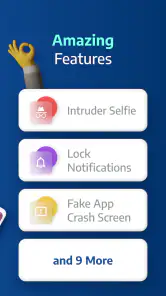
Stealth mode, which hides the app from the app drawer and uses a secret dialing code to launch it, makes the tool less visible in ordinary browsing. That can be handy if the whole point is to avoid drawing attention to the fact that certain apps are protected. The trade-off is discoverability: if I forget how to open the lock app, or another person is helping troubleshoot the phone, the hidden entry point can become an inconvenience. I would record the launch method somewhere secure before relying on it.
The intruder selfie feature is attention-grabbing, but I would think carefully before enabling it. It may help identify who tried to open a protected app, yet it can also capture an innocent person who mistypes or taps the wrong thing. A family member borrowing the phone, for instance, could trigger it by accident. I would treat any captured image as a clue rather than proof of intent, and avoid turning a minor privacy feature into a source of suspicion.
How it compares with other ways to protect a phone
Compared with relying only on the phone’s passcode, an app lock adds a second check around chosen apps after the device is already accessible. That is a meaningful difference in a shared household or workplace, but it does not make the phone’s main lock optional. I would keep the device secured first, then use app-level protection for the additional situations where handing over an unlocked phone is unavoidable.
Built-in private-space, app-pinning, or screen-time tools may be better when the goal is to limit a particular session, manage a child’s access, or keep someone inside one task. Their purpose is different from a reusable lock placed around selected apps. Likewise, a password manager is the better tool for protecting and organizing account credentials; an app lock does not replace the need for strong, distinct passwords on the accounts inside those apps.
Compared with simpler app-locking alternatives, this one may appeal to someone who values disguises, stealth, separate app credentials, and an intruder-photo option in addition to basic locking. The cost of that flexibility is more setup and more decisions. If I only need a straightforward barrier and do not care about appearance or hidden access, a simpler built-in option may be easier to maintain. I would choose features based on a real use case, not on the length of the feature list.
Questions worth settling before setup
Will it work for someone who just wants a quick PIN? The PIN, pattern, and fingerprint choices make the basic idea approachable, and the setup is described as straightforward. I would still begin with one low-risk app and test locking and unlocking before extending protection to more of the phone. That gives me a chance to learn how the prompt behaves without interrupting an important task.
Is it appropriate for a child’s phone or a shared family device? It can help add a boundary around selected apps, but I would not use stealth or surprise photo capture as a substitute for a clear family agreement. If the goal is parental control, usage limits, or a child-safe environment, tools designed specifically for those jobs are more appropriate. An app lock is best understood as access friction, not a complete supervision system.
Does the free price mean every feature is free? The app is free to install, and it offers in-app purchases priced from $0.99 to $99.99 per item. I would check the purchase details shown in the app before committing to a paid option and decide whether the extra customization solves a genuine problem for me. A basic privacy need should not be confused with a need to buy every available add-on.
Would I recommend it to everyone? No. Someone who never lends out an unlocked phone, already uses an effective built-in private space, or dislikes adding another step to app access may be happier without it. It is also not the right choice for anyone expecting an app lock to secure the whole device against a determined attacker. Its value is most evident in ordinary, low-stakes moments when another person might otherwise open an app simply because the phone is in their hands.
Setup, maintenance, and the switching cost
I would make the first setup deliberately small. Pick a few genuinely sensitive apps, choose one unlocking method, then use the phone normally for a day before changing anything else. This reveals whether a particular lock causes friction during quick tasks, such as checking a message while carrying groceries or opening a work app between meetings. If the protection is irritating in the situations where I need it, I can adjust the selection rather than abandon the whole idea.
There is also a maintenance cost that is easy to overlook. A changed phone routine, a new app, or a forgotten security answer can leave the original setup out of step with what I actually want protected. I would revisit the list occasionally and remove locks that no longer serve a purpose. Fewer, well-chosen barriers are easier to remember and less likely to slow down normal use than a blanket rule applied to everything.
Switching away from an app lock should be just as deliberate as setting one up. Before removing it, I would make sure I can access the protected apps normally and know which passwords or recovery answers I chose. If I move to a built-in privacy tool, I would test that option first rather than assume it behaves the same way. The aim is to preserve the boundary I need without leaving myself locked out or carrying redundant layers that complicate everyday use.
Who should choose it
App Lock LLC’s app has a broad audience: its content rating is Everyone, and it has a 4.4 average from around 1.9 million ratings, with over 100 million installs. It was released on May 30, 2018, and version 5.5.9 requires Android 7.0 or later. Those figures suggest a widely used app, but they do not tell me whether its particular options match my habits; I would still judge it by how comfortably it works on my own phone.
I would put it on the shortlist for someone who regularly shares an unlocked phone, wants selected apps to have their own barrier, and appreciates choices such as disguised prompts or hidden access. I would skip it if my priority is whole-device security, account-password management, parental controls, or a one-off way to restrict a single borrowed-phone session. Those needs call for different tools, and piling them onto an app lock would blur what it is actually good at.
Ever had that "Oh no!" moment when you realize someone might have peeked at your phone's private apps? Well, worry no more because Applock Pro - App Lock & Guard is here to save the day. This nifty app is like having a personal security guard for all your apps, making sure only you can access them. Let me take you through my experience with this app and why I think it's a must-have.
Customizing Your Lock
Customization is where this app really shines. You can set different passwords for different apps if you're feeling extra cautious. Plus, there’s an option to attach a security question for that added layer of security. What I loved the most is the ability to disguise the app lock screen to make it look like a system error or a random pop-up. This means even if someone tries to snoop, they’ll be none the wiser!
Stealth Mode Activated
If you’ve got a nosy sibling or friend, the stealth mode feature will become your best friend. When stealth mode is activated, Applock Pro - App Lock & Guard vanishes from the app drawer and can only be launched by dialing a secret code. I mean, how cool is that? It’s like having a secret lair for your apps.
Another cool feature is the intruder selfie. If someone enters the wrong password, the app snaps a photo using the front camera. It’s like having your very own detective capturing culprits in the act. I had a good laugh when I tested this on myself, and trust me, it works like a charm!
Why You Need It
In today’s world, privacy is everything. Whether you’ve got sensitive work documents, personal chats, or just those embarrassing selfies you’d rather keep to yourself, Applock Pro - App Lock & Guard has got you covered. It’s not just about keeping your apps safe; it’s about peace of mind, knowing that your personal stuff stays personal.
To wrap it up, the app is user-friendly, highly customizable, and packed with features that cater to your security needs. If you’re on the hunt for an app that offers reliable protection with a touch of fun, then giving Applock Pro - App Lock & Guard a go is a no-brainer. So go ahead, lock it up and keep those snoopers at bay!
Applock Pro - App Lock & Guard Frequently Asked Questions
What does Applock Pro offer, and what should I consider before installing it?
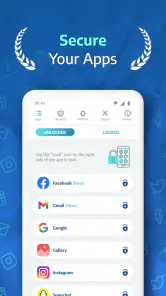
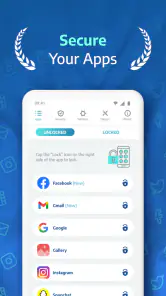
Applock Pro is a productivity app whose stated purpose is to secure apps with lock screens, custom themes, and different features. If you want an added layer between someone using your device and the apps you select, its basic premise may suit you. Before installing, consider which apps you want to protect and whether the available locking options fit your needs.
Is Applock Pro compatible with my device?
Applock Pro is an app for Android, with a minimum operating system requirement of Android 7.0. Before downloading, check your device’s software version so you know it meets that requirement. The app is listed in the Productivity category and is intended for a general audience. Compatibility can also depend on the device and operating system you use.
Who makes Applock Pro, and is it widely used?
Applock Pro is developed by App Lock LLC. It has more than 100 million installs and an average rating of 4.4 from around 1.9 million ratings, giving prospective users a sense of how widely it is used. Those figures can be useful context, but they do not replace checking whether its features fit your own privacy needs.
What is Applock Pro and how does it work?
Applock Pro is a security application designed for Android and iOS devices that allows users to lock apps and protect personal data with a password, pattern, or biometric authentication. Once installed, it provides a user-friendly interface to easily select which apps to lock, ensuring your private information remains secure.
Is Applock Pro free to use or does it require a subscription?
Applock Pro offers both free and premium versions. The free version provides basic app locking features, while the premium version, available through a subscription, unlocks advanced features such as ad-free usage, customizable lock themes, and enhanced security settings. Users can choose according to their needs and budget.
Pros
- Easy to use interface.
- Supports fingerprint lock.
- Customizable themes.
- Fast app locking.
- Minimal battery usage.
Cons
- Ads in free version.
- Limited features without premium.
- No cloud backup.
- Occasional crashes.
- Inconsistent updates.
- Category
- Productivity
- Version
- 5.5.9











