APPatient
- 4.41K
- 4.0
- Installs
- 1.00M
- Price
- Free

Screenshots
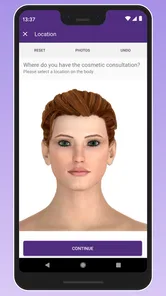
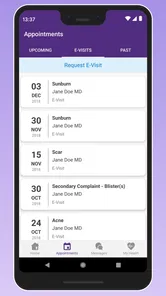
Analysis by Reviewed
Before I choose a patient portal, I ask one practical question: does my provider use it, and will I use it between visits? APPatient is most useful as a companion to care I already receive, not as a replacement for clinic staff or medical advice. I’d consider it if I want one place to check appointments, contact my provider, and keep track of records without making every routine task a phone call.
Check the provider connection first
Before building a routine around any patient portal, I’d confirm that the medical practice I use works with it and ask how patients are invited to sign in. APPatient is developed by ModMed, and its usefulness depends on the connection to my provider: a polished app cannot show or manage information the practice has not made available through its system. That makes this an important first step, especially if I see clinicians at more than one practice.
A sensible way to start is to install the app, complete the provider’s sign-in or enrollment steps, and then check whether the expected appointment and record information appears. If I need access for a family member, I’d clarify the practice’s process rather than assume my own account automatically covers another person. This small check can prevent frustration later, when I need a record quickly.
A better fit for ongoing care than urgent questions
The app’s strongest everyday role is keeping administrative details close at hand. For example, if I had a follow-up coming up, I could check the appointment in advance, look over available records, and use the provider messaging option for a non-urgent question. That is a more deliberate workflow than searching old emails or calling the office just to confirm a detail.
Messaging is not the same as an emergency channel, and I would not treat a portal as one. If a health concern needs immediate attention, I’d use the appropriate urgent or emergency service instead of waiting for an app reply. For routine matters, a written message can help me explain a question clearly and revisit the exchange later, though response timing is something to handle through the practice rather than assume.
Getting Started with APPatient
First off, downloading and setting up the app was a breeze. Available on both Android and iOS, it’s just a quick search and install away. Upon launching, you’re greeted with a clean and intuitive interface. The app guides you through the setup process effortlessly. I barely had to lift a finger to enter my details and preferences. APPatient immediately attempts to integrate with your existing medical providers, which is a real time-saver.
Features and Functionality
The app is packed with features that cater to a variety of healthcare needs. One of the standout features is the ability to book and manage appointments directly through the app. No more endless phone calls or waiting on hold! Plus, it sends you reminders, so you never miss an important date with your healthcare provider.
More From Our News Desk

 Block Blast!
 Makes Every Clear Feel Like One More Turn
A clean little block puzzle becomes a study in space, risk, and self-control. Its best moments come from one satisfying clear; its toughest test is knowing when to stop.

 Super Stylist Fashion Makeover
Super Stylist Turns Dress-Up into a Runway Career
Its makeover-to-client loop turns quick outfit decisions into shareable style theater. The question is whether the closet keeps giving players a reason to return.

 Block Craft 3D:Building Game
Block Craft 3D Under Pressure: How Well Does It Recover When Building Goes Wrong?
A failure-focused look at Block Craft 3D’s forgiving building loop, its uncertain recovery edges, and the moments that demand more than a cheerful village.

 Woodturning
 Trades Creative Freedom for a Satisfying Carving Loop
If your usual creative game is about building, decorating, or styling, Woodturning trades open-ended projects for a tactile, tightly guided carving loop. Here is what that switch really costs.

 PUBG MOBILE
 Shows What Battle Royale Must Get Right
PUBG MOBILE shows how battle royale has matured: bigger systems matter less than meaningful choices, readable fights, and a reason to return after every loss.

 Braindom: Brain Games Test
Braindom’s Social Life Happens Between Puzzles
Braindom turns quick logic traps into a personal ritual, but its community value is more about comparing answers than building together.
Latest News



Another nifty feature is the access to your medical records. Having all this information at your fingertips is incredibly empowering. You can review your past appointments, medications, and even lab results, which makes managing your health a lot more straightforward.
For a more useful records check, I’d look at the information before an appointment and note any questions while it is fresh, rather than trying to interpret a result on my own. A portal can help me prepare for a conversation, but it does not replace a clinician’s explanation. I’d also keep in mind that records are tied to what the practice makes available, so I would not treat the app as a guaranteed complete archive of every visit or test from every provider.
In terms of usability, the app runs smoothly without any hitches. Navigation is seamless, and the designers clearly put thought into ensuring that users of all tech levels can easily find what they need. Kudos to the developers for that!
Making the portal useful in real life
The best way I can see this fitting into a busy routine is as a small preparation tool, not something I need to check constantly. Imagine noticing a medication question the evening before a scheduled visit. I could write down the detail, check the available records, and send a non-urgent message if the practice supports that use. Then I’d bring the question to the appointment rather than relying on a hurried call or trying to remember it later. For a same-day concern, I would contact the practice through its advised route instead.
There is a useful distinction between having information and knowing what it means. Seeing a result or medication entry can help me spot what I want to ask about, but it is not a reason to change treatment on my own. I’d use the record view to make a concise list of questions, including when something happened and what I noticed. That turns the portal into a better aid for the conversation without asking it to perform the clinician’s role.
One practical tip is to check the appointment and records when I have time, rather than waiting until I am at the clinic door. If something looks missing or confusing, I can ask the office while there is room to resolve it. I’d also keep a separate note of the practice’s preferred contact route for urgent scheduling changes; a portal is convenient, but convenience should not become an assumption that a message will be seen immediately.
Where another option may work better
If my main goal is broad health tracking—such as collecting information from multiple services or devices—a general wellness or health-record tool may be a better fit. APPatient is centered on communicating with a participating provider and handling care-related tasks, not on replacing every health app a person might use. Likewise, someone who prefers speaking to a receptionist may find a quick call clearer than learning a new portal, particularly for a complicated scheduling issue.
Compared with a practice’s website, an app can be more convenient when I want to check a detail on my phone between errands. A website or phone call may still suit me better when I need to work through a complicated request or when I am already familiar with the office’s established process. The choice is less about which format is universally superior and more about whether the clinic keeps the information and communication channel I need in the one I choose.
There is also a real switching cost. If I already use a practice’s existing portal, moving my habits to another app only makes sense if APPatient gives me access to the services I need. I would avoid maintaining duplicate routines unless there is a clear benefit; otherwise, appointment details and messages can end up scattered. I’d ask the office which channel it expects patients to use, and keep the practice’s contact details available for time-sensitive questions.
For people who receive care from several practices, I would not assume one login will bring every provider together. I’d first identify which clinic uses APPatient and what information it makes available, then decide whether a separate portal is worthwhile for that relationship. If most of my care sits elsewhere, the portal I already use—or a direct call to the relevant office—may be more useful than adding another app just to have it installed.
Privacy, expectations, and practical limits
Health information deserves care, so I would use a device passcode, avoid leaving the app open on a shared screen, and sign out when using a device someone else can access. Those are sensible habits for any patient portal. I would not assume that having records on a phone means every item is current or that a message has been read immediately; for anything that affects a near-term appointment or treatment, the practice can clarify the right way to follow up.
APPatient is free, carries a Mature 17+ age rating, and has an average rating of 3.9 from around 8,600 ratings, with about 4,000 written reviews and over one million installs. It was released on March 2, 2016; version 7.11.0 (3666b6ea7) supports Android 7.0 and later. I’d treat those figures as context rather than a promise of fit: a patient portal’s value depends more on whether my own provider uses it and keeps the relevant information available.
Security and Privacy
In today’s digital age, security is a top priority, especially when it comes to personal health information. APPatient doesn’t disappoint in this department. The app uses advanced encryption to protect user data and complies with healthcare privacy regulations. This means you can rest easy knowing your sensitive information is safe.
Who is likely to get the most from it?
I’d recommend trying it if my provider actively uses the portal and I have recurring appointments, records to review, or routine questions that do not need an immediate answer. In that situation, keeping appointment details and provider communication close at hand can reduce small bits of admin. It may also suit someone who likes to prepare for visits in advance and prefers having a written record of what they asked.
I’d be less enthusiastic if I rarely need a portal, my clinic does not support APPatient, or I expect it to combine records from unrelated providers automatically. It is also not the right choice for someone who needs real-time clinical guidance or urgent triage. For those needs, the practice’s direct instructions or appropriate urgent care channels matter more than the convenience of any app.
For a caregiver, the first question is not simply whether the app is easy to install, but whether the practice allows and supports access on behalf of another patient. I would confirm that process before relying on it to coordinate appointments or records. That avoids confusing personal access with authorized access and makes it clearer whose account should be used for a particular care task.
What I Loved
Honestly, what’s not to love about an app that streamlines healthcare management? The convenience of having everything in one place is fantastic. I particularly appreciated the appointment reminders and easy access to my health records. It feels like having a personal health assistant right in my pocket!
Moreover, the app’s user-friendly design makes it accessible to everyone, whether you’re tech-savvy or not. The fact that it integrates with existing healthcare systems is the cherry on top.
For someone juggling regular visits, the practical win is reducing small bits of admin: checking a date before arranging the rest of the day, reviewing records before asking a question, and using provider messaging for an issue that can wait. I would keep notifications and account access aligned with how I actually manage care, rather than turning every alert into something urgent. If the app is not connected to the clinic I use, though, I would choose that clinic’s recommended contact route instead of expecting this one to serve as a universal portal.
My recommendation
My recommendation is conditional but clear: if the provider I rely on uses APPatient, I’d try it for appointment organization, record access, and non-urgent communication. I’d start by checking that the right provider and expected information appear, then use it for one ordinary task before making it part of my routine. That is enough to see whether the portal saves effort in my own care rather than adding another place to check.
If my provider does not use it, or if my main need is urgent help, multi-provider tracking, or a detailed conversation about a difficult scheduling issue, I’d choose the channel built for that purpose. For me, the app’s value comes from a good match with the practice, not from replacing every other way of managing health. APPatient is worth considering when that match is there; otherwise, I would keep things simple and follow the provider’s preferred route.
APPatient Frequently Asked Questions
What is APPatient, and who develops it?
APPatient is a medical app developed by ModMed for patients who want to handle parts of their healthcare experience on a mobile device. Its tools focus on tasks such as checking appointments, viewing medical records, and contacting a provider. Before downloading, consider whether your healthcare provider supports APPatient, since the app is most useful when your provider makes its patient services available through it.
What is the primary purpose of the APPatient app?
APPatient is designed to streamline the healthcare experience by allowing patients to manage their appointments, view medical records, and communicate with their healthcare providers directly from their mobile devices. It simplifies the process of scheduling, accessing medical history, and receiving updates on health-related matters.
How secure is my personal and medical data on the APPatient app?
APPatient prioritizes the security and privacy of users' data by implementing robust encryption protocols and following industry standards for data protection. Users can rest assured that their sensitive medical information is stored securely and only accessible to authorized personnel, ensuring compliance with healthcare regulations.
Can I use APPatient to communicate with my healthcare provider?
Yes, APPatient offers a messaging feature that allows users to directly communicate with their healthcare providers. This feature facilitates quick consultations, prescription refills, and appointment requests, making healthcare management more accessible and efficient for patients.
Is APPatient compatible with all healthcare providers?
APPatient is compatible with a wide range of healthcare providers, but it's advisable to check with your specific provider to ensure they support the app. The app aims to integrate smoothly with various healthcare systems, enhancing patient experience by providing consistent access to medical services.
Pros
- User-friendly interface for all ages.
- Secure and encrypted data handling.
- Easy appointment scheduling.
- Provides health tracking features.
- Supports multiple languages.
Cons
- Limited customer support availability.
- Requires stable internet connection.
- Some features are premium only.
- Occasional app crashes reported.
- Compatibility issues on older devices.