Apartments.com Rental Search
- 10.86K
- 4.7
- Installs
- 5.00M
- Price
- Free

Screenshots


Analysis by Reviewed
When I’m looking for a rental, I want to narrow down the options quickly without losing track of promising places. Apartments.com Rental Search is built for that kind of home hunt, with listings for different kinds of rentals and tools for comparing candidates. It’s a free House & Home app from Costar - Apartments Admin, and its broad reach makes it a useful place to begin rather than a guarantee that every listing will suit your needs.
Quick searches, careful decisions
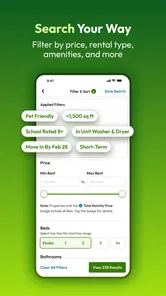
The app’s filters can help turn a broad area into a more manageable shortlist. I’d start with the essentials—location, rent, and bedroom count—then loosen one requirement at a time if the results are sparse. That small change is more useful than repeatedly searching with an overly narrow set of demands: it shows which preference is limiting the options while keeping the trade-off clear.
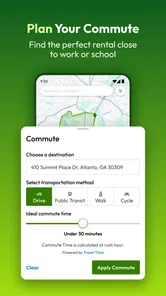
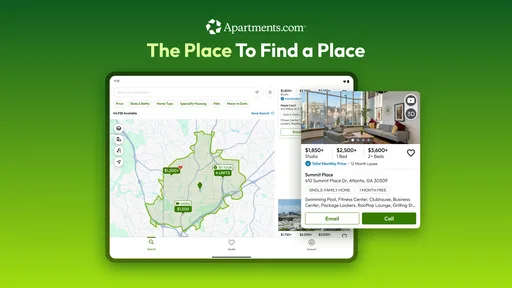
For a realistic weekday search, I might check the map during a commute break, save a few plausible homes, and review them later with a roommate. The map is useful for judging location at a glance, but I wouldn’t treat it as a substitute for checking the actual route, travel time, or neighborhood at the hours I’d use it. A listing that looks close on screen may not fit my daily routine.
Where it fits among rental-search options
Compared with browsing property websites in a phone browser, a dedicated search app can make repeated visits and saved comparisons feel more convenient. Compared with asking friends or local groups for leads, it gives me a more organized starting point, though personal recommendations can add context a listing cannot. I’d use Apartments.com to discover and sort possibilities, then contact the relevant property and verify the details before making plans.
It suits renters who are exploring several neighborhoods, coordinating with a partner or future roommate, or trying to keep a moving search organized. It may be less helpful if you need a very specific kind of home in a small area, or if you prefer to deal only with referrals and direct local contacts. In those cases, I’d use it as one source rather than the whole search strategy.
First Impressions
From the moment you download and open Apartments.com Rental Search, the sleek and user-friendly interface immediately grabs your attention. The design is clean, intuitive, and doesn’t overwhelm you with information. I mean, who wants to deal with a cluttered screen when you’re already stressed about finding a new place to live, right?
Searching Made Simple
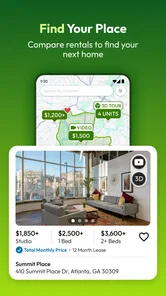
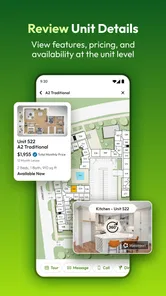
The app offers a powerful search engine that lets you filter through listings with ease. You can search by location, rent price, number of bedrooms, and much more. One feature I found particularly helpful is the map view, which lets you see the proximity of listings to your workplace or favorite coffee shop. Plus, the app provides detailed information about each listing, including photos, floor plans, and even 3D tours. It’s like having a personal real estate agent in your pocket!
More From Our News Desk

 Block Blast!
 Makes Every Clear Feel Like One More Turn
A clean little block puzzle becomes a study in space, risk, and self-control. Its best moments come from one satisfying clear; its toughest test is knowing when to stop.

 Super Stylist Fashion Makeover
Super Stylist Turns Dress-Up into a Runway Career
Its makeover-to-client loop turns quick outfit decisions into shareable style theater. The question is whether the closet keeps giving players a reason to return.

 Block Craft 3D:Building Game
Block Craft 3D Under Pressure: How Well Does It Recover When Building Goes Wrong?
A failure-focused look at Block Craft 3D’s forgiving building loop, its uncertain recovery edges, and the moments that demand more than a cheerful village.

 Woodturning
 Trades Creative Freedom for a Satisfying Carving Loop
If your usual creative game is about building, decorating, or styling, Woodturning trades open-ended projects for a tactile, tightly guided carving loop. Here is what that switch really costs.

 PUBG MOBILE
 Shows What Battle Royale Must Get Right
PUBG MOBILE shows how battle royale has matured: bigger systems matter less than meaningful choices, readable fights, and a reason to return after every loss.

 Braindom: Brain Games Test
Braindom’s Social Life Happens Between Puzzles
Braindom turns quick logic traps into a personal ritual, but its community value is more about comparing answers than building together.
Latest News



There’s a useful trade-off here: more listing detail can help me decide which places deserve a closer look, but polished photos and tours are still only part of the picture. I’d use them to rule out obvious mismatches, then confirm practical points directly before spending time on a visit. Keeping a short list of questions alongside saved homes—such as what matters most about the layout or location—can make comparisons more grounded than relying on first impressions alone.
Saving and Sharing
Once you come across an apartment that tickles your fancy, you can save it for later or share it with your friends or future roommates. The "Favorites" feature is an absolute lifesaver for those of us who like to compare different options before making a decision. You can easily access your saved listings, making it super convenient to revisit your top choices without starting your search all over again.
For a shared search, I’d agree on a few must-haves before sending listings back and forth. Otherwise, a pile of favorites can become another inbox to manage. A practical approach is to save only places that pass the same basic test, then use the shared shortlist to discuss meaningful differences—such as commute convenience versus space—instead of debating every result.
Notifications: Never Miss a Beat
Another aspect where this app shines is its notification system. You can set alerts for new listings that match your criteria, ensuring you’re always in the loop. No more missing out on that perfect apartment because you didn't check back in time. Trust me, this feature alone can make your apartment hunting experience a lot less stressful.
Alerts are most useful when the search criteria are realistic and the updates are worth acting on. If they feel too broad, I’d tighten the location or price range; if they return too little, I’d relax one filter and see what changes. I’d still check the app when I have time to assess a listing properly rather than treating every notification as an urgent lead.
Performance and everyday reliability
For ordinary browsing, I’d expect a home-search app to feel most useful when it gets me from a location and a few filters to a clear set of candidates without unnecessary fuss. Apartments.com is designed around that practical loop: search, inspect, save, and return. Its value during a heavy-use session depends less on flashy effects than on whether I can keep my criteria and comparisons straight while moving between listings.
Rental searches can mean opening many photos, maps, and property details in one sitting, so I’d keep the workflow focused: shortlist first, inspect the strongest matches, and revisit saved options later. That reduces needless backtracking and makes the app easier to use during a busy day. If a screen or listing takes a moment to load, I’d avoid assuming the property has disappeared; returning to the results or saved list is a sensible way to resume the search.
The app has a 4.7 average from around 95,000 ratings, and it has been installed over 5 million times. Those figures suggest it is a familiar option for many renters, though they can’t tell me whether a particular listing is current or appropriate for my situation. I’d use the app to organize discovery, not as a substitute for checking details with the property contact.
Device fit and who should use it
It’s rated for Everyone, runs on Android 10 or later, and version 13.8.0 is the current release. Before installing, I’d check that my phone meets the operating-system requirement; someone using an older device may need to search in a browser or another compatible service instead. Since this is a visual search experience, a larger screen can also make maps, photos, and floor plans easier to compare, even though a phone is handy for quick checks while out and about.
The app was released on January 17, 2012, and its long presence in rental searching helps explain why it may be a familiar starting point. Still, the best tool depends on the move: renters with flexible dates or several possible neighborhoods can benefit from exploring broadly, while someone who already has a trusted local lead may get more value from following that lead directly. I’d treat Apartments.com as a practical companion, not a required step for every move.
Making a shortlist that holds up
One way I’d make a rental search more useful is to separate “interesting” from “worth contacting.” A home can look appealing in a photo but fail a basic test once I check the location, price, or layout. I’d keep a small set of non-negotiables in mind and use the app to spot candidates that meet them, then reserve saved listings for homes I could realistically pursue. That avoids confusing a long collection of attractive possibilities with genuine progress.
When comparing homes, I’d also note what I still need to ask about rather than assuming every listing gives the same level of detail. For one place, the deciding issue might be whether the floor plan works for working from home; for another, it could be whether the route to a regular destination is practical. A brief note outside the app can help me remember why a listing made the shortlist and what needs confirmation before I arrange a visit.
Using the app around a real move
Imagine I’m planning a move while working full time. I could search a few neighborhoods after work, save places that fit my budget and room needs, and use the map to identify clusters worth exploring in person. On the weekend, I’d compare those candidates with a roommate and decide which contacts deserve a message. This makes the app useful as a planning tool, not just something to browse when I have a spare minute.
For someone moving to an unfamiliar city, that same process can expose the practical differences between areas before committing to a viewing schedule. I’d start broad enough to see alternatives, then narrow down based on the places I actually need to reach. The trade-off is that a map and listing details can help organize research but cannot replace seeing a neighborhood for yourself or confirming important terms with the property contact.
What to expect from a long search session
Rental browsing can become repetitive, especially when I’m opening many listings to compare similar homes. The app’s useful role is to give that search a rhythm: filter, inspect, save, and return to the strongest options. I wouldn’t expect the phone to do the decision-making for me, and I’d avoid opening every result just because it appears in the list. A focused shortlist makes heavy use feel less scattered.
For a smoother session, I’d do the broad comparison when I have a little time and use quick checks for new possibilities later. If the app feels slow or a page does not respond as expected, I’d give it a moment and return to the search or saved homes before repeating the same action. That is a practical recovery habit rather than a claim about guaranteed speed or uninterrupted performance. The app is a visual tool, so browsing lots of media may also feel more comfortable on a larger display than on a small phone.
Final Thoughts
Overall, Apartments.com Rental Search is a game-changer for anyone in the market for a new place. It combines convenience, efficiency, and a touch of fun in what can often be a daunting and tedious process. Whether you’re moving across the country or just down the street, this app is your go-to tool for finding the perfect spot to call home. So why not give it a whirl and see how it can make your apartment search a breeze?
My recommendation is to begin with a manageable set of filters, save only credible contenders, and use the map and listing media to decide what deserves a closer look. The app is free, so it’s easy to try as part of a broader search; just keep your own priorities in view and verify the details that matter before committing. For renters who value an organized shortlist, it’s a sensible place to start.
Apartments.com Rental Search Frequently Asked Questions
Is Apartments.com Rental Search available for iPhone as well as Android?
Apartments.com Rental Search is an app for finding rental homes, and its store summary covers houses, apartments, condos, casas, flats, rentals, studios, and beds. Before downloading, check the requirements shown in the app store on your device so you choose the compatible version. The listed minimum operating system requirement is Android 10, and the app is free to download.
How much does Apartments.com Rental Search cost to download?
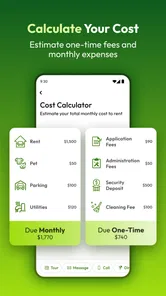
Apartments.com Rental Search is free to download, so you can try its rental-search tools without paying an upfront app price. Keep in mind that downloading the app is separate from renting a home: deposits, rent, application costs, or other arrangements may involve costs agreed with a landlord or property manager. Review any terms directly with them before making a commitment.
Is Apartments.com Rental Search compatible with my phone, and who is the app intended for?
Apartments.com Rental Search is a House & Home app for people looking for a rental, whether they are searching for a house, apartment, condo, flat, studio, or bed. It is rated for Everyone and requires Android 10 or later. The app is free, so you can install it and explore its rental-search tools without paying to download it.
What kinds of homes can I look for with Apartments.com Rental Search?
The app is designed to help users find a range of rental homes, including houses, apartments, condos, flats, studios, and individual beds. That broad scope makes it useful whether you are looking for a place of your own or a smaller rental option. You can begin by searching for the type of home that fits your needs and narrowing your options from there.
What features does the Apartments.com app offer to make rental search easier?
The Apartments.com app provides users with various features to simplify the rental search process. It offers a comprehensive database of available rentals, detailed property information, high-quality photos, and virtual tours. Users can filter searches by location, price range, and amenities, and save their favorite listings for easy access. Additionally, it includes user reviews and ratings to help make informed decisions.
Pros
- User-friendly interface simplifies search
- Comprehensive listings for various regions
- Detailed property descriptions available
- Includes high-quality images and videos
- Advanced filters for tailored searches
Cons
- Limited international listings
- Some outdated property information
- Occasional app crashes reported
- Limited customer support response
- Requires internet for full functionality