Apartments by Apartment Guide
- 6.30K
- 4.6
- Installs
- 1.00M
- Price
- Free

Screenshots

Analysis by Reviewed
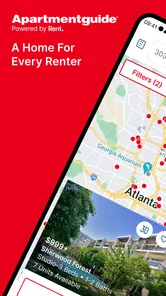
When it comes to finding the perfect place to call home, the Apartments by Apartment Guide app is like having a savvy friend who knows all the ins and outs of the rental market. From the moment I downloaded it, I felt like I had a personal assistant in my pocket, ready to help me navigate the sometimes overwhelming sea of rental listings.
Free to use, with value in the search
The app is free, so I can explore rentals without paying to begin my search. That makes it easy to try alongside the other ways people look for homes, such as browsing rental websites or contacting properties directly. Free access is useful, but it does not make every listing a match; I still need to check whether a home suits my budget, location, and move-in plans.
For me, the strongest value is having a focused place to compare possibilities instead of keeping a scattered collection of browser tabs. The app is in the House & Home category, and Rent Group, Inc is its developer. Its audience is broad: it is rated for Everyone, and it has an average rating of 4.6 from around 44,000 ratings. Those figures suggest it has found a substantial audience, though my own decision would still depend on how useful its listings are in the area where I need to rent.
What free access does—and does not—settle
Because I can start browsing without paying, I see little downside to checking whether the app covers the neighborhood I have in mind. But I would separate that convenience from the cost of renting itself: using the app does not tell me whether a particular home fits my total monthly budget. I would compare the rent with the other expenses I expect, and confirm any fees or lease terms directly with the property before treating a listing as affordable.
That distinction matters most when I am comparing homes that look similar on screen. A lower advertised rent is not automatically the better choice if the location adds commuting costs or the layout does not work for the people sharing it. I use the app to find candidates, then make a separate comparison of the full practical picture. Its free access is a helpful starting point, not a substitute for checking what a rental will actually cost.
Easy Navigation and User-Friendly Interface
The first thing that struck me about the Apartments by Apartment Guide app was how intuitive it is. I’m no tech wizard, but even I could easily find my way around. The app’s clean design and straightforward layout make it a breeze to use. Whether you’re a first-time renter or a seasoned apartment hunter, you’ll appreciate how user-friendly this app is. It’s like the developers knew exactly what we needed and delivered it in spades.
Comprehensive Listings and Detailed Filters
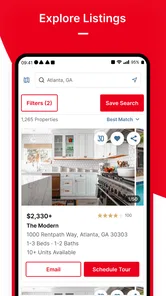
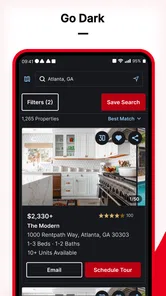
One of the standout features of this app is its comprehensive listings. I was amazed at the sheer number of options available, from cozy studios to sprawling multi-bedroom apartments. But what really sets this app apart is the detailed filter system. You can search by location, price, amenities, and more, making it incredibly easy to find something that fits your specific needs. It’s like having a personalized apartment search engine at your fingertips.
More From Our News Desk

 Block Blast!
 Makes Every Clear Feel Like One More Turn
A clean little block puzzle becomes a study in space, risk, and self-control. Its best moments come from one satisfying clear; its toughest test is knowing when to stop.

 Super Stylist Fashion Makeover
Super Stylist Turns Dress-Up into a Runway Career
Its makeover-to-client loop turns quick outfit decisions into shareable style theater. The question is whether the closet keeps giving players a reason to return.

 Block Craft 3D:Building Game
Block Craft 3D Under Pressure: How Well Does It Recover When Building Goes Wrong?
A failure-focused look at Block Craft 3D’s forgiving building loop, its uncertain recovery edges, and the moments that demand more than a cheerful village.

 Woodturning
 Trades Creative Freedom for a Satisfying Carving Loop
If your usual creative game is about building, decorating, or styling, Woodturning trades open-ended projects for a tactile, tightly guided carving loop. Here is what that switch really costs.

 PUBG MOBILE
 Shows What Battle Royale Must Get Right
PUBG MOBILE shows how battle royale has matured: bigger systems matter less than meaningful choices, readable fights, and a reason to return after every loss.

 Braindom: Brain Games Test
Braindom’s Social Life Happens Between Puzzles
Braindom turns quick logic traps into a personal ritual, but its community value is more about comparing answers than building together.
Latest News



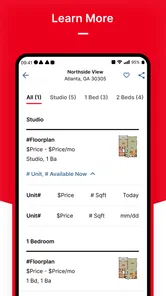
Another thing I loved is the ability to see high-quality photos and floor plans for each listing. It’s incredibly helpful to get a sense of the space before you even schedule a visit. Plus, the app provides essential information such as pet policies, parking options, and nearby schools, so you can make an informed decision without having to dig around on multiple websites.
Making a shortlist that works in real life
A practical way to use the filters is to start with the constraints that could rule a home out, such as location and price, then narrow by amenities. If I filter too tightly at the beginning, I may hide workable options; I would loosen one preference at a time if the results look thin. Photos and floor plans help me compare layouts, but I would treat them as a screening step rather than a substitute for seeing the home and confirming details with the property.
For example, if I were moving for work, I could first search near the places I regularly need to reach, save a few plausible homes, and then compare the layouts and practical details with someone who will share the decision. Sharing a shortlist is more useful than sending a stream of individual listings: it lets others react to the same options and makes trade-offs easier to discuss. Before making plans around a listing, I would check that its availability and terms still fit, since rental details can change.
A more careful way to compare listings
When I have several promising results, I would avoid choosing by the first attractive photo. I would open each candidate and compare the details that affect day-to-day life: whether the layout seems workable, whether the location matches my routine, and whether the listed practical information answers my basic questions. Then I would write down what still needs confirmation, such as current availability, the exact rent, and any conditions that matter to my household.
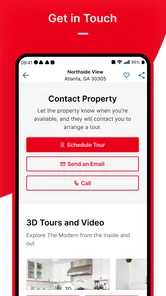
This approach also helps when listings are incomplete or presented differently. One property may give a useful floor plan while another emphasizes photos; neither presentation tells the whole story. I would use the app to make a first pass, then contact the property with specific questions rather than asking broadly whether it is “available.” That makes it easier to catch mismatches early and saves time on viewings that were never a good fit.
Real-Time Updates and Notifications
In the fast-paced world of real estate, timing is everything. That’s why I was thrilled to discover that this app offers real-time updates and notifications. You can set your preferences and get alerts when new listings that match your criteria become available. It’s like having a personal concierge keeping an eye on the market for you. No more missing out on great opportunities because you didn’t check the app at the right moment.
And let’s not forget about the save and share features. Found a place you adore? Save it to your favorites for easy access later, or share it with your friends or family to get their opinions. It’s a collaborative experience that makes the whole process feel less daunting.
Using alerts without letting them take over
I would treat notifications as prompts to review new possibilities, not as a reason to rush into a decision. A listing that matches my filters may still miss an important need, and the alert itself is not a confirmation that the home is available. To keep the search manageable, I would make the filters broad enough to catch plausible options, then review each alert against the needs I consider essential.
A realistic routine might be to check new matches at a set point in the day, save the ones worth discussing, and remove candidates that fail a basic requirement. That is more useful than reacting to every notification immediately, especially if I am searching over several weeks. The saved list becomes a working record of what I considered, while direct follow-up remains necessary for the details that can change.
Where it fits—and where it doesn’t
I see this as a useful starting point for renters who want to browse apartments and rental homes, compare options, and keep a shortlist in one place. It may be especially handy when a move is still being planned and I want to watch for suitable listings without repeatedly starting from scratch. The app has been available since September 2, 2010, and version 11.8.0 requires iOS 8.0 or later, which gives readers a concrete compatibility check before installing.
It is not a replacement for contacting a landlord or property manager, arranging a viewing, or checking a lease carefully. Nor would I rely on it alone if I were searching for a room in a shared home, a short-term stay, or a property type outside its apartment-and-rental-home focus. Compared with general classified listings, its rental focus can make browsing feel more purposeful; compared with calling properties directly, it is better for discovery than for settling the details. I would use both approaches when the move is important or the local choice is limited.
Choosing the right search route
For a renter who wants to browse several apartment and rental-home possibilities in one place, this app makes more sense as a discovery tool than as a complete moving service. General classified sites can be useful when the search includes unusual arrangements or listings from individual owners, but their broader mix may take more sorting. Calling properties directly is more useful once I know which places interest me and want answers about current terms, viewing times, or the application process.
I would therefore use the route that matches the stage of my move. Early on, I would explore and save candidates here; when the shortlist is small, I would contact each property and verify the details; before committing, I would read the lease and inspect the home. Someone who already knows the exact building they want may be better off contacting it directly, while someone searching across areas may benefit more from browsing first.
Who is most likely to get value
I think the app is most useful for renters who are still comparing neighborhoods, layouts, or price ranges and want a convenient way to keep possibilities together. It can also help people coordinating a move with a partner or family member, because sharing a few saved options gives everyone a concrete basis for discussion. A first-time renter may appreciate the ability to browse and compare before reaching out, while an experienced renter may value the quicker overview when relocating to an unfamiliar area.
It is less suited to someone whose search is mainly for roommates, temporary accommodation, or a property that falls outside apartments and rental homes. It may also be a poor fit for anyone who prefers to avoid app-based browsing or already has a trusted local contact and a specific property in mind. I would not install it expecting the app alone to make the decision; it is useful when I want to organize a search, but judgment and direct verification still belong to me.
Final Thoughts
All in all, the Apartments by Apartment Guide app is a game-changer for anyone in the market for a new home. Its user-friendly interface, detailed filters, and real-time updates make apartment hunting not only manageable but downright enjoyable. If you're in the market for a new place, I can’t recommend this app enough. It’s like having a trusty sidekick on your quest for the perfect apartment. Happy hunting!
My recommendation comes with one sensible caveat: use it to organize and discover options, then verify the important details before committing. With over a million installs and a free starting point, it is an easy tool to try if you are currently renting or preparing to move. If your search needs are very different from apartments and rental homes, or you prefer to deal directly with properties from the outset, another route may suit you better. For a renter who wants a clearer shortlist and a convenient way to keep an eye on possibilities, I think it earns a place in the search.
Apartments by Apartment Guide Frequently Asked Questions
Is Apartments by Apartment Guide free to download, and are rentals free?
The app is free to download and use for exploring rental listings, so you can begin your search without paying for the app itself. Renting a home is a separate matter: rent and any applicable leasing fees are part of the rental process, not the app download. It is worth keeping those housing costs in mind as you compare places.
What devices and operating systems can I use with the app?
Apartments by Apartment Guide is available for Android and iOS devices. On Android, your device needs to run Android 8.0 or later to install it. Before downloading, check your phone’s operating system and make sure you have enough room for the app. Once installed, you can use it to explore rental homes and apartments.
Can I use the app to look for rental homes as well as apartments?
Yes. Apartments by Apartment Guide is intended to help people explore both apartments and rental homes, making it a useful place to start if you are open to more than one kind of rental. You can browse available options and consider which listings fit your needs. The app’s focus is finding a place to rent, rather than buying a home.
What should I know about the app before downloading it?
Apartments by Apartment Guide is a House & Home app from Rent Group, Inc. Its purpose is to help people explore apartments and rental homes and find a place to rent. It is free to download, rated for Everyone, and has a 4.6 average from around 44,000 ratings. The app is available for devices running Android 8.0 or later.
Is Apartments by Apartment Guide available on both Android and iOS?
The app is designed for people looking for rental homes, and it is available for Android and iOS devices. If you plan to use it on Android, check that your device runs Android 8.0 or later before downloading. Once installed, you can use its rental search tools to explore listings and compare possible homes.
Pros
- User-friendly interface with easy navigation.
- Comprehensive search filters for specific needs.
- High-quality images of apartments.
- Detailed neighborhood information provided.
- Regular updates with new apartment listings.
Cons
- Limited availability in smaller towns.
- Some listings lack updated contact info.
- Occasional app crashes reported by users.
- No option to save searches for later.
- Needs more user reviews on listings.