Apartment List: Rent app
- 14.97K
- 4.4
- Installs
- 5.00M
- Price
- Free

Screenshots


Analysis by Reviewed
When I first open Apartment List, I see it as a way to make the first part of renting less scattered: set priorities, look through apartment options, and decide which ones deserve a closer check. That is useful if you are new to renting and are not sure how to turn a broad wish list into a manageable search. It is a free House & Home app from Apartment List, rated for Everyone, and it is focused on rental apartments rather than buying a home or browsing every kind of property.
What to expect from the first search
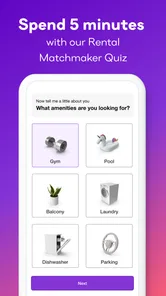
The app is built around comparing rental options by price and amenities, and a personalized quiz helps shape what appears in your search. I would take a minute to separate must-haves from nice-to-haves before answering. A pet-friendly place might be essential; a gym in the building might simply be a bonus. The more honestly you rank your needs, the more useful your shortlist is likely to be. Marking every attractive detail as mandatory can make the results feel too narrow, while treating everything as optional can leave you with too much to sort through.
When I begin looking, I also consider how long I expect to stay and what my ordinary week looks like. An amenity only matters if I will use it, and a lower rent may not be a good trade if the location makes daily travel difficult. I treat matches as candidates to investigate, not recommendations that make the decision for me.
Getting started without overthinking it
For a first-time user, I would keep the initial setup simple. Decide on a budget that reflects what you can comfortably afford, then identify a small number of non-negotiables before filling in preferences. If you are unsure whether a feature is essential, leave room to compare options with and without it rather than letting a first guess define the whole search. This makes it easier to see whether a preference is worth the trade-off.
There is no need to solve the entire move in one sitting. A useful first session can be just enough to understand the kinds of apartments the app brings forward. If the results are too limited, revisit the preferences that are nice rather than necessary. If they are too broad, tighten the criteria that affect your daily life most. That adjustment is more productive than assuming the app has made a mistake simply because the first screen is not a perfect answer.
Finding and comparing places that fit
First off, let's talk about the user interface. The app is incredibly user-friendly and intuitive, which means you won't be spending hours just trying to figure out how to use it. From the get-go, Apartment List guides you through a personalized quiz to understand your preferences. Do you want a pet-friendly place? Need a gym in the building? It's all taken into account.
Tailored results at your fingertips
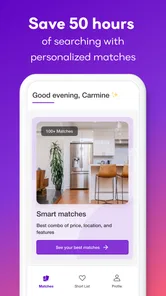
Once you've set up your preferences, the app does the heavy lifting by providing you with a curated list of apartments that match your criteria. This is where the magic happens. Gone are the days of sifting through irrelevant listings. The app uses a smart algorithm to ensure that the options presented to you are precisely what you're looking for. It's like having a personal assistant but without the hefty price tag.
More From Our News Desk

 Block Blast!
 Makes Every Clear Feel Like One More Turn
A clean little block puzzle becomes a study in space, risk, and self-control. Its best moments come from one satisfying clear; its toughest test is knowing when to stop.

 Super Stylist Fashion Makeover
Super Stylist Turns Dress-Up into a Runway Career
Its makeover-to-client loop turns quick outfit decisions into shareable style theater. The question is whether the closet keeps giving players a reason to return.

 Block Craft 3D:Building Game
Block Craft 3D Under Pressure: How Well Does It Recover When Building Goes Wrong?
A failure-focused look at Block Craft 3D’s forgiving building loop, its uncertain recovery edges, and the moments that demand more than a cheerful village.

 Woodturning
 Trades Creative Freedom for a Satisfying Carving Loop
If your usual creative game is about building, decorating, or styling, Woodturning trades open-ended projects for a tactile, tightly guided carving loop. Here is what that switch really costs.

 PUBG MOBILE
 Shows What Battle Royale Must Get Right
PUBG MOBILE shows how battle royale has matured: bigger systems matter less than meaningful choices, readable fights, and a reason to return after every loss.

 Braindom: Brain Games Test
Braindom’s Social Life Happens Between Puzzles
Braindom turns quick logic traps into a personal ritual, but its community value is more about comparing answers than building together.
Latest News



Another cool feature is the ability to compare listings side by side. This is particularly handy when you're torn between two or more options. The app lays out the pros and cons of each apartment, helping you make an informed decision.
A useful comparison, with a reality check
Side-by-side comparisons are most helpful when you use them to expose trade-offs rather than pick a winner on the spot. I would compare a few candidates at a time, checking whether the rent difference buys something I genuinely need, such as a more suitable amenity or a better fit for my routine. Keep a separate note of questions to verify during a viewing: what is included, how the space feels in person, and whether the location works at the times you actually travel. A listing can look convincing on a screen and still fail that practical test.
Compared with broad classified listings or a property manager’s own site, a rental-focused app can make discovery and comparison feel more organized. Those alternatives may still be better when you want to search a particular building directly, check details from its source, or explore options that do not surface in a curated feed. I would use Apartment List to make a manageable shortlist, then confirm important details with the person handling the rental before making plans.
Making the shortlist work harder
One useful approach is to compare apartments in small groups instead of trying to remember every promising place you have seen. For each candidate, note the rent, the feature that makes it stand out, and the question you still need answered. This simple habit keeps a polished photo or one appealing amenity from overshadowing practical concerns. It also makes it easier to explain your thinking to a roommate or partner without asking them to retrace your entire search.
Another trade-off worth watching is how a filter changes the shape of your choices. If an essential requirement removes most options, that may be a sign to widen the search area or reconsider a preference—not to dismiss the requirement automatically. Conversely, if you get many matches, compare the qualities that affect everyday life first. The app can help organize possibilities, but the useful judgment still comes from deciding which compromises you can live with.
Communication made easy
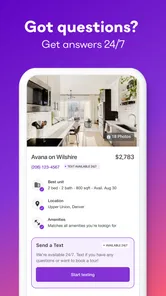
In the past, contacting landlords or property managers could be a hassle. With Apartment List, you can easily send messages or inquiries directly through the app. No more jumping through hoops or dealing with unresponsive emails. It's all about convenience and efficiency here.
Plus, the app keeps all your conversations organized, so you won't have to scroll through endless threads to find that one message about a move-in date. It's all neatly packed in one place.
Making the first contact count
For a useful first message, I would keep it specific: name the listing, state when I hope to move, and ask one or two questions that could change my decision. For example, if an advertised amenity is central to my choice, I would ask whether it is available to residents and confirm the details directly. This helps turn browsing into a real next step without assuming that a match answers every practical question. I would also check the conversation thread before following up, so I do not send the same inquiry twice.
A realistic routine might be to browse during a lunch break, save a couple of plausible options, and compare them later with a partner or roommate. If one still looks promising, send a clear inquiry and use the reply to decide whether a viewing is worth arranging. That small sequence—shortlist, compare, ask, then verify—keeps the search moving without treating every attractive listing as a commitment.
Who benefits most, and who may want another route
I think the app is especially helpful for someone who is renting for the first time, is moving to an unfamiliar area, or has several preferences that need sorting into priorities. It gives that person a structured place to begin and a way to compare candidates without keeping every detail in their head. It can also help renters who already know their budget but have not yet decided which amenities are worth paying attention to.
It is less suitable as the only source for someone who already has a specific building in mind, wants to inspect every possible listing independently, or has a highly specialized search that depends on details beyond broad price and amenity comparisons. In those cases, I would check the property manager’s own information or use broader classified listings alongside the app. Apartment discovery works best when more than one route is available, especially in a fast-moving search where a curated feed may not show every option.
Where it may not be the right fit
The curated approach is most useful when you have several preferences but are open to weighing them against each other. It may feel limiting if you want to inspect every available listing yourself, search only one specific property, or rely on information you have already gathered elsewhere. In those cases, I would pair the app with direct searches rather than expect one feed to represent the entire rental market. The app can help organize discovery, but it cannot replace a viewing or careful confirmation of the terms.
Apartment List has a 4.5 average from around 66,000 ratings, and it has been installed over 5 million times. It first arrived on January 30, 2017, and version 3.18.1 is the current release; the app is intended for OS 9 or later. Those figures offer context, but my decision would still come down to whether its apartment-focused search suits the area and the way I want to look.
From a promising match to a real decision
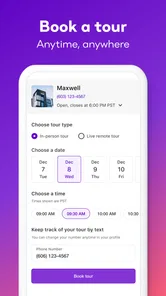
A match is a reason to investigate, not a guarantee that an apartment will work for you. Before arranging a viewing, I would make sure the listing still fits the move timing I have in mind and prepare questions about details that could affect my decision. During a visit, I would pay attention to how the rooms feel and whether the location suits my usual routine, rather than relying only on the way the listing presents the property.
People often wonder whether they can make a final choice from the app alone. I would not. The useful role here is to help identify and compare possibilities, while direct communication and an in-person check help establish whether a particular place is right. If a response raises new questions, I would resolve those before treating the apartment as a serious option. That extra step may seem slower, but it is a sensible safeguard for a decision as personal as choosing a home.
My take after weighing the search
All in all, Apartment List is a must-have for anyone in the market for a new rental. It combines technology and user experience in a way that makes apartment hunting not just bearable, but actually enjoyable. So, if you're ready to find your next home without the usual stress and headaches, give Apartment List a try. You might just find the perfect place to hang your hat.
I would call it a practical starting point, especially for a first-time renter who wants help turning a long wish list into a few candidates worth checking. The app is free, and the fact that it has around 15,000 written reviews gives new users a sense of its established audience, though individual experiences will naturally differ. My advice is to begin with honest priorities, use comparisons to spot compromises, and verify the details that matter before committing. That is where the app’s convenience becomes genuinely useful: it helps you take the next step, while leaving the final judgment in your hands.
Apartment List: Rent app Frequently Asked Questions
Can I search for rentals in my preferred location?
Apartment List is an apartment-finding app designed to help renters explore homes for rent and compare available options. You can enter preferences such as location and budget to guide the recommendations you see. Before relying on a listing, review its details and confirm that the property is in the area you want and still suits your plans.
Can I save listings while I decide which apartments to consider?
The app is intended to make apartment hunting more organized by presenting rental options that match your preferences. As you browse, you can compare listings and keep track of the possibilities that interest you. Take time to review each property's details and contact the property manager to confirm availability and any information that matters to your decision.
Is Apartment List available for both Android and iOS?
Apartment List is a mobile app for searching rental apartments, and it is available for Android and iOS users. Before installing, check that your phone meets the operating-system requirement for the version you plan to download. The app is free, and its Everyone age rating makes it suitable for a broad audience. You can use it to explore rental options and compare listings.
What devices can run Apartment List?
Apartment List is a rental-search app for mobile devices, and its current version is 3.18.1. It supports iOS 9 and later, so it is worth checking your device’s software before downloading. The app is free, and its Everyone age rating makes it suitable for a broad audience. Once installed, you can use it to explore rental options and compare listings.
What is Apartment List and how does it work?
Apartment List is a comprehensive app that helps users find rental properties tailored to their specific needs. Users begin by filling out a detailed questionnaire about their preferences, such as budget, location, and amenities. The app then generates a list of personalized apartment recommendations, making it easier for users to find their ideal home without the hassle of endless searching.
Pros
- User-friendly interface simplifies apartment search.
- Comprehensive filters for customized results.
- Includes virtual tours for many listings.
- Up-to-date listings reduce search time.
- Personalized matches based on preferences.
Cons
- Limited customer support availability.
- Some areas have sparse listings.
- Occasional app crashes reported.
- In-app ads can be intrusive.
- Requires account for full functionality.