Amwell: Doctor Visits 24/7
- 3.82K
- 3.9
- Installs
- 1.00M
- Price
- Free

Screenshots
Analysis by Reviewed
When a health concern comes up at an inconvenient hour, the first question is often whether it can wait until morning. I see Amwell: Doctor Visits 24/7 as a way to seek medical guidance remotely rather than immediately arranging a trip to a clinic. It is a free medical app from American Well, and its promise is convenience; the practical value depends on whether a video visit suits the problem and whether you can get through setup when you need help.
Where users can get stuck
A telehealth visit is only useful if the appointment can get underway. Before relying on Amwell for an urgent, non-emergency concern, I would make sure I can sign in and reach the visit flow while I am calm, not while trying to manage a sick child or an uncomfortable symptom. The app has an average rating of 3.9 from around 8,500 ratings, and more than a million installs. Those figures suggest that many people have tried it, but they are not a guarantee that every visit will feel effortless.
Video care also asks more of you than a phone call: you need a working device, a usable connection, and enough privacy to discuss health matters. If the camera image freezes or audio cuts out, it can be hard to explain symptoms clearly. I would treat a video consultation as a convenient route for concerns that can be discussed remotely, not as a substitute for emergency services or an in-person examination when one is needed.
Getting a visit ready and recovering if it falters
I focus on the practical handoff between preparing for a visit and deciding what to do if the connection or conversation stalls. One useful habit is to keep your main concern and the next step you need written down before opening the visit flow, so a disruption does not leave you starting from memory. From there, the key is knowing which basic checks are worth trying—and when it is better to switch to another way of getting care.
Simple setup checks that save time
Before starting, check that the app opens, your sign-in details work, and your device has a stable internet connection. Find a quiet, well-lit place and keep any useful notes nearby, such as when the symptom began and what has changed. These small steps make it easier to use the consultation time well, especially if you are feeling unwell or speaking on behalf of a child.
Amwell is listed for devices running Android 6.0 or later, and its current version is 15.10.07.005. If the app behaves unexpectedly, checking that your device meets that minimum and that you are using an up-to-date installation is a sensible first step. I would also close other apps using the connection and move somewhere with stronger reception before assuming the problem is with the service.
What to do if the visit does not go smoothly
If a consultation does not connect, I would avoid repeatedly tapping through the same screen. First check the connection, then close and reopen the app and sign in again if needed. If the issue persists, try again later or use another appropriate route to care rather than letting troubleshooting delay help. Keep a note of what you were trying to do and any error message you saw; that makes it easier to describe the problem if you contact support.
More From Our News Desk

 Block Blast!
 Makes Every Clear Feel Like One More Turn
A clean little block puzzle becomes a study in space, risk, and self-control. Its best moments come from one satisfying clear; its toughest test is knowing when to stop.

 Super Stylist Fashion Makeover
Super Stylist Turns Dress-Up into a Runway Career
Its makeover-to-client loop turns quick outfit decisions into shareable style theater. The question is whether the closet keeps giving players a reason to return.

 Block Craft 3D:Building Game
Block Craft 3D Under Pressure: How Well Does It Recover When Building Goes Wrong?
A failure-focused look at Block Craft 3D’s forgiving building loop, its uncertain recovery edges, and the moments that demand more than a cheerful village.

 Woodturning
 Trades Creative Freedom for a Satisfying Carving Loop
If your usual creative game is about building, decorating, or styling, Woodturning trades open-ended projects for a tactile, tightly guided carving loop. Here is what that switch really costs.

 PUBG MOBILE
 Shows What Battle Royale Must Get Right
PUBG MOBILE shows how battle royale has matured: bigger systems matter less than meaningful choices, readable fights, and a reason to return after every loss.

 Braindom: Brain Games Test
Braindom’s Social Life Happens Between Puzzles
Braindom turns quick logic traps into a personal ritual, but its community value is more about comparing answers than building together.
Latest News



It is also worth separating an app problem from a care decision. If your symptoms are severe, rapidly worsening, or otherwise feel like an emergency, do not wait for a video appointment to load. A telehealth app can help with access to a clinician, but it cannot provide hands-on examination or urgent physical treatment through a screen.
When a different option makes more sense
For a minor concern that can be described and shown on camera, a remote visit may be more convenient than travelling to a clinic. For a problem that needs tests, a physical examination, or immediate treatment, an in-person clinician or emergency service is the better choice. Compared with a regular office appointment, Amwell can reduce travel and scheduling friction; compared with a phone advice line, video gives you a visual conversation, but it also relies on a working camera and connection.
I would not choose it as the only way to manage ongoing or complex care. A clinician who can see your history over time may be better placed to coordinate follow-up, and a local practice may be easier when you need examination or tests. The app is most useful as one access route, not a replacement for every part of healthcare.
Who is likely to get the most from it?
Amwell may suit someone who wants to discuss a straightforward concern outside ordinary clinic hours, a parent looking for guidance when a child develops a non-emergency symptom, or a person whose schedule makes travel difficult. For example, if a mild symptom appears in the evening, you can prepare a short timeline, find a private spot, and see whether a remote consultation is appropriate instead of making a rushed decision based only on a web search.
A useful habit is to write down your main question before the call and mention what you have already tried. That keeps the conversation focused and helps you leave with a clear understanding of the next step. If you need a prescription or other treatment, ask the clinician what is appropriate for your situation rather than assuming a video visit will lead to a particular outcome.
How Does it Work?
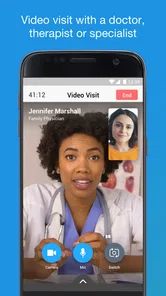
The process is as straightforward as ordering a pizza. You sign up, choose a doctor, and start your consultation. The app has a user-friendly interface that makes navigating through different specialties a breeze. Whether you need a general practitioner, a pediatrician, or even a therapist, Amwell has got you covered. Plus, the app is HIPAA compliant, ensuring your personal information is safe and secure.
Why Choose Amwell?
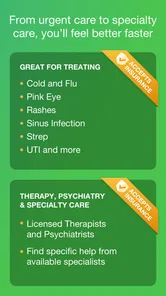
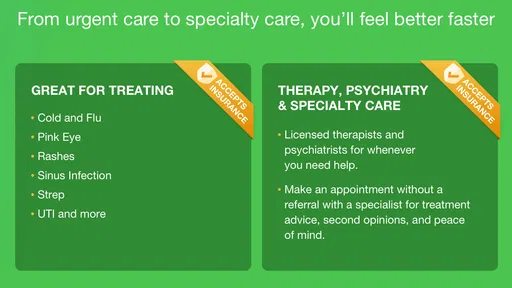
One of the standout features of Amwell is its 24/7 availability. You can consult with a doctor at any time of the day or night. This is especially handy for parents with young children or anyone with a hectic schedule. Furthermore, the app offers a wide range of specialists, so you’re not limited to only general medicine. This means whether it's a rash, a mental health concern, or a prescription refill, there's someone available to help.
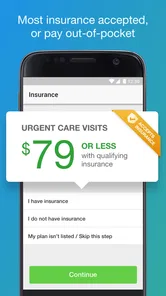
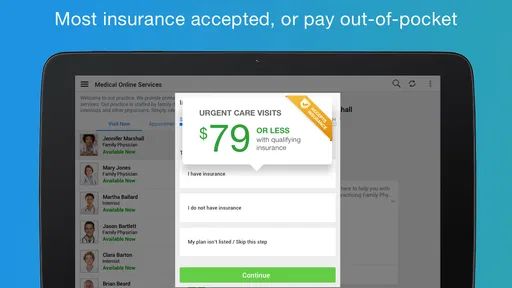
The app also supports insurance integration, which means you might pay less than a typical doctor visit. And let's be honest, who doesn't love saving a few bucks?
User Experience
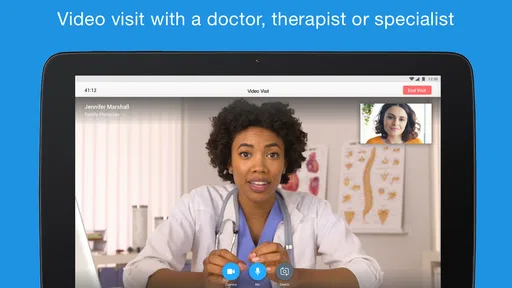
Using the app feels like having a friendly chat with your local doctor. The video quality is top-notch, and the doctors are professional and attentive. During my consultation, I felt heard and understood, which is not always the case with traditional visits. Plus, the convenience of having a consultation from the comfort of my couch was a huge bonus.
And if you’re worried about technical glitches, the app’s support team is quick to respond, ensuring your experience is as smooth as possible.
Making a remote conversation more useful
A small preparation step that often pays off is separating what you observed from what you think it means. I would describe the symptom in plain terms, say when it started, and note whether it has changed, rather than leading with a self-diagnosis. If there is something visible that is relevant, good lighting and a steady camera can help you show it; still, a clinician may need an in-person examination to assess it properly.
For a caregiver, it helps to have the person experiencing the concern nearby if they can participate, while keeping the conversation private and calm. If you are asking on behalf of a child, write down any questions before the visit and make sure you can describe the timeline clearly. That is more useful than trying to remember details under pressure, and it does not depend on special app features.
Before beginning a visit, I would also decide what a useful outcome looks like: reassurance, advice on what to monitor, or guidance about where to go next. Remote care is not always about receiving treatment through the screen. Sometimes its practical value is helping you choose the appropriate next step, including an in-person appointment if the clinician thinks one is needed.
Choosing between a visit, a clinic, and self-care
The main trade-off is not simply convenience versus inconvenience. A video consultation can make sense when the concern is suitable for discussion and travel is the main obstacle. A local clinic is usually a stronger option when examination, testing, or continuity with someone who knows your history matters. For a minor issue that is already improving, you may decide to monitor it or use existing medical advice rather than starting a new visit; if it worsens, that decision should change.
Compared with searching symptoms online, talking to a clinician gives you a chance to explain your particular situation and ask follow-up questions. But the screen does not make a remote assessment complete, and a reassuring conversation should not override worsening symptoms or a need for hands-on care. I would use online reading to prepare questions, not as a substitute for a clinician’s judgment.
Cost is another practical question. The app is free to download, but that alone does not tell you what a consultation may cost. Before confirming a visit, check the displayed charges and any insurance details that apply to you. I would not assume every appointment is free or that coverage works the same for every person; knowing the likely expense beforehand avoids an unpleasant surprise when you are already focused on a health concern.
Privacy, continuity, and realistic expectations
A medical conversation needs a private setting, so I would use headphones if they help keep the discussion from being overheard and choose a place where I can speak comfortably. Avoid sharing sensitive details where other people can see or hear them. The app is for a consultation, not a replacement for keeping your own medical notes, so I would write down any instructions or follow-up advice that matters to me after the call.
For recurring symptoms or several related concerns, a single remote visit may not provide the continuity you need. Keep track of what was discussed and tell your regular clinician about advice received elsewhere when it is relevant. If you already have a care team, contacting them may be more useful than starting from scratch, especially when decisions depend on your medical history or previous test results.
Amwell is aimed at a general audience, with an Everyone age rating, but that does not mean every situation is suitable for a remote consultation. A younger user may need a parent or guardian involved, and anyone who cannot comfortably communicate by video may prefer another route. I would choose the care format around the person and the health concern, rather than trying to make every problem fit the app.
What I would check before committing to a visit
Amwell is free to install, and its medical focus is clear, but I would treat the first few minutes as a practical check rather than assuming everything is ready. Confirm that you can access your account, that your audio and camera work in the setting you plan to use, and that you have enough battery and connection for a conversation. If one of those basics is unreliable, a phone call to a clinic or another suitable service may be less stressful.
The app has been available since October 6, 2013, and the current version is 15.10.07.005. Its 3.8K reviews offer a useful reminder that real experiences vary, even when the central idea is straightforward. I would pay attention to whether the app fits my own device and circumstances, rather than treating popularity or an average rating as proof that it will solve every access problem.
Practical verdict
For me, Amwell is best understood as an extra doorway to medical advice: particularly handy when a non-emergency concern comes up at an awkward time and a video discussion seems appropriate. It is less suitable when you need urgent physical care, tests, or a clinician who already knows the full story. The app can reduce the effort of arranging a conversation, but it cannot remove the need to judge the seriousness of symptoms or follow through on in-person care when that is recommended.
I would install it ahead of time if I expected to use remote care, check that I can get through the basic setup, and keep a clinic or emergency option in mind as well. That preparation turns the app from a last-minute experiment into a more realistic backup. If you want convenient access to a clinician and understand the limits of video care, it may be worth having; if you need hands-on assessment or dependable continuity above all else, a local healthcare provider is the better first choice.
Amwell: Doctor Visits 24/7 Frequently Asked Questions
What devices can I use Amwell on?
Amwell is a medical app for mobile devices, designed for virtual doctor visits from a smartphone or tablet. Before downloading, check that your device is running a compatible operating system; the app requires iOS or Android 6.0 or later. A stable internet connection and a working camera and microphone are also useful for taking part in a video consultation.
Is Amwell free to download, and who can use it?
Amwell is free to download and is rated for Everyone, so its app-store age rating is suitable for a broad audience. That does not mean every consultation is free: visit costs and insurance coverage can depend on the care you choose and your plan. The app is published by American Well and is intended to make virtual medical care accessible from a mobile device.
What is Amwell and how does it work?
Amwell is a telemedicine app that allows users to have virtual doctor visits 24/7. By using your smartphone or tablet, you can connect with doctors for a wide variety of medical issues. The app is designed to provide convenient healthcare access, eliminating the need for in-person visits. You simply need to download the app, create an account, and you can start arranging visits with healthcare professionals at your convenience.
Is Amwell covered by insurance?
Amwell accepts many major health insurance plans, which can help reduce the cost of your virtual visit. However, coverage may vary depending on your specific insurance provider and plan. It is recommended to check with your insurance company to confirm if telehealth services through Amwell are covered under your policy. The cost of a visit can depend on your coverage, so check the details before proceeding.
What types of healthcare services are available on Amwell?
Amwell offers a wide range of healthcare services, including urgent care, therapy, psychiatry, and nutrition counseling. Users can access care for common issues such as colds, sinus infections, and allergies, as well as mental health support and diet advice. This versatility makes Amwell a comprehensive solution for many healthcare needs, all accessible from the comfort of your own home.
Pros
- Available 24/7
- convenient for late-night needs.
- Access to various specialists and healthcare services.
- User-friendly interface for easy navigation.
- Quick video consultations
- saving travel time.
- Compatible with most insurance plans.
Cons
- May experience occasional app glitches.
- Requires a stable internet connection.
- Limited to virtual consultations only.
- Some users report long wait times.
- Not available in all regions.