Amazon Fire TV
- 88.90K
- 4.6
- Installs
- 50.00M
- Price
- Free

Screenshots
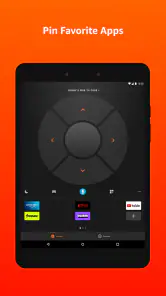
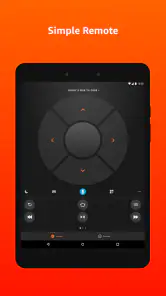
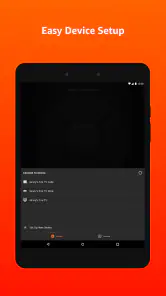
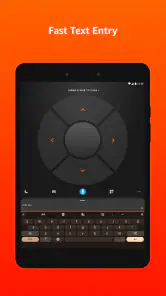
Analysis by Reviewed
For most people, the biggest appeal of Amazon Fire TV is not novelty; it is making a television easier to navigate from the sofa. I find it most useful when I want to search without pecking at an on-screen keyboard, or when the TV’s own menus feel awkward. It is a focused remote-control app in the Tools category, made by Amazon Mobile LLC, rather than a replacement for the television or a general-purpose streaming service. That distinction matters: it helps with controlling Fire TV, but it does not supply the shows or make an unsupported television compatible.
A companion for the moments when the remote gets in the way
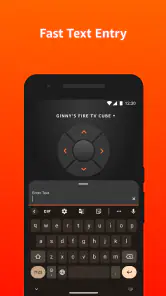
The app is free, rated for Everyone, and has a 4.6 average from around 526,000 ratings, with over 50 million installs. Its appeal is easy to understand if you already use a Fire TV: a phone is often close at hand, and typing a title or the name of an app is less fiddly on a phone keyboard than entering it one letter at a time with a remote. Voice search is another useful shortcut when you know what you want but would rather not browse through rows of menus.
A realistic example: I might be settling in after dinner, remember a film title halfway through looking for something to watch, and use the phone to search rather than back out through several screens and spell it with the remote. For a household where the remote tends to vanish between cushions, keeping the app ready can also provide a practical backup. I would treat that as convenience, though, not a reason to discard the physical remote; a phone can be elsewhere, out of charge, or being used by someone else.
That backup works best when the app is already installed and the phone can connect to the same Fire TV setup you normally use. I would test it before the physical remote goes missing, rather than discovering in the middle of a movie night that the phone needs attention first. It is also worth agreeing on who controls playback in a shared room: a phone remote is convenient, but it can make it less obvious to everyone else who is navigating.
Where it fits among remote-control options
Compared with an ordinary Fire TV remote, the app’s clearest advantage is text entry and having a controller on a device you already carry. The physical remote is still the better choice when you want quick tactile buttons without unlocking or handling a phone. Compared with a television maker’s remote app, this one makes most sense when Fire TV is the device you actually navigate; if you mainly use your TV’s built-in menus or another streaming box, the matching controller for that system is likely the more direct option.
One practical tip is to use the phone keyboard for searches and login fields, then return to the regular remote for routine viewing if that feels faster. That split avoids treating one controller as best for every task. Voice search is also most helpful when the title or destination is clear; when I am browsing without a particular choice in mind, the screen’s menus remain the better way to discover what is available.
This distinction matters most in homes with more than one way to watch. If you switch between Fire TV and a television’s own interface, the phone app should not be expected to become a universal remote for every screen or device. I would decide which system handles most of your viewing and keep that system’s controller easiest to reach. If Fire TV is only used occasionally, opening a dedicated phone app may be more steps than using the controller already beside the television.
More From Our News Desk

Weather by Xiaomi Review: Clear at a Glance, Less Clear Up Close

X Under Pressure: Can It Recover When Posting Goes Wrong?

Clash of Clans Is Won Between the Battles

Android Auto Makes the Case for Quieter Car Software

MobiOffice: Transforming Mobile Productivity with Seamless Integration

EA SPORTS FC™ Mobile Soccer: Redefining Mobile Sports Gaming
Setting Up the Magic
Setting up the Amazon Fire TV was surprisingly easy. I'm not exactly tech-savvy, but even I managed to do it in a jiffy. All you need to do is plug it into your TV's HDMI port, connect to Wi-Fi, and voilà! You're ready to explore its plethora of features. The sleek remote fits comfortably in the hand, making navigation a breeze.
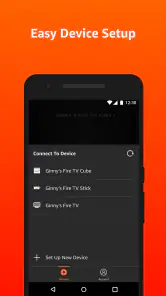
It helps to separate the setup of the Fire TV device from the setup of its phone controller. The app is useful only once the phone and the Fire TV are ready to work together, so I would first make sure the television itself is showing the Fire TV interface. Then, with both devices available, follow the in-app connection flow and confirm that the phone can navigate before putting the remote away. That small check turns the app into a dependable alternative instead of a theoretical backup.
If a connection does not appear right away, I would check the basic setup before assuming the app is at fault: confirm the Fire TV is powered on, the phone is connected to the expected home network, and the television is on the correct input. These are sensible first checks for a phone-based controller, and they are easier to do before everyone is waiting to watch something. The app does not change the underlying requirement that a Fire TV device must be part of the setup.
Endless Entertainment Options
Once you're all set up, the Amazon Fire TV opens the door to a wide array of entertainment options. From streaming services like Netflix, Hulu, and Amazon Prime Video to music apps such as Spotify and Pandora, there's something for everyone. I found the voice search feature particularly useful – just ask Alexa to find your favorite show and see it pop up on your screen. It's like having a personal assistant dedicated to your entertainment needs.
For this app, the useful question is what happens when searching by voice is less convenient than typing. In a quiet room, speaking a title can be quicker; in a shared space, late at night, or when the title is hard to pronounce, the keyboard is the more discreet and predictable route. I would also keep the search focused on a specific show, film, or destination rather than expecting voice control to replace browsing altogether. These are different ways to get around Fire TV, not a guarantee that every spoken request will be the best route to a result.
For a family choosing something together, I find the most practical approach is to use voice or typing only after the group has settled on a title. If nobody knows what they want, the app’s search shortcuts cannot solve the bigger problem of choosing; browsing the television’s screen is still the natural option. This is a small but useful expectation to set, especially for someone considering the app because they hope it will make every part of watching television hands-free.
Gaming on the Big Screen
Aside from streaming, the Amazon Fire TV doubles as a gaming console. With a variety of games available on the Amazon Appstore, you can enjoy casual gaming sessions right from your couch. I tried a few games, and while it's no replacement for a dedicated gaming console, it offers a fun diversion for those who enjoy light gaming.
The phone app should be thought of as a way to navigate Fire TV, not as a substitute for game controls. For casual play, it can help get to the relevant screen, but anyone choosing a setup mainly for games should consider whether the available controls and the experience they want are a good match. A dedicated console is still the clearer choice for someone who expects gaming to be the main event rather than an occasional extra alongside streaming.
Intuitive Interface and Accessibility
What struck me was the intuitive interface of the Amazon Fire TV. The menu is straightforward, and switching between apps is seamless. It's designed to be user-friendly, ensuring that even the least tech-savvy individuals can navigate it without a hitch. Additionally, the accessibility features, such as screen magnification and voice control, make it inclusive for everyone.
There are a couple of compatibility questions worth resolving before relying on it. The app is currently version 3.9.0 and requires Android 7.0 or later, so an older Android phone may not be able to install it. On iOS, check the current app-store requirements for your device before making it your only controller. In either case, it is intended to work with Fire TV, so confirm that your television setup includes a Fire TV device rather than assuming the app will control any smart TV.
For an older household member or a guest who finds the physical remote confusing, I would introduce one task at a time: first basic navigation, then text entry, and only then voice search if it feels comfortable. The phone keyboard may be easier for entering a long title, but it also asks the user to move attention between the phone and television. For someone who prefers large, tactile buttons or does not want to handle a phone while watching, the standard remote may remain the more comfortable choice.
Another practical trade-off is that a phone is a personal device, while a television is shared. Handing someone the phone to change a program also hands over whatever else is on that device, and the phone may be needed for a call or message. I see the app as an optional second control surface, not something every household member must use. Keeping the physical remote within reach makes the arrangement more flexible.
The Final Verdict
After spending some quality time with the Amazon Fire TV, I can confidently say it's a worthwhile addition to any home. It transforms your ordinary TV into a smart entertainment hub with minimal effort. Whether you're a fan of binge-watching, listening to music, or casual gaming, this device has got you covered. Plus, with the added convenience of voice control, it truly feels like a step into the future.
So, if you're looking to upgrade your entertainment setup, the Amazon Fire TV is a solid choice. It combines functionality, ease of use, and a wide range of features that cater to all your entertainment needs.
My recommendation is narrower and more practical: this is a handy companion for people who already watch through Fire TV and often search, type, or need a backup controller. It is less compelling if you rarely use your phone while watching, prefer the feel of physical buttons, or want one app to manage several kinds of television equipment. With a 4.6 average and more than 89,000 written reviews, it has clearly found an audience, but popularity does not remove that basic fit question. If Fire TV is central to your setup, the free app is easy to justify; if it is not, the controller designed for your main device is the better place to start.
The app’s release date is November 18, 2014, and the current version is 3.9.0. Those details are less important than whether the phone you have can run it and whether Fire TV is the device you use most. I would treat the app as a low-cost convenience rather than a reason to change a working television setup: it is free, but its value comes from saving effort during searches and giving you another way to navigate.
In short, I would recommend installing it if Fire TV is already part of your routine, especially if typing with the physical remote regularly slows you down. I would skip it as a priority if you mainly use another streaming box, want a single controller for mixed equipment, or simply prefer physical controls. For the right viewer, it makes the small everyday tasks of searching and navigating feel easier; for everyone else, the usual remote remains perfectly reasonable.
Amazon Fire TV Frequently Asked Questions
Does the Amazon Fire TV app work on iPhone and Android phones?
The Amazon Fire TV app is available for Android and iOS mobile devices, so you can use a compatible phone or tablet as a companion to your Fire TV. On Android, it requires version 7.0 or later. The app is free to download, but you’ll need a Fire TV device for its remote-control features to be useful.
Can I use the Amazon Fire TV app without a Fire TV device?
The Amazon Fire TV app is designed to work with a Fire TV device, helping you navigate its interface, search for content, and control playback from a mobile device. It is a companion app rather than a standalone streaming service, so its usefulness depends on having a compatible Fire TV setup connected to your television.
What can I do with the Amazon Fire TV app on my phone?
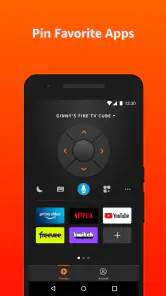
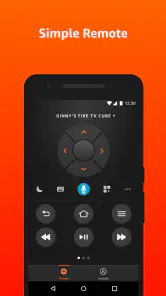
The app provides simple navigation, a keyboard, and voice search for Fire TV. These tools can make it easier to browse menus, enter text, and look for shows or other content without relying only on the physical remote. It is a practical option when typing with a remote feels slow or when you want another way to control your Fire TV.
How do I connect the Amazon Fire TV app to my Fire TV device?
Once you have the app installed and your Fire TV ready, open the app and follow its on-screen prompts to find and connect to your device. Your phone and Fire TV need to be set up in a way that lets them communicate on your home network. After connecting, you can use the phone’s navigation controls, keyboard, and voice search as alternatives to the physical remote.
What is Amazon Fire TV and how does it work?
Amazon Fire TV is a streaming media player that allows users to watch video content from various streaming services, such as Netflix, Hulu, Amazon Prime Video, Disney+, and more. It connects to your TV via HDMI and uses your Wi-Fi network to stream content. The device comes with a remote control and can also be controlled using voice commands through Alexa.
Pros
- Easy to navigate interface
- Wide range of streaming apps
- Supports 4K and HDR content
- Alexa voice control integration
- Regular software updates
Cons
- Limited storage space
- Ads on the home screen
- Remote requires AAA batteries
- Occasional connectivity issues
- No Google Play Store access
- Category
- Tools
- Version
- 3.9.0









