Calculator Launcher
- 3.82K
- 4.1
- Installs
- 1.00M
- Price
- Free

Screenshots
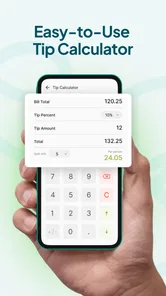
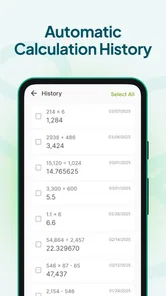


Analysis by Reviewed
I tend to judge a calculator by what happens after the first few days: does it become a useful part of my routine, or does it get replaced by the calculator already on my phone? All-in-one Calculator Launcher makes a case for staying by bringing calculations and app access together. That combination is appealing when I want to do a quick sum without treating it as a separate task, though its lasting value depends on whether I actually use that launcher-style workflow.
The first-week appeal
The idea is easy to understand as soon as I need to switch between a calculation and another app. While working out a shared bill, for example, I might total the meal, divide the amount, then open a payment or messaging app to settle it. Keeping app access close to the calculator can make that small sequence feel less interrupted than returning to the home screen and searching again.
It is a free tools app from AtomApplications, aimed at an Everyone audience. It was released on October 17, 2023, and its current version is 3.9.4. Those details give a sense of the product’s place in the app ecosystem, but the more practical question is whether its combined approach fits the way I use my phone.
Who benefits from the combined workflow
I can see the strongest fit for people who calculate while doing something else on their phone: comparing household costs while reading a shopping list, checking figures during a conversation, or moving between study materials and a calculation. The key is not simply doing many sums; it is needing to act on the answer immediately. If that describes your routine, keeping calculation and app access together may feel useful well beyond the first week.
For a realistic example, imagine planning a weekend grocery shop. I could total a few item prices, compare quantities with a unit conversion, then move to a notes app or a message to coordinate the list. The calculation itself is ordinary, but reducing the small back-and-forth between apps can make the task feel smoother. I would still keep the list and final spending decision in the app meant for that job; the calculator is most helpful as a quick bridge, not as a replacement for a dedicated organizer.
Where the routine can pay off
For repeat tasks, I would judge the app less by the number of functions on offer and more by how often I reach for them. A student moving between a calculation and study materials, or someone checking totals while planning household spending, may benefit from having both actions close together. Unit conversions can also save a separate search when I am comparing measurements or quantities. The useful habit is to keep the calculation tied to the next action, rather than treating every sum as a reason to leave the screen.
Compared with a phone’s standard calculator, the main appeal is not necessarily that every calculation will be better; it is the promise of a broader working space. A dedicated calculator can be the better choice when I want nothing but a quick result, while a search engine may be more convenient for a one-off conversion. This app makes most sense when switching between calculation and other phone tasks is a regular nuisance.
More From Our News Desk

 Lark Player:Music Player & MP3
Switching to Lark Player: A Better Fit for Music Stored on Your Phone?
Lark Player makes sense if your music already lives on your phone. Here is what changes, what does not transfer by assumption, and how to test the switch without regret.

 Tile Master® - Matching Game
Tile Master Finds Its Place in the Gaps of a Noisy Phone
OS changes rarely transform a tile puzzle, but they reshape the small rituals around it. Tile Master’s appeal lies in how well its brief, tactile rounds fit the modern phone.

 Google Docs
 Shows What Mobile Writing Still Gets Wrong
Google Docs still makes a strong case for the shared document, but its real significance is how it exposes the gap between cloud convenience and genuinely capable mobile work.

 YouTube Studio
 Is Becoming a Creator’s Daily Control Room
As publishing turns into a daily, data-led habit, YouTube Studio is becoming the control room creators reach for between uploads—not another tool for making videos.

 Tiles Hop Music & Ball Game
Tiles Hop Review: When the Beat Is Clear, Every Miss Counts
Tiles Hop turns a simple bouncing-ball premise into a sharp test of timing. Its best design is immediate and readable; its weakest moments come when recovery feels less clear than the beat.

 Piano - Music Keyboard & Tiles
: Inviting Rhythm, Unproven Recovery
A tile-tapping piano game lives or dies by timing. This resilience-focused review separates what its format promises from what players still need to verify.
Latest News



A Calculator That Does More
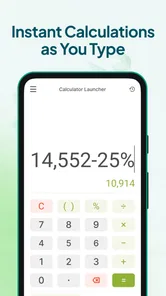
At its core, the All-in-one Calculator Launcher is a calculator app. But calling it just a calculator would be akin to calling a Swiss Army knife just a blade. This app offers an extensive array of mathematical functions, ranging from basic arithmetic to complex equations involving trigonometry and calculus. It's like having a math tutor in your pocket!
What sets this app apart is its ability to integrate seamlessly into your daily smartphone use. With its launcher functionality, you can access your favorite apps directly from the calculator screen. Need to quickly check your calendar while calculating monthly expenses? No problem. This app allows you to multitask like a pro.
Turning quick access into a useful habit
I would give the launcher a fair trial by choosing only a couple of apps I already open when working with figures. A calendar might make sense for monthly planning, while notes could be handy for keeping a temporary list of amounts. Then I would use the calculator normally for a week and notice whether those shortcuts help often enough to become automatic. Adding many destinations at once risks making the screen feel like another home screen to manage, which defeats the point of keeping the workflow quick.
That trial also answers a practical question: does the app need to become my default calculator to be worthwhile? I don’t think so. It can earn a place as a situational tool if I reach for it during budgeting or conversions, even if I keep using the built-in calculator for a fast sum. If I find myself opening it only to admire the concept and then switching away, that is a good sign the extra layer is not serving me.
User-Friendly Interface
One of the first things you'll notice about this app is its sleek and intuitive design. The user interface is clean, with a minimalistic layout that makes navigation a breeze. The buttons are large and easy to press, which is a blessing for those of us who don’t have the most nimble fingers. Plus, the app supports various themes, so you can customize its appearance to suit your mood or style.
The app also includes a handy widget that you can place on your home screen. This means you can perform quick calculations without even opening the app—a small but significant feature that enhances user experience.
Widget or full app: choosing the lighter touch
The widget is useful for a different reason than the launcher. It can make a quick calculation easier to start, while the app’s broader approach is about what I do after or around that calculation. I would try the widget in a spot I already visit rather than rearranging my home screen around it. If it makes arithmetic more convenient, that may be enough; if the launcher is the feature I value, I would assess that separately instead of assuming one automatically makes the other worthwhile.
There is a trade-off in keeping a special-purpose tool visible: every shortcut takes attention and space. For someone who already has a calculator widget or a home-screen routine they like, this one may offer little practical improvement. I would keep it only if the faster entry point becomes part of an actual recurring task, not simply because widgets are available.
Keeping it useful without creating clutter
A launcher feature is most useful when the apps it surfaces are the ones I genuinely open during calculation-heavy moments. I would start with a short, practical set—perhaps a calendar for budgeting or a notes app for recording figures—rather than trying to make the calculator a substitute for the whole home screen. That keeps the advantage focused: fewer detours for a handful of repeated tasks, not a new place to manage every app.
The widget also changes the decision about whether to keep the app. If I mainly need quick arithmetic, placing a calculator shortcut where I already look may be enough to establish a habit. If I rarely use the widget and never launch another app from the calculator, the standard calculator is likely simpler. The best test is to notice whether the combined workflow saves a real step in a normal week, not whether it looks clever on the first launch.
Performance and Reliability
In terms of performance, the All-in-one Calculator Launcher is smooth and reliable. It runs without a hitch and doesn’t drain your battery, which is always a concern with powerful apps. Whether you're using it to solve complex equations or just to tally up your shopping list, the app performs admirably.
Furthermore, it’s compatible with both Android and iOS platforms, so no matter your device, you can reap the benefits of this versatile app. Regular updates ensure that any bugs are quickly addressed, and new features are added, keeping the app fresh and relevant.
Routine calculations versus specialist work
For ordinary arithmetic and everyday conversions, I would treat this as a convenience tool rather than a specialist instrument. If I were checking a figure where a mistake could affect a payment, measurement, or important plan, I would enter each value deliberately and check the result another way. That is not a criticism unique to this app: a quick interface makes calculations easy to start, but it cannot tell me whether I typed the right number or chose the right units.
Someone who needs a calculator designed around detailed working, a particular professional workflow, or a record they can review later may be better served by a dedicated option for that purpose. The appeal here is speed and proximity to other phone tasks. I would not choose it solely because I sometimes need advanced mathematics; I would first make sure its actual working style suits the kind of calculations I do.
What to check before relying on it
For everyday sums, I would use the result as a prompt for the next step, not as a reason to skip checking an important figure. When a calculation matters—such as splitting a bill or comparing a unit price—I find it sensible to enter the numbers carefully and sanity-check the answer. A multi-purpose interface can reduce app switching, but it does not remove the need to verify inputs.
The app is rated 4.4 on average from around 11,000 ratings, with roughly 3,300 written reviews and over one million installs. Those figures suggest that many people have tried it, but they cannot tell me whether its particular mix of calculator and launcher suits my habits. I would treat the free download as a low-commitment trial and decide based on how often its extra access proves useful.
What could wear thin
The main risk is not that a calculator becomes difficult to understand; it is that the extra layer stops earning attention. If I need only occasional sums, my phone’s built-in calculator is already close at hand and avoids learning another routine. If I mostly want a one-time conversion, searching for it may be quicker than opening a separate app. The combined setup is most convincing when I repeatedly move from figures to another app, and least convincing when those moments are rare.
I would also be cautious about confusing a broad feature pitch with a reason to keep the app indefinitely. A tool can be pleasant to explore and still not become part of my daily habits. After the novelty fades, the useful test is simple: am I reaching for its widget, conversions, or app access without having to remind myself? If not, uninstalling it or returning to the default calculator is a sensible choice, not a failure to use it properly.
Is It Worth It?
So, is the All-in-one Calculator Launcher worth downloading? In my opinion, absolutely. It’s more than just a calculator; it’s a tool that simplifies your daily tasks and enhances productivity. Whether you're a student, a professional, or someone who just likes to keep things organized, this app has something to offer.
In conclusion, the All-in-one Calculator Launcher is a testament to how innovative app design can enhance our digital lives. It’s practical, efficient, and a joy to use. So why not give it a try? You might just wonder how you ever managed without it.
When the novelty fades
My longer-term verdict is more measured than that enthusiastic first impression. The app earns its place if I repeatedly use its app-launching workflow, conversions, or widget; if my needs stop at occasional arithmetic, it may become one more shortcut to maintain. I would also avoid making it my sole tool for specialist work where I need a particular interface or a carefully auditable calculation history. For routine phone use, though, its appeal is straightforward: it can keep a small set of everyday tasks closer together without asking me to reorganize everything.
Calculator Launcher Frequently Asked Questions
Is All-in-one Calculator Launcher free, and what devices can I use it on?
All-in-one Calculator Launcher is a free tools app from AtomApplications. Its listed minimum operating-system requirement is version 10, so check that your device meets this requirement before downloading. The app is intended to combine quick calculations and unit conversions with a launcher-style experience, making it useful for people who want those tools together.
What can I use the calculator and unit-conversion tools for?
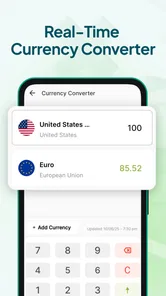
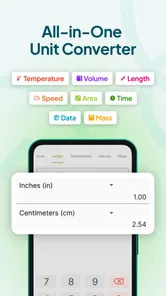
The app is designed for quick calculations and unit conversions, which can be handy for everyday tasks such as checking a total or converting a measurement. It brings these functions together in a calculator-focused interface, so you can use it as a practical tool rather than opening separate apps for each simple calculation. The specific conversion options may depend on the app’s current features.
What is the All-in-one Calculator Launcher app?
The All-in-one Calculator Launcher is a versatile application designed for Android and iOS devices that combines the functionalities of a calculator with a customizable app launcher. This app allows users to perform complex calculations and launch other apps directly from its interface, providing a streamlined experience for managing daily tasks efficiently. It is listed in the Tools category and is available to download for free.
How does the All-in-one Calculator Launcher improve productivity?
The app improves productivity by integrating essential tools into a single platform, reducing the need to switch between multiple apps. Users can perform calculations and access frequently used applications without leaving the calculator interface, saving time and enhancing workflow efficiency. Its customizability allows users to tailor the app to their specific needs.
Is the All-in-one Calculator Launcher user-friendly?
Yes, the All-in-one Calculator Launcher is designed with user-friendliness in mind. It features an intuitive interface that makes it easy for users of all ages to navigate. The app offers simple customization options and clear instructions, ensuring that even those not tech-savvy can utilize its features without any hassle.
Pros
- User-friendly interface with intuitive navigation.
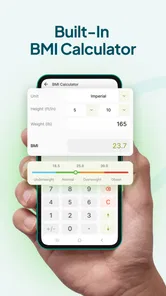
- Wide range of calculators for diverse needs.
- Customizable themes for personalized experience.
- Offline access without internet dependency.
- Minimalistic design for quick calculations.
Cons
- Ads may interrupt during calculations.
- Limited advanced scientific functions.
- No cloud sync for saving calculations.
- Occasional lags on older devices.
- No tutorial for first-time users.