Alarm Clock for Me
- 49.03K
- 4.3
- Installs
- 50.00M
- Price
- Free
Screenshots
Analysis by Reviewed
I find Alarm Clock for Me most useful when one phone has to serve as the household’s bedside clock without turning into a shared account or family-management tool. Imagine a weekday morning: I set my own wake-up time, leave the phone visible on the nightstand, and let someone else check the time without needing to touch my alarms. That simple arrangement can work well for a couple or a small household, as long as everyone agrees who is responsible for changing settings and silencing the device.
Keeping one phone’s settings personal
Sharing a device calls for a little care. I would treat alarms, sounds, and snooze choices as personal settings rather than assume the app separates them by person. Before handing the phone to a child or housemate, I’d show them how to read the clock and use the flashlight without casually editing a wake-up alarm. If several people need alarms at different times, a dedicated clock or separate phones may be a cleaner arrangement than relying on one shared setup.
That distinction matters more than it might seem. A roommate who snoozes an alarm meant for an early shift can create a real problem, while a child exploring the screen may change a setting without understanding the consequence. I’d keep the phone’s owner in charge of alarm changes and agree on a simple household rule: check the display freely, but ask before changing anything. That is a practical habit, not a substitute for separate profiles or family controls.
Making the routine work for more than one person
For coordination, I’d use the app as a visible timekeeper, not as a household planner. Its large bedside display can help everyone see whether it is time to get ready, while each person’s actual schedule stays in their own calendar or alarm arrangement. If one person needs an earlier wake-up, place the phone where its sound and vibration are appropriate for the room; a shared bedroom may call for a quieter personal device instead.
One useful habit is to review the next morning’s alarm before going to sleep, especially after a weekend or a change in routine. Multiple alarms can help separate workdays from other mornings, but they can also become confusing if old ones are left enabled. I’d give each alarm a consistent purpose in my own routine and periodically remove or disable the ones I no longer need. This small bit of upkeep is more reliable than trying to remember which tone means what when I’m half asleep.
Where it fits among alarm options
Compared with a phone’s built-in clock, a dedicated alarm app can feel more focused on the bedside experience: themes, a sleep timer, weather information, and the large clock display put more of the night-and-morning routine in one place. The trade-off is that extra choices do not automatically make waking up easier. If all I need is one dependable alarm, the default clock app may be simpler and already familiar. If I want a separate bedside display and a way to wind down with sound, this app makes more sense.
I’d also avoid treating any phone alarm as a guarantee without checking how the phone is set up. Before relying on it for an important morning, I’d confirm the alarm time, sound level, and vibration behavior, then make sure the phone has enough charge and is positioned where I can hear or notice it. That is especially sensible when the phone doubles as the household clock or sits across the room as a reason to get out of bed.
You May Like

Clash of Clans Is Won Between the Battles

Android Auto Makes the Case for Quieter Car Software

MobiOffice: Transforming Mobile Productivity with Seamless Integration

EA SPORTS FC™ Mobile Soccer: Redefining Mobile Sports Gaming

How Microsoft OneDrive Became a Mobile Productivity Giant

How Google Translate Breaks Language Barriers Effortlessly
A realistic night-to-morning routine
For example, if I have an early start after a late evening, I can use the sleep timer for quiet audio while settling down, then check that the wake-up alarm is set before putting the phone on the nightstand. I’d keep the display visible enough to read without turning the phone into a bright distraction, and I’d choose a volume that suits the room. In a shared bedroom, that last choice matters: an alarm that works for me may still be disruptive for someone whose morning starts later.
This is also where I’d be deliberate about the difference between a bedtime aid and a morning backup. The timer is useful for ending audio after I’ve fallen asleep, while a separate alarm handles the wake-up. I wouldn’t assume the wind-down routine guarantees a good night or that one alarm is suitable for every important occasion. If missing an early appointment would have serious consequences, I’d use a second independent wake-up method rather than putting all my trust in one phone.
Hey there! If you're anything like me, waking up in the morning can be a struggle. That's why I decided to give Alarm Clock for Me a shot, and let me tell you, it has transformed my mornings!
Get Up and Shine with Alarm Clock for Me
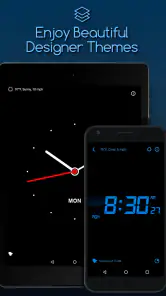
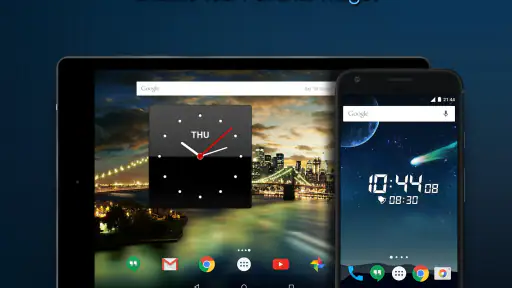
First off, let's talk about the design. The app is super sleek and user-friendly. It’s got this modern vibe that fits right in with any phone's interface. You can choose from a variety of themes to match your personal style, which is a nice touch! No more boring alarms; waking up with style has never been easier.
Features That Make a Difference
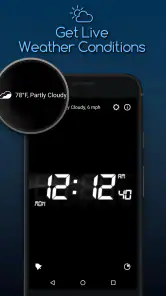
What makes this app stand out for me is its customization options. You can set multiple alarms, each with different tunes, and even adjust the snooze duration. If you're someone who needs a little extra motivation to get out of bed, the app has a vibration feature that will surely do the trick. Plus, it offers a weather update feature, so you know what to expect when you step outside. Gone are the days of being caught unprepared by the rain!
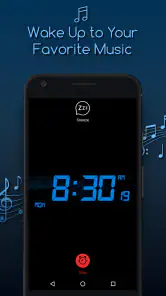
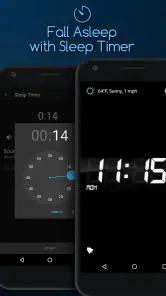
One feature I absolutely love is the sleep timer. If you enjoy falling asleep to music or nature sounds, this app has got you covered. You can set the timer, and the sounds will gently fade out as you drift off to dreamland. It's like having a personal lullaby machine right in your pocket!
User Experience: Easy and Intuitive
Installation is a breeze, and setting up your alarms takes no time at all. The app's interface is intuitive, so you won't find yourself fumbling around trying to figure out how to set your morning alarm. The developers have clearly put a lot of thought into the user experience, making it accessible for everyone, even if you're not tech-savvy.
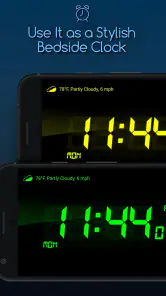
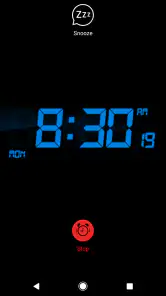
The app also includes a bedside clock mode, which is perfect if you like to have your phone on your nightstand. It displays the time in a big, bold font that's easy to read, even without your glasses! There's also a handy flashlight feature in case you need to find something in the dark. It's these little things that make the app a great companion for your nighttime routine.
Using the display without disrupting the room
I find the bedside clock mode most practical when I decide in advance where the phone will sit and who needs to see it. On a nightstand, the large time display is easy to glance at; across the room, it can also serve as a visible reference without inviting everyone to handle the device. I’d try the display in the actual bedroom before making it part of a shared routine, since screen brightness and placement can affect whether it feels helpful or distracting.
The flashlight is a modest but useful extra for finding a dropped item or navigating a dark room without turning on the main light. I’d use it as an occasional convenience, not as a reason to leave the phone within reach of a child who might alter an alarm. In a home where the phone belongs to one person, simple boundaries around who can tap the screen are more reliable than assuming the app will keep each person’s choices separate.
My Final Thoughts
Overall, Alarm Clock for Me is more than just an alarm app; it's a complete package designed to make your mornings better. Whether you need a reliable alarm, a weather update, or a soothing bedtime soundtrack, this app has it all. I’d recommend giving it a try if you want to revolutionize your morning routine. Seriously, it’s a game-changer!
Who is likely to enjoy it—and who may not
I’d recommend it most to someone who wants more bedside convenience than a bare-bones clock provides: a readable nightstand display, distinct alarms, a snooze setting, and a way to wind down with timed audio. It can also suit a household that wants one glanceable clock in a shared room, provided each person understands that the device’s settings are managed by whoever owns the phone.
I would skip it if you prefer the fewest possible options, need separate alarm profiles for different household members, or don’t want a phone screen lit beside the bed. In those cases, the standard clock app or a standalone alarm clock is a better fit. A physical clock also avoids having to keep a phone charged and within reach, while a default app may be the more sensible choice when all you need is a single wake-up time.
Small habits that make it more dependable
The less obvious benefit of multiple alarms is that they can represent different routines, not just repeated attempts to wake up. I’d use separate tones for distinct mornings and keep the schedule tidy, rather than stacking several alarms minutes apart. That makes it easier to recognize the intended cue and reduces the chance that an old setting becomes an accidental early wake-up. For an important appointment, I’d still check the alarm the night before instead of assuming yesterday’s setup matches tomorrow.
The sleep timer is best treated as a wind-down aid, not a promise of a particular sleep result. I’d choose audio that is pleasant at a low volume, set the timer before settling in, and avoid leaving the phone in a spot where the sound or display bothers someone sharing the room. Likewise, weather information can help me decide whether to bring a coat, but I’d check the forecast more deliberately if the day depends on precise travel planning.
Cost, age, and trust at home
The app is free to start, with in-app purchases listed at $2.99 per item. It is rated for Everyone, which makes its general age context broad, but that does not mean a young child should be left to manage a parent’s alarm settings. I’d let children use the clock display or flashlight with supervision and keep responsibility for wake-up routines with the adult who depends on them.
Mobile Heroes is the developer, and the app has been available since March 5, 2013. Its current version is 2.85.3, and it requires Android 6.0 or later. It has a 4.3 average from around 833,000 ratings and more than 50 million installs. Those figures suggest that it is a widely used option, though they don’t tell me whether its particular mix of bedside tools suits my routine. I’d make that call based on whether I’ll actually use the added features.
A practical household verdict
For a shared home, I see this as a convenient bedside display and personal alarm app, not a system for coordinating everyone’s schedules. It works best when one person owns the settings, checks alarms before bed, and treats the screen as a shared time reference rather than a shared control panel. If your household needs independent schedules on one device, or a wake-up signal that cannot disturb anyone else, choose a different arrangement.
For my own routine, the appeal is the combination of a clear bedside clock, customizable alarms, weather at a glance, and a sleep timer. I’d use it when those details make the phone more helpful at night and in the morning; I wouldn’t install it just to replace a simple alarm I already trust. That balance is why I’d recommend trying it for a week of ordinary mornings and keeping it only if the extra bedside features genuinely earn their place.
Alarm Clock for Me Frequently Asked Questions
Is Alarm Clock for Me suitable for everyday use?
Alarm Clock for Me is designed to combine an alarm with a stylish clock, making it a practical option if you want those tools together on your phone. It is a productivity app intended to help you stay on time, whether you use it mainly to wake up or to check the clock. Its usefulness will depend on which of its clock and alarm features fit your routine.
What age group can use Alarm Clock for Me?
Alarm Clock for Me has an Everyone content rating, so it is suitable for a general audience. Its core purpose is straightforward: it provides an alarm and a clock display for everyday use. Parents can still review the app’s store page and settings before a child installs it, especially if they want to understand available features and optional purchases.
Is Alarm Clock for Me free to download?
Yes, Alarm Clock for Me is free to download, so you can try its clock and alarm features without paying upfront. The app also offers optional in-app purchases, which are priced at $2.99 per item. You can decide whether those extras suit your needs; downloading the free app does not require you to buy them.
Will Alarm Clock for Me work on my phone?
Alarm Clock for Me is available for Android and iOS, and the Android version requires Android 6.0 or later. Before downloading, check your phone’s operating system version and make sure it meets that requirement. The app is a practical choice if you want a clock and alarm tool on your smartphone, with a stylish clock intended to help you stay on time.
What features does Alarm Clock for Me offer?
Alarm Clock for Me offers a variety of features to enhance your waking up experience. It includes customizable alarm tones, a built-in weather update feature, and a sleep timer. Additionally, the app provides different clock styles, a nightstand mode, and a flashlight feature, making it a versatile tool for both day and night use.
Pros
- Customizable alarm tones
- Sleek
- user-friendly interface
- Includes weather updates
- Multiple alarm options
- Built-in flashlight feature
Cons
- Contains ads in free version
- Limited features without premium
- Battery consumption is high
- No integration with smart devices
- Occasional notification glitches
- Category
- Productivity
- Version
- 2.85.3













