AirTag Scan: Bluetooth Tracker
- 543.00
- 4.5
- Installs
- 1.00M
- Price
- Free

Screenshots
Analysis by Reviewed
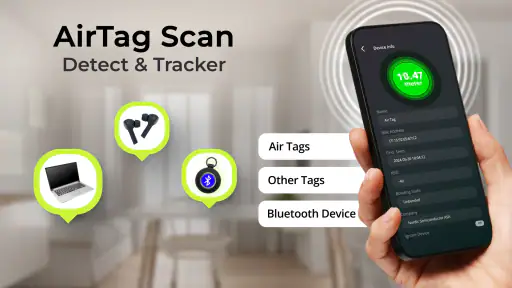
I tried AirTag Scan: Bluetooth Tracker as a practical tool for checking nearby Bluetooth devices, AirTags, and possible hidden trackers. My first impression was that it is aimed at a very specific concern rather than everyday phone maintenance: you open it when you want to understand what wireless devices may be around you. That makes it more useful in certain moments than as an app you leave open all day.
It is a free Tools app from One Music Player, with optional in-app purchases ranging from $0.99 to $99.99 per item. The app is rated for Everyone, runs on Android 8.0 or later, and its current version is 7.0.2. It has reached over a million installs and holds a 4.5 average from around eleven thousand ratings, which gives it a fairly convincing track record for this kind of focused utility.
How it fits into a shared household
The most realistic use case is not one person secretly monitoring everyone else. It is a shared household where somebody notices an unfamiliar Bluetooth signal, finds an object that does not belong to them, or wants to check a car, bag, guest room, or rental space. In that situation, having a dedicated scanner on a phone is more convenient than trying to interpret a long list of Bluetooth devices in system settings.
Imagine returning from a busy day with a child’s backpack, sports equipment, and several borrowed items in the hallway. A small tracker may have been attached to a bag accidentally, or an unfamiliar device may simply belong to a visitor. I would use the app as a first screening step: scan the area, look at what appears, then match the results against the physical objects and the people who are actually present. The important point is that the scan gives you something to investigate, not an instant verdict.
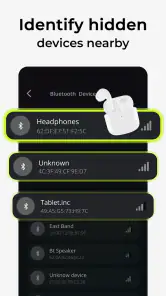
This distinction matters because Bluetooth environments are naturally crowded. Phones, earbuds, watches, speakers, cars, televisions, and smart-home accessories can all create nearby signals. A result that looks unfamiliar is not automatically dangerous, and a device that does not appear does not automatically prove that nothing is there. I found the app most sensible when treated as an awareness tool rather than a security guarantee.
For a shared phone, I would keep the purpose clear before handing it to another household member. One person might use it to check a suitcase before travel, while another might use it to identify a misplaced accessory. That is a healthier arrangement than turning the scanner into a way to inspect another person’s belongings without their knowledge. The app can support a conversation, but it cannot replace one.
What the scan is useful for in everyday situations
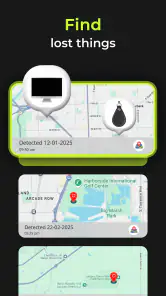
A quick check can be helpful before leaving a hotel room, collecting a used item, or lending a vehicle to someone else. It can also help when a family member says that an unknown device keeps appearing nearby. Instead of guessing from a notification or searching randomly, you can scan from the location where the concern occurs and compare the result with the devices you recognize.
I especially like the idea of using it after moving objects between rooms. A Bluetooth tag attached to a key set, luggage, or pet accessory may be easy to overlook when it travels with a bag. A scan around the entryway can prompt a simple inventory: which signals belong to our own belongings, which belong to a visitor, and which need a closer look?
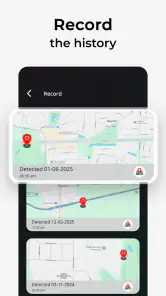
There is also a useful travel workflow. Before unpacking, scan the room; after identifying familiar devices, physically inspect anything that remains unexplained. If the concern involves a tracker, document where you found the object and when you noticed it. The app is then part of a calm process rather than a source of panic.
Where household expectations need boundaries
Because this is a scanner, people may assume it can identify every device with certainty. I would not make that promise to a child, a partner, or an older relative. Bluetooth visibility depends on the device, its state, distance, and the surrounding environment. The app can help reveal nearby signals, but it does not turn an ordinary phone into a complete forensic instrument.
It is also not the same as a family location service. It does not give me a reason to expect shared maps, household profiles, contact tools, or parental supervision features. If your main goal is knowing where family members are, a location-sharing service is the more appropriate category. If your goal is checking for nearby wireless trackers, this app is much more directly relevant.
Setup, account boundaries, and coordination
The setup is best approached as a short, deliberate check rather than a permanent background routine. I would install it on the phone that will actually be used for inspections, open the scanner in the place where the concern exists, and give the results enough context before acting. A scan performed in a crowded living room may look very different from one performed beside a parked car or inside an empty bedroom.
For a household, the account question is simple but important: the app should be used on the device and account of the person who has agreed to perform the check. I would not assume that one installation creates a shared family workspace or synchronizes findings between phones. If several people need to coordinate, the practical method is to agree on who will scan, where, and how the result will be discussed.
That boundary prevents a common mistake: treating a technical result as private evidence against somebody else. If a partner sees an unfamiliar signal near a bag, the next step should be identifying the physical source together. If a teenager finds an unknown tracker, an adult should help with the follow-up instead of expecting the child to interpret every result alone. The app can make the first observation easier, but the household still needs a sensible process.
I would also avoid scanning while driving or while distracted in a public place. Pull over, stop moving, and inspect the surroundings safely. A phone display can encourage tunnel vision, especially when someone is already worried. The strongest workflow is scan, pause, identify known devices, inspect the relevant object, and escalate only if the concern remains credible.
Making results easier to understand
One practical tip is to build a small household reference before there is a problem. Walk through the home with the phones, watches, headphones, speakers, and other Bluetooth accessories normally in use. You do not need to create a complicated record; simply knowing which devices are usually present makes later scans less confusing.
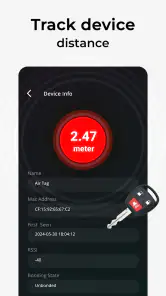
A second useful habit is changing one variable at a time. If you are searching around a car, scan beside the vehicle, then step away and scan again. If a signal remains associated with the car while you move around it, that is more informative than a single crowded scan near the driveway. This is not a laboratory test, but it can help separate a nearby household device from something that travels with the object.
A third tip is to inspect the physical environment rather than staring only at the screen. Check bags, pockets, under seats, compartments, and objects that recently changed hands. A scanner may help narrow attention, but it cannot tell you whether a device is hidden inside a lining or merely belongs to someone standing nearby. The real strength comes from combining the app with ordinary observation.
The app’s free entry point is useful for trying this workflow without committing immediately. At the same time, the presence of optional purchases means I would read each purchase screen carefully before accepting anything. A household should decide in advance whether the free experience is enough and who, if anyone, is authorized to buy extras. That is particularly important on a shared phone used by children or guests.
What I would explain to children and older relatives
The Everyone age rating makes the app approachable, but age suitability is not the same as technical understanding. A younger user may see a list of devices and assume every unfamiliar name represents a threat. I would teach them three rules: ask an adult, do not confront a stranger, and do not remove an object just because the app displayed a signal.
For an older relative, the challenge may be different. The scan itself can be less intimidating than interpreting the results. I would demonstrate the process using familiar household devices and explain that a phone, television accessory, or visitor’s earbuds may appear. The goal is confidence without overconfidence: the app is useful for raising a question, not for proving a conclusion by itself.
Trust also matters between adults. Using a tracker scanner openly for a shared travel check feels very different from secretly searching another person’s possessions. I would recommend agreeing on the purpose before scanning. That small conversation protects privacy and makes the result more likely to be handled calmly.
How it compares with the usual alternatives
Android’s built-in Bluetooth settings are fine when I only need to pair with a known speaker, keyboard, or headset. They are not designed around the same focused question: what Bluetooth devices or possible trackers are nearby right now? This app is more convenient when detection is the starting point rather than connection.
Dedicated tracker networks and manufacturer tools can be better when the device belongs to a particular ecosystem. If I am trying to manage my own branded tracker, the maker’s app may provide ownership details, location history, or actions that a general scanner does not. I would choose this app when I want a broad first look, not when I need complete control over one known product.
Security software is another different alternative. Antivirus and privacy tools may focus on malicious applications, permissions, or account activity, while this app focuses on nearby Bluetooth hardware. Neither category replaces the other. Someone worried about a suspicious app on their phone needs a mobile-security check; someone worried about an unfamiliar physical tracker needs a nearby-device scan and an inspection of the environment.
Manual searching remains important, too. A scanner can save time by directing attention, but it cannot identify every object visually or explain ownership. In a hotel room or car, I would combine the app with a careful physical inspection. If the concern involves harassment, stalking, or immediate danger, I would preserve relevant details and seek help from a trusted person or appropriate local service rather than relying on the app alone.
Limitations I noticed in the concept
The biggest limitation is interpretive, not cosmetic. Bluetooth detection is inherently contextual, and a crowded environment can produce more uncertainty than a quiet one. A result may be unfamiliar because the device belongs to a neighbor, visitor, vehicle, or forgotten accessory. That means the app is strongest for prompting a structured investigation and weaker as a one-tap answer.
I also would not choose it as a general household dashboard. It is not the right tool for managing everyone’s devices, assigning family roles, or coordinating location sharing. If your family needs calendars, shared reminders, child accounts, or emergency contacts, look elsewhere. This app earns its place when the specific task is checking nearby Bluetooth devices and possible trackers.
Another trade-off is that a free app with optional purchases requires attention during setup and use. I appreciate being able to start without paying, but I would still review the purchase choices before allowing a child to use the phone. The wide range between the smallest and largest listed purchase makes that boundary especially worth discussing in a shared-device household.
Finally, I would avoid treating the displayed device identity as a complete explanation. Names can be generic, unfamiliar, or disconnected from the person who owns the hardware. The responsible next step is always physical verification and a conversation when appropriate. That may sound obvious, but it is the difference between using a scanner helpfully and letting it create unnecessary suspicion.
My household verdict
After using it as a focused utility, I see AirTag Scan: Bluetooth Tracker as a practical first-check app for people who want a clearer way to investigate nearby Bluetooth signals. Its value is highest in short, specific situations: checking luggage, examining a vehicle, identifying an unfamiliar item, or helping a family member understand what devices are around them.
I would recommend it to a household that can agree on sensible boundaries. Let one person lead the scan, involve others when the result affects their belongings, and treat every detection as a clue rather than proof. That approach makes the tool more useful and avoids turning a privacy concern into a family argument.
I would skip it if you are looking for a full parental-control system, a shared location platform, or a replacement for the official app connected to your own tracker. Those needs call for different tools. I would also skip relying on it alone in a serious safety situation, because no phone scanner can replace physical inspection, trusted support, or professional help.
For the right reader, though, the combination of a free starting point, broad everyday purpose, and straightforward household use is appealing. One Music Player has made a tool that fits naturally into a travel bag or shared phone, provided everyone understands its limits. My final advice is simple: use it calmly, scan with a clear purpose, compare results with the real objects nearby, and keep the conversation about safety and trust—not suspicion.
Pros
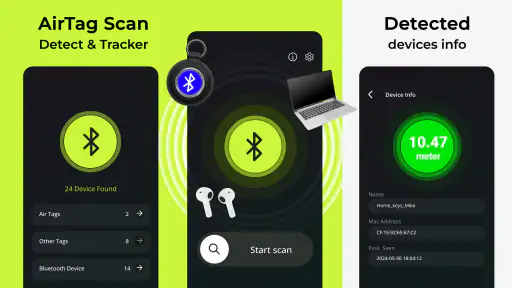
- Quickly detects nearby Bluetooth trackers and AirTags.
- Simple interface makes scanning easy for first-time users.
- Useful for checking unfamiliar trackers in your surroundings.
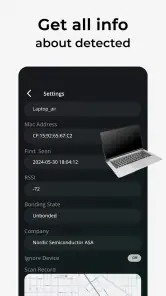
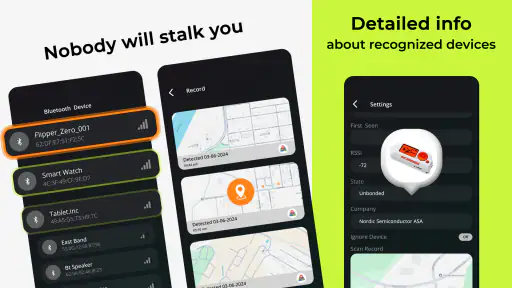
- Provides device details to help identify detected trackers.
- Lightweight app with minimal storage requirements.
Cons
- Bluetooth scanning may be less accurate through walls or obstacles.
- Some features may require in-app purchases or subscriptions.
- Cannot physically disable or remove a detected tracker.
- Results can vary depending on phone hardware and permissions.
- Frequent scans may increase battery consumption.

- Category
- Tools
- Version
- 7.0.2











