AI Photo Studio & Hair Styler
- 807.00
- 3.5
- Installs
- 1.00M
- Price
- Free
Screenshots
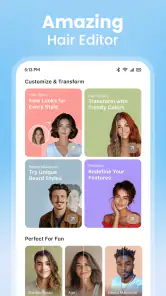
Analysis by Reviewed
I approached AI Photo Studio & Hair Styler as a quick creative photography tool rather than a full replacement for a professional editor. Its appeal is immediate: take or choose a portrait, experiment with an AI dance effect, create a stadium-style video, or test a haircut idea against your face shape. In my experience, that makes it most interesting when I want a playful result quickly, not when I need precise retouching or a carefully controlled final image.
The app is free to install, aimed at Everyone, and comes from SPARK DYNAMICS YAZILIM HIZMETLERI LIMITED SIRKETI. It sits in the photography category, although its features reach into short-form video and appearance experimentation. The combination gives it a broader personality than a basic filter camera, but it also means the experience depends heavily on what kind of result I am trying to make.
Its average rating is 3.5 from around 5,600 ratings, with roughly 800 written reviews, and the app has passed one million installs. Those figures suggest a sizeable audience but also a mixed experience. I can understand that balance: the creative ideas are easy to grasp, while AI processing, network conditions, and the gap between an amusing preview and a convincing finished result can affect how satisfied I feel.
What the app is really like to use
A creative studio built around quick experiments
The strongest part of the app is the way it turns a familiar portrait into something more active. A conventional photo editor usually asks me to adjust brightness, crop a frame, or apply a fixed visual effect. Here, the emphasis is on transformation. The AI dance filter is designed for movement, the stadium video generator aims for a more dramatic scene, and the hair styling tools make the phone camera feel like a visual consultation space.
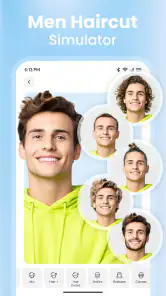
I would not treat these tools as equally useful for every person. The haircut feature has a practical angle because it can help me discuss a possible change before visiting a salon. The dance and stadium options are more social and entertainment-focused. They work best when I want to send something amusing to friends or make a short visual post without learning a complicated editing timeline.
That distinction matters. If I open the app expecting the control of a desktop editor, I am likely to find the process too automated. If I open it expecting a fast way to explore an idea, the limited control becomes part of the convenience. I choose a starting image, select the type of transformation, and judge the result. The app is about seeing possibilities quickly rather than building every detail manually.
Why the haircut feature deserves a closer look
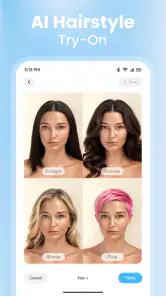
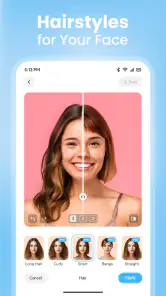
The hair styling function is more useful when I treat it as a conversation starter, not a promise of an exact preview. Face shape and hair volume can be difficult for an automated system to interpret, especially when the original portrait is angled, poorly lit, or partly covered. A clear, front-facing image gives the tool a better chance of producing something I can meaningfully compare.
My practical tip is to prepare more than one portrait before deciding on a style. A tightly cropped selfie may show facial features clearly but hide the shoulders and neck, while a wider image may provide better context but make the face smaller. Comparing outputs from different starting photos can reveal whether a suggested look is consistently interesting or simply a quirk of one image.
I would also avoid using one generated result as the sole reason to make a major haircut decision. The output can help me notice whether I like shorter sides, more volume, or a different fringe, but it cannot replace a stylist’s advice about texture, maintenance, growth patterns, or how a cut will behave day to day. That is one of the app’s most important trade-offs: it encourages exploration, but the visual result remains an approximation.
When movement makes the result more demanding
Still images are usually easier to evaluate than generated videos. With the dance filter or stadium-style video tool, I am not only judging the face; I am also watching whether the transformation remains coherent as the scene changes. Small visual oddities that I might overlook in one frame can become obvious when the clip plays repeatedly.
For better results, I would start with a well-lit portrait where the subject is easy to separate from the background. A simple background is often a sensible choice because it gives the transformation less visual clutter to interpret. I would also avoid judging the first preview too quickly. Watching the whole clip matters more than checking the opening frame, since the most distracting artifacts may appear later in the movement.
This is where the app differs from ordinary social filters. A standard filter often applies a predictable overlay directly to the camera feed. These AI-focused tools are more ambitious, but ambition introduces inconsistency. One image may look playful and convincing, while another with a similar pose may feel less natural. I see that unpredictability as part of the fun, but not as a reason to rely on every output.
Connectivity changes the rhythm of the experience
The app’s most important practical limitation is that AI-style creation can feel tied to the quality of the current connection. I would plan to use it when the phone has a stable network path, especially for video generation or any process that takes longer than a simple local adjustment. A weak connection can turn a quick experiment into a waiting exercise, and that changes the app from spontaneous entertainment into something I need to schedule around.
This matters in ordinary situations. Imagine I am sitting with friends and want to make a humorous stadium clip from a group portrait. The idea is immediate, but the result may not be. If processing takes time or a request needs to be tried again, the conversation can move on before the video is ready. I would therefore create the source image first, choose the effect only when I am ready, and avoid starting several experiments at once.
On a reliable connection, the network element is easy to accept because it supports the app’s more ambitious transformations. On an unstable connection, the same design becomes friction. I would not assume that every creative step is available without communication, so I would avoid depending on the app for a presentation, a time-sensitive post, or an activity where I cannot afford to wait.
Using it in real mobile situations
AI Photo Studio & Hair Styler makes the most sense on a phone because the typical workflow begins with a portrait already stored in the camera roll. I can test a hairstyle while shopping for clothes, create a playful clip during a gathering, or compare several visual ideas while travelling. The screen is large enough for casual decisions, and the process does not demand the long setup associated with desktop editing.
There is a difference between using it at home and using it in public, though. At home, I can take several images, review them carefully, and retry a result. In a café or on public transport, I am more likely to choose the first usable portrait and accept a rougher outcome. The app rewards a little preparation, so the fastest mobile workflow is not always the one with the fewest taps; it is the one that begins with a suitable image.
For a haircut discussion, I would save a small set of outputs rather than showing only one. A stylist can respond more usefully to a comparison between two or three directions than to a single artificial preview. For social use, I would keep the audience in mind before generating anything involving another person’s face. A friend may enjoy appearing in a silly clip, but permission is still a sensible part of responsible sharing.
What happens when a result fails
AI tools are easier to enjoy when I have a recovery plan. If a portrait produces an awkward face, an uneven hairline, or a video that does not hold together visually, I would not immediately blame the selected style. First, I would try a different source image with clearer lighting, a more direct angle, and less obstruction around the face. Changing the input often tells me more than repeatedly pressing the same option.
If a request appears to stall, I would give the process a moment before launching several duplicates. Repeated attempts can make it harder to know which result belongs to which source image, particularly when I am experimenting quickly. I prefer a simple sequence: keep the original portrait, try one transformation, inspect the result, then change one variable at a time.
For video, I would preserve the original still image separately before experimenting. That gives me a clean starting point if a generated clip is disappointing. It also lets me crop or improve the source in another editor before returning to the AI tool. This two-step workflow is less exciting than pressing a button immediately, but it is more efficient when the first input is not ideal.
There is also a psychological recovery step. A failed result is not necessarily evidence that the app is useless; it may show that a particular effect is sensitive to pose, framing, or image quality. At the same time, I would not keep retrying indefinitely. If several clean portraits produce results I would never share, a conventional filter or manual editor is probably the better route for that project.
Being careful with personal images
Because the app works with portraits, I would use it thoughtfully with images that reveal personal information. I prefer starting with a simple photo that does not include documents, addresses, workplace screens, or other people who have not agreed to participate. This is especially important when I am experimenting in a hurry and selecting images directly from a busy camera roll.
I would also separate experimentation from sensitive photography. A casual selfie is one thing; an image connected to identification, private family circumstances, or confidential work is another. The more personal the image, the more cautious I would be about sending it into any AI creation workflow. That is not a criticism aimed only at this app; it is a sensible habit for any service that transforms photographs.
After creating something, I would review where the result is being shared rather than treating the generated file as harmless by default. A funny dance clip can still expose someone’s face, and a hairstyle preview can reveal more of a person’s appearance than they intended to publish. Keeping the audience narrow when the image is experimental is a practical way to stay in control.
Storage is another reason to be selective. Video experiments can quickly become clutter, especially when I generate multiple versions of the same idea. I would keep the original and the best final result, then remove failed attempts from the phone when I no longer need them. That makes later browsing easier and prevents a temporary experiment from becoming a permanent collection of near-duplicates.
Free access and the cost of going further
The app is free, which makes trying its core concept relatively approachable. However, in-app purchases range from $7.99 to $99.99 per item. That is a wide span, so I would pay close attention to the purchase screen and the exact value attached to any option before confirming it. A free download does not mean every creative path will remain free.
My advice is to test the app with a small, realistic goal before spending money. If I only want to see whether a hairstyle direction suits me, I should first decide whether the available free experience answers that question. If I am making several videos for regular social posting, I should consider how often I will use the feature rather than buying impulsively after one entertaining preview.
This pricing structure also affects who should skip the app. Someone who wants a completely predictable, one-time editing tool may prefer a conventional photo editor with clearly defined controls. Someone who enjoys trying AI transformations and accepts that some attempts will be less useful may find the free entry point worthwhile, provided the purchase choices are read carefully.
How it compares with familiar photography alternatives
Compared with a standard filter app, this one is more focused on changing the situation around a portrait rather than simply changing its color or texture. That makes it more memorable for playful content, but less suitable when I need subtle correction. For removing a blemish, balancing exposure, straightening a frame, or making a natural crop, a traditional editor is usually faster and more dependable.
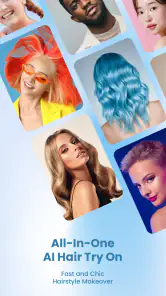
Compared with a dedicated hairstyle simulator, the hair feature benefits from being part of a wider creative package. I can move from appearance testing to a dance or stadium experiment without switching apps. The trade-off is specialization: a tool built only for hair may offer a more detailed catalogue or more focused comparison workflow, while this app spreads its attention across several AI experiences.
Compared with a manual video editor, the stadium generator is attractive because it removes much of the timeline work. I do not need to arrange every transition to get an imaginative starting point. But manual editing remains better when timing, music, captions, clip order, and brand consistency matter. I see the generated video as a quick concept or shareable novelty, not as a substitute for deliberate production.
Who will enjoy it, and who will not
I would recommend the app to someone who likes experimenting with selfies, wants a visual aid for discussing a haircut, or regularly makes casual short-form content. It is especially appealing when the goal is to produce a reaction: surprise, amusement, or a quick “what would I look like with this?” moment. The app’s variety gives me more reasons to return than a single-purpose filter.
I would be more cautious about recommending it to a photographer who needs exact control, a creator working to a strict deadline, or anyone who dislikes waiting for AI processing. It is also not my first choice for a realistic beauty preview. The more important the decision and the more natural the result needs to look, the more I would combine its output with a conventional editor or professional advice.
The minimum operating system is Android 9, and the current version is 2.0.0.2. For a person with a compatible phone, the bigger question is not whether the app sounds interesting but whether the phone’s camera roll contains suitable portraits and whether the network environment supports patient experimentation. Those two factors shape the experience more than the number of available ideas.
My final view on the connected experience
After looking at the app as a daily mobile tool, I see its main strength in fast visual exploration. It gives me a way to move from an ordinary portrait to a hairstyle concept, a dance transformation, or a stadium-themed video without learning a complex editing system. That immediacy is genuinely useful when I want an idea rather than a polished production.
The limitations are equally clear. Results can vary with the source image, generated video needs closer inspection than a still filter, and network-dependent moments can interrupt the spontaneity. The broad range of purchase options also means I would approach upgrades carefully. I would keep the original photos, avoid sensitive images, and use a stable connection whenever I want a smoother session.
My recommendation is to treat this as a playful AI photography studio, not an all-purpose editor or a definitive style consultant. If that expectation fits, the app offers enough variety to justify a test, especially because the download is free. If I need precision, guaranteed timing, or complete control over every visual detail, I would choose a conventional photo or video editor instead. For casual mobile creativity, though, it is an enjoyable option when I am willing to accept a little unpredictability.
Pros
- Creates realistic hairstyle previews before making a salon appointment.
- Offers quick AI transformations with minimal editing experience required.
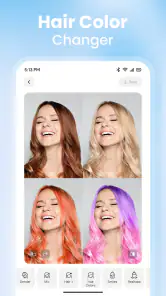
- Useful for comparing hair colors
- cuts
- and styling ideas in one place.
- Can inspire personalized looks for different face shapes and occasions.
- Simple interface makes experimenting with styles accessible to most users.
Cons
- Results may look less accurate with poor lighting or low-quality photos.
- Some hairstyles may not match real hair texture
- length
- or volume.
- Advanced styles and features may require a subscription or in-app purchase.
- AI-generated images can occasionally produce distorted facial or hair details.
- Uploading personal photos may raise privacy concerns for some users.
- Category
- Photography
- Version
- 2.0.0.2











