AI Photo Editor - AI Morph
- 860.00
- 4.2
- Installs
- 10.00M
- Price
- Free

Screenshots







Analysis by Reviewed
Have you ever wished your photos could transform into something completely different, like turning a selfie into a renaissance painting or morphing your pet into a comic book hero? Well, you're in luck because AI Photo Editor - AI Morph does just that! This app has taken the photo editing world by storm, and let me tell you, it's like having a mini Photoshop in your pocket, but way more fun and user-friendly.
Unleashing Your Creativity
First off, let's talk about the main event—transformations! AI Photo Editor - AI Morph excels at turning ordinary photos into extraordinary works of art. With just a few taps, you can morph your images into a variety of styles. Whether you're into the classic look of a Van Gogh or the vibrant pop of a comic strip, this app has got you covered. The AI does all the heavy lifting, so even if you're not tech-savvy, you'll feel like a pro.
Features That Wow
One of the standout features is the app's vast array of filters. I mean, who doesn't love a good filter, right? From vintage vibes to futuristic feels, the selection is vast and varied. But what sets this app apart is the ability to customize these filters. Want to tweak the saturation or contrast? Go for it! The app gives you full control to make each photo uniquely yours.
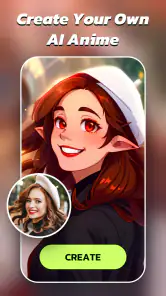
Another cool feature is the face morphing tool. This is where you can really let your imagination run wild. Ever wondered what you'd look like as a cartoon character or a fantasy creature? Now you can find out! It's not just fun for personal use; it's a great tool for content creators looking to spice up their social media feeds.
User Experience
As for usability, the app is incredibly intuitive. The interface is sleek and straightforward, making it easy to navigate even for beginners. The app loads quickly, and the transformations are processed in a matter of seconds, thanks to some nifty AI wizardry. Plus, the developers are constantly updating the app to add new features and improve performance, which is always a bonus in my book.
One thing I really appreciate is the app's built-in tutorial for newcomers. It walks you through the basics and even gives you some tips and tricks to get the most out of the app. It's like having a little guide by your side, ensuring you're making the most of every feature.
Final Thoughts
All in all, AI Photo Editor - AI Morph is a blast to use. It's perfect for anyone looking to add a creative touch to their photos or just have some fun with their images. Whether you're a casual user or a social media influencer, this app offers something for everyone. So, if you're ready to transform your photos and unleash your inner artist, give this app a download. Trust me, you won't be disappointed!
Pros
- Intuitive user interface with easy navigation.
- Wide range of AI filters for creativity.
- Fast processing of high-quality images.
- Supports multiple image formats.
- No watermark on output images.
Cons
- Requires a stable internet connection.
- Occasional lag on older devices.
- Limited free version features.
- Some advanced tools need a subscription.
- Large app size may consume storage.

- Category
- Photography
- Version
- 1.22.0











