HD Video Player All Format
- 335.00
- 4.4
- Installs
- 10.00M
- Price
- Free

Screenshots
Analysis by Reviewed
I usually reach for a separate video player when a file won’t open cleanly in the phone’s default gallery or when I want more control over subtitles and playback. HD Video Player All Format is aimed at that everyday problem: it’s a free video player from Daily Joy Studio, with support for high-resolution playback and a broad range of formats. I’d treat it as a practical local-media player, rather than an all-in-one streaming service.
When a separate player earns its place
The app is most useful when your videos come from several places: a clip saved from a chat, a personal recording, or a film file you have already downloaded. Instead of expecting the gallery to handle every file equally well, you can try opening them in a player built around watching videos. That distinction matters most when you need subtitles or want to change playback settings without editing the original file.
I would not install it just because I occasionally watch a short clip. The built-in player may already be enough for that, and streaming apps remain the simpler choice when you want to browse a catalogue rather than manage files on your phone. But if you often keep videos locally, a dedicated player can make the handoff from saved file to viewing session less fussy.
From finding a file to pressing play
My first useful test would be a mixed folder: a downloaded film, a short clip someone sent me, and a video with subtitles. A general gallery app can be convenient for quick viewing, but it may offer fewer playback controls or stumble over less common files. A dedicated player is worth trying when I want one place to open those clips and adjust how they look or sound.
The workflow is straightforward in principle: locate a video in the library, open it, then make any viewing adjustments that suit the moment. For a subtitle-heavy film, I’d check the subtitle option before settling in; for a dim room, I’d adjust the picture rather than repeatedly changing the phone’s overall display. These small choices make a player more useful than simply tapping a file in a gallery.
For a practical first run, I’d choose a short video whose format I already know, then try one that has caused trouble in the default gallery. That gives you a useful comparison without making your first test a long film or an important presentation. If both play as expected, try the subtitle control on a file that needs captions. This simple sequence helps separate a file problem from a setting you may need to adjust.
It is also worth thinking about the viewing situation before you start. At home, you can afford to pause and experiment; on a commute, you probably want the file ready and the captions checked before leaving. I’d use the app’s controls during a low-stakes viewing session first, so I know where to look when I need to change something quickly later.
More From Our News Desk

Weather by Xiaomi Review: Clear at a Glance, Less Clear Up Close

X Under Pressure: Can It Recover When Posting Goes Wrong?

Clash of Clans Is Won Between the Battles

Android Auto Makes the Case for Quieter Car Software

MobiOffice: Transforming Mobile Productivity with Seamless Integration

EA SPORTS FC™ Mobile Soccer: Redefining Mobile Sports Gaming
Everyday viewing, with a few practical trade-offs
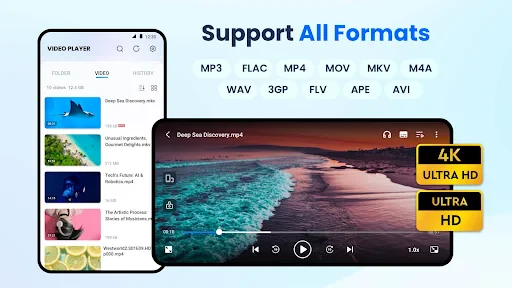
A realistic use case is watching a downloaded episode during a commute or playing a family video at home. The app supports subtitles, which can help when dialogue is hard to hear or the video is in another language. It also advertises 4K and 1080p playback, though the experience still depends on the video file and the phone; a high-resolution label alone cannot guarantee smooth playback on every device.
Playback speed can be handy for reviewing a long clip or catching up on a talk, while brightness and volume controls can reduce the need to leave the player mid-video. I’d use those adjustments selectively: changing speed may make speech less natural, and a brighter picture can be uncomfortable in a dark room. The best setting is the one that fits the content, not simply the most extreme one.
One useful habit is to check a video’s captions and sound before you settle in somewhere noisy. A subtitle option can make dialogue easier to follow, but it does not remove the need to choose the right subtitle track or confirm that captions appear. For a film with separate subtitle files, I’d keep the video and subtitle together and test them at home. That small bit of preparation is more useful than finding out halfway through that the text is missing or out of sync.
For a long talk or lecture, I’d use speed controls as a review aid rather than assuming faster is always better. A modest change can help when revisiting familiar material, but names, technical terms, and unfamiliar accents are easier to miss when speech is rushed. If the aim is to enjoy a film, normal speed is usually the better choice; if the aim is to locate a particular section in a recording, a quicker pace may save time.
Where it fits among video apps
Compared with a phone’s built-in gallery player, this app is the more relevant option when format support, subtitle handling, or playback controls matter. Compared with a streaming service, it serves a different purpose: it plays video files you already have rather than providing a catalogue to browse. If most of your viewing happens through streaming apps, installing another player may not change much; if you regularly keep videos on your device, it can be a useful alternative.
There are sensible limits to that recommendation. A file can still be awkward because of its own encoding, and high-resolution playback can be demanding on an older or less capable phone. I’d test a representative clip before relying on it for a trip or presentation. It is also not a video-editing tool: despite its broad media focus, its role is playback, not cutting clips or assembling a finished project.
The app is free to install, with optional in-app purchases listed between about seven and ten dollars per item. Its age rating is Everyone, and it has reached more than ten million installs, with an average rating of 4.4 from around 38,000 ratings. Those figures suggest a widely used player, but I’d still judge it by whether it handles the files I actually watch. The current version is 1.6.8, and it runs on Android 6.0 or later.
That makes it an easy app to try if you want a local-file player without paying upfront, but I would not treat optional purchases as necessary for basic suitability unless a specific paid feature matters to you. Start by checking the playback tasks you actually have: opening a file, following subtitles, and making a simple viewing adjustment. If those work for your usual videos, you have a clearer reason to keep it than a feature list alone can provide.
For a family video shared at home, I’d open the saved clip before everyone gathers, check that the picture and audio behave as expected, and then pass the phone over. That may sound cautious, but it avoids turning a casual moment into a troubleshooting session. If you often share a phone for viewing, the larger practical question is whether the controls are easy for the next person to understand; a quick test is a better guide than assuming every player feels familiar.
Preparing files and avoiding avoidable snags
Subtitles are another point worth checking in your own workflow. If a video has a separate subtitle file, I’d confirm that the player can pair it as expected before starting a long film; subtitle formats and file names can affect whether the right text appears. When captions do not show, checking the subtitle control and keeping the video and subtitle files together are sensible first steps, rather than assuming the video itself is broken.
For someone who watches clips from different sources, the main advantage is avoiding a conversion step just to try a file. That does not mean every format or every file will behave identically, so I would keep the original file untouched and use a short sample when testing an unfamiliar download. This is especially useful before travelling, when discovering a compatibility issue after going offline is much more annoying than checking at home.
A sensible travel routine is to open the video while you still have time and confirm that it starts, that the sound is clear, and that any captions you need are visible. If a file fails, you can try another player or replace the file before you depend on it. Keeping the original untouched is helpful because it leaves you free to test without risking the only copy of a video you care about.
When a file does not behave as expected, I would troubleshoot in a small order: reopen it, check the subtitle selection if captions are the issue, and try a short portion of another video. If the problem follows only one file, the file itself may be the sticking point; if several videos behave the same way, the phone or the player may be struggling with the task. This is not a guarantee of a fix, but it keeps you from changing unrelated settings at random.
First Impressions and User Interface
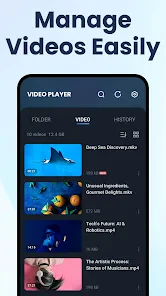
Upon launching the app, I was immediately greeted by a clean and intuitive user interface. The design is minimalistic yet functional, allowing users to easily navigate through their media library. You know that feeling when you open an app and everything just makes sense? That's exactly what happens here. The developers clearly put a lot of thought into ensuring that the app is user-friendly.
Features Galore
One of the standout aspects of this app is its versatility. It supports a wide range of video formats, so you won’t have to worry about converting files just to watch them. Whether it's MP4, AVI, or MKV, this player handles them all. I found this particularly useful when I wanted to play a variety of videos without constantly fiddling with settings.
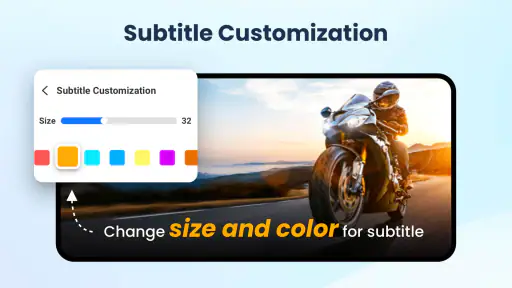
Another feature worth mentioning is the app’s ability to play high-definition content without a hitch. I tested it with several HD videos, and the playback was smooth as butter. No lagging, no buffering—just pure, uninterrupted video bliss. The app even allows for subtitle integration, which is a huge plus for foreign films or hearing-impaired users.
I would still avoid reading those format examples as a promise that every file carrying the same extension will play identically. A video’s encoding can make a difference, and a phone’s capabilities matter too. If you are choosing a player for one particular file, try that file rather than relying on its name or resolution alone. That is the fairest way to decide whether this app solves your specific problem.
Customization and Extra Perks
Customization is another area where this app shines. You can tweak the playback settings to your heart's content. Adjusting brightness, volume, and playback speed is a breeze. There's even a night mode feature to ease eye strain during those late-night movie marathons. It’s these little touches that make the app feel like it’s tailored just for you.
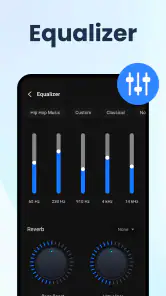
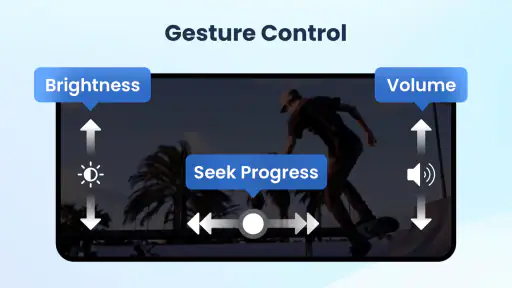
The app also comes with a built-in equalizer, which audiophiles will definitely appreciate. It allows you to fine-tune the audio output to match your preferences, enhancing your overall viewing experience. Plus, the gesture control feature is a nice touch for those who prefer swiping over tapping.
My advice is to make one adjustment at a time. If a clip sounds too quiet, try the volume control before changing the equalizer; if the image feels harsh in a dark room, adjust the picture rather than changing several phone-wide display settings. This keeps the experience predictable and makes it easier to return to your normal viewing setup afterward.
Gesture controls can be convenient when you are holding the phone with one hand, but they may take a little practice if you are used to tapping visible buttons. I would test them on a short clip before using them in the middle of a film. If gestures feel less reliable to you, there is no need to force the habit; a control is useful only when it makes playback easier.
Who will get the most from it
I’d recommend giving the player a try if you keep videos on your device, regularly switch between different kinds of files, or want subtitle and playback adjustments in one place. It is particularly suited to someone who wants to test a video directly instead of first converting it or moving it into a streaming library. Its appeal is practical: it helps with the viewing part of a local-media routine.
I’d skip it if almost everything you watch comes from streaming services and your current apps already do the job. It is also not the right choice if your main goal is editing, organizing a large media collection, or creating a polished video. Those tasks call for tools built around editing or catalog management, while this app is meant to open and play files.
Final Thoughts
After spending some quality time with HD Video Player All Format, I can confidently say that it's a must-have for anyone who frequently watches videos on their mobile device. Its wide range of supported formats, combined with its superior playback quality, make it stand out in a crowded market. While there are many video players available, this one truly offers a comprehensive package that caters to all your viewing needs.
So, if you're on the lookout for a reliable and feature-rich video player, give this app a try. It just might become your go-to app for all things video. Trust me, once you try it, you'll wonder how you ever watched videos without it!
HD Video Player All Format Frequently Asked Questions
Who develops HD Video Player All Format, and what kind of app is it?
HD Video Player All Format is made by Daily Joy Studio and is designed for playing video files. It sits in the video player and editor category, with a focus on playback rather than video creation. Its stated features include support for multiple video formats, high-definition video, and subtitles, making it an option to consider if you want a dedicated app for watching videos on your device.
What is the app’s age rating, and is it intended for general use?
The app has an Everyone content rating, so it is presented as suitable for a broad audience. That rating may help families decide whether it fits their needs, though it does not replace checking how any app works on your own device. HD Video Player All Format is primarily a video playback tool, with listed support for different formats, high-definition video, and subtitles.
Is HD Video Player All Format suitable for beginners?
Yes. HD Video Player All Format is a video player, so its main purpose is straightforward: choose a video and watch it. Its support for multiple video formats and subtitles can also make it useful when your files come from different sources. The app is free to download, and it is rated for Everyone, making it a general-purpose option for everyday viewing.
Is HD Video Player All Format free to download?
HD Video Player All Format is free to download, so you can try its video playback features without paying an upfront price. The app also offers in-app purchases, with items priced from $6.99 to $9.99. Those purchases are separate from the initial download, so consider whether you need any paid extras before making a purchase. The app is developed by Daily Joy Studio.
What video formats does HD Video Player All Format support?
HD Video Player All Format is designed to support an extensive range of video formats, including MP4, AVI, MKV, FLV, WMV, MOV, and more. This ensures that users can play almost any video file they have without needing to convert it to a different format, making it incredibly versatile and user-friendly.
Pros
- Plays all video formats seamlessly.
- User-friendly interface.
- High-definition video support.
- Subtitle customization available.
- No intrusive ads.
Cons
- Some features require premium version.
- Occasional lag on older devices.
- Limited audio format support.
- No cloud sync option.
- Large app size.
- Category
- Video Players & Editors
- Version
- 1.6.8