AI Mirror: Hugs Video & Photo
- 6.13K
- 4.5
- Installs
- 10.00M
- Price
- Free

Screenshots

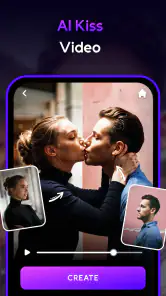
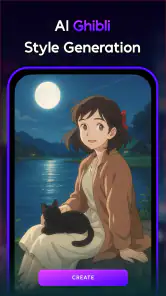
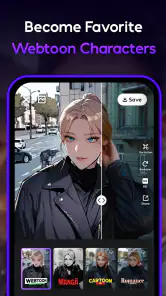
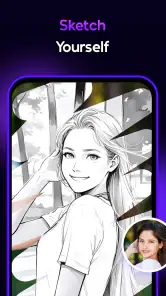
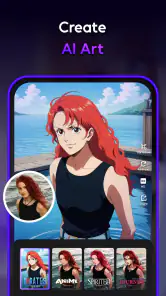
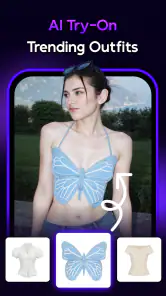
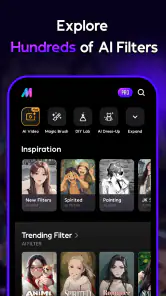
Analysis by Reviewed
I look at an AI photo app differently from a traditional editor: I want to know whether it gives me an interesting result quickly, and whether that result is useful enough to keep or share. AI Mirror: Hugs Video & Photo is a photography app from POLYVERSE INC. that leans into AI-made visual effects and playful transformations. Its appeal is strongest when I want to experiment rather than make careful, pixel-by-pixel adjustments.
What the free starting point does—and doesn’t—tell you
The app is free to download, with in-app purchases listed from $0.99 to $59.99 per item. That range is broad, so I would treat the free access as a chance to explore before deciding whether a paid option is worthwhile. I wouldn’t assume every effect or creation is included at no cost, and I’d check the price shown for a particular purchase before confirming it.
That distinction matters because AI editing apps often invite you to try several looks before you find one you actually want to save. If you only need an occasional novelty image or a quick creative experiment, free access may be enough for your purpose. If you expect to use paid tools regularly, judge the value by the specific options you reach for, not by the number of effects you can browse.
Where the creative value comes from
The most appealing idea here is the short route from an ordinary photo to a more stylized image or video. Rather than building an edit from layers and fine adjustments, I can approach the app as a place to try an AI-driven look and see whether it suits the subject. That makes it better for playful social posts, personal experiments, and lighthearted gifts than for work requiring a consistent, carefully controlled visual identity.
The store’s positioning points toward anime-inspired looks, character transformations, and AI dance videos. Those themes give the app a more specific personality than a basic camera filter pack. They are also a reminder to choose a source image with the result in mind: a clear, well-lit face is usually a more sensible starting point for a character-style portrait than a distant subject, a busy group photo, or a face partly hidden by hair or accessories.
One useful habit is to keep an untouched copy of the original photo before experimenting. A dramatic AI treatment can be fun, but it may change the mood or details in a way that makes the image less suitable for its original purpose. Keeping both versions lets me use the stylized result for a casual post while preserving the natural image for a profile, family album, or practical use.
How I would fit it into an ordinary day
Imagine taking a quick portrait before meeting friends and wanting something more amusing than the usual filter. I could try a character-like transformation, compare it with the original, and decide whether the result feels like me or simply looks entertaining. If I wanted a moving post instead, the dance-video concept offers a different kind of experiment. The point is not to make every picture look polished; it is to have a low-effort way to make one moment feel more playful.
More From Our News Desk

Weather by Xiaomi Review: Clear at a Glance, Less Clear Up Close

X Under Pressure: Can It Recover When Posting Goes Wrong?

Clash of Clans Is Won Between the Battles

Android Auto Makes the Case for Quieter Car Software

MobiOffice: Transforming Mobile Productivity with Seamless Integration

EA SPORTS FC™ Mobile Soccer: Redefining Mobile Sports Gaming
For a smoother session, I’d start with one image rather than importing a batch and hoping the same treatment works across all of them. AI effects can be highly dependent on the framing and subject, so checking a single result first helps avoid spending time on a set that does not fit the look. I’d also decide in advance whether I want something flattering, funny, or deliberately unreal. That small choice makes it easier to judge an output instead of endlessly tapping through styles.
Where it sits among photo-editing alternatives
Compared with a conventional photo editor, this app is aimed less at precise control over exposure, color, cropping, and retouching, and more at AI-led transformations. If I need to correct a shadow, match a product image to a brand palette, or make a batch of photos consistent, a manual editor is the better tool. If I want an unexpected character look or a playful motion effect without constructing it by hand, the AI-first approach is more appealing.
It also differs from a standard social-media filter. A simple filter usually changes the tone or adds a surface effect while leaving the basic image largely intact; AI transformations can produce a more substantial change in how a person or scene appears. That greater novelty comes with a trade-off: the result may feel less faithful to the source. I would view it as creative interpretation, not as a reliable way to preserve every detail.
For anyone comparing several AI apps, I’d focus on the type of output they actually want rather than assuming that all tools with “AI” in the name do the same job. This one’s identity is tied to stylized imagery and animated, entertainment-oriented results. Someone looking primarily for detailed retouching or a straightforward library of subtle camera filters may be happier elsewhere.
Practical limitations worth weighing
Highly stylized edits can be inconsistent from one image to another. A portrait that works well may have clean lighting and an unobstructed face, while a photo taken in a dim room or at an awkward angle may give the effect less to work with. I’d try a second source image before deciding that a particular style is unsuitable, but I would not expect every transformation to preserve the exact expression, proportions, or small details that matter in a realistic portrait.
There is also a difference between making a result and knowing how it will be used. A funny transformation can be perfect for a private chat and wrong for a professional headshot. Before sharing, I’d look closely at the face, background, and any details the effect has changed. That review is especially sensible when the image includes friends or family, because a playful result may not be the way they want to appear publicly.
AI processing can also make a quick edit feel less predictable than a normal slider adjustment. With a manual tool, I can usually see what changing brightness or contrast will do. With a transformation, the output may be more of a fresh interpretation. That is part of the fun, but it means I’d avoid relying on it when a client, deadline, or specific visual brief requires repeatable results.
Who is likely to get the most out of it?
I’d recommend trying it if you enjoy turning selfies and casual photos into imaginative versions of themselves, or if you like making short, playful visual content without learning a complex editing workflow. It should also suit people who enjoy exploring trends and want a quick way to test a new look before deciding whether it is worth sharing. The app has a Mature 17+ content rating, so it is not aimed at younger children.
I’d be more cautious if you mainly need a dependable tool for natural-looking corrections, precise retouching, or professional image delivery. It is also not an obvious fit if you dislike AI changing the appearance of a photo or prefer to control every adjustment yourself. In those cases, a conventional editor gives clearer, more direct control and may be a better use of your time.
For a first try, I’d choose a well-lit, close-up image with one clear subject, test an effect that matches the mood I want, and compare the result with the original before saving or sharing. If a paid option appears during that process, I’d pause to check its displayed cost and whether it unlocks something I genuinely expect to use. That approach keeps experimentation fun without turning a casual download into an impulse purchase.
First Impressions
Upon launching AI Mirror, I was greeted with a sleek and user-friendly interface. It's the kind of app that doesn't require a manual to navigate, which is always a plus in my book. The app promises to deliver some cool effects and edits, and I was eager to see if it lived up to the hype.
Features That Stand Out
One of the first features I tried was the AI-powered photo editing tool. It’s like having a mini Photoshop right in your pocket. The app offers an array of filters and effects that can make your photos look professional with just a few taps. I especially loved the "magic wand" feature that automatically enhances images. It's perfect for those of us who want great-looking photos without spending hours editing.
Video editing is another area where AI Mirror shines. The app provides several templates that make it easy to create stunning videos. Whether you're looking to make a quick montage or a detailed video project, this app has got you covered. The AI does a lot of the heavy lifting, allowing you to focus on your creative vision.
AI Integration
The real magic of AI Mirror lies in its AI capabilities. The app intelligently recognizes different elements in your photos and videos, suggesting edits that enhance the overall quality. It's like having a creative assistant who's always on call. Plus, it learns from your editing style, making future edits even more tailored to your preferences.
Performance and Usability
Performance-wise, the app is a powerhouse. I experienced no lags or crashes, even when working on high-resolution files. The developers have clearly put a lot of thought into making sure the app runs smoothly, which is essential for any creative tool.
Usability is another strong point. The app is intuitive, with all the tools and features neatly organized. Even if you're not tech-savvy, you'll find yourself creating impressive edits in no time.
Final Thoughts
So, is AI Mirror: Hugs Video & Photo worth a try? Absolutely! It's a delightful blend of technology and creativity that empowers users to create stunning visuals without the steep learning curve. Whether you're a seasoned editor or a newbie, this app offers something for everyone. It’s not just another app on my phone; it’s a creative companion.
If you're looking for an app that delivers on its promises and more, I highly recommend giving AI Mirror a whirl. It's a fun, easy, and powerful tool that will undoubtedly add some sparkle to your digital creations. Happy editing!
AI Mirror: Hugs Video & Photo Frequently Asked Questions
Can AI Mirror: Hugs Video & Photo create AI dance videos from my photos?
AI Mirror’s store summary highlights AI dance videos alongside anime AI filters, cartoon characters, and photo editing. This makes dance-style video creation one of the app’s advertised creative uses. If that is the main feature you want, consider whether its broader mix of photo and video tools suits your needs, and review any purchase details in the app before using paid features.
Can I use AI Mirror: Hugs Video & Photo to make anime or cartoon-style edits?
Anime AI filters and cartoon characters are among the creative tools highlighted for AI Mirror: Hugs Video & Photo. The app is intended for photo and video editing, so these styles may appeal if you want to give images a more animated look. Browse the available options in the app and consider which features are accessible for free before deciding whether it is right for you.
Is AI Mirror: Hugs Video & Photo suitable for users under 17?
AI Mirror: Hugs Video & Photo is rated Mature 17+, so it may not be appropriate for younger users. Parents and guardians should review that age guidance and consider whether the app’s photo and video editing content is suitable before allowing a download. The app is a photography tool focused on AI filters, dance videos, cartoon characters, and photo editing.
What is AI Mirror: Hugs Video & Photo and what does it offer?
AI Mirror: Hugs Video & Photo is an innovative application that uses artificial intelligence to enhance your video and photo editing experience. It offers a range of features including advanced filters, AI-driven photo enhancements, and creative tools for both photos and videos. Users can expect a seamless editing experience with intuitive controls and professional-quality results, making it a popular choice for both amateur and professional content creators. Its store summary highlights anime AI filters, AI dance videos, cartoon characters, and photo editing.
Is AI Mirror: Hugs Video & Photo free to use?
AI Mirror: Hugs Video & Photo is free to download and offers a way to explore its editing features without an upfront price. Some tools or content may involve in-app purchases, with items ranging from $0.99 to $59.99. Check the purchase details shown in the app before paying, and make sure any transaction fits your budget. Availability of particular features may depend on the option you choose.
Pros
- Intuitive interface for easy navigation.
- High-quality video and photo output.
- Offers creative editing features.
- Frequent updates with new tools.
- Compatible with various file formats.
Cons
- Requires a stable internet connection.
- In-app purchases can be pricey.
- May drain battery quickly.
- Limited free version features.
- Occasional app crashes reported.
- Category
- Photography
- Version
- 6.8.5












