AI Cleaner: Clean up Storage
- 425.00
- 4.4
- Installs
- 5.00M
- Price
- Free

Screenshots



Analysis by Reviewed
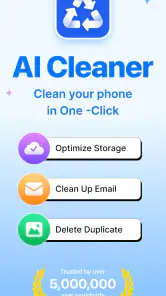
I approached AI Cleaner: Clean up Storage as a practical maintenance tool rather than a magic speed-up button. Its job is straightforward: help me find disposable clutter, duplicate photos, and unusually large files so I can recover space without hunting through every folder by hand. That makes it most useful when a phone is constantly warning about low storage, a photo library has become difficult to manage, or downloaded videos and documents are quietly taking over.
The app sits in the Tools category and is developed by iKame Applications - Begamob Global. It is free to install, with optional in-app purchases priced from $6.99 to $49.99 per item. The age rating is Everyone, which fits the simple storage-management purpose. I would still treat every suggested deletion as a decision rather than an automatic command: freeing space is helpful, but removing the wrong image or document is not worth saving a few gigabytes.
How AI Cleaner feels in everyday use
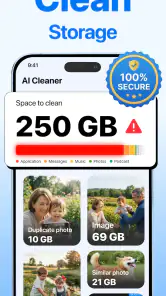
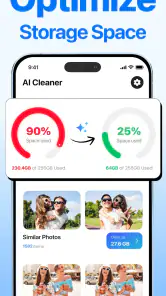
The first thing I like about this kind of cleaner is the way it changes the storage problem from a vague warning into a set of visible choices. Instead of opening file managers, gallery folders, and download locations one by one, I can start with the areas most likely to contain waste. The focus on junk, duplicate photos, and large files gives the app a sensible structure for a quick cleanup session.
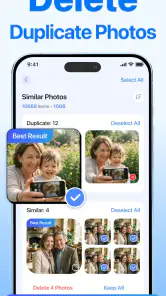
In a realistic situation, imagine preparing for a trip while the phone keeps reporting that there is not enough room for new photos. I would begin with duplicate images, because messaging apps and editing workflows often leave several versions of the same shot. Then I would inspect large files, where an old video or an offline download can matter far more than dozens of small items. Only after that would I review general junk. That order reduces the chance of deleting something important just because it appears disposable.
The “AI” label suggests that the app is intended to make sorting more convenient, but I would not interpret it as permission to approve everything blindly. Similar-looking photos can include the original, a cropped copy, and a version with a different resolution. A useful cleaner should narrow the search; I still want to make the final choice. That human review is especially important for family pictures, receipts, scans, and work files that may look repetitive but serve different purposes.
For a quick maintenance routine, the app’s appeal is clear. I can use it when storage becomes tight instead of waiting until the phone is nearly unusable. I also see value in running a careful review after moving photos to another location, cleaning up a long chat history, or finishing a project with many exported files. The best result is not simply the largest number of deleted items; it is a smaller, more understandable collection of files.
The current release and what it tells me
The current version is 1.2.5, and the app was released on March 25, 2026. That places it in an early stage of its product life, so I see the present release as a foundation rather than a finished storage-management ecosystem. It already has a clear purpose, but I would judge future updates by how carefully they improve review accuracy and user control, not just by whether they add more aggressive cleanup buttons.
More From Our News Desk

Weather by Xiaomi Review: Clear at a Glance, Less Clear Up Close

X Under Pressure: Can It Recover When Posting Goes Wrong?

Clash of Clans Is Won Between the Battles

Android Auto Makes the Case for Quieter Car Software

MobiOffice: Transforming Mobile Productivity with Seamless Integration

EA SPORTS FC™ Mobile Soccer: Redefining Mobile Sports Gaming
Its public reception is encouraging: the app has a 4.4 average from around thirty-eight thousand ratings, alongside over four hundred written reviews and more than five million installs. Those figures show that the concept has reached a substantial audience, but they do not remove the need for caution. Storage cleaners affect personal files, so trust comes from predictable suggestions, understandable categories, and easy recovery—not from popularity alone.
For someone deciding whether to try it today, the current release seems best suited to a focused cleanup rather than a complete replacement for the phone’s file tools. I would install it when I want a guided scan of common storage problems. I would not assume that one pass will organize every folder, identify every unnecessary file, or solve storage permanently. New photos, downloads, and cached content will continue to accumulate.
What has changed in practical terms
The confirmed product details establish a relatively focused tool: junk cleanup, duplicate-photo discovery, and large-file review are the central reasons to use it. I would avoid treating the version number as evidence of a particular new feature unless the app itself explains that change. A newer release can improve stability or refine existing screens without changing the basic workflow, and that distinction matters when setting expectations.
From a user’s perspective, the meaningful evolution to watch is whether those three cleanup areas become more precise and less tiring to review. Duplicate detection should help distinguish true repetitions from edited variations. Large-file handling should make it easy to understand why an item is large before I remove it. Junk cleanup should be conservative enough that “clean” does not become a synonym for “delete everything unfamiliar.” Those are the improvements that would make the current concept more dependable.
I also appreciate that the app’s purpose is narrower than a bundle of unrelated phone utilities. A dedicated storage workflow can be easier to understand than an application that mixes cleaning with battery claims, device boosting, security scans, and other unrelated promises. In my view, that focus is a strength, provided the app keeps explaining what it wants me to remove and why.
How existing users should approach an update
If I were already using an earlier release, I would update with a simple checklist. First, I would review any important photos and documents outside the cleaner. Next, I would perform a scan without immediately approving the suggested deletions. Finally, I would compare the categories and inspect a sample from each one. This makes it easier to notice whether the newer version has changed how results are grouped or presented.
I would also avoid conducting a major cleanup while distracted or in a hurry. A storage tool is most useful when it saves time, but the cost of a mistaken deletion can be much higher than the time saved. For duplicate photos, I would open borderline matches before selecting them. For large files, I would check whether the item is an old download, a personal recording, or something still needed. For junk, I would be especially conservative with anything whose purpose is unclear.
There is another practical trade-off: a cleaner can make storage feel manageable, but it can also encourage repeated short-term fixes. If I remove a large video and immediately download another one, the phone will eventually fill again. I would pair the app with a broader habit—moving important media elsewhere, deleting completed downloads, and avoiding multiple exported copies of the same file. The app can reveal the problem efficiently; it cannot decide my long-term storage habits for me.
Where the app still needs careful handling
The main limitation is inherent to the category. “Junk” is not equally obvious on every phone, and a duplicate is not always redundant. A screenshot may resemble a camera photo but contain useful information. Two documents may have identical names while representing different revisions. A large file may be exactly the one I need for offline access. Because of that, I would value review screens and clear context more than a promise of instant cleanup.
The free price lowers the barrier to trying the tool, but the optional purchases deserve attention before I commit to a regular workflow. Items range from $6.99 to $49.99, so I would check which functions are available without paying and whether a purchase genuinely improves my routine. Someone who only needs an occasional manual cleanup may find the free experience sufficient. Someone who wants frequent guided maintenance should compare the paid value with the storage tools already included on the phone.
I would also skip this app if my main problem is not clutter discovery. If I need a full file-management system, detailed folder control, reliable backup, or a way to transfer media between devices, a dedicated file manager or backup service may be a better match. This app’s appeal is its focused cleanup approach. It should not be judged as though it were an archive, cloud drive, or complete replacement for the operating system’s storage settings.
Another reasonable concern is privacy. A cleaner must examine file information to identify categories such as duplicates and large items, so I would read the permission prompts carefully and avoid granting access that does not seem necessary for the task. I would also inspect the app’s own explanations before starting a scan. The right approach is not to assume that every cleaner is unsafe, nor to assume that every cleaner deserves unlimited access.
How it compares with built-in tools and manual cleanup
The built-in storage screen has one major advantage: it is already part of the phone and usually understands system-level storage categories. Manual browsing can also be more precise because I choose every folder and file myself. If I only need to remove a known download or uninstall a large app, those options may be faster and involve fewer decisions.
Where this app can earn its place is in the middle ground between system settings and painstaking inspection. I may know that my storage is full without knowing whether duplicates, oversized media, or accumulated junk are responsible. A guided review can point me toward the most productive area first. That is more convenient than searching randomly, while still leaving the final approval with me.
Compared with a general file manager, the cleaner is less about navigating a hierarchy and more about surfacing likely candidates. That is useful for people who do not enjoy organizing folders, but it can feel restrictive to experienced users who want exact control over paths, naming, and file operations. Compared with a cloud-storage workflow, it is also more immediate: I can reclaim local space by reviewing what is already on the phone, but I should not confuse deletion with backup.
My preferred workflow would combine them. I would use the operating system’s storage view to understand the broad situation, use this app to locate duplicate photos and large files that deserve attention, and then use a file manager or backup destination when I need to preserve something before removing it. That division of labor plays to each tool’s strengths and avoids expecting one cleaner to solve every storage problem.
Useful workflows beyond a one-time scan
One non-obvious use is preparing for a high-volume photo day. Before a wedding, vacation, concert, or work event, I would clear obvious duplicates and review large videos so the phone starts with a sensible amount of free space. I would not delete meaningful memories simply to create room, but removing abandoned exports and repeated downloads beforehand can prevent an avoidable storage warning at the worst moment.
A second workflow is the “after editing” cleanup. Photo and video apps often produce an original, an edited copy, a compressed preview, and a final export. These files can look similar while having different purposes. I would use the duplicate-photo area to find candidates, then keep the version with the quality or format I actually need. This is more useful than deleting every visual match, because editing projects often depend on one particular copy.
A third is reviewing large files by purpose rather than by size alone. I would separate items into keep, move, and remove. A finished recording might be moved to long-term storage; an old offline film might be removed; a work presentation might stay on the phone until the meeting ends. Thinking in these three groups prevents the common mistake of treating “large” as “unimportant.”
For people who share media through messaging apps, I would make the app part of a monthly review rather than an emergency measure. I would look for repeated images and videos after a busy period, especially when the same file has been saved from several conversations. The key is to check the context before deletion: a duplicate meme is easy to remove, while a repeated scan of a document may be valuable.
Who should use it, and who should pass
I would recommend trying it to someone who wants a simple, guided way to investigate a full phone, especially if duplicate photos and oversized files are the main suspects. It also suits users who do not want to learn a complicated file manager. The Everyone age rating and straightforward purpose make the app approachable, although every user should still review deletion suggestions personally.
I would be more cautious recommending it to photographers, editors, students with large research folders, or anyone who keeps several versions of important files. Those users may benefit from exact folder-level control and a deliberate backup process before cleaning. The app can still help locate candidates, but it should be treated as a discovery assistant rather than an authority over valuable files.
I would also pass if I am looking for a performance booster, a backup platform, or a solution to limited hardware capacity. Removing clutter can make more room, but it does not change the phone’s physical storage limit. If storage fills because of a growing media collection, the lasting answer may be moving files elsewhere or changing what I keep locally.
What I would watch in future releases
Because version 1.2.5 is still an early point in the app’s development, I would watch for improvements that make recommendations easier to verify. Clear grouping, useful previews, and careful distinctions between originals and copies would have a direct effect on trust. I would also look for a smoother way to handle files that I want to move rather than delete, since reclaiming space safely often requires both actions.
I would pay attention to how the app handles borderline cases. The most impressive cleaner is not the one that reports the biggest cleanup; it is the one that helps me understand uncertain results. Better explanations around duplicate matches, large-file context, and junk categories would make the tool more suitable for cautious users. I would also want updates to preserve a calm, review-first workflow instead of pushing me toward one-tap deletion.
For existing users, future changes should be judged by control and consistency. If a redesign makes scanning faster but makes it harder to inspect individual items, that is not automatically progress. If an update improves organization while keeping deletion reversible or understandable, that would be a more meaningful step. Since the app already has a substantial audience, keeping that trust should matter as much as adding new cleanup categories.
My overall view is positive but measured. AI Cleaner: Clean up Storage gives me a focused way to find common sources of wasted space, and its strongest value is the guided review of duplicates and large files. I would use it when I need a clearer starting point than the phone’s basic storage screen provides, while keeping backups and final decisions under my control.
It is not a substitute for file management, archiving, or sensible storage habits, and the optional purchases mean I would test the free experience before spending money. Still, for a user facing a crowded photo library or a phone full of forgotten downloads, it is a practical tool to consider. I would recommend it as a cleanup assistant—not as an automatic judge—and that distinction is what makes the app useful without making it risky.
AI Cleaner: Clean up Storage Frequently Asked Questions
How much storage space does AI Cleaner: Clean up Storage need on my device?
The amount of space available after cleanup depends on what is stored on your device and which files you choose to remove. AI Cleaner: Clean up Storage is intended to help identify junk, duplicate photos, and large files that may be taking up room. Review its suggestions carefully, since deleting files only frees space when you confirm items you no longer need.
Can I keep using my phone while AI Cleaner: Clean up Storage scans files?
AI Cleaner: Clean up Storage is a mobile utility for finding files that may be suitable for cleanup. Scanning and reviewing storage are tasks you can perform as part of managing your device, but take care not to interrupt a cleanup after you have confirmed deletions. Check the app’s prompts and your device’s behavior during use, especially when handling photos or other important files.
Is AI Cleaner: Clean up Storage suitable for beginners?
The app is designed to help users locate junk, duplicate photos, and large files, making it relevant even if you do not regularly manage your storage manually. Its suggestions still need your attention: review each selected item and make sure you recognize anything you plan to delete. Careful checking is a sensible habit for new users and anyone with valuable personal files.
Can I use AI Cleaner: Clean up Storage for free?
AI Cleaner: Clean up Storage is free to download, so you can get started without paying upfront. The app also offers in-app purchases, with prices ranging from around $7 to $50 per item. Before purchasing or starting any paid feature, review the price, renewal terms, and cancellation details shown in the app.
Which devices and operating systems support AI Cleaner: Clean up Storage?
The app is available for Android devices that run version 9 or later. Compatibility can still depend on your particular device and its software, so check the app’s store page on your phone before downloading. AI Cleaner: Clean up Storage is a mobile utility for locating files that may be suitable for cleanup.
Pros
- Quickly identifies large
- duplicate
- and unnecessary files
- Simple interface makes storage cleanup easy for beginners
- Useful photo organization tools help reduce gallery clutter
- Can free space without requiring advanced technical knowledge
- Scans multiple file categories in one convenient place
Cons
- Some cleaning suggestions may require manual review before deletion
- Results can vary depending on device storage permissions
- Advanced features may be limited or locked behind a subscription
- Scanning large photo libraries can take noticeable time
- Aggressive cleanup may remove files you intended to keep if unchecked
- Category
- Tools
- Version
- 1.2.5









