PDF Reader - PDF Converter
- 154.00
- 4.2
- Installs
- 10.00M
- Price
- Free
Screenshots
Analysis by Reviewed
I tend to notice the value of a PDF app when I’m away from my desk and need to do something more than open a file. With PDF Reader - PDF Converter, reading, marking up, scanning, and converting documents are brought together on a phone. That combination can be convenient, but it also makes the app a better fit for some routines than others. My main question is whether its range of tools helps with real tasks without making reading harder than it needs to be.
Readable pages and practical navigation
For everyday reading, I find the appeal of a phone-based PDF tool is having the file and basic actions close at hand. Still, a clean interface does not make every PDF equally easy to read: a scanned page, a dense form, and a text document can feel very different on a small screen. I’d zoom in before relying on a page for careful reading, and check that a converted copy has kept its layout before sharing it.
That small check matters when a document contains columns, tables, or unusual spacing. Conversion can be convenient for editing, but the result may need a quick visual review rather than being treated as an exact replica. For an important contract or application, I would keep the original PDF intact and use a converted version as a working copy.
Getting Started with PDF Reader - PDF Converter
First things first, downloading and setting up the PDF Reader - PDF Converter was a breeze. Available on both Android and iOS, it took me just a few minutes to get it up and running. Once you open the app, you’re greeted with a clean and intuitive interface. You don’t need to be a tech guru to figure this one out, which is a huge relief.
What the combined toolkit is good for
The app is a free productivity tool from iKame Applications - Begamob Global, and the appeal is its mix of document tasks in one place. It can read and convert PDFs, with the original description also pointing to editing. The practical advantage is less about replacing a desktop office suite and more about handling small jobs while a file is already on your phone: inspect a page, make a note, or prepare a copy for another workflow.
That breadth comes with a useful trade-off. A single app can reduce the need to jump between a scanner, reader, and converter, but a specialist tool may offer a more focused experience for one particular job. If I only wanted to view a document, I’d compare this with a basic reader already available on my device. If I regularly switch between reading and light document handling, the broader toolkit makes more sense.
The Features That Stand Out
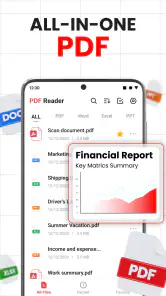
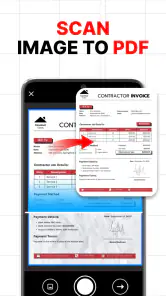
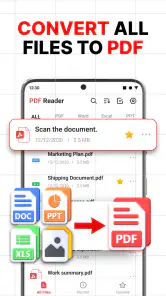
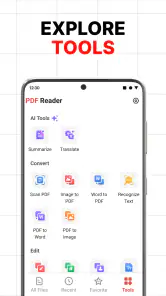
The app offers a plethora of features, but a few really stand out. You can easily open, view, and convert PDF files to other formats like Word, Excel, and more. It’s like having a little document wizard in your pocket. I particularly loved the document scanner feature. With just a snap, you can convert any hard copy into a digital PDF file. Seriously, how cool is that?
You May Like

Clash of Clans Is Won Between the Battles

Android Auto Makes the Case for Quieter Car Software

MobiOffice: Transforming Mobile Productivity with Seamless Integration

EA SPORTS FC™ Mobile Soccer: Redefining Mobile Sports Gaming

How Microsoft OneDrive Became a Mobile Productivity Giant

How Google Translate Breaks Language Barriers Effortlessly
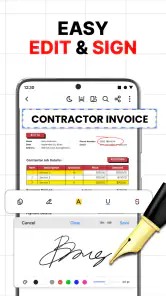
Another nifty feature is the annotation tool. You can highlight, underline, or add notes to your PDF files, making this app perfect for students or professionals who need to mark up documents on the go. It’s like having your own personal notepad within your phone. And let’s not forget about the cloud integration. You can sync your documents with cloud services like Google Drive and Dropbox, ensuring that you have access to your files whenever you need them.
Small workflows that prevent later hassle
I’d use the scanner for a receipt or a signed paper that I need to keep with a project, then give the file a recognizable name before I move on. That simple habit makes a bigger difference than collecting scans with vague names: later, searching a folder for “travel receipt” is easier than opening several files to identify them. For notes on a document, I’d keep comments short and tied to a specific passage so they remain useful when I revisit the file on a phone.
For a student, the practical workflow is to mark up a reading and keep the original alongside the annotated copy. For someone handling office paperwork, a quick scan and a cloud copy can help make a paper document available away from a desk. I’d still check a scan for legibility before discarding or putting away the paper, especially if a faint signature or small print matters.
A less obvious benefit of having scanning and annotation together is that I can check a newly captured page immediately, rather than discovering later that the image is crooked or too hard to read. I’d make that check while the paper is still in front of me. For a multi-page document, I’d also pause to make sure the pages are in the intended order before treating the digital file as the finished copy.
Performance and Usability
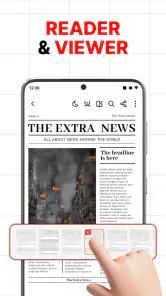
Now, let’s talk about performance. The PDF Reader - PDF Converter runs smoothly without any lag. Whether you’re opening large PDF files or converting documents, the app handles tasks efficiently. The user interface is straightforward, with all the essential tools easily accessible. I found myself navigating through the app effortlessly, which is a big plus.
One thing I appreciate is the app’s offline mode. You don’t need an internet connection to access your files, which is a lifesaver when you’re on the go and data is limited. Plus, the app doesn’t bombard you with ads, which is a breath of fresh air in the app world.
Preparing files for places with poor reception
Offline access is especially useful when I’m on a train or in a place with unreliable reception: I can read a saved file without waiting for a connection. I would prepare by opening or saving the document before leaving, rather than assuming a cloud file will be available offline automatically. That distinction is worth remembering when a meeting or class depends on having the right page ready.
One everyday example is getting a form ready before an appointment. I’d locate the file at home, check the relevant page, and make sure the copy I need is accessible before heading out. If I have to add a note or scan a supporting paper, doing it ahead of time gives me a chance to check the result instead of troubleshooting in a waiting room with limited signal and little time.
Comfort across different abilities and situations
For sensory comfort, I’d treat the app as a handy reader rather than assume every file will be comfortable on a phone. Zooming can help with small print, but it also means moving around the page more often. If I needed long, uninterrupted reading or more control over display and assistive settings, I’d compare it with a dedicated e-reader or the accessibility features already built into my device.
That distinction matters for people who rely on larger text, screen readers, or other device-level support. A PDF’s own structure can affect how usable it is, especially if it is a scan rather than selectable text. I would test an important document with the settings and assistive tools I already use, rather than assume that an app’s general reading controls will solve every access need.
Motor comfort is part of the same decision. A compact phone screen can make repeated zooming, panning, and precise annotation tiring, even when the app itself feels straightforward. For a quick highlight or a short note, a finger-operated workflow may be enough; for extensive editing or a long document, I’d prefer a larger screen or a tool designed around keyboard and pointer use.
Where I’d be cautious
The all-in-one approach is convenient, but it may not suit people who only need to read PDFs and already have a preferred reader. A focused reader can be simpler if conversion, scanning, and annotation would go unused. Likewise, anyone preparing a document for formal submission should inspect the final file carefully: a scan needs to be readable, and an edited or converted document should be checked for layout and missing details.
There is also a privacy-minded reason to be deliberate about cloud workflows: I’d consider whether a document is appropriate to store in a connected service before syncing it. For sensitive paperwork, I would first check the storage choices and use the workflow that matches the document’s importance. Convenience is useful, but it should not replace a considered decision about where a file belongs.
The app is free to start, while in-app purchases range from $3.99 to $29.99 per item. I’d explore the basic workflow first and only consider a purchase if a feature I genuinely need is available through it. The app is rated for Everyone, and it comes from iKame Applications - Begamob Global. Its average rating is 4.2 from around 36,000 ratings, with over 10 million installs; those figures suggest a sizeable audience, though they can’t tell me whether a particular workflow will fit my needs.
For someone deciding whether to pay, my advice is to begin with a specific task rather than the promise of an all-purpose document toolbox. Try reading a file, making a small annotation, or scanning a page you can compare with the paper original. If those steps fit naturally into your routine, it is easier to judge whether any paid option would be worthwhile than it is to buy first and search for a reason to use it.
A sensible choice for mixed document tasks
All in all, the PDF Reader - PDF Converter is a powerhouse app for anyone who regularly deals with PDF documents. Its user-friendly interface, coupled with its robust features like document conversion, annotation, and cloud syncing, make it a must-have tool. Whether you’re a student, a business professional, or just someone who needs to keep their documents organized, this app has got you covered.
So, if you’re looking for a reliable and efficient PDF management tool, give the PDF Reader - PDF Converter a try. It might just become your new favorite app for handling digital documents. Trust me, you won’t regret it!
Who is likely to get the most from it?
I’d recommend trying it if your PDF tasks are mixed: reading a handout, making a few notes, scanning a paper, then converting a file for further editing. Having those jobs together can save app-switching, particularly when you’re working from a phone rather than a computer. If your needs are limited to viewing documents, or if you depend on carefully tuned accessibility controls for extended reading, a simpler or more specialized option may be a better fit.
The app’s current version is 4.4.3, and it was released on March 5, 2025. For me, the best way to judge whether it belongs in a daily routine is to try one ordinary task first: open a document you already use, make a small annotation, and check whether the result is easy to find and share. That gives a more useful answer than expecting one app to replace every document tool.
My inclusive verdict
I see this as a practical phone companion for people who need to do several modest PDF jobs in the same place, especially when they move between home, class, and work. Its reader, scanner, conversion, and annotation tools can make everyday paperwork less fragmented, while offline access is handy when a saved file needs to be opened away from a reliable connection.
It is not automatically the best choice for every reader. Anyone who needs a highly controlled long-reading setup, frequent detailed editing, or a workflow built around a larger screen may be better served by a dedicated reading or desktop document tool. I’d also test it with the actual files and device settings that matter to me, because the accessibility of a PDF depends partly on how that PDF was made. Used with those limits in mind, it is a useful option rather than a one-size-fits-all answer.
PDF Reader - PDF Converter Frequently Asked Questions
Can I open PDFs from my device’s local storage?
PDF Reader - PDF Converter is intended for reading and working with PDF documents, so it may be a useful option if you want to handle files on your mobile device. Before making it part of your routine, consider how you usually organize documents and whether the app’s available file-access options suit that workflow. Its core appeal is bringing PDF reading and related tools together in one place.
Can I convert documents both to and from PDF?
The app is described as a tool to read, convert, and edit PDF files, which makes conversion a central part of its purpose. That can be convenient when you need to turn documents into PDFs or work with PDFs alongside other file types. If a particular format or conversion result matters to you, check the choices available in the app before relying on it for an important document.
Who is the PDF Reader - PDF Converter designed for?
PDF Reader - PDF Converter is a productivity app for people who regularly read or work with PDF documents. It may suit students reviewing study materials, professionals handling work files, or anyone who wants PDF tools on a mobile device. The app is rated for Everyone, so its intended audience is broad, though the features you need will determine whether it fits your routine.
What features does the PDF Reader - PDF Converter offer?
The PDF Reader - PDF Converter app provides a suite of features designed to manage PDFs efficiently. Users can view, annotate, and edit PDF files effortlessly. Additionally, the app allows conversion of various file types into PDFs and vice versa. It also supports features like merging multiple PDFs, splitting them, and extracting specific pages, making it a versatile tool for both personal and professional use.
Is the PDF Reader - PDF Converter app free to use?
The PDF Reader - PDF Converter is free to download, with in-app purchases available for users who want paid options. The free version provides basic functionalities such as viewing and converting PDFs. Some advanced features may require a purchase, so check the options shown in the app before committing. This pricing setup makes it possible to try the reader first and decide whether the additional tools are worth paying for.
Pros
- User-friendly interface enhances reading experience.
- Supports various file formats effortlessly.
- Fast conversion speeds for large documents.
- Offline access to saved PDFs.
- Secure file handling and privacy features.
Cons
- Ads can be intrusive during use.
- Limited free features without subscription.
- Occasional lag with large files.
- In-app purchases can add up quickly.
- Requires frequent updates for bug fixes.
- Category
- Productivity
- Version
- 4.4.3













