AI Chat: Ask AI Chat Anything
- 1.84K
- 4.7
- Installs
- 10.00M
- Price
- Free

Screenshots



Analysis by Reviewed
I find a chat assistant most useful when I have a small question or a rough idea and want help turning it into a next step. AI Chat: Ask AI Chat Anything is aimed at that everyday role: quick exchanges for work, study, planning, and casual curiosity. Its usefulness depends on how clearly I ask and whether I check important answers, so I treat it as a helpful starting point rather than an authority.
How it fits into a connected day
Because the experience centers on asking questions and receiving responses, connectivity matters: when I have a stable connection, it is easy to move from a thought to a follow-up without breaking my flow. That suits tasks such as drafting a message, simplifying a tricky explanation, or brainstorming a few options. If a reply takes longer than expected, I would first check my connection and try again, rather than assume the app has lost the conversation or that the answer will arrive instantly.
Useful on the move, with a little planning
On a phone, the chat format works well for short prompts between other tasks. I might ask for a polite version of a message while waiting for a meeting, then refine it with a clearer instruction once I have a moment. For longer work, I prefer to prepare the key details first: the intended reader, tone, and length. A specific prompt usually gives me a more usable starting draft than a broad request, and it reduces the need to keep correcting the direction.
For example, if I need to write a quick note to reschedule an appointment, I can state the situation and ask for a concise, friendly draft. I would still check the names, date, and tone before sending it. That small review matters: a chatbot can help with wording, but I remain responsible for details that affect someone else.
When a reply needs a second look
Not every answer should be treated as settled. For current conditions, changing information, or anything with serious consequences, I would verify the response with a reliable source. If the app seems slow or a reply does not appear, I would avoid repeatedly sending the same request; checking the connection and simplifying the prompt are more sensible first steps. Breaking a complicated request into smaller questions can also make it easier to spot where an answer is vague.
That workflow is a useful trade-off: the app can help me get unstuck, but it does not remove the need for judgment. I would not use a conversational assistant as my only source for medical, legal, financial, or emergency decisions. For those, a qualified person or authoritative service is the better choice.
Keeping mobile use intentional
When I am on a limited or unreliable connection, I would save non-urgent questions for a steadier moment rather than depend on an immediate exchange. I also avoid putting sensitive personal information into prompts unless it is genuinely necessary. That is a good habit with any online assistant, especially when a task can be explained with general details instead of names, account information, or private documents.
More From Our News Desk

Weather by Xiaomi Review: Clear at a Glance, Less Clear Up Close

X Under Pressure: Can It Recover When Posting Goes Wrong?

Clash of Clans Is Won Between the Battles

Android Auto Makes the Case for Quieter Car Software

MobiOffice: Transforming Mobile Productivity with Seamless Integration

EA SPORTS FC™ Mobile Soccer: Redefining Mobile Sports Gaming
Compared with a conventional search engine, a chat assistant is more convenient when I want a draft, an explanation in simpler language, or several ideas shaped around one request. Search is usually the better route when I need to compare original sources, check a current fact, or see where information comes from. I see the two as complements: use chat to organize a question, then use direct sources to confirm facts that matter.
AI Chat is a free productivity app from iKame Applications - Begamob Global, with optional in-app purchases ranging from $0.49 to $59.99 per item. It is rated Teen, has a 4.7 average from around 441,000 ratings, and has been installed over 10 million times. Version 35.1.1 supports Android 9 or later. Those details make it easy to understand who can try it, but they do not mean every useful capability is necessarily free; I would check any purchase prompt before proceeding.
I think it is best for people who want a conversational way to brainstorm, polish everyday writing, or ask for an accessible explanation. It is less suitable if you need guaranteed factual accuracy, source-first research, or a tool that works independently of a dependable connection. If you prefer typing a focused question and reviewing the result yourself, it can fit neatly into a mobile routine.
Getting Started with AI Chat
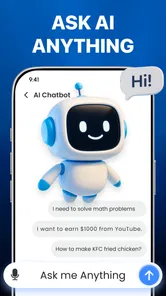
First things first, downloading and setting up the app is a breeze. Whether you're on Android or iOS, a few taps and you’re in. The interface is sleek and modern, making it super easy to navigate even if you're not a tech wizard. Once you're in, you're greeted by an inviting chat screen that’s just begging for you to start typing.
Features That Stand Out
Now, what sets this app apart from the myriad of other chatbots out there? Well, for starters, the AI here is quite intuitive. It learns from your interactions, meaning the more you chat, the better it gets at understanding your quirks and preferences. It’s like having a buddy who’s always keen to listen and learn!
The app offers a range of customization options, too. You can tweak the chat settings to suit your vibe, whether you want a casual chat or more formal exchanges. Plus, there’s a neat feature where you can set reminders or ask for suggestions on various topics, making it not just a chatbot, but a handy little assistant for your daily life.
Experience and Performance
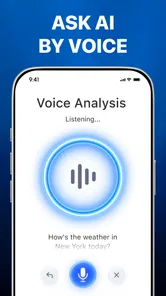
Chatting with the AI is a smooth experience. I threw a bunch of random questions at it, ranging from "What's the weather like today?" to "Tell me a joke," and it handled them with ease. The responses were quick and, more often than not, surprisingly accurate. It’s evident that there’s some serious tech wizardry going on behind the scenes.
One thing I noticed is that this app is quite resource-friendly. It doesn’t hog your phone’s memory or battery, which is a huge plus if you’re like me and constantly juggling a dozen apps.
Ending Thoughts
In conclusion, if you're on the lookout for an app that combines the roles of a conversational partner and a personal assistant, AI Chat: Ask AI Chat Anything is definitely worth a shot. It’s engaging, smart, and a fun way to kill some time or get things done more efficiently. Whether you're looking to chitchat or need a quick info fix, this app has got your back.
So, why not give it a whirl? Who knows, you might just find your new go-to app for all things chatty!
AI Chat: Ask AI Chat Anything Frequently Asked Questions
What can I use AI Chat: Ask AI Chat Anything for in everyday life?
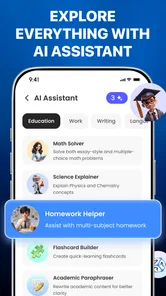
AI Chat: Ask AI Chat Anything is presented as an AI assistant and chatbot intended to support daily work and life. You can use it to ask questions, explore ideas, and get help with everyday tasks. As with other AI chat tools, check responses before relying on them for important decisions, since generated answers can be incomplete or mistaken.
Who develops AI Chat: Ask AI Chat Anything, and what devices can install it?
AI Chat: Ask AI Chat Anything is a productivity app developed by iKame Applications - Begamob Global. It is available for Android devices running Android 9 or later. Before downloading, check that your device meets this requirement and that you are choosing the correct app, since the developer name is a useful way to identify it.
What is AI Chat: Ask AI Chat Anything?
AI Chat: Ask AI Chat Anything is an advanced application that allows users to engage in conversations with an AI-driven chatbot. This app is designed to answer a wide range of queries, from simple questions to complex topics, providing users with insightful and accurate responses, making it a versatile tool for daily use. Its stated purpose is to support daily work and life, so it may be useful for quick questions, ideas, and everyday assistance.
How does AI Chat ensure the privacy of my data?
AI Chat takes user privacy seriously by employing state-of-the-art encryption methods to secure all communications between the user and the app. The app does not store personal conversations or share data with third parties, ensuring that all interactions remain confidential and secure, aligning with best practices in data protection. As with any chatbot, avoid entering sensitive personal or financial details unless you have reviewed the app’s privacy information and are comfortable with its terms.
Can AI Chat understand multiple languages?
Yes, AI Chat is equipped with multilingual capabilities, allowing it to understand and respond in various languages. This feature makes it accessible to a global audience, breaking down language barriers and providing users with the flexibility to communicate in their preferred language, enhancing user experience significantly. For important translations or nuanced wording, review the response carefully, since the meaning and tone may not always match what you intended.
Pros
- Fast and responsive AI responses.
- User-friendly and intuitive interface.
- Supports multiple languages.
- Customizable chat themes.
- Regular updates with new features.
Cons
- Requires internet connection.
- Limited free tier features.
- Occasional minor bugs.
- High battery consumption.
- Privacy concerns with data.













