AI Chat Smith Smart Assistant
- 5.94K
- 4.3
- Installs
- 10.00M
- Price
- Free

Screenshots

Analysis by Reviewed
When I need to turn a loose idea into something usable, I like having an assistant that can handle more than one kind of task. AI Chat Smith Smart Assistant is a free productivity app from Smart Widget Labs Co Ltd. It brings chat, research, image generation, math help, and writing assistance together, which makes it a convenient place to begin; it does not remove the need to check answers or finish work in my own words.
Quick prompts and realistic expectations
Short, clearly framed questions are the easiest way to judge whether an AI assistant fits into a daily routine. I would expect a simple request, such as asking for a plain-language explanation, to feel different from asking for an extended research response or an image. Those are not equivalent workloads, so I would not judge the whole app by the speed of one answer. If a response takes longer than I expected, I first check whether I have asked for too much at once.
A practical approach is to break a large request into stages. I can begin with a brief outline, decide which part is actually useful, and then ask a focused follow-up. That gives me more control over the result than sending a long, mixed prompt and hoping the answer covers every point. It also makes errors easier to catch because I am reviewing smaller pieces of output.
What to expect when you open it
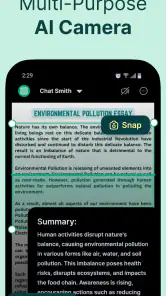
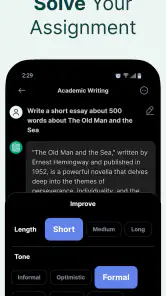
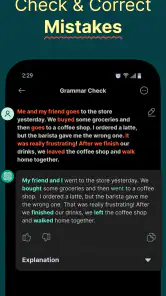
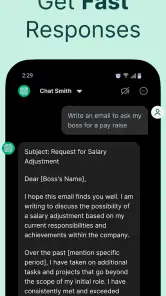
The app brings several kinds of assistance together, including chat, deeper research, image creation, math help, and writing support. That breadth is handy when a task changes direction: I might begin by asking for an explanation, then ask for a clearer summary or a first draft. Rather than treating every response as finished work, I get the most value by using it to move past a blank page and then checking the result myself.
For example, on a busy morning I could ask it to make a long set of notes easier to scan, use a follow-up to turn the main points into a short message, and check a calculation before entering it elsewhere. Keeping those steps in one assistant can save the friction of opening separate tools. It is still sensible to verify figures, factual claims, and anything I plan to send or publish.
Speed, stability, and demanding sessions
I would approach speed as a task-by-task question rather than assume every part of an AI assistant responds equally quickly. A short prompt is a lighter request than a substantial research query or an image-generation task, so I leave room for more involved requests to take longer. If a response seems incomplete or delayed, I find it practical to narrow the prompt, ask for one part at a time, or retry only after checking whether the original request was clear.
During heavier use, the main challenge is often keeping the work organized. I try to give each request a clear purpose and include relevant context, rather than stacking several unrelated questions into one message. That makes the response easier to assess and gives me a cleaner follow-up if the first answer misses the point. For research or writing, asking for an outline before requesting detail can also make a large task easier to review.
More From Our News Desk

Weather by Xiaomi Review: Clear at a Glance, Less Clear Up Close

X Under Pressure: Can It Recover When Posting Goes Wrong?

Clash of Clans Is Won Between the Battles

Android Auto Makes the Case for Quieter Car Software

MobiOffice: Transforming Mobile Productivity with Seamless Integration

EA SPORTS FC™ Mobile Soccer: Redefining Mobile Sports Gaming
Where it fits among other tools
Compared with a basic chatbot, the attraction here is having different AI tasks available within one app. Compared with dedicated writing, calculator, research, or image tools, the convenience may be greater, but a specialist app can be a better choice when I need a narrow workflow or a result I can verify through a familiar process. I see this assistant as a useful general-purpose companion, not an automatic substitute for specialist software or careful research.
That distinction matters most when accuracy has consequences. I would use it to brainstorm a structure, explain a concept in plainer language, or generate a starting point for a message; I would not treat an AI response alone as authority for a medical, legal, financial, or other high-stakes decision. The best habit is to check important claims against dependable sources and keep private or sensitive details out of prompts unless I am comfortable sharing them with the service.
Getting Started with AI Chat Smith Smart Assistant
Once you download and install AI Chat Smith Smart Assistant, you're greeted with an intuitive user interface that's both sleek and easy to navigate. The setup process is straightforward, requiring you to grant a few permissions, such as accessing your contacts and calendar. Don't worry; these permissions are essential for the app to function effectively, and it handles your data with utmost care.
Features Galore
One of the standout features of this app is its ability to integrate seamlessly with various third-party applications. Whether you want to check the weather, set reminders, or play your favorite tunes, AI Chat Smith has got you covered. It's like having a personal assistant who never sleeps, always ready to assist at a moment's notice.
The app also excels in understanding natural language, which means you can talk to it just like you would with a friend. Need to know the capital of France or the latest sports scores? Just ask, and you'll get a quick, accurate response. It's like having a walking encyclopedia in your pocket!
Everyday Usability
What I absolutely love about AI Chat Smith is its ability to learn from your interactions. Over time, it becomes more attuned to your preferences, offering personalized recommendations and reminders tailored just for you. This adaptive learning feature truly sets it apart from other smart assistants on the market.
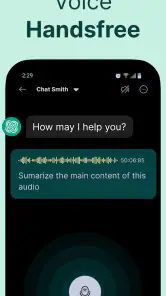
Additionally, the app's voice recognition is top-notch. Even in noisy environments, it manages to pick up your commands without a hiccup. This is particularly useful for those moments when you're on the go and need to issue commands hands-free.
A day-to-day workflow that makes sense
For a realistic workday example, I might receive a dense set of meeting notes and want to prepare a concise update before lunch. I could ask for the main decisions and open questions to be separated, then request a short message based only on those points. Before sending it, I would compare the draft with the original notes, especially for names, deadlines, and commitments. The app can help me get from raw material to a readable first pass; I remain responsible for making sure the summary has not quietly changed the meaning.
That workflow is more useful than asking for a polished final answer in one go. It gives me a chance to correct the framing early and avoid spending time editing a draft built on a misunderstanding. The same staged method works for a study topic: ask for an explanation, identify what remains unclear, and use a follow-up to probe that point rather than treating one broad answer as a complete lesson.
Practical limits and cost
The app is rated for Everyone, and its broad appeal makes sense for everyday questions, drafting, and learning support. Still, I would not recommend treating fluent-sounding answers as proof: a confident mistake can be harder to spot than an obvious failure. For schoolwork, work documents, and research, I use the output as a draft or explanation and check key details before relying on it.
It is free to install, with in-app purchases ranging from $3.99 to $59.99 per item. I would start with the free experience and only consider paying if I had a repeated use for the tools and understood which purchase matched it. The app has a 4.3 average from around 523,000 ratings, while more than 10 million installs suggest it has reached a large audience; neither figure guarantees that every feature will suit my needs.
One useful way to decide whether a purchase is worthwhile is to keep track of the tasks for which I actually return to the app. If I only use it now and then to rephrase a sentence, paying may not make sense. If I regularly use several kinds of assistance, I would first make sure the relevant paid option matches that routine rather than assuming every feature is included in the same way. The free starting point lets a new user test the basic fit before making that decision.
Who will get the most from it
I think this app is most appealing to people who switch between small, varied tasks: a student looking for a simpler explanation, a busy worker shaping rough notes, or someone who wants to explore an idea before doing more careful research. The advantage is not that every answer is ready to use, but that a single assistant can help with several first steps. People who already have a trusted specialist tool for each task may find the all-in-one approach less compelling.
I would also skip it as a primary tool if my work depends on precise source trails, strict document controls, or a specialist calculator or image workflow. A general assistant is not a substitute for a domain-specific process when I need repeatable, auditable results. For sensitive work, I would avoid entering confidential material and use an approved tool instead. That is a practical boundary, not a reason to avoid using it for ordinary, low-stakes drafting and learning.
Device and workflow considerations
AI Chat Smith supports Android 5.0 and later, so it can run on a broad range of Android devices. On an older or resource-limited phone, I would keep requests concise and avoid assuming that demanding AI work will feel as immediate as a simple text exchange. A stable connection and a little patience are sensible expectations for tasks that involve generating or processing substantial content; if something goes wrong, I would first simplify the request and try again rather than repeat a long prompt unchanged.
A useful tip is to ask for a small, checkable result first. For instance, when researching a topic, I might request a short outline, identify what needs evidence, then ask for a focused explanation of one point. This creates natural checkpoints and reduces the chance of accepting a long answer that mixes useful details with unsupported claims. For writing, I get better control by specifying the audience and tone, then editing the draft in my own words.
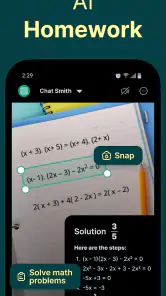
For a calculation, I would provide the numbers and the exact question, then check the result independently before using it in a budget or other consequential decision. For image work, I would refine the prompt in manageable steps instead of expecting the first attempt to match a detailed mental picture. These habits do not guarantee a perfect response, but they make the app easier to evaluate and reduce the cost of correcting a weak first result.
Wrapping It Up
In conclusion, the AI Chat Smith Smart Assistant is a robust, feature-packed app that aims to make your life easier and more organized. Its user-friendly interface, coupled with its seamless integration capabilities and adaptive learning features, make it a standout choice for anyone in need of a digital personal assistant.
While no app is without its quirks, AI Chat Smith Smart Assistant comes pretty close to perfection in the realm of smart assistants. So, if you're ready to embrace the future of digital companionship, give this app a try. You might just find it becoming an indispensable part of your daily routine.
It is best suited to someone who wants one place to explore several AI-assisted tasks and is willing to review the results. If I needed a tightly controlled professional workflow, dependable source citations, or a specialist feature set, I would choose a dedicated alternative instead. For casual assistance and early-stage ideas, though, the mix of options is appealing. The app was released on December 21, 2022, and its current version is 8.251117.22; my practical verdict is to try it for low-stakes tasks first and decide whether its convenience earns a regular spot on your phone.
AI Chat Smith Smart Assistant Frequently Asked Questions
What does AI Chat Smith Smart Assistant cost to download?
AI Chat Smith Smart Assistant is free to download, so you can install it without paying upfront. The app also offers in-app purchases priced from $3.99 to $59.99 per item. If you plan to use paid options, review the purchase choices shown in the app before confirming a transaction, so you can decide whether they suit your needs.
Which devices and operating systems can run AI Chat Smith Smart Assistant?
AI Chat Smith Smart Assistant is available for Android and iOS. On Android, the minimum operating system requirement is version 5.0, which helps you check compatibility before downloading. You can find the app through the relevant app store for your device. Checking your phone’s operating system and available storage before installation can help avoid problems during setup.
Who makes AI Chat Smith Smart Assistant, and when was it released?
AI Chat Smith Smart Assistant is developed by Smart Widget Labs Co Ltd and was released on December 21, 2022. It is a productivity app centered on AI-assisted tasks, including research, writing, math problem-solving, and image generation. Knowing the developer and release date can help you identify the app when searching for it and distinguish it from other chatbot or assistant apps.
What is AI Chat Smith Smart Assistant, and what can I use it for?
AI Chat Smith Smart Assistant is a productivity app built around AI tools for everyday tasks. Its listed capabilities include an AI agent and chatbot, deep research, image generation, math solving, and writing assistance. It may be useful when you want help drafting text, exploring a topic, working through a math problem, or generating an image from a prompt.
What platforms is AI Chat Smith Smart Assistant available on?
AI Chat Smith Smart Assistant is available for download on both Android and iOS platforms. Users can easily find it on the Google Play Store for Android devices and Apple's App Store for iOS devices. The app is compatible with most modern smartphones, ensuring a wide range of accessibility for various users.
Pros
- Highly accurate responses
- User-friendly interface
- Wide range of functionalities
- Quick response time
- Customizable settings
Cons
- May require internet connection
- Occasional lag in responses
- Limited offline capabilities
- Can consume battery quickly
- Subscription needed for premium features
- Category
- Productivity
- Version
- 8.251117.22