ActiveBuilding
- 3.17K
- 1.8
- Installs
- 1.00M
- Price
- Free

Screenshots
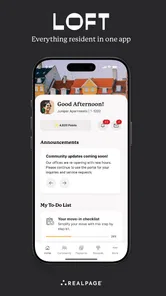
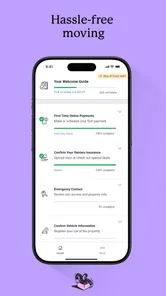
Analysis by Reviewed
In a shared household, the person who handles rent, building notices, and repair follow-ups often ends up relaying everything to everyone else. I see the appeal of ActiveBuilding as a resident portal that can bring some of those apartment tasks and community conversations into one place. Its usefulness, though, depends on whether your property actually uses it and which services it has made available to residents.
One household, separate accounts
If several adults in a home need to keep up with building matters, a resident app can be more practical than relying on one person to forward every update. I would treat each person’s account as their own, rather than sharing a login: that makes it clearer who is handling a request or replying to a community post. Before signing up, check with your property team about how each resident should get access and which household members are eligible. The app should not be treated as a substitute for an agreed household routine or an official conversation with management.
This matters most when a household has different roles. One person may manage lease-related responsibilities, while a roommate is better placed to report a leaking tap or read a notice about a shared space. Separate access can make those handoffs easier to understand, but it does not automatically establish who is authorized to act for the household. I would confirm that with management rather than assume every resident account has the same permissions.
A useful handoff for everyday tasks
Picture a weekday morning when a resident notices a repair issue before leaving for work. They can use the portal to send the request, then let the other people at home know it has been reported rather than asking someone else to submit it again. Later, residents can check for an update or a building announcement in the same general place. That kind of handoff is the practical advantage I would look for: less uncertainty about who has contacted the office, not a guarantee that a repair will be completed faster.
A small household habit can make this workflow more dependable: after one person submits a request, they can tell the others what was reported and when, without sharing account credentials. If the issue changes or needs urgent attention, contact management through its direct route instead of relying on a portal status alone. This avoids duplicate reports while keeping responsibility clear, and it prevents a routine app check from being mistaken for an emergency follow-up.
Compared with email, phone calls, paper notices, or a property’s own website, a dedicated resident app can be easier to check on the go and keep building-related activity together. Those familiar alternatives may still be better for a detailed conversation, an urgent problem, or anything that needs a clear record outside the app. I would keep the property’s direct contact route handy and avoid assuming an in-app message is an emergency channel.
Making an apartment portal work for your household
ActiveBuilding is a free House & Home app from RealPage Incorporated. It is aimed at residents who want a phone-based route to their building’s services, rather than a general home-organizing tool. The app has an average rating of 1.8 from around 5,700 ratings, so I would go in with measured expectations and check whether its available functions suit your property before making it central to household routines.
More From Our News Desk

 Block Blast!
 Makes Every Clear Feel Like One More Turn
A clean little block puzzle becomes a study in space, risk, and self-control. Its best moments come from one satisfying clear; its toughest test is knowing when to stop.

 Super Stylist Fashion Makeover
Super Stylist Turns Dress-Up into a Runway Career
Its makeover-to-client loop turns quick outfit decisions into shareable style theater. The question is whether the closet keeps giving players a reason to return.

 Block Craft 3D:Building Game
Block Craft 3D Under Pressure: How Well Does It Recover When Building Goes Wrong?
A failure-focused look at Block Craft 3D’s forgiving building loop, its uncertain recovery edges, and the moments that demand more than a cheerful village.

 Woodturning
 Trades Creative Freedom for a Satisfying Carving Loop
If your usual creative game is about building, decorating, or styling, Woodturning trades open-ended projects for a tactile, tightly guided carving loop. Here is what that switch really costs.

 PUBG MOBILE
 Shows What Battle Royale Must Get Right
PUBG MOBILE shows how battle royale has matured: bigger systems matter less than meaningful choices, readable fights, and a reason to return after every loss.

 Braindom: Brain Games Test
Braindom’s Social Life Happens Between Puzzles
Braindom turns quick logic traps into a personal ritual, but its community value is more about comparing answers than building together.
Latest News



Features That Make Life Easier
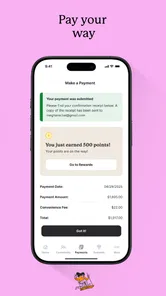
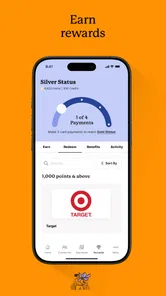
One of the first things I noticed was how user-friendly the interface is. Even if you're not tech-savvy, you’ll find it a breeze to navigate. The app lets you do all the essentials: pay rent, submit maintenance requests, and even book amenities. But what truly wowed me were the community features. You can join forums, participate in polls, and even organize events. It’s like having a neighborhood watch, social club, and community board all rolled into one app!
Another feature worth mentioning is the real-time notifications. I love how they keep me in the loop about community announcements or when my maintenance request is being handled. It’s like having a concierge at your fingertips.
For practical use, I would separate quick checks from decisions that need a paper trail. A notification can be a useful nudge to open the portal, but I would read the full notice before acting on deadlines or building instructions. If a household member is away, agree on who will check for updates and how important information will be passed along. That is more reliable than assuming everyone has seen the same alert, especially when accounts and devices are personal.
Building Connections, One Tap at a Time
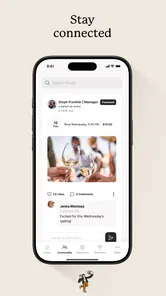
What sets ActiveBuilding apart is its ability to foster genuine connections. It’s not just about transactions; it’s about interactions. I’ve seen neighbors who’ve never exchanged a word in the hallway start chatting on the app. That’s the beauty of it—you feel more involved and connected.
Community features are most valuable when residents want to coordinate around the building rather than just complete a transaction. A poll or discussion can help surface shared preferences, while an event post can give neighbors a place to organize. I would still treat posts as community conversation, not as an official notice from management unless the property clearly identifies them that way. That distinction helps avoid confusing a neighbor’s suggestion with a building rule.
For a shared device, I would be cautious about leaving a resident account signed in where other people can open it. A phone used by several household members can blur the boundary between personal messages, account activity, and shared chores. I would sign out when appropriate, keep account access individual, and have each adult check that their own notifications are not visible to others. The portal is for residents, not a household calendar or a family-control system.
If a shared tablet is the only convenient screen at home, I would use it for general building information only when the account holder is present, rather than treating it as a communal login. Rent details, maintenance conversations, and personal account activity should remain with the person responsible for them. A separate household note can record neutral items such as “repair request submitted” or “check the lobby notice,” without copying private details into a shared document.
Age, access, and trust
The app is marked Teen, but that label is not a substitute for checking your building’s eligibility rules or deciding who should see account information. For families, I would keep rent and maintenance tasks with the adult responsible for the lease, and only involve younger household members in community information that is suitable to share. The app was released on May 11, 2015, and its current version is 8.4.4, with Android support from version 8.0; it has over one million installs. Those figures give a sense of its established presence, but they do not tell me whether a particular property’s setup will be smooth.
Parents and guardians should also distinguish a content age label from a building’s access rules. A teen rating does not mean every teenager in a home can register as a resident or should handle lease-related tasks. I would ask management which people can have accounts, then decide as a household what information is appropriate to share. There is no reason to pass around a single password simply because several people need to know that a notice has arrived.
One helpful habit is to agree on a simple division of responsibility before using the portal: who reports repairs, who watches announcements, and who follows up with management if a status does not change. That avoids duplicate submissions and the mistaken assumption that another resident has already handled something. For a household that prefers one shared record, a jointly accessible email thread or notes app may be clearer; ActiveBuilding makes more sense when the property’s resident services are actually routed through it.
When setting up household routines, I would start with one low-stakes task, such as checking an announcement or confirming where a maintenance request belongs. That gives residents a chance to learn the property’s process before relying on it for something time-sensitive. If access is confusing or a service appears unavailable, asking the property team is more useful than repeatedly trying different household logins. The property’s setup, not a household’s guesswork, determines how well the portal fits.
Security is another aspect where the app shines. With features like secure messaging and a resident directory, you can communicate safely without compromising your privacy. It’s reassuring to know that while you’re connecting with your community, your information remains protected.
Even with private messaging and a directory, I would be thoughtful about what I share and with whom. A resident directory can make neighbor-to-neighbor contact convenient, but it is still sensible to keep conversations focused on the building and avoid posting details a household would not want broadly visible. For sensitive account or maintenance matters, I would use the appropriate direct channel and check who is receiving the message before sending it.
Where it fits—and where another option is better
ActiveBuilding is a better fit for residents whose property has made it part of day-to-day operations than for someone simply looking for a general-purpose home app. A shared calendar can be better for chores and family plans; email may suit long conversations that need to be searched or forwarded; and a phone call is the safer choice when an issue is urgent. The portal’s value is in bringing property-related activity together when the building actually supports that workflow.
I would also consider the household’s communication style. If everyone already checks the property website and only needs occasional announcements, installing another app may add little. If different residents routinely handle repairs, notices, or amenity arrangements, a resident portal may reduce the number of messages one person has to relay. The decision is less about replacing every existing tool and more about whether the building’s services are easier to manage through this one.
The Verdict: A Must-Have for Community Dwellers
In the end, ActiveBuilding isn’t just an app; it’s a community builder. Whether you're new to apartment living or have been in your complex for years, this app enhances the experience. It’s like the Swiss Army knife of resident apps—versatile, reliable, and incredibly handy.
My recommendation is conditional rather than universal: it is most useful when your building actively relies on it and residents have a clear way to get individual access. If your property handles everything through a different portal, or you mainly need a household budget, chore list, or shared calendar, another tool will fit better. It is free, rated for teens, and has around 3,200 written reviews alongside its 5,700 ratings, but its low average score is a reason to test the essentials yourself rather than assume every part will work equally well for everyone.
That score makes me cautious about recommending it as the only route for important building matters. I would first check whether the functions your property uses are available to your account, then try the task you expect to need most—such as finding an announcement or submitting a routine request. If that process is clear, it can earn a place in your household’s routine. If it is not, use the property’s established contact methods and avoid letting an app become a bottleneck.
If you're looking to engage more with your community, streamline your living arrangements, or simply make life a bit easier, downloading this app might just be the best decision you make. After all, why just live in a community when you can be a part of it?
ActiveBuilding Frequently Asked Questions
Do I need to live in a participating community to use ActiveBuilding?
ActiveBuilding is intended for residents using a community’s residential portal, rather than as a general-purpose home management app. The app’s description presents it as the LOFT Living resident portal experience, so access is tied to the community and its setup. Before downloading, check with your property management team that your residence uses ActiveBuilding and ask how residents get started.
What is ActiveBuilding and how does it work?
ActiveBuilding is an app designed to enhance the living experience in residential communities by facilitating communication, service requests, and community engagement. It connects residents, property managers, and service providers through a single platform, allowing users to submit maintenance requests, receive community announcements, and access various amenities with ease. The app helps streamline property management processes and fosters a better sense of community among residents.
Is ActiveBuilding free to use, or are there any subscription fees involved?
ActiveBuilding is free to download. It is typically offered as a complimentary service to residents of participating properties, as the cost is usually covered by the property management company. However, it's important to verify with your specific building or management team for any potential charges or premium features that may require additional fees. Generally, most of the core features are accessible without any extra cost to the residents.
What features does ActiveBuilding offer to enhance community living?
ActiveBuilding offers a variety of features to enhance community living, including the ability to submit and track maintenance requests, view and RSVP to community events, and access important property documents. Additionally, residents can communicate with property management and neighbors through the app, receive real-time announcements, and even book shared amenities like gyms or conference rooms. These features aim to create a more connected and convenient residential experience.
How secure is my personal information on ActiveBuilding?
ActiveBuilding prioritizes user privacy and data security by implementing robust security measures, including encryption and secure user authentication processes. The app complies with industry standards to protect users' personal information and prevent unauthorized access. However, it is always advisable for users to practice good security habits, such as using strong passwords and regularly updating them, to further safeguard their information while using the app.
Pros
- User-friendly interface for easy navigation.
- Real-time updates on community events.
- Secure communication with building management.
- Mobile access to all building amenities.
- Customizable notifications for important alerts.
Cons
- Limited integration with other smart home devices.
- Occasional glitches in event notifications.
- Requires stable internet for optimal performance.
- Some features locked behind premium access.
- Complex setup for first-time users.