Word Search Explorer
- 23.41K
- 4.9
- Installs
- 100.00M
- Price
- Free

Screenshots
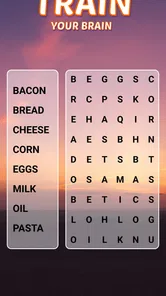
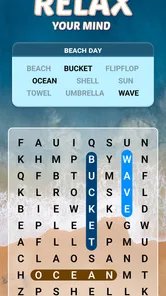
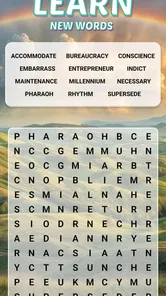
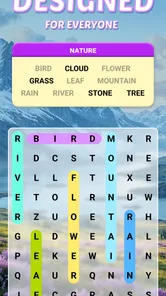
Analysis by Reviewed
Have you ever found yourself craving a little mental workout while waiting for your coffee or during a lazy Sunday afternoon? Enter Word Search Explorer, a delightful app designed to tickle your brain cells and keep you entertained for hours. Let's dive into what makes this word puzzle app a must-have on your phone.
A gentle first impression
The moment you fire up Word Search Explorer, you're greeted with a user-friendly interface that screams simplicity and fun. No convoluted menus or confusing options here! You can jump right into the action with just a tap. The app offers a plethora of word puzzles across various categories, so whether you're a foodie, a movie buff, or a nature enthusiast, there's something for everyone.
That quick start is a genuine strength for a word search game. I don't have to learn a complicated rule set before getting something out of a short break. The basic pleasure is familiar: scan a grid, spot a word, and mark it. This makes the game approachable for someone who rarely plays mobile games, as well as for a regular puzzle fan who just wants a low-pressure activity between errands.
PlaySimple Games made this as a free word game, and its senior-friendly intent is reflected in the straightforward format. The age rating is Everyone, so it can suit a broad range of players, including people who prefer an uncomplicated pastime over fast reactions or intricate controls. I would still suggest trying it on the device you plan to use: comfort depends on the screen size and how easily you can read and tap the grid, not only on the game’s simple rules.
The game has a 4.9 average from around 695,000 ratings and over 10 million installs, which suggests it has found a large audience. Those numbers are useful context, but they don't tell me whether its pace or presentation will suit you personally. If you enjoy quietly scanning for familiar words, the core idea is easy to appreciate; if you need competition, a story, or a constantly changing puzzle mechanic, the basic word-search format may feel too restrained.
How the puzzles build a playable mood
I find that a good word-search session depends on more than a clear grid: the themes, visual restraint, and unhurried pace need to work together. Here, that combination makes it easier to choose a puzzle for the kind of break I have—brief and casual, or a little more focused. The next section looks at how those themed grids give the simple search a sense of variety without changing its basic rules.
A world made from themes and grids
What I love about this app is the sheer variety of puzzles. From easy grids that help you ease into the game to more complex ones that really test your mettle, Word Search Explorer keeps you on your toes. Each puzzle is like a mini-adventure, and the satisfaction of finding that last elusive word is genuinely rewarding.
More From Our News Desk

Weather by Xiaomi Review: Clear at a Glance, Less Clear Up Close

X Under Pressure: Can It Recover When Posting Goes Wrong?

Clash of Clans Is Won Between the Battles

Android Auto Makes the Case for Quieter Car Software

MobiOffice: Transforming Mobile Productivity with Seamless Integration

EA SPORTS FC™ Mobile Soccer: Redefining Mobile Sports Gaming
The themes give each set of words a little identity without asking the player to follow a plot. That suits the format: I can dip into a topic I like, or simply take whatever puzzle is ready when I have a spare moment. It is a small but useful choice when attention is divided. A familiar subject can make the hunt feel inviting, while an unfamiliar one can turn the same grid into a light vocabulary exercise.
One practical way to enjoy the themed structure is to treat each puzzle as a stopping point rather than a task to clear in a long sitting. If I'm waiting for an appointment, I can begin a grid and play until I'm called; at home, I can do another when I want a quiet pause. The game works best when I let that modest scale be the point. It doesn't need to become a daily target or a test of speed to be satisfying.
Sound, visuals, and a comfortable rhythm
Graphically, the app is easy on the eyes. The crisp, clean design ensures that the words stand out, making them easier to spot. The soothing background music adds a nice touch, creating a relaxing atmosphere as you hunt for words. And if you're not a fan of sound while playing, you can easily mute it in the settings.
The visual clarity matters more than decoration in a search puzzle. A busy screen would compete with the letter grid, while a restrained presentation lets my attention stay on the task. The music supports an unhurried mood rather than turning the hunt into a race. I like having the option to silence it, especially if I'm playing in a waiting room, sharing a space, or listening to something else. Muting the sound is also a sensible first adjustment if the game is meant to be a quiet wind-down rather than an audio experience.
For older players or anyone who finds small text tiring, I would judge the experience by an actual session rather than by the clean look alone. A readable board can still require sustained close attention, and spotting words in a dense grid is different from reading a page. Short sessions with a pause between them are a practical way to see whether the screen remains comfortable. The game’s calm presentation helps, but it cannot remove the ordinary visual effort of a word search.
Hints, challenge, and the right way to play
Plus, the app regularly updates with new levels, ensuring you never run out of challenges. It's like having an endless library of puzzles right in your pocket!
Another cool feature is the hint system. Stuck on a tricky word? No worries! You can use hints to uncover letters and get back on track. It’s a handy tool that ensures you don’t get too frustrated and can keep enjoying the game.
I recommend treating hints as a way to keep a puzzle pleasant, not as a shortcut to use automatically. I would first scan the rows and columns in one direction, then check the diagonals and reverse directions before spending help. That simple routine makes a hard-to-see word less likely to feel random, and it lets a hint rescue a session when my attention is fading. If I use one as soon as I hesitate, I lose some of the satisfaction that makes the final find worthwhile.
The balance is personal. Someone playing to relax may prefer a hint as soon as a search stops being enjoyable; a player who wants a more deliberate challenge can save help for the last few words. Neither approach is wrong, but the game is more rewarding when I decide what I want from a session instead of treating every grid as a score test. This is a gentle puzzle format, not a reason to turn a break into another performance measure.
Word search also has a particular kind of repetition: the central action stays the same even when themes and difficulty change. Compared with crosswords, it asks less for definitions and general knowledge; compared with word games built around forming words from a letter rack, it relies more on visual scanning than spelling combinations. That makes it a comfortable alternative when I want to recognize words rather than invent them. On the other hand, players who want clues, layered strategy, or a strong sense of progression may find those other formats more engaging.
Where it fits into an ordinary day
So, why should Word Search Explorer earn a spot on your home screen? Well, besides being a fantastic way to sharpen your vocabulary and spelling skills, it's perfect for those moments when you need a quick mental break. Whether you're on a commute, waiting in line, or just chilling at home, this app is your go-to companion.
A realistic use for me is a short wait with no reliable place to spread out a newspaper or puzzle book. I can open a grid, focus on a few words, and stop when the moment is over. The phone format is convenient for that kind of interruption, though it also means the screen competes with notifications and whatever else is happening around me. I get the best experience when I put the phone on a quiet setting and give the puzzle a few minutes of attention instead of switching in and out every few seconds.
It can also work as a shared, low-pressure activity. Two people can look at the same screen and take turns finding words, especially if one person wants help getting started. That is different from a competitive head-to-head game: the appeal is having a common thing to look at, not racing to beat another player. For a group that prefers conversation or tactile pieces, a printed puzzle may be a better fit; this app is most convenient when everyone is already comfortable gathering around a phone.
For a daily habit, I would keep the goal modest. A single puzzle can be a small transition between work and rest, or something to do while waiting for a meal. If I notice myself playing longer than intended, the easy access that makes the game handy can become a drawback. It is worth deciding in advance whether I want one short break or a longer stretch, particularly when I have other things to get done.
Cost, compatibility, and who will enjoy it
The game is free to download, though optional in-app purchases range from $0.99 to $19.99 per item. I would start with the free experience and decide for myself whether anything offered is useful; there is no need to spend just to find out whether the core word-search loop suits me. If you are setting it up for a family member, it is sensible to make sure they understand that optional purchases can appear in a free game and to use the device’s purchase controls if needed.
It is currently version 1.226.0 and supports Android 7.0 or later. That makes it worth checking the operating system on an older phone before trying to install it. The game is rated Everyone, but suitability is not only about age: anyone who dislikes looking at a screen for sustained periods, has difficulty distinguishing letters on their device, or wants a more physically tactile puzzle may prefer a large-print book or paper grid.
I would recommend it most to people who like word searches, want a calm activity with little setup, or appreciate familiar puzzles organized around themes. It is also a reasonable choice for someone easing into mobile games because the main action is easy to understand. I would skip it if I mainly want a narrative adventure, a social competition, or a game where every round introduces a substantially different mechanic. The strength here is dependable simplicity, and that same simplicity limits how much the experience can surprise a player who has exhausted the basic appeal of scanning grids.
A relaxed fit, with clear limits
In a world filled with complex games that demand hours of your time, Word Search Explorer is a refreshing change. It's simple, entertaining, and quite frankly, a bit addictive. So go ahead, give it a download and unleash your inner word sleuth!
Word Search Explorer Frequently Asked Questions
Is Word Search Explorer designed with older players in mind?
Yes. Word Search Explorer is presented as a visually pleasing word game specially designed for seniors, while its word-search format can also appeal to anyone who enjoys finding words in a letter grid. The focus is on examining the puzzle and locating its listed words, making it a calm, accessible style of play rather than an action-based game.
What is the age rating, and is the game suitable for children?
Word Search Explorer has an Everyone content rating, so it is presented as suitable for a broad audience, including children and adults. Its central activity is finding words in a letter grid. As with any game, parents can decide whether its presentation and play style suit a particular child, but the rating indicates that it is intended for general audiences.
Who develops Word Search Explorer, and can I download it for free?
Word Search Explorer is a free word game from PlaySimple Games, available on Android and iOS. Its simple premise makes it easy to understand before you begin: look through a letter grid and find the words listed for each puzzle. Optional in-app purchases are available, so the game can be downloaded without an upfront purchase while offering paid extras for players who want them.
What is Word Search Explorer and how does it work?
Word Search Explorer is a captivating puzzle game available for both Android and iOS platforms. It offers a variety of word search puzzles designed to challenge players of all ages. The game provides a grid filled with letters, and players must find and mark all the hidden words listed below the grid. With varying difficulty levels, it ensures hours of engaging gameplay. The game also features hints and daily challenges to keep users entertained.
Does Word Search Explorer require an internet connection to play?
Word Search Explorer can be played both online and offline, making it convenient for players who may not always have access to an internet connection. While the basic gameplay and puzzles are available offline, certain features like daily challenges and leaderboard updates require an internet connection. This flexibility allows players to enjoy the game anywhere, anytime.
Pros
- Engaging and educational word puzzles.
- Diverse levels to keep players challenged.
- User-friendly interface and design.
- Offline play available.
- Regular updates with new content.
Cons
- Contains in-app purchases.
- Ads can be intrusive.
- Limited hints without purchase.
- No multiplayer mode.
- May drain battery quickly.













