Word Connect
- 160.24K
- 4.8
- Installs
- 50.00M
- Price
- Free

Screenshots
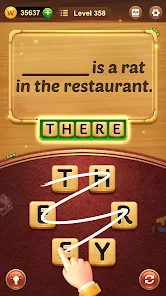
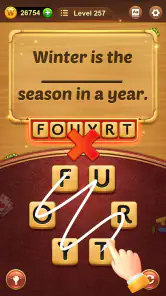

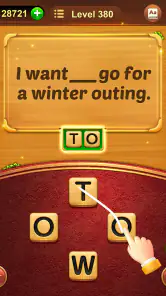
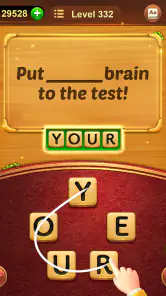
Analysis by Reviewed
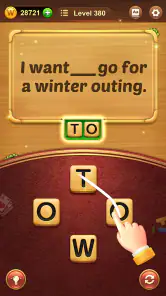
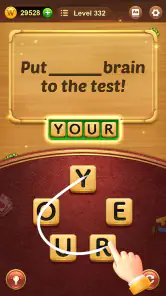
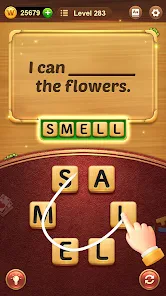
I reach for Word Connect when I want a word puzzle that asks for attention without demanding a long, uninterrupted session. Its central pleasure is turning a small group of letters into words by tracing across them. That simple action makes each puzzle easy to understand at a glance, while the search for less obvious combinations gives it enough bite to hold my focus.
Why the letter-swiping idea works
Many word games ask you to solve a clue or fill a grid; here, the letters themselves are the starting point. I like that shift: instead of waiting for an idea to arrive, I can test possible combinations and notice patterns as I go. Finding a short word can open up a new way to look at the same letters, and a longer answer often feels earned rather than handed to me.
That makes the game useful in small pockets of the day. I can play a level while waiting for a kettle to boil, then put my phone away without needing to remember a complicated story or unfinished strategy. It is also a gentle vocabulary workout, though I would treat it as practice in spotting familiar word patterns, not as a structured language course.
Gameplay That Keeps You Hooked
From the moment you launch the app, Word Connect draws you in with its sleek and intuitive interface. The concept is simple: you're given a mix of letters, and your task is to form words out of them. It sounds easy, right? But as you progress through the levels, the challenge ramps up, and that's where the fun really begins.
Each level offers a new set of letters and a fresh challenge. What I love about this app is its ability to keep you engaged without feeling overwhelming. The learning curve is just right, allowing you to feel accomplished without getting frustrated. It's perfect for both quick play sessions and extended gaming marathons.
A useful way to approach a stubborn puzzle
When I stall, I stop trying to spot the longest answer first. I scan for common short combinations, then rearrange my attention around the letters that remain. This is a small change, but it helps prevent the familiar loop of repeatedly staring at the same arrangement. I also find it better to pause than to guess at random: a brief reset can make a pattern visible without turning a relaxing puzzle into a chore.
That approach highlights a real trade-off. The game rewards patience and flexible thinking, but players who prefer clear clues, a narrative, or a changing set of puzzle mechanics may find the repeated letter-building format too narrow. If you want crosswords that test general knowledge or a word game built around direct competition, another style will probably suit you better.
More From Our News Desk

Weather by Xiaomi Review: Clear at a Glance, Less Clear Up Close

X Under Pressure: Can It Recover When Posting Goes Wrong?

Clash of Clans Is Won Between the Battles

Android Auto Makes the Case for Quieter Car Software

MobiOffice: Transforming Mobile Productivity with Seamless Integration

EA SPORTS FC™ Mobile Soccer: Redefining Mobile Sports Gaming
Aesthetically Pleasing and User-Friendly
One of the first things I noticed about Word Connect is its pleasing visual design. The colors are vibrant without being harsh on the eyes, and the animations are smooth. Navigating through the menus is a breeze, which is a big plus in my book. There's nothing worse than a cluttered app interface, and thankfully, Word Connect steers well clear of that pitfall.
Sound design is another area where this app shines. The background music is calming and adds to the overall relaxing vibe of the game. Plus, the sound effects are satisfying without being intrusive, striking a great balance that enhances the gaming experience.
Good fit for a light, repeatable routine
In an ordinary day, I might open it during a short commute break or while waiting for an appointment, solve a puzzle or two, and stop there. The compact format suits those moments better than a game that expects a long session. For a family looking for an Everyone-rated word game, it is an approachable option; younger players can still benefit from playing with an adult if they meet unfamiliar vocabulary.
It is free to download, and ZenLife Games Ltd is the developer. The game is rated 4.8 on average from around 1.3 million ratings, with over 50 million installs. Those figures suggest broad appeal, but they do not tell me whether its particular loop will hold your interest. The practical question is whether you enjoy finding words from a fixed set of letters.
What to expect before you settle in
The game is listed as a word game, and its store summary emphasizes building words, which matches the core activity. It was released on June 5, 2017, and version 7.1128.440 requires Android 5.0 or later. In-app purchases range from $0.99 to $99.99 per item, so although the game is free, it is worth checking purchase choices carefully if you share a device or want to avoid spending.
A common question is whether it works for a quick break or demands a long commitment: the individual letter puzzles make short visits natural, while anyone chasing continued progress may choose to stay longer. Another is whether it suits every word-game fan. I would recommend it to people who enjoy an uncluttered search for combinations, but not to someone who needs clues, rich storytelling, or a different challenge in every round.
Making the most of the letter set
I get more from each round when I treat the letters as a limited workspace rather than a prompt to guess every word I know. First, I look for familiar endings and beginnings; then I check whether the remaining letters can form a second, shorter answer. This turns the puzzle into a sequence of manageable observations, and it is especially helpful when a board feels busy even though the task itself is simple.
There is also a useful distinction between solving the required words and exploring the combinations that occur to you. If I am playing for a quick mental reset, I focus on completing the puzzle and stop when I am satisfied. If I have more time, I let myself test less obvious arrangements. The first approach keeps the game brisk; the second makes it feel more like a vocabulary scavenger hunt, though it can also make a short break stretch longer than intended.
For younger players or anyone using the game to practise English, I would keep a note of unfamiliar words instead of assuming that every accepted answer will teach its meaning by itself. Looking up a word afterward turns an incidental discovery into a small learning moment. That is a better fit for this game than expecting it to explain grammar or build a carefully planned course.
How it compares with other word puzzles
Compared with crosswords, Word Connect puts less weight on outside knowledge and more on seeing possibilities inside a given set of letters. That makes it easier to start when I am tired or have only a minute, but it also means I miss the satisfaction of working through a clue that connects to a broader subject. Scrabble-style games, meanwhile, ask players to weigh placement and competition; this one feels quieter and more self-directed.
That difference is the main reason I would choose it over those alternatives for a waiting room or a short pause between tasks. There is little setup: I can look at the letters and begin. If I want a social contest, strategic decisions, or clues that reward general knowledge, I would choose another kind of word game instead. Word Connect is strongest when the pleasure is the search itself, not a story or a head-to-head result.
It is also worth being realistic about repetition. New letter sets give each puzzle a fresh local problem, but the basic act of tracing words remains the constant. Players who enjoy improving their eye for combinations may find that consistency comforting; players who need a new mechanic every few minutes may feel they have seen the central idea quickly. I would decide based on whether repetition helps you settle in or makes you restless.
A practical routine for short sessions
One everyday use is to keep the game for moments when I would otherwise scroll without much purpose: a delayed appointment, a quiet lunch break, or a few minutes before leaving home. I set a small stopping point, such as finishing the current puzzle, rather than treating continued progress as the goal. That keeps the game useful as a brief diversion instead of letting it take over a gap in the day.
For a shared device, it is sensible to check purchase settings before handing it to a child. The game is free to start, but optional in-app purchases are offered, so a parent who wants to avoid accidental spending should make that choice in the device settings rather than relying on a child to navigate purchase prompts. Its Everyone age rating makes it broadly approachable, but it does not mean every word will be familiar to every player.
On compatibility, the listed Android requirement is version 5.0 or later, which gives older Android users a clear starting point for checking whether their device can run it. The game is on version 7.1128.440. I would still consider the actual device and personal preference: a compatible phone does not make the repeated letter-search format a good fit for someone who prefers clue-led puzzles.
Who will enjoy it, and who may move on
I would recommend it most to casual players who like finding patterns, want a game they can leave and return to, or enjoy an easygoing word activity without a big learning curve. It can also suit families who want something simple to pick up together, especially if an adult is nearby to discuss unfamiliar vocabulary. The broad audience is reflected in its 4.8 average rating and roughly 160,000 written reviews, though neither popularity nor praise can settle whether its particular rhythm suits you.
I would steer away from it if you want a structured language-learning plan, detailed explanations for every answer, a strong competitive layer, or a puzzle whose rules change from round to round. It is not a replacement for a crossword collection or a spelling lesson; it serves a narrower purpose. Knowing that before installing it is useful, because the same simplicity that makes it accessible is also the source of its limits.
Endless Levels and Brain-Teasing Challenges
One of the standout features of Word Connect is its seemingly endless array of levels. Just when you think you've seen it all, the game throws a new twist your way. This keeps the gameplay fresh and exciting, making it a go-to app whenever you have a few spare minutes.
There's also a social aspect, allowing you to compare scores with friends or even collaborate on particularly tricky puzzles. It's always more fun to share the challenge with others, and Word Connect does a great job of integrating this social element.
In conclusion, if you're looking for a game that's both relaxing and challenging, Word Connect is definitely worth a download. Its engaging gameplay, stunning visuals, and endless puzzles make it stand out in the crowded world of mobile apps. Trust me, your vocabulary will thank you!
Word Connect Frequently Asked Questions
Does Word Connect work on Android devices, and what software version is required?
Word Connect is available for Android devices running version 5.0 or later. Before downloading, check your device’s software version so you know it meets that requirement. The game is a word puzzle focused on building words, making it a straightforward option for players who want a casual vocabulary challenge on a compatible Android phone or tablet.
What is Word Connect’s age rating, and is it suitable for families?
Word Connect has an Everyone content rating, so it is presented as a game for a broad audience. Its word-building puzzles may appeal to children and adults alike, especially players who enjoy spelling challenges. As with any game, parents can decide whether its style and optional in-app purchases are appropriate for their household and can review device purchase settings.
How much storage space does Word Connect need?
Before downloading Word Connect, it is worth checking that your device has enough free storage for the game and its updates. The game is available for Android devices running version 5.0 or later, while its current release is version 7.1128.440. Keeping some additional space available can also help your device install updates smoothly.
Who develops Word Connect, and is it a well-established game?
Word Connect is developed by ZenLife Games Ltd and has been available since June 5, 2017. It has attracted over 50 million installs, with a 4.8 average from around 1.3 million ratings and roughly 160,000 reviews. Those figures suggest it has reached a large audience, though the best way to judge its puzzles is to try the free game yourself.
What is Word Connect and how does it work?
Word Connect is a popular word puzzle game that challenges players to form words from a set of letters. The game presents a grid of scrambled letters, and the player's task is to swipe and connect the letters to form valid words. As you progress, the levels increase in difficulty, providing an engaging and educational experience. It is available on both Android and iOS platforms, making it accessible to a wide range of users.
Pros
- Engaging word puzzles enhance vocabulary.
- Simple and intuitive user interface.
- Offline mode available for on-the-go play.
- Challenging levels keep players hooked.
- Frequent updates with new puzzles.
Cons
- Contains in-app ads that can be intrusive.
- Limited free hints available.
- Repetitive gameplay after long sessions.
- Some levels can be frustratingly difficult.
- In-app purchases can be pricey.
- Category
- Word
- Version
- 7.1128.440