CodyCross: Crossword Puzzles
- 30.63K
- 4.7
- Installs
- 100.00M
- Price
- Free

Screenshots
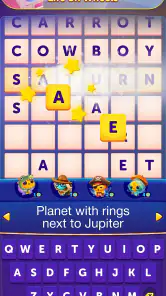

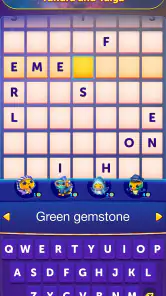
Analysis by Reviewed
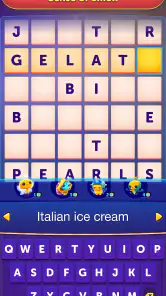
I like word games that let me make progress in short bursts, and CodyCross: Crossword Puzzles is built around that kind of play. It combines crossword-style clues with themed puzzles, so it feels more guided than a blank newspaper grid. That makes it approachable when I want a quick mental break, though it may not suit someone looking for a strict, traditional crossword challenge.
Where players can get stuck
The most common snag is not knowing a clue, but deciding what to do when one answer blocks the rest of the grid. Since words intersect, a guess can affect several spaces, and forcing letters in too quickly may make the puzzle feel harder than it is. I find it more useful to move to another clue, fill in answers I’m confident about, and return to the uncertain one once the crossing letters offer more context.
Hints are available for moments when that approach stops helping. I would treat them as a way to get past a genuine dead end rather than as the first response to every difficult clue: pausing to reconsider the wording often gives the satisfaction of solving it yourself. The trade-off is that players who rely on hints frequently may find the challenge less rewarding, while players who refuse any assistance can hit a frustrating patch.
Reads About CodyCross: Crossword Puzzles
Setup checks and everyday use
Before settling in for a longer session, I’d make sure the game has finished loading and that the device has a stable connection if a screen or puzzle does not appear as expected. If the interface seems unresponsive, closing and reopening the app is a sensible first check; so is making sure the device has enough free space and is running a compatible system. These are ordinary troubleshooting steps, not a reason to assume the puzzle itself is broken.
For a typical day, I might open it during a quiet part of a commute, solve a few clues, then leave the rest for later. That works better than treating every grid as a timed test. If you prefer longer, uninterrupted sessions, the themed progression gives you a clear thread to follow; if you only have a minute or two, a clue or two can still make the game feel worthwhile without demanding a major commitment.
A useful way to recover your momentum
When I return to a puzzle after a break, I avoid immediately changing every uncertain answer. I scan the filled spaces first, then look for crossings that now make a clue easier to interpret. This small reset keeps a hasty guess from spreading into several answers and gives me a clear place to restart. If I still cannot see a path, I step away rather than spending hints just to maintain a streak of progress.
That approach is especially helpful if you play in scattered moments and don’t remember exactly what you were thinking when you stopped. The grid itself becomes a kind of working note: confirmed letters show what you know, while empty spaces mark the questions still open. I find that more satisfying than treating a pause as lost progress, and it makes the game easier to fit around a busy day.
More From Our News Desk

Weather by Xiaomi Review: Clear at a Glance, Less Clear Up Close

X Under Pressure: Can It Recover When Posting Goes Wrong?

Clash of Clans Is Won Between the Battles

Android Auto Makes the Case for Quieter Car Software

MobiOffice: Transforming Mobile Productivity with Seamless Integration

EA SPORTS FC™ Mobile Soccer: Redefining Mobile Sports Gaming
How the puzzle routine feels
CodyCross: Crossword Puzzles is a word game from Fanatee, Inc. Its premise adds a light narrative frame to crossword solving: CodyCross is an alien exploring Earth, and the puzzles are arranged around different themes. In my experience, that structure helps the game feel less like a stack of unrelated grids and gives curious players a reason to keep moving forward.
Gameplay and features
The game mechanics are simple yet captivating. You start by solving crosswords to unlock new levels and worlds. Each world has a unique theme, ranging from science to history, ensuring that you are not only entertained but also learning something new as you play. The game is divided into different packs, and each pack comes with dozens of puzzles to solve. This structure keeps the game exciting as you never know what theme you’ll encounter next.
One of the standout features of CodyCross is the hint system. If you’re ever stuck, you can use tokens to reveal letters or even whole words. This feature is a lifesaver and ensures that you won’t be left frustrated if you hit a tricky spot. Plus, the game regularly updates with new levels and challenges, so there’s always something fresh to tackle.
What the themed format changes
The themes do more than decorate a set of clues: they give me a useful frame for making educated guesses. If a group of answers belongs to a recognizable subject, I can use what I know about that topic without assuming every clue is a specialist test. Still, I would not treat the game as a dependable lesson or reference source. Its main job is entertainment, and any new vocabulary or facts are a pleasant side effect rather than a substitute for looking something up.
This format also makes the experience different from a daily newspaper crossword. A conventional grid often asks me to adapt to a setter’s style and may reward broad wordplay knowledge; CodyCross feels more guided, with its themed sequence helping me decide what to try next. That guidance is a real advantage when I want an accessible puzzle, but it can feel less satisfying if I enjoy the independence and ambiguity of a tougher open grid.
Small-session strategies that work
For a short break, I’d set a modest goal before opening the game: solve a few clues, or work on one area of the grid, rather than expecting to finish a whole sequence. That gives the session a natural stopping point and helps keep optional hints from becoming an impulse purchase or an automatic shortcut. When I have more time, I can follow the themes for longer without changing how I approach each clue.
A second useful habit is to distinguish a clue I genuinely do not understand from one I have not given enough time. I try re-reading the wording and checking the number of spaces against crossing letters before using help. It is a simple way to preserve the pleasure of solving while still allowing a hint when I am properly stuck. Players who enjoy making every answer unaided may want to use assistance sparingly; those who prefer a smoother, less stop-and-start session may find hints worth keeping in reserve.
Who will enjoy it—and who may prefer another game
The guided themes make this a good fit for casual players, families, and anyone who likes learning unfamiliar words through context. Compared with a conventional crossword app, it is more structured and story-led; compared with a word-search game, it asks you to interpret clues and fit answers across a grid. If you want open-ended, newspaper-style grids or a tougher test with fewer nudges, a traditional crossword may be a better match. The game is free to start, but it includes in-app purchases, so I’d keep that in mind if you prefer an experience with no optional spending.
It also suits people who like a clear sense of forward movement but do not need a competitive score to stay interested. The themed route gives each session a little context, while the crossword format still asks you to reason through clues rather than simply spot hidden words. I would skip it if I mainly want a pure word search, a head-to-head word battle, or a minimalist puzzle with no story framing. Those preferences call for a different kind of word game, not a different way of playing this one.
Its audience is broad: the age rating is Everyone, and the game has a 4.7 average from around 1.4 million ratings, with over 100 million installs. Those figures suggest wide appeal, but they do not tell you whether its clue style will suit you. I’d judge that by trying a few puzzles and seeing whether the mix of themes, progression, and hints feels motivating rather than too guided.
When a technical snag may be elsewhere
If a puzzle behaves oddly, I would first check whether the issue is limited to one screen or happens throughout the app. Restarting the game and checking for a stable connection can help separate a temporary loading problem from a clue that simply needs another look. If other apps are also slow, the device or network may be the more likely source of trouble; if only this game is affected, checking that it is up to date is a reasonable next step.
I’d also avoid treating every pause or slow response as proof that an answer has been entered incorrectly. A brief wait, a fresh launch, and a quick check of whether the rest of the device is behaving normally are more useful first steps than repeatedly tapping the same control. If the trouble follows the game alone, the next practical move is to check for an available update before trying more disruptive changes.
On Android, the current version is 2.1.0 and the minimum system requirement is Android 6.0. The game is also available on iOS. It is free, with in-app purchases ranging from $0.99 to $84.99 per item, so I’d avoid tapping purchase options casually and check the amount shown before confirming anything. The game was released on April 5, 2017, but what matters more in daily use is whether it runs comfortably on your device and whether its pace suits you.
Visuals and user experience
The graphics in CodyCross are colorful and inviting. Each world is beautifully designed with vibrant colors and quirky animations that make the game visually appealing. The user interface is intuitive, making navigation a breeze. Whether you are a seasoned crossword veteran or a newbie, you’ll find the app easy to use and navigate.
Moreover, the app runs smoothly on both Android and iOS platforms, with no noticeable lags or crashes. This reliability is crucial, especially when you’re deeply engrossed in solving a challenging puzzle.
For a practical test, I’d try it in the setting where I expect to use it most: a quiet lunch break, a waiting room, or a relaxed evening at home. The short-clue rhythm works well when I can focus for a little while, but a noisy environment can make wordplay harder to parse. If concentration is limited, solving the clues I recognize first is a better plan than pushing through the entire grid. That keeps the session pleasant rather than turning a casual game into another task.
My practical verdict
In a nutshell, CodyCross: Crossword Puzzles is a delightful blend of fun, learning, and challenge. It’s perfect for anyone looking to sharpen their mind while having a good time. The app's blend of educational content with traditional crossword fun makes it a standout choice in the crowded world of puzzle apps. So, if you haven't tried it yet, download it today and embark on a puzzle-solving adventure with CodyCross!
Remember, whether you’re killing time on a commute or looking to unwind after a long day, CodyCross offers a perfect escape into a world of words and wonders. Enjoy your crossword journey!
My recommendation is strongest for someone who likes clues with a bit of structure and wants a game that can be picked up without planning a long session. I would approach it as a relaxed puzzle routine, not as a replacement for serious crossword practice or a guaranteed way to learn a subject. Give the themes a chance, use the crossings before reaching for help, and keep spending choices deliberate. If that balance sounds appealing, it is an easy word game to try; if you want complete freedom, harder wordplay, or no purchase prompts, a more traditional crossword app may fit you better.
CodyCross: Crossword Puzzles Frequently Asked Questions
Does CodyCross: Crossword Puzzles take up much storage space on my device?
Storage needs can vary depending on your device and the version you install, so it is sensible to check the available space shown by your app store before downloading. CodyCross is a word game centered on crossword puzzles, rather than a graphics-heavy action game. Keeping some room free can also help your device install updates and continue running comfortably.
Is CodyCross: Crossword Puzzles appropriate for children and family play?
CodyCross: Crossword Puzzles has an Everyone content rating, and its focus on word clues and crossword grids makes it suitable for a broad audience. Families can take turns solving clues or play independently at their own pace. The game includes in-app purchases, so parents may want to review their device’s purchase settings before letting children play.
Can I choose how challenging the puzzles are in CodyCross: Crossword Puzzles?
The game is organized around themed crossword puzzles that players work through as they progress. Rather than needing to select a difficulty setting before starting, you can take each puzzle clue by clue and use hints when you need help. That approach can suit casual players as well as people who enjoy a more demanding word challenge.
Is CodyCross: Crossword Puzzles suitable for beginners and experienced word-game players?
CodyCross: Crossword Puzzles is built around themed crossword puzzles, so it can appeal to players who enjoy working through clues at their own pace. The game introduces challenges as you progress, giving word-game newcomers room to get comfortable while offering ongoing puzzles for experienced solvers. If a clue proves difficult, the hint system can help you move forward.
What is CodyCross: Crossword Puzzles about?
CodyCross: Crossword Puzzles is a captivating word game where players solve themed crossword puzzles. Each puzzle features a set of clues and a grid to fill in with the correct words. As players progress through levels, they unlock new worlds and challenges, making it a fun and educational experience for word enthusiasts.
Pros
- Engaging and educational gameplay
- Visually appealing graphics
- Frequent updates with new content
- Offline play available
- Wide range of topics covered
Cons
- In-app purchases can be pricey
- Occasional ads interrupt gameplay
- Some puzzles may be too easy
- Limited social features
- Requires internet for daily challenges
- Category
- Word
- Version
- 2.1.0