Hangman
- 11.28K
- 4.6
- Installs
- 50.00M
- Price
- Free

Screenshots


Analysis by Reviewed
I find this kind of word game works best when I want something brief and focused, rather than another app that demands a long session. Hangman brings the familiar letter-guessing challenge to a phone, keeping the basic idea easy to understand while giving me a simple way to fill a spare moment. It is a straightforward choice for people who enjoy words, casual puzzles, or a little friendly competition.
Reading the board and finding your way around
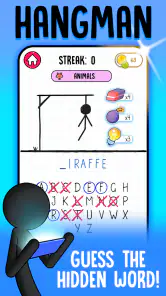
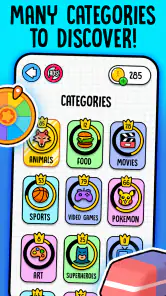
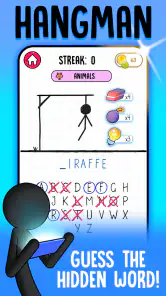
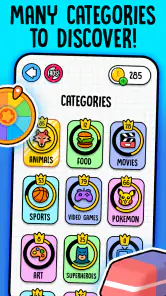
The transition from paper to digital for Hangman is seamless. The app offers a clean, intuitive interface that is super easy to navigate. You start with a blank slate and a series of underscores representing the mystery word. One wrong letter, and you start building your little stick figure—head, body, arms, and legs. The anticipation is intense! What’s more, the app comes packed with various categories like movies, animals, and even geography to spice up the guessing game. It’s like having a pocket-sized trivia game combined with the classic hangman challenge.
That familiar board also helps make the game legible as a task, even for someone who has not played hangman in years. There is no elaborate map to learn or inventory to manage; the central question is simply which letter to try next. I like that directness because it keeps the mental effort on word patterns instead of navigation. A player can glance at the blanks, consider a category, and make a choice without needing to remember a chain of instructions.
In practice, I’d treat each round as a small exercise in narrowing possibilities, not as a test of obscure vocabulary. Look at the word length first, then use the category to make a mental shortlist before choosing letters. That helps make guesses feel reasoned rather than random. A useful trade-off is that familiar topics can make rounds easier, while a less familiar category can turn the same simple board into a tougher vocabulary challenge.
There is a small strategy to the order of guesses. I usually start with letters that are common in English, but the category and the visible word shape should matter more than any fixed formula. If a short word has only a few blanks, a broad guess may be less useful than thinking of likely endings; with a longer word, common vowels can reveal its structure quickly. This is not a complicated system, but approaching guesses deliberately makes the limited mistakes feel like a puzzle constraint rather than a penalty.
Learning at different paces
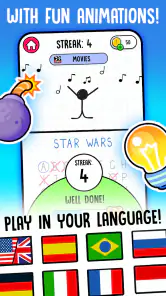
One of the standout features of this app is its inclusivity. Whether you’re a kid learning new words or an adult who wants to kill some time, Hangman has got you covered. The difficulty levels can be adjusted, making it a versatile app for everyone. I found myself getting caught up in it during those boring commutes, and it was a lifesaver during long waits at the doctor’s office.
The app also encourages learning, especially for kids. There’s a hint system that gives you a little nudge in the right direction without giving away the answer entirely. It adds an educational twist to the game without making it feel like a chore. As a parent, I appreciate that—it’s sneaky learning at its best!
More From Our News Desk

Weather by Xiaomi Review: Clear at a Glance, Less Clear Up Close

X Under Pressure: Can It Recover When Posting Goes Wrong?

Clash of Clans Is Won Between the Battles

Android Auto Makes the Case for Quieter Car Software

MobiOffice: Transforming Mobile Productivity with Seamless Integration

EA SPORTS FC™ Mobile Soccer: Redefining Mobile Sports Gaming
For a shared round, I’d let a child choose a category and talk through possible words before using a hint. That turns a miss into a chance to discuss spelling and letter patterns, rather than simply racing to finish. When playing alone, I’d save hints for the point where several plausible answers remain; using one too early can remove the satisfying part of solving the word yourself. The adjustable difficulty also matters in a mixed-age group: it can help keep a younger player involved, though it won’t make every word equally familiar to everyone.
That distinction is worth keeping in mind if the game is being used as a learning activity. It can prompt a useful conversation about spelling, vocabulary, and how a word is built, but the experience still centers on guessing. I would not treat a successful round as proof that a player has learned a word for good. For a child who is just beginning to read, an adult may need to explain unfamiliar words after the answer appears and offer context beyond the category label.
For adults learning English, the same word-first format can be enjoyable practice, especially when a familiar category gives enough context to make guesses. It is less suited to someone who needs definitions, pronunciation, or examples of a word in a sentence. I would pair it with a dictionary or a more structured language-learning tool if the goal is deliberate study. Here, learning comes as a side benefit of play, not as a substitute for a lesson.
Useful in short, ordinary moments
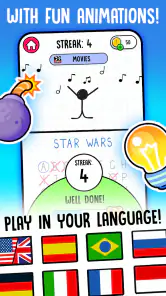
Besides being a throwback to simpler times, the app is a great way to unwind. It’s perfect for those moments when you don’t want to dive into something too intense. The graphics are simple yet charming, echoing the straightforward nature of the original game. Plus, you can play solo or challenge friends, adding a competitive edge that keeps you coming back for more.
A realistic use for it is a few rounds while waiting for an appointment: the rules are quick to grasp, and a word puzzle can be put down mentally when your name is called. It also suits a quiet break at home when you want to focus on one small task rather than scroll through a feed. Compared with a crossword or a word-search game, Hangman asks for fewer clues and gives each guess more immediate consequence. That makes it brisk, but it may feel thin if you want a long puzzle, a story, or a larger set of mechanics to master.
It can also work as a low-preparation activity between people who are already sitting together. One person can suggest a letter while another watches the word take shape, and the group can discuss possibilities without needing a board, paper, or a set of rules to explain at length. The app makes that familiar turn-taking easy to start. Still, it is better for a small, informal moment than for a carefully balanced party game: players who know different amounts of vocabulary may not have an equal chance, and a quick round does not give everyone much time to contribute.
Compared with a word-search app, this game is more about deduction than scanning a crowded grid. Compared with a crossword, it asks less from the player at once and gives feedback after each guess, but it also offers less depth for someone who likes layered clues. A spelling game may be more appropriate when the goal is structured practice, while a broad trivia game can be better for a group that wants facts and discussion. I reach for this one when I want a compact word challenge, not when I want a full evening’s entertainment.
Because the game depends on reading letters and tapping choices, it is most comfortable when the screen is easy for you to see and touch. The visual simplicity keeps attention on the word, but it is not the same as offering extensive customization for different needs. If small text or precise taps are tiring, a spoken-word game or a puzzle designed around larger controls may be a better fit. In a noisy place, the visual guessing loop is convenient; in a setting where looking at a phone is awkward, it is less suitable.
For motor comfort, the pace of a letter-guessing round is gentler than a game that demands quick reactions or repeated gestures. That can be a practical advantage when someone wants a calm activity and time to consider a choice. But tapping remains central, so a person with limited dexterity may still find the interaction frustrating, particularly if selecting small on-screen letters takes effort. I would try a round before recommending it for that situation rather than assuming that simple rules automatically make it accessible.
The same balance applies to attention and sensory context. There is little on-screen complexity competing with the word itself, which I find helpful when I want a focused break. Yet a player who is sensitive to visual clutter, needs stronger contrast, or benefits from spoken prompts may prefer a game built specifically around those needs. I would not describe a plain-looking board as a complete accessibility solution: readability depends on the individual, the device, and the conditions in which they are playing.
What to expect from a free game
It’s also worth noting that the app doesn’t bombard you with ads every few minutes, which is a refreshing change from many other free apps. You get to enjoy the game with minimal interruptions, which is a huge win in today’s ad-heavy app environment.
Senior Games develops this free word game, which is rated for Everyone. It has a 4.6 average from around 600,000 ratings, and more than 50 million installs. That popularity makes it easy to see why people reach for a familiar format, but it does not mean every player will enjoy the same pace or vocabulary. The game has been available since April 26, 2018, and version 5.5.68 requires Android 7.1 or later. Optional in-app purchases range from $0.49 to $30.99 per item, so I’d check the purchase prompts before handing a device to a child or anyone likely to tap through quickly.
Free entry makes it easy to test whether this particular style suits you before spending anything. I would first play a few rounds across the categories and difficulty choices, then decide whether the pacing and word challenge are enjoyable enough to keep. Purchases are optional, but their range makes it sensible to be attentive when a child is using the phone. The game’s core appeal is already easy to judge in ordinary play: do you enjoy teasing a word out of a few letters, or does the format start to feel repetitive after several rounds?
Another practical question is whether it is a good choice for a child to use alone. Its Everyone rating makes it broadly suitable by age, but that does not remove the need for an adult to consider the device’s purchase settings and how comfortable the child is with reading. I would sit nearby for the first few rounds, both to help with unfamiliar vocabulary and to make sure the child understands that hints are optional. That small bit of guidance can keep the game playful instead of turning a difficult word into a frustrating guessing contest.
For a commute, I would choose it when I can safely look at the screen and tap without rushing. It is less appropriate when I need to keep my eyes on my surroundings, balance in a crowded space, or respond quickly to something else. At home, it can be a quiet individual activity; in a group, it can become a shared guessing exercise. The same simplicity that makes it easy to start also means it will not adapt itself to every setting, so I would choose the moment rather than expect it to work everywhere.
Some players may wonder whether the game stays engaging over time. My answer is that its appeal depends on how much satisfaction you get from the basic deduction loop. Categories and adjustable difficulty give you ways to change the feel of a round, but the central action remains guessing letters until the answer is clear. If you enjoy that repeated rhythm, it can be a dependable little habit. If you need new mechanics, progression, or a substantial solo challenge to hold your attention, a richer word game will probably serve you better.
Likewise, it is not a replacement for a paper version in every situation. The phone is convenient because the answer and drawing are handled for you, and the categories can offer a starting point when nobody has a word ready. A paper game can be more flexible for a teacher, parent, or group leader who wants to choose exact vocabulary, tailor the rules, or make the whole activity collaborative. I would choose the app for quick access and choose paper when control over the words and pace matters more.
If you are deciding whether to install it, the clearest test is to ask what you want from a word game. For a short round with a visible objective and little setup, this is a sensible option. For someone who prefers listening rather than reading, wants extensive accessibility controls, or needs a structured learning path, I would look elsewhere. Those are not small distinctions: the game’s strongest quality is its simplicity, and that same simplicity sets a firm limit on how much it can offer.
If you want a quick word game with a recognizable objective, this is an approachable place to start. I’d recommend it to families who can take turns, casual players who prefer short rounds, and anyone who enjoys guessing from letter patterns. I’d skip it if I wanted a deep solo campaign, robust accessibility options, or a puzzle that does not rely on visual reading and tapping. Those are meaningful limits, but for a simple pause-filler, the appeal is clear.
Hangman on your phone is like carrying a piece of your childhood with you. It’s easy to pick up, hard to put down, and always ready to entertain. Whether you’re looking to pass the time, learn something new, or just have a bit of fun, this app delivers on all fronts. So go ahead, give it a try—just make sure you’re ready to save that stick figure from a terrible fate!
Hangman Frequently Asked Questions
Can I play Hangman without creating an account?
Hangman is presented as a straightforward word game, so the central activity is guessing hidden words rather than setting up a separate account-based experience. You can focus on choosing letters and trying to solve each word. If you prefer to keep your play simple, this classic format is easy to understand before you begin.
What kind of game is Hangman, and who developed it?
Hangman is a word game developed by Senior Games. Its familiar format centers on guessing a hidden word by selecting letters, making it accessible to people who already know the paper-and-pencil game as well as newcomers. The overall idea is simple: use the revealed letters to work out the answer before you run out of attempts.
Is Hangman free to download, and what should I know about optional purchases?
Hangman is a free word game from Senior Games, so you can try the classic guessing experience without paying to download it. The game also offers optional in-app purchases, with prices ranging from around fifty cents to about thirty-one dollars per item. Review purchase options before confirming anything, especially if children will be playing on your device.
What is the main objective of the Hangman app?
The main objective of the Hangman app is to guess the hidden word by suggesting letters within a certain number of attempts. The game challenges players to think strategically and enhance their vocabulary skills while providing an entertaining and educational experience. It's a digital version of the classic paper-and-pencil game.
Is the Hangman app suitable for all age groups?
Yes, the Hangman app is designed to be suitable for all age groups, including children and adults. It offers different levels of difficulty, making it accessible for beginners as well as challenging for more experienced players. The app is a great tool for learning new words and improving spelling in a fun way. It has an Everyone content rating, which suits its family-friendly style.
Pros
- Fun and educational gameplay
- Improves vocabulary skills
- Simple user interface
- Can be played offline
- Suitable for all ages
Cons
- Limited word categories
- Repetitive gameplay
- Ads can be intrusive
- No multiplayer mode
- Limited customization options
- Category
- Word
- Version
- 5.5.68