Classic Words With Friends
- 569.34K
- 3.8
- Installs
- 50.00M
- Price
- Free

Screenshots

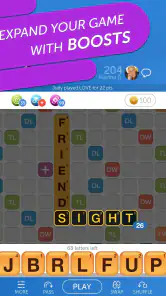
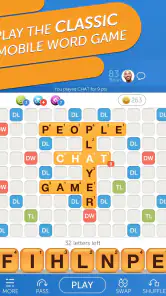

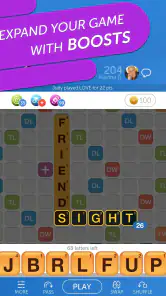
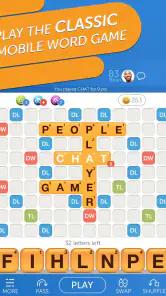

Analysis by Reviewed
When I first opened a word game on my phone, I wanted a quick way to make a few moves without needing to set aside a whole evening. Classic Words With Friends suits that stop-and-start style: I can think through a board, play a word, and return later when an opponent has taken a turn. That slower rhythm is a big part of its appeal, though it won’t suit anyone who wants a rapid-fire puzzle with an immediate finish.
What to expect from a familiar word-game format
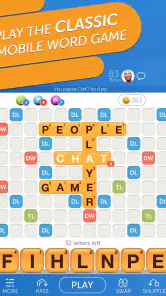
This is a word game from Zynga, built around arranging letters on a crossword-style board and choosing where each play will score. The familiar format makes it easy to understand the basic aim, but strong turns depend on more than finding a long word: the placement of letters and the board’s scoring spaces matter too. I like that a modest word in the right spot can be more useful than an impressive one that opens an easy scoring opportunity for the other player.
It has been around since Feb 14, 2011, and its reach is reflected in over 50 million installs, with a 3.8 average from around 1.7 million ratings. Those figures suggest a well-established game, not a guarantee that every match will feel lively. Because turns may be spread across the day, I’d treat it as a casual pastime rather than a dependable way to find an opponent instantly.
A reassuring first session
The game is free to download and rated Everyone. On Android, it requires version 6.0 or later; the current version is 38.01.01. I’d start by choosing the solo option if I’m new to this kind of board. A computer opponent gives me room to learn how the letter tiles fit, how the board shapes possible plays, and how to avoid making a move just because it uses every letter I can see. The store summary also describes multiplayer, so once the basics feel comfortable, I can move on to a friend or another opponent.
For a first meaningful success, I’d aim for a legal, well-placed word rather than a high score. Before confirming a move, I check whether it creates extra words where the new tiles cross existing ones and whether it leaves a useful opening for the next turn. That small pause makes the game feel less like guessing. If I don’t recognize a word, an in-game dictionary can help turn the moment into a learning opportunity; I still wouldn’t rely on it to plan every move.
Where the routine works—and where it doesn’t
A realistic use is a few turns during a lunch break, followed by another look after work. That suits people who enjoy an ongoing match and don’t mind waiting. It is less suitable if you want a self-contained round, dislike asynchronous play, or prefer word puzzles with a single correct answer. Compared with a quick anagram or crossword app, this game asks for more tactical thinking and gives you an opponent’s choices to respond to; compared with a board game played in person, it is convenient but lacks the shared table and face-to-face conversation.
As I learn, I try not to spend every strong tile immediately. Keeping a flexible mix of letters can make a later turn easier, while a move that scores well now might leave an awkward rack. I also look at the spaces I’m opening near valuable board squares, not only the points I’m gaining. These habits are useful even in casual matches, and they give me something concrete to improve without turning every game into homework.
More From Our News Desk

Weather by Xiaomi Review: Clear at a Glance, Less Clear Up Close

X Under Pressure: Can It Recover When Posting Goes Wrong?

Clash of Clans Is Won Between the Battles

Android Auto Makes the Case for Quieter Car Software

MobiOffice: Transforming Mobile Productivity with Seamless Integration

EA SPORTS FC™ Mobile Soccer: Redefining Mobile Sports Gaming
Getting Started with Classic Words With Friends
First things first, installing Classic Words With Friends is a breeze. Available on both Android and iOS, it’s just a quick download away. Once installed, you’ll be greeted with a simple yet inviting interface that makes you want to dive right into the action. The app layout is intuitive, ensuring even the newest players won’t feel lost in the wordy wilderness.
Gameplay and Features
The game is reminiscent of the classic Scrabble, but with its unique twists that make it stand out. You can play solo against the computer, which is great for those moments when you want to hone your skills. The AI is pretty smart, offering various difficulty levels to match your expertise. But, the real fun begins when you challenge your friends or even random opponents from around the globe. It’s all about testing your vocabulary prowess and strategic thinking.
One of my favorite features is the chat option. It adds a social element to the game, making it not just about words but also about connecting with others. And, if you’re competitive like me, the leaderboard is where you’ll spend a lot of your time, trying to climb up and showcase your word wizardry.
Why You’ll Love It
If you’re someone who loves expanding their vocabulary, this app is a goldmine. Every game feels like a mini lesson, introducing you to new words and meanings. Plus, the in-game dictionary is a handy tool to ensure you’re always learning. The app also rewards your progress with coins and badges, adding that extra layer of motivation to keep playing.
Moreover, the design is pleasing to the eye, with vibrant colors and smooth animations that keep the experience lively. The developers have done a commendable job in keeping the app updated with new features and improvements, which shows their commitment to providing the best user experience.
Making the most of each match
I’d use solo play to practise calmly, then take a friend match when I’m ready for the social side. Chat can make a familiar opponent feel more like a companion than a faceless score, although anyone who wants a purely quiet puzzle may prefer not to make that part of the experience central. The leaderboard is useful if friendly competition motivates you, but I wouldn’t use rank as the measure of whether I’m improving: noticing better placements and learning unfamiliar words is a more satisfying yardstick.
There are a few practical trade-offs to keep in mind. In-app purchases range from $0.99 to $149.99 per item, so I’d check purchase prompts carefully and decide in advance whether I want to spend anything. The free entry point is enough to see whether the turn-based format fits me; purchases are not a reason to start if I’m mainly looking for a simple, no-distraction word puzzle. The game’s long history also means its social side can feel more rewarding when I already have a friend who wants to play.
If a move seems confusing, I first check the letters already on the board and the words created in every direction, rather than assuming a promising-looking placement will work. If a match feels slow, I treat it as a game to revisit rather than something that needs constant attention. And if I’m stuck on vocabulary, I use the dictionary to learn from a play, then try to remember the word next time instead of checking every turn. Those small routines keep the experience relaxed and make each match a little more useful.
Who will get the most from it
I think the best fit is someone who enjoys language but also likes weighing small strategic choices. You don’t need to be an expert speller to begin; the board gives you visible clues, and solo play lets you try moves without the pressure of keeping another person waiting. It also works well for friends or relatives who want a low-effort way to stay in touch: a word and a short message can carry a match forward without arranging a shared play time.
I’d be more cautious if you’re looking for a game that reliably occupies a fixed five-minute window. A match can be available to revisit, but its pace depends on the other player, so it doesn’t offer the neat start-and-finish of a daily word puzzle. Someone who dislikes competitive scoring may also find the head-to-head format less relaxing than a crossword. In that case, a solo puzzle with a defined endpoint is likely the better choice.
A small routine that makes turns easier
When I pick up an unfinished match, I start by scanning the whole board rather than staring only at my tiles. I look for existing letters that could let me make a short crossing word, then compare that opportunity with any longer play. This helps avoid the common trap of treating the longest word as automatically best. It also makes a difficult rack feel more manageable because a useful turn may come from building onto the board, not using every tile at once.
After choosing a candidate, I check what the placement might give the opponent. A play near a premium square can be worthwhile, but only if I’m comfortable with the opening it creates. I also keep an eye on whether a new placement forms more than one word. This is a practical way to catch an invalid move before committing and to notice when a crossing creates extra value. I wouldn’t calculate every possibility in a casual game, but a quick second look often improves the decision.
For vocabulary practice, I find it more useful to pause on one unfamiliar word than to look up every play. I can check its meaning, connect it to the letters or board position that helped me notice it, and then try to recall it later. That keeps the dictionary from becoming a crutch and makes the learning feel connected to an actual match. Players who mainly want a spelling reference or structured lessons should choose a dedicated learning tool instead; this game teaches incidentally, through play.
How it differs from other word games
Against an anagram game, the appeal here is not simply rearranging letters until a solution appears. I have to think about the shared board, the available spaces, and the opponent’s likely reply. A crossword app is usually more focused on clues and a set of answers, while this match leaves room for several plausible choices. That freedom is satisfying when I want to make a tactical decision, but less satisfying when I want the clean certainty of solving a puzzle.
Compared with playing a tile word game around a table, the phone version is easier to fit into separate schedules and doesn’t require everyone to be present together. The trade-off is that conversation and reactions become optional rather than part of the moment. If the social connection matters most, I’d invite someone I already know and use the match as a reason to check in. If I mainly want a quiet solo challenge, I’d stay with practice or pick a puzzle designed around individual solving.
Questions worth settling before you start
Can I play without committing to a long session? In my experience, yes: the turn-based structure is naturally suited to brief visits, though it is not the same as completing a whole round quickly. Can a beginner make progress? Yes, especially by learning how placements intersect and using solo play to become comfortable with the board. Is it only for playing with friends? No; the game also offers solo play and multiplayer, so you can choose between practising and competing.
Do purchases have to be part of the experience? The game is free to download, while optional in-app items are available at a wide range of prices. I’d begin without buying anything and see whether the basic play suits me, taking care around purchase prompts. Is it a good choice for children? Its Everyone rating makes it suitable for a broad audience, though I’d still consider whether competitive turns and any social features fit the child’s age and preferences.
For a first day, I’d keep the plan simple: try a solo game, take a moment to inspect how a word intersects the board, and use the dictionary only when a word genuinely teaches me something. Once that feels comfortable, I’d start a match with a friend or another opponent and accept that the fun comes from returning to it, not racing to the finish. That path makes the first success feel achievable without needing a big vocabulary or a complicated strategy.
Final Thoughts
In conclusion, Classic Words With Friends is more than just a game; it’s a delightful journey into the world of words. Whether you’re playing to relax, compete, or learn, it caters to all these needs effortlessly. It’s addictive, educational, and most importantly, it’s fun! So, if you're ready to challenge your brain and have some fun along the way, give it a try. Trust me, you won't regret it!
Classic Words With Friends Frequently Asked Questions
Can I play Classic Words With Friends on iOS as well as Android?
Classic Words With Friends is a word game from Zynga, and the experience centers on solo play or multiplayer crossword-style games with friends. Before downloading, check that the version offered in your device’s app store is compatible with your phone or tablet. Android users need version 6.0 or later; the game is free to download, with optional in-app purchases.
Does Classic Words With Friends cost anything to play, or are purchases required?
The game is free to download, and its core word-game format is available without an upfront purchase. Optional in-app purchases are available, with prices ranging from $0.99 to $149.99 per item. You can decide whether any offered extras are worthwhile before buying; you do not need to make an in-app purchase simply to get started playing.
Is Classic Words With Friends free to download, and what device does it require?
Classic Words With Friends is free to download, so you can try its word-game format without an upfront purchase. It is a word game developed by Zynga, and it requires Android 6.0 or later. If you are checking whether the app suits your device before installing, make sure your operating system meets that minimum requirement.
What is Classic Words With Friends and how does it work?
Classic Words With Friends is a popular word puzzle game that allows players to challenge their vocabulary skills by forming words on a digital board. Players take turns to create words using lettered tiles, aiming to achieve the highest score possible. The game can be played solo against AI or with friends in multiplayer mode. It includes various features like word hints, score tracking, and a built-in dictionary to enhance the gaming experience.
Can I play Classic Words With Friends without an internet connection?
Yes, one of the great features of Classic Words With Friends is its offline mode. Players can enjoy the game without an internet connection, making it convenient for traveling or when in areas with poor connectivity. The offline mode allows you to play against the computer, ensuring you never miss out on the fun even when you're not online.
Pros
- Engaging word puzzles
- Multiplayer mode
- User-friendly interface
- Offline mode available
- Educational benefits
Cons
- Occasional ads
- Requires internet for online play
- Limited free features
- In-app purchases
- Some outdated graphics
- Category
- Word
- Version
- 38.01.01