Wordscapes
- 263.70K
- 4.4
- Installs
- 100.00M
- Price
- Free

Screenshots
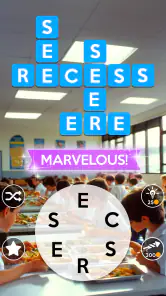
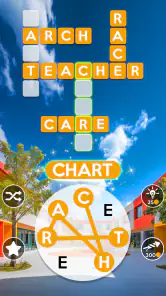
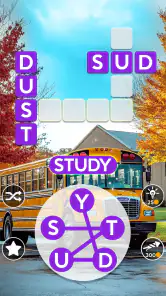
Analysis by Reviewed
I often reach for a word game when I want something more absorbing than scrolling but less demanding than a long story or strategy session. Wordscapes suits that in-between mood: I build words from a small set of letters and fit them into a crossword-shaped grid. The rules are quick to grasp, yet finding every answer can take real patience. Its quiet pace also makes it easy to share a device for a few turns, as long as everyone is comfortable taking turns rather than treating progress as a separate personal save.
A small puzzle for a shared pause
One everyday situation where this works well is a few minutes waiting for dinner, an appointment, or a ride. I can open a puzzle, make a couple of guesses, and pass the tablet to someone else without needing to explain a complicated control scheme. A child might spot a short familiar word while an adult notices how a longer answer crosses the grid. That makes the screen a focus for conversation rather than a reason for everyone to retreat into separate games.
For a calmer shared session, I’d suggest agreeing that the person holding the device enters the words while everyone else offers ideas. It avoids several people tapping at once and keeps the puzzle readable. If one player prefers to think silently, though, this style can feel more like an audience than a team effort; taking turns with the device is better than calling out guesses over one another.
Reads About Wordscapes
This is also a useful choice for someone who wants a light mental break but doesn’t want to start a long match that needs an opponent to stay online. The grid gives a small, concrete goal: find a word, use its crossing letters, and see whether the board opens up. I wouldn’t choose it when the group wants a loud party game or a clear winner. Its pleasure is in solving at a gentle pace, not in turning every round into a contest.
Discovering the World of Words
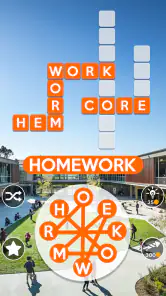
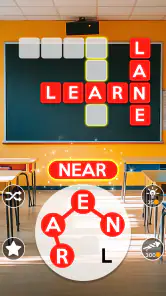
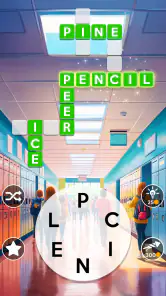
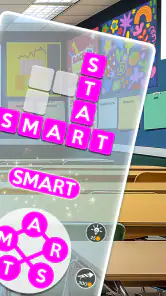
I stumbled upon Wordscapes while searching for something to fill in the gaps during my daily commute. What can I say? I’m a sucker for games that make me think a little! The premise is straightforward: you’re given a circle of letters, and your mission is to form words that fit into the crossword-style puzzle above. Sounds simple, right? Well, it is... at first!
As you progress, the puzzles get trickier, and you’ll find yourself scratching your head more often than not. But that’s the beauty of it! The game brilliantly balances difficulty and fun, keeping you coming back for more. Plus, with over 6,000 puzzles, there's no shortage of content to keep your brain engaged.
The Gameplay Experience
What really hooked me was the seamless gameplay. The interface is clean and intuitive, making it easy to navigate through the puzzles. And can we talk about the stunning backgrounds? Each level is set against a beautiful landscape, which adds a nice calming effect to the whole experience. The visuals are definitely a feast for the eyes.
More From Our News Desk

Android Auto Makes the Case for Quieter Car Software

MobiOffice: Transforming Mobile Productivity with Seamless Integration

EA SPORTS FC™ Mobile Soccer: Redefining Mobile Sports Gaming

How Microsoft OneDrive Became a Mobile Productivity Giant

How Google Translate Breaks Language Barriers Effortlessly

Why Google Sheets Is the Ultimate Mobile Productivity Tool
Another thing I love is the flexibility the game offers. Whether you’ve got five minutes or an hour to spare, you can jump in and start playing without any hassle. It’s perfect for those quick mental breaks or longer sessions when you have more time to kill.
Making Shared Play Work
On a shared tablet, I’d treat it as a pass-the-device game: one person suggests a word, another checks where its letters fit, and then you swap turns. That works especially well when a puzzle has several crossing answers, since solving one can make the next guess obvious. It also turns a quiet wait at a café or a short evening break into a small cooperative activity without requiring everyone to learn complicated controls.
The trade-off is that a shared device can blur whose progress, coins, or puzzle choices are whose. I’d agree on one simple rule before playing: either keep one household run that everyone contributes to, or let one person be responsible for moving through the levels. If different players want independent progress, sharing the same game session may feel frustrating; a shared screen is not the same thing as separate personal profiles.
Setup, Turns, and Boundaries
Because the basic puzzle is easy to understand, younger players can join in by spotting familiar words, while adults can focus on the harder combinations. I wouldn’t assume that this makes every round equally suitable for every age or reading level: the appeal depends on comfort with spelling and the language of the puzzle. The game is rated Everyone, but I still find it useful for a parent or caregiver to try a few rounds first and decide whether its pace and word choices suit the child.
For a household, a little coordination prevents accidental frustration. Before handing over the device, decide whether hints are fair game and whether anyone is trying to solve the board unaided. A hint can be a helpful nudge when everyone is stuck, but using one too quickly can take away the satisfying moment of spotting a word. I also wouldn’t make the game a vocabulary test: guessing together is more enjoyable than correcting every miss.
Boosting Your Vocabulary
A delightful perk of playing Wordscapes is how it subtly boosts your vocabulary. You’ll often come across words you didn’t even know existed, and it’s always satisfying to expand your lexicon while having fun. It’s like a mini English lesson wrapped up in a game!
And let’s not forget the daily challenges. These are a fantastic way to earn extra coins and sharpen your skills. The game keeps things fresh by introducing new puzzles regularly, so you never run out of challenges to tackle.
A Useful Way to Get Unstuck
When I’m stuck, I try changing the order in which I look at the letter circle rather than repeating the same guess. I scan for short words first, then use the letters already placed in the crossword to narrow down longer possibilities. This is more satisfying than spending a hint immediately, and it makes the crossing pattern feel like a genuine solving tool rather than decoration. If I’m playing with someone else, saying possible letter combinations aloud often helps us notice a word neither of us saw alone.
That approach has a limit: the game rewards finding words that fit its grid, not exploring every possible word in the language. If you want a strict spelling trainer, a dictionary-based study tool, or a timed competitive word battle, this is not the same experience. I see it as a relaxed puzzle with vocabulary benefits, rather than a structured lesson or a test of speed.
In-App Features and Community
Now, I’d be remiss not to mention the social aspect of the game. You can connect with friends and even join teams to compete in tournaments. It adds a layer of camaraderie and competition, which is always a nice touch. Plus, if you ever find yourself stuck, there’s a handy hint system to nudge you in the right direction.
For a household deciding whether to spend, the game is free to start, while optional in-app purchases range from $0.99 to $99.99 per item. I’d keep purchases separate from the fun of solving: a player can take a break, try another letter combination, or ask a teammate before deciding a hint is worth using. On a shared device, it’s sensible to make sure the person holding it understands that purchases cost money rather than assuming every button is simply another puzzle tool.
Keeping Household Progress Clear
When several people use one device, I’d make the person responsible for the game session clear before anyone starts moving through puzzles. That small boundary matters more than it sounds: one player may want to linger over a difficult board, while another might be eager to advance. A shared household run can be fun if everyone accepts that choices and progress belong to the group. If that compromise would bother anyone, it’s better to treat the game as one person’s activity and let others contribute suggestions only when invited.
The same idea applies to hints and coins. Rather than spending a hint because one person is impatient, I’d agree that the group tries a few different letter scans first, then lets the current player decide. This keeps the help option from becoming a source of arguments and preserves the satisfaction of solving a word together. It also gives younger players room to make guesses without feeling that an adult is racing to finish the board for them.
How It Fits Beside Other Word Games
Compared with a head-to-head word match, this feels less demanding because I don’t need another player to be available at the same moment. Compared with a crossword app, the letter circle gives me a different starting point: I’m assembling possible words from a fixed set and using the grid’s crossings to test them. That makes it more tactile and exploratory than simply filling answers from clues, although someone who loves clue-solving may prefer a traditional crossword.
It also differs from a word-search puzzle, where the task is usually to spot words already arranged in a field of letters. Here, I have to form answers and work out how they intersect. The format is satisfying when I want a gentle puzzle with a visible sense of progress, but it won’t replace a competitive vocabulary game for someone who wants a clock, an opponent, and a decisive result. Choosing between these styles comes down to whether you enjoy quiet deduction or social pressure.
For a practical routine, I’d use a single puzzle as a short break and stop when attention starts to fade rather than turning every spare minute into a streak to maintain. A tricky board can be left for later; returning with fresh eyes often makes the available combinations easier to notice. That flexibility is one of the better reasons to choose this over a timed format, where pausing can cost momentum or affect a match.
Who Will Enjoy It—and Who May Prefer Something Else
I’d recommend it to people who like an unhurried crossword-style challenge, want a game that can be picked up for a short break, or enjoy talking through word clues with someone nearby. PeopleFun’s game has a 4.4 average from around 1.3 million ratings, and it has been installed over 100 million times; that broad appeal is easy to understand, though popularity alone can’t tell you whether its particular pace will suit you.
If your usual word-game choice is a head-to-head match, a timed anagram race, or a daily grid you want to finish in one focused sitting, those formats may be a better fit. This one is more about gradually filling a board and working out how a set of letters connects. I especially like that it doesn’t demand a long uninterrupted session, but players who dislike revisiting a puzzle or prefer a clear competitive finish may find it less compelling.
The game is free, with optional purchases, and its content rating is Everyone. It was released on June 14, 2017; version 2.31.0 is listed for devices running OS 7.0 or later. Those details make it straightforward to judge basic device and age fit, while the more personal question is whether you want a calm word puzzle or a faster, more competitive alternative.
For a household, my verdict is that it works best as an easygoing shared pastime when everyone understands that the game session has one common line of progress. The Everyone rating is a useful starting point, not a substitute for checking whether a particular child is comfortable with the vocabulary and reading involved. I’d try a few rounds together, set expectations about hints and purchases, and then see whether the puzzle naturally invites conversation. If the family wants separate records, firm account boundaries, or a competitive game with a clear winner, another format will probably suit better.
All in all, Wordscapes has been a delightful addition to my app collection. It’s engaging, educational, and endlessly entertaining. Whether you’re a word aficionado or just looking for a new way to pass the time, give it a shot. You might just find yourself pleasantly surprised by how addictive it can be!
Wordscapes Frequently Asked Questions
Can I play Wordscapes in short sessions, or do I need to set aside a lot of time?
Wordscapes is built around individual word puzzles, so it can suit either a brief break or a longer stretch of play. You can focus on finding words that fit the crossword grid and stop when it suits you. The pace is unhurried, with no need for quick reactions, making it easy to return to the game when you have time.
What kind of word skills does Wordscapes test?
The game asks you to form words from a circle of letters and use them to complete a crossword-style grid. That makes vocabulary and pattern recognition central to play: you need to spot possible combinations and work out where each word fits. As the puzzles become more challenging, you may need to consider the available letters more carefully, but the basic rules remain straightforward.
Is Wordscapes suitable for relaxing play, or does it become stressful?
Wordscapes is designed around word puzzles and a relaxed presentation, with beautiful landscapes accompanying the game. You can work through each puzzle at your own pace, looking for words that fit the crossword grid. The difficulty increases as you progress, so later levels can offer more of a challenge, but the basic play remains focused on finding words rather than quick reactions.
Is Wordscapes suitable for children and family play?
Wordscapes is a word puzzle game with an Everyone content rating, so it is suitable for a broad audience. Its simple format—forming words from a circle of letters to complete a crossword-style grid—makes it easy to understand, while the puzzles can also give players a chance to practise vocabulary. Families can take turns solving levels or play individually at their own pace.
What is Wordscapes and how does it work?
Wordscapes is a popular word puzzle game available on both Android and iOS platforms. The game combines elements of crossword puzzles and word search games. Players are provided with a circle of letters at the bottom of the screen and must find words to fill in the crossword puzzle above. As you progress, the puzzles become more challenging, testing your vocabulary and puzzle-solving skills, making it both entertaining and educational.
Pros
- Beautiful and relaxing graphics.
- Challenging word puzzles.
- Offline play available.
- Expands vocabulary.
- Regular updates and new levels.
Cons
- Contains in-app purchases.
- Ads can be intrusive.
- Requires internet for some features.
- Limited hints without purchase.
- Can be repetitive over time.
- Category
- Word
- Version
- 2.31.0