PopCat Tiles: Piano & Music
- 26.00
- 4.7
- Installs
- 10.00M
- Price
- Free

Screenshots





Analysis by Reviewed
I usually reach for a rhythm game when I have a few spare minutes and want something more engaging than scrolling. PopCat Tiles: Piano & Music puts that quick, focused play around a simple idea: follow the music with timely taps while cute cats give the screen its personality. It is a music game from JMGame, and the appeal is less about learning piano technique than about staying in step with a tune. That distinction matters if you are deciding whether you want a casual reflex challenge or a tool for practicing an instrument.
What the tapping challenge asks of you
The central appeal is the direct link between timing and sound. You are not composing a tune or controlling a character through a world; you are watching the tiles and responding to the music. That narrow focus makes the game easy to understand, but the challenge comes from keeping your attention steady as the sequence continues. I like that the basic task is clear from the start: listen, watch, and tap with care.
That simplicity also makes it easy to fit around a busy day. I can see opening it for a short break while waiting for a kettle, sitting on a bus, or taking a pause between study tasks. It does not ask me to remember a story or plan a complicated strategy before I can play. The important practical detail is to choose a moment when you can look at the screen; the rhythm may be accessible, but the falling tiles still need your attention.
For a first session, I would focus on keeping a comfortable pace rather than chasing a flawless run. If I miss a tile, tapping more aggressively is unlikely to help; I would pause, listen for the beat, and try to settle into the timing on the next attempt. This is a small but useful adjustment because the game rewards controlled reactions, not frantic ones. It can also help you notice whether a miss came from losing the beat or simply looking away at the wrong moment.
How the music and visuals shape a session
The cat-centered presentation gives the rhythm challenge a softer, more playful feel than a plain screen of tiles. That matters if you want a casual game rather than a stern accuracy test, though the cute visuals do not change what the play requires: your focus stays on timing. I would treat the animation as part of the mood, not as a cue that the game is meant for very young children or as a replacement for learning an instrument.
The music is the anchor, so choosing a tune that feels comfortable can make the opening minutes less intimidating. Familiarity with a melody may help you anticipate its pulse, but it does not remove the need to watch the tiles. That distinction is useful: listening can support your timing, while looking away because you think you know what comes next can still cost you a tap.
It is also worth separating enjoyable musical play from music education. The game can give you a satisfying reason to listen closely and coordinate your fingers, but that is not the same as learning notation, piano fingering, or how to perform a piece on a keyboard. If your goal is a structured lesson, I would choose a teaching app or a real instrument. If your goal is a light rhythm challenge with a musical frame, this is much closer to the mark.
More From Our News Desk

Weather by Xiaomi Review: Clear at a Glance, Less Clear Up Close

X Under Pressure: Can It Recover When Posting Goes Wrong?

Clash of Clans Is Won Between the Battles

Android Auto Makes the Case for Quieter Car Software

MobiOffice: Transforming Mobile Productivity with Seamless Integration

EA SPORTS FC™ Mobile Soccer: Redefining Mobile Sports Gaming
When a short play session works best
The format makes most sense in small, uninterrupted windows. For example, I might play one attempt during a quiet break, then stop before it turns into a distraction from work. If a section keeps catching me out, I would use the retry to pay attention to where my timing slips rather than immediately moving on or tapping faster. That approach turns a quick session into a modest test of focus without requiring a long commitment.
It can also be a better pick than a sprawling game when I have limited time and want an immediate activity. Some music games lean heavily on progression, collecting, or a larger competitive structure. PopCat Tiles keeps the core rhythm action prominent, which makes it easier to start playing, but may feel less satisfying to someone who wants extensive customization or a long-term system to work through. I would decide based on whether the act of matching taps to music is enough to keep me interested.
Because a missed tile can interrupt the music, the game suits players who find retries motivating. If a broken streak makes you want to try again and improve, that interruption can give each attempt a clear goal. If it makes you tense or irritated, the same design may make a short break feel like work. I would not choose it for a wind-down moment when I want to play without concentrating; a calmer listening app or a less demanding casual game would be a better fit then.
A Purrfect Musical Experience
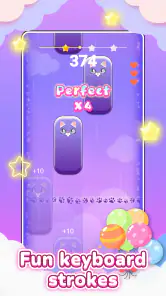
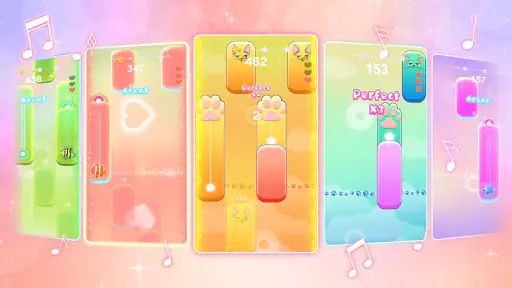
If you're a fan of rhythm games, then you're going to love PopCat Tiles: Piano & Music. The concept is simple yet endlessly entertaining: tiles fall from the top of the screen in time with the music, and it's your job to tap them as accurately as possible. Miss a tile, and the music stops, leaving you scrambling to get back in the groove. It's a test of your reflexes and rhythm skills, and it's incredibly satisfying when you nail a perfect streak.
That basic loop is the game’s most important strength: it gives each short session a clear focus. I find it useful when I want to concentrate on one thing for a few minutes, rather than commit to a long level or a story. Because a missed tile interrupts the music, accuracy feels connected to the song instead of being just a score on a screen. The trade-off is that a mistake can break the flow, which may feel more frustrating than relaxing if you are playing while distracted.
Cat-astrophically Cute Graphics
One of the first things you'll notice about this app is its adorable graphics. The cats in the game are irresistibly cute, each bringing its own unique charm to the table. Whether you're a cat lover or just someone who appreciates good design, you'll find yourself smiling at the delightful animations and colorful backgrounds. The visual appeal of this game is a big part of what makes it so engaging, and it's clear that the developers put a lot of thought into every detail.
The playful presentation also helps make the rhythm challenge feel less stern than a bare-bones timing game. Still, the animation is decoration, not a substitute for musical instruction: I would not choose it to learn piano fingering, read notation, or build a structured practice routine. If your goal is to play an instrument, a lesson-based app or a real keyboard is a better fit. Here, the point is to react to the beat and enjoy the immediate feedback.
Variety is the Spice of Life
Another highlight of PopCat Tiles: Piano & Music is the wide variety of songs available. From classical pieces to pop hits, there's something for everyone. The app regularly updates its song library, so you're never stuck playing the same tunes over and over again. The difficulty levels range from beginner to expert, ensuring that players of all skill levels can find a challenge that suits them. Plus, if you're the competitive type, you can compare your scores with friends and see who really has the best rhythm.
For a practical everyday use, I can imagine opening it during a quiet break, choosing a familiar-sounding tune, and using one attempt as a quick reset before returning to work or study. A useful habit is to start with a song that feels comfortable rather than immediately chasing a difficult run; that gives your hands time to settle into the timing. Then, if a section keeps tripping you up, treat the next attempt as a timing challenge instead of tapping harder or faster. That small change helps keep the play deliberate rather than frantic.
Compared with music games that emphasize building a collection, following a narrative, or competing through elaborate progression systems, this one puts the tap-to-the-beat action front and center. That makes it easy to understand without a long learning period, but it also means players looking for deeper customization or a more involved long-term structure may prefer another game. It suits someone who wants a direct rhythm test with a light visual style, not someone expecting a full music-making studio or a piano course.
Easy to Learn, Hard to Master
While the game is easy to pick up and play, mastering it is a whole different story. The tiles come fast and furious as you progress, and you'll need sharp reflexes and a good sense of timing to keep up. But don't worry if you struggle at first - the game is incredibly forgiving, and there's a real sense of accomplishment when you finally conquer a challenging song. It's this balance of accessibility and difficulty that keeps players coming back for more.
My main caution is about the kind of attention the game asks for. The falling tiles demand that you watch the screen closely, so it is not ideal if you want something you can play while carrying on a conversation or keeping an eye on another task. Nor would I recommend it to someone who dislikes retrying after a broken streak. The game is at its best when you can give it a brief, uninterrupted window and accept that improvement comes from learning the timing, not simply tapping as quickly as possible.
PopCat Tiles is free to download, with optional in-app purchases priced from $1.99 to $19.99 per item. It is rated Everyone, has a 4.7 average from around 16,000 ratings, and has passed 10 million installs. The current version is 1.6.8, and it requires Android 6.0 or later. Those details make it easy to judge the basic fit: it is accessible to a broad audience, while purchases are something to keep in mind if you prefer to avoid optional spending in games. I would check the purchase prompts carefully rather than assuming every part of the experience is included without extra cost.
For parents considering it for a child, the Everyone rating is reassuring as a general age classification, but I would still look at the device’s purchase settings together if accidental spending is a concern. For adults, the key question is simpler: do you enjoy keeping time with a song and retrying a sequence until it clicks? If yes, the straightforward format is a good match. If you want deep music theory, an instrument simulator, or a hands-off listening experience, another kind of app will serve you better.
Who will get the most from it
I would recommend it most to someone who likes music but does not need a rhythm game to teach them an instrument. It works as a small, focused challenge for a commute break, a wait between appointments, or a few minutes at home when you want to do something active without beginning a lengthy game. The cat styling may also make it a friendly choice for players who find intense, competitive rhythm games off-putting, although the timing demands still matter.
For families, the broad age classification makes it a plausible casual option, but I would still show a child how to handle purchase prompts and use the device’s spending controls if that is a concern. The game is free to start, while optional purchases range from $1.99 to $19.99 per item; I would not treat “free” as a reason to ignore those settings. Adults who share a device with children may want to check those controls before handing it over.
The game’s public reception is strong, with a 4.7 average from around 16,000 ratings and more than 10 million installs. I see that as useful context for a casual player deciding whether it is an established option, not as proof that every player will enjoy the same rhythm or difficulty. JMGame’s music title is free, rated Everyone, and its current version is 1.6.8 for Android 6.0 or later, so Android users can quickly judge whether their device meets the stated minimum.
In conclusion, PopCat Tiles: Piano & Music is a delightful blend of music, rhythm, and adorable cats that will keep you entertained for hours. Whether you're a seasoned gamer or just looking for something fun to pass the time, this app is sure to hit the right notes. So why not give it a try? You might just discover your inner pianist.
PopCat Tiles: Piano & Music Frequently Asked Questions
Can I play PopCat Tiles: Piano & Music with one hand?
The game’s basic interaction is tapping tiles as they appear, so its controls are straightforward and suited to touchscreens. Whether a particular song feels comfortable with one hand depends on the pace and where tiles appear on your screen. If you prefer a simple pick-up-and-play music game, the tap-to-the-beat idea is easy to grasp.
Does PopCat Tiles: Piano & Music help improve rhythm or finger coordination?
PopCat Tiles: Piano & Music asks you to tap tiles in time with the beat, which gives you a chance to practice timing and finger coordination while playing. It is best approached as a casual rhythm game rather than a formal music lesson. The cute cat theme keeps the experience lighthearted, while following the beat gives each session a clear focus.
Who developed PopCat Tiles: Piano & Music, and what kind of game is it?
PopCat Tiles: Piano & Music is a music game developed by JMGame. Its central idea is tapping tiles in time with the beat, with cute cats adding a playful touch. The simple premise makes it easy to understand before you start, while the rhythm-based play gives you a reason to keep practicing your timing and finger coordination.
What is PopCat Tiles: Piano & Music about?
PopCat Tiles: Piano & Music is a fun and engaging music game that combines the excitement of playing the piano with popular tunes and adorable cat characters. Players can tap on the tiles as they appear on the screen to create beautiful melodies, all while enjoying the charming animations of the cat-themed interface. It's a delightful way to enjoy music on your mobile device.
Is PopCat Tiles: Piano & Music free to play?
Yes, PopCat Tiles: Piano & Music is free to download and play. However, the game may offer in-app purchases that can enhance the gameplay experience. These purchases might include additional songs, themes, or other special features. Players can enjoy the core game without any cost, but optional items are available for those who wish to expand their experience. In-app purchase prices range from $1.99 to $19.99 per item, so check the purchase options before buying.
Pros
- Engaging gameplay with simple mechanics.
- Wide variety of popular songs to play.
- Visually appealing design and animations.
- Regular updates with new songs.
- Easy to learn
- quick to master.
Cons
- Contains in-app purchases.
- Advertisements can be intrusive.
- Limited offline capabilities.
- Requires high device compatibility.
- May be repetitive over time.
- Category
- Music
- Version
- 1.6.8












