No Wifi-Mini Games
- 65.00
- 3.9
- Installs
- 5.00M
- Price
- Free

Screenshots
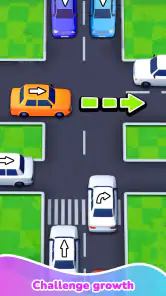







Analysis by Reviewed
When a phone is passed around at home, a small collection of offline games can be more useful than a single title that only one person enjoys. I’d treat No Wifi-Mini Games as a shared option for short breaks: one person can try a puzzle, then hand the phone to someone else for a quick arcade-style session. That setup suits a quiet wait or a rainy afternoon, though it works best when everyone is happy to take turns rather than expecting a multiplayer experience.
Sharing one phone without turning play into a project
For a household, the main appeal is convenience. You can keep the game on a device that travels between rooms or comes along on errands, and offline play makes it useful when a connection is unavailable or you simply want to leave mobile data alone. I’d still agree on a basic handoff routine—finish a round, then pass the phone on—because a shared collection can make it easy for one player to keep saying “one more.” That is a people problem, not a feature the game solves for you.
It is also worth separating casual entertainment from anything that needs individual progress or personal settings. If several people use the same device, assume that the experience is shared unless you have another reason to manage the phone differently. I would not choose this as a substitute for separate accounts or a game built around distinct player profiles. Its strength is being ready for a spare moment, not organizing a household’s gaming life.
Picking the right moment and the right player
A realistic use is a family waiting for a meal or an appointment: the phone can offer a brief distraction without relying on a stable signal, and a puzzle gives the next person a natural point to take over. For younger players, I’d keep the device in view and set expectations about turns and screen time as I would with any casual game. The age classification is Everyone, which makes it broadly suitable, but that label is not a replacement for a caregiver’s judgment about how a child uses a shared device.
I’d recommend it most to people who want variety in short bursts and don’t mind moving between small games rather than investing in one deep challenge. If you want a long story, a carefully balanced competitive game, or a way to coordinate several players at once, a dedicated title will likely serve you better. Compared with downloading individual casual games, a mini-game collection is handy because it puts different kinds of quick play in one place; the trade-off is that no single activity may have the depth or polish you’d expect from a game built around just one idea.
Small habits that make offline play smoother
One useful habit is to open the game before leaving home and make sure it reaches the game-selection screen while you still have a connection. That avoids discovering at the worst moment that you need to complete an initial step first. Once you are offline, try a few different activities before settling on a favorite: the best choice for a short queue may not be the one you want during a longer trip. And if the phone is shared, agree on a stopping point before handing it over; quick games can make time feel shorter than it is.
Offline does not automatically mean distraction-free or endlessly suitable for every situation. A child using a parent’s phone may still encounter the device’s usual notifications or other apps, so the adult should prepare the phone as needed rather than assuming the game handles that boundary. Likewise, anyone who dislikes switching between multiple small experiences may find a focused standalone puzzle more satisfying.
More From Our News Desk

Weather by Xiaomi Review: Clear at a Glance, Less Clear Up Close

X Under Pressure: Can It Recover When Posting Goes Wrong?

Clash of Clans Is Won Between the Battles

Android Auto Makes the Case for Quieter Car Software

MobiOffice: Transforming Mobile Productivity with Seamless Integration

EA SPORTS FC™ Mobile Soccer: Redefining Mobile Sports Gaming
Why No Wifi-Mini Games Stands Out
No Wifi-Mini Games is not just an app; it’s a treasure chest of fun, packed with a variety of games that require no internet connection. Whether you’re into puzzles, racing, or strategy, this app has got you covered. I’ve spent hours diving into its offerings, and trust me, it’s like carrying a pocket arcade wherever you go.
Game Variety and Features
What I love about this app is its diversity. You get a smorgasbord of games, each with its own unique twist and challenge. From brain-teasing puzzles that make you feel like a genius to adrenaline-pumping racers that get your heart racing, there’s something for everyone. And the best part? You don’t need Wi-Fi! Each game is designed to work perfectly offline, ensuring you’re never left twiddling your thumbs.
The interface is super user-friendly. Navigating through the app is a breeze, and the graphics are surprisingly good for offline games. It’s like the developers knew we’d appreciate a smooth, visually appealing experience even without the internet. Plus, the games load quickly, which is a huge bonus when you’re itching to start playing.
Perfect for On-the-Go Entertainment
Imagine being on a flight, and instead of watching reruns of that movie you’ve seen a dozen times, you’re conquering new levels in your favorite game. Or maybe you’re on a road trip, and while everyone else is struggling with spotty service, you’re happily engrossed in a challenging puzzle. That’s the magic of No Wifi-Mini Games.
And it’s not just about killing time. These games can actually be pretty addictive. I found myself saying, “just one more level” more times than I’d like to admit. It’s a great way to keep your mind engaged and entertained, especially when you’re off the beaten path.
My Final Thoughts
All in all, No Wifi-Mini Games is a solid choice for anyone looking to have some fun without the need for an internet connection. It’s versatile, engaging, and perfect for gamers of all ages. Whether you’re a casual player or a hardcore gamer, you’re sure to find something that tickles your fancy.
So, next time you know you’ll be offline, don’t forget to download this app. Trust me, your future bored self will thank you!
What to expect before installing
This is a free casual game from JMGame, released on September 6, 2024. Its current version is 2.1.3, and it supports Android 6.0 and later. The average rating is 3.9 from around 4,300 ratings, with about 65 written reviews and over 5 million installs. Those figures suggest that it has reached a broad audience, but I would read the rating as a reminder to keep expectations measured: a mini-game collection can be convenient without every activity becoming a personal favorite.
The base download costs nothing, while optional in-app purchases are priced from $0.99 to $5.99 per item. For a shared phone, I’d make the purchase boundary clear before handing it to a child or another family member. Free-to-start does not mean every optional item is free, and a simple agreement about asking before buying is more useful than assuming everyone understands the same rules. The game’s Everyone age rating is reassuring as a broad classification, but it does not set household spending limits or replace an adult’s supervision.
How I would use it in an ordinary day
Picture a household waiting for a takeaway order while one adult finishes a call and a child grows restless. I’d bring the game up once, choose a short activity, and make the handoff happen at a clear stopping point rather than letting the phone become an open-ended turn-taking negotiation. If the wait ends early, the game can be closed without interrupting a long story or a team match. That flexibility is the collection’s practical advantage: it asks for a few spare minutes, not a plan for the evening.
For travel, I’d treat it as a backup rather than the whole entertainment plan. Before a train ride or flight, try opening it while connected, then check that the activities you expect to use are available offline. This small test is especially worthwhile when the phone is shared: there is little value in promising a child a game for a long wait only to discover that the device needs attention first. I would also make sure the phone has enough charge for the journey, since offline play saves reliance on a network but does not make the screen use itself cost nothing.
There is a useful distinction between “works without Wi-Fi” and “is ideal for every offline moment.” A puzzle may suit a quiet waiting room, while a more reflex-driven arcade activity can be awkward if you are standing in a crowded line or trying to keep an eye on bags. I’d pick the game to match the setting, keep the volume considerate, and avoid handing the device over when the person using it needs to stay alert. Those are ordinary practical choices, but they make a casual collection easier to use well.
Shared-device boundaries that matter
Because the appeal is a shared assortment rather than a clearly personal gaming account, I would not build family expectations around saved progress, separate identities, or private settings. If one person cares about maintaining a particular run or keeping a preferred setup, agree on who uses the device and when instead of assuming the game will separate everyone’s activity. On a household tablet, that may mean designating a short play window; on a parent’s phone, it may mean closing the game and returning the device immediately after the agreed turn.
Another small but useful habit is to decide where the phone rests while someone plays. Passing a device between siblings can lead to accidental taps or a lost place, especially when the next person is eager to start. I’d have the current player finish the activity, set the phone down, and let the next person choose, rather than grabbing it mid-session. That keeps the experience fair without needing a complicated rotation chart, and it prevents the collection’s quick-play format from turning into a dispute over who was “almost done.”
For adults, the same boundary can be about attention rather than fairness. A short game can make a break feel restorative, but it can also stretch into several rounds if there is no natural stopping cue. When I use a collection like this during a work break, I’d pick one activity and decide in advance whether I have time for another. It is a more reliable approach than opening the app with no limit and trusting that a quick game will remain quick.
Choosing it over other casual games
Compared with a single-purpose puzzle, this collection has the advantage of choice: if one style does not suit your mood, you can move to another without installing a separate title. That makes it a sensible fit for a family with different tastes or for someone who gets bored repeating one mechanic. The cost of that variety is focus. A standalone puzzle can offer a more coherent challenge and a clearer sense of progression, so I would choose one when I want to settle into a particular type of play rather than browse a set of small diversions.
Compared with online casual games, offline play is the key practical difference. It is useful in places where a connection is unreliable, and it avoids making a stable signal the condition for a quick session. But anyone who specifically wants live competition, shared online play, or frequent social interaction should look at a game designed around those things. The offline-first appeal here is personal convenience, not a promise of coordinated group play.
It also sits between carrying several separate games and choosing one polished favorite. One collection can be easier to keep at hand than a folder of individual downloads, particularly on a device used by different people. On the other hand, a person who already knows exactly what they enjoy may prefer the more focused option, with fewer choices to browse and a single style to master. I see the collection as a useful spare-time toolbox, not an automatic replacement for every casual game on a phone.
Who will enjoy it, and who may not
I’d put it on a shortlist for people who want brief entertainment during commutes, appointments, travel, or quiet gaps at home, especially when internet access is not dependable. It also makes sense for a shared household device when players are content to take turns and do not need separate progress or coordinated multiplayer. If you are introducing it to a younger player, the Everyone rating is one helpful starting point; I would still stay involved, set device rules, and explain that optional purchases require permission.
I would skip it if your main goal is a deep campaign, a dependable competitive ladder, or a game in which a group can play together at the same time. I’d also look elsewhere if you dislike collections that ask you to choose among several small activities, or if a particular puzzle genre is what you want most. In those cases, a dedicated game is more likely to give you the depth, consistency, or social structure you are looking for.
The collection’s rating and install history can help set expectations, but they cannot tell you which mini-game will click with your family. I’d approach it as a low-commitment try: install it, sample a few options, and keep it only if the activities fit the moments when you actually reach for your phone. That is a better test than expecting every game in a varied collection to suit every age, mood, and member of the household.
A practical household verdict
For a household, the strongest case is simple: it gives people a ready source of small offline diversions without requiring each person to choose and manage a separate game. The best results come from treating it as a shared turn-taking activity, not as a family account system or a substitute for a game designed for multiplayer. I’d keep the phone’s normal controls and the family’s own rules in charge of notifications, screen time, and purchases.
My recommendation is cautious but positive for anyone who values convenience over depth. The game is most convincing as a flexible backup for the moments when a connection is poor, a wait is longer than expected, or different people want a quick distraction in turn. Try it with realistic expectations, decide how your household will share the device, and let the activities that genuinely hold your attention determine whether it earns a place on the phone.
No Wifi-Mini Games Frequently Asked Questions
Is No Wifi-Mini Games suitable for children?
No Wifi-Mini Games has an Everyone age rating, making it suitable for a broad audience, including children. Its casual mini-game format can work well for short play sessions, while the puzzle and arcade-style activities offer simple entertainment. Parents should still check the app and any purchase settings on the device, especially if children will be playing unsupervised.
How much storage space does No Wifi-Mini Games need?
The amount of storage available on a device is worth considering before installing any game, particularly a collection that brings multiple mini-games together. No Wifi-Mini Games is a casual game, and its current version is 2.1.3. Check the app’s download page on your device for its current installation size, since that is the most useful figure when deciding whether you have room.
What is No Wifi-Mini Games?
No Wifi-Mini Games is a collection of offline games that can be played without an internet connection. This app is designed for users who want to enjoy gaming on the go without the need for WiFi or mobile data. It offers a variety of mini-games across different genres, ensuring there's something fun for everyone.
Do I need an internet connection to play No Wifi-Mini Games?
No, you do not need an internet connection to play No Wifi-Mini Games. The main feature of this app is its ability to function completely offline, allowing users to enjoy their favorite games anytime and anywhere, making it perfect for travel or areas with poor connectivity.
What types of games are included in No Wifi-Mini Games?
No Wifi-Mini Games includes a diverse selection of games, such as puzzles, action, adventure, and strategy games. This variety ensures that users can find games that match their interests and preferences. Each game is optimized for offline play, providing hours of entertainment without needing an internet connection.
Pros
- Wide variety of mini-games available.
- No internet required for gameplay.
- User-friendly interface and controls.
- Regular updates add new games.
- Lightweight and fast to install.
Cons
- Contains in-app advertisements.
- Limited multiplayer options.
- Some games may feel repetitive.
- Occasional bugs in certain games.
- Graphics quality varies across games.
- Category
- Casual
- Version
- 2.1.3