Magic Piano: Rhythm Challenge
- 25.00
- 4.3
- Installs
- 10.00M
- Price
- Free

Screenshots
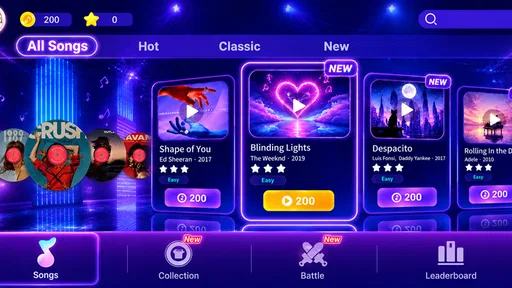


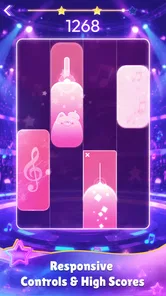


Analysis by Reviewed
My main takeaway from Magic Piano Music is that it works best as a quick, playful music game, not as a substitute for learning piano. It turns listening into a simple tap-along challenge, which makes it easy to pick up when I have a spare moment. I’d recommend it to people who enjoy chasing a rhythm and want a low-pressure way to interact with music, while anyone hoping to practise real keyboard technique should look elsewhere.
A pocket-sized rhythm break
In an ordinary day, I can see myself opening it during a short wait or using a few songs to reset between tasks. The appeal is that I don’t need to know how to read music or own an instrument to take part. The game format gives each song a clear focus: follow the notes, keep time, and try to stay consistent. That can make even a brief session feel purposeful rather than like simply letting another playlist run.
There is a useful distinction between enjoying the performance and learning an instrument. Tapping in time may help me pay closer attention to rhythm, but it does not teach hand position, sight-reading, or how to play a piano piece on physical keys. I’d treat any improvement as game-specific coordination, not evidence that I’m developing piano skills. That expectation keeps the experience enjoyable instead of frustrating.
Making short sessions work
A practical way to approach a rhythm game like this is to begin with a song that feels comfortable, then replay a more demanding one when I’m settled. That gives me a useful point of comparison without turning every attempt into a test. If I keep missing the same moments, I can focus on watching the note pattern rather than reacting to every tap in isolation. The aim is not to rush through a track but to find a rhythm I can follow consistently.
This also makes the game easier to fit around real life. During a commute or a wait, I’d choose a brief session and avoid treating a missed note as a reason to keep playing until I’m annoyed. At home, I might give a tricky song more attention, with the phone resting securely rather than held at an awkward angle. The small adjustment matters: when the screen is steady, it is easier to keep my eyes on the action and my fingers relaxed.
What to consider before settling in
Music games often depend on timing and repeated attempts, so I’d use headphones in a noisy place and keep the phone steady when a song gets demanding. If I’m missing notes, I’d first check whether surrounding noise or an awkward grip is distracting me before assuming I need more practice. Short sessions are also a sensible way to enjoy a challenging track without turning a casual game into a chore.
Compared with rhythm games that lean heavily on dense visual effects or elaborate controls, this piano-tile approach is easy to understand at a glance. That simplicity is a strength when I want to start playing quickly, though it may feel limited to someone who wants deeper music-making tools, free-form composition, or instrument lessons. For those goals, a piano-learning app or a real keyboard offers a more relevant experience.
More From Our News Desk

Weather by Xiaomi Review: Clear at a Glance, Less Clear Up Close

X Under Pressure: Can It Recover When Posting Goes Wrong?

Clash of Clans Is Won Between the Battles

Android Auto Makes the Case for Quieter Car Software

MobiOffice: Transforming Mobile Productivity with Seamless Integration

EA SPORTS FC™ Mobile Soccer: Redefining Mobile Sports Gaming
The choice between this and a music-streaming app is just as important. Streaming is better when I want to listen without concentrating or when I need music to fill a room. This game asks me to participate, so it suits a short break when I want something to do with the melody. It is not a replacement for passive listening: if I’m tired, multitasking, or trying to relax without watching a screen, pressing tiles may feel like extra work rather than entertainment.
Who will enjoy it most
I think the strongest fit is someone who already likes casual mobile games and wants music to be part of the challenge. It can also work for a parent looking for a simple shared activity: an adult can help a child choose a tune, then take turns trying it. The Everyone age rating makes the game broadly approachable, but I would still supervise purchases and set expectations about screen time, especially with younger players.
It is less suited to a person who wants a structured path through music theory, progressive piano exercises, or feedback on playing an actual instrument. A dedicated teaching app is more useful for those goals, while a physical keyboard is the better choice for practising touch and hand movement. And if competitive play is not appealing, the game’s rhythm challenge may still be enjoyable, but it should not be mistaken for a calm piano simulator.
Cost, access, and sensible expectations
Magic Piano Music is a free music game from FunGo Studio, rated for Everyone, with a 4.5 average from around 21,000 ratings and over 10 million installs. It was released on June 25, 2024, and version 3.8.3 requires Android 6.0 or later. Optional in-app purchases range from $0.99 to $9.99 per item, so I’d check the purchase prompts carefully if I’m setting it up for a child or trying to keep spending under control. The game’s broad audience rating makes it approachable, but it doesn’t change the fact that its central appeal is tapping along, not formal instruction.
Because it is free to start but offers paid items, I would decide on a spending limit before handing the device to a child or letting anyone make purchases independently. The free entry point makes it easy to see whether the basic rhythm-game idea clicks, while optional purchases mean it is worth pausing at any prompt and considering whether the extra item actually improves the way you want to play. I would not treat a purchase as necessary for learning piano; that is a different goal and calls for a different tool.
For a first try, I’d use a short session to answer a few practical questions: Can I follow the notes comfortably on my screen? Do I enjoy replaying a melody to improve my timing? Does the sound and pace suit the place where I’m playing? Those answers are more useful than assuming the game will fit simply because it has a piano theme. If the tapping feels satisfying, the low-commitment format is a good match; if it feels like a chore, no amount of persistence turns it into a lesson app.
Diving into the Melodic World
First things first, let’s talk about the interface. The Magic Piano Music game welcomes you with a sleek and vibrant design. It’s super user-friendly, making it easy for anyone, from a novice to a seasoned pianist, to navigate. The app offers a wide variety of songs across different genres. Whether you're into pop, classical, or even anime soundtracks, there’s something here for everyone. I was pleasantly surprised to find some of my favorite tunes available for play.
Gameplay and Features
So, how does it work? Imagine a game where instead of shooting aliens or collecting coins, you’re tapping on tiles to create beautiful melodies. It’s a rhythm game at its core, similar to other popular music games, but with a twist. The game challenges you to hit the right notes at the right time, and trust me, it’s both thrilling and addictive. You start with simple tunes and gradually unlock more complex pieces as you progress. It’s incredibly satisfying to see yourself improve and tackle more challenging songs.
One of the standout features is the multiplayer mode, where you can compete against friends or players worldwide. It adds a competitive edge that keeps you coming back for more. Plus, the app frequently updates its song library, so there’s always something new to look forward to.
Choosing a comfortable way to play
For a better session, I’d make a small routine out of the first few minutes: set the phone down if the surface is stable, make sure the volume is comfortable, and give the screen my attention instead of trying to play while reading messages. Rhythm games reward focus, and dividing attention can make a song seem harder than it is. If I’m on the move, I’d stick to simpler play rather than expecting a clean run while juggling a bag or navigating a crowded space.
That distinction is useful when deciding whether to use headphones. They can help me hear the melody in a noisy place, but I would keep the volume comfortable and remain aware of my surroundings outside the home. In a quiet room, the phone’s own audio may be enough. The best setup is not necessarily the most elaborate one; it is the one that lets me follow the rhythm without straining or creating a distraction.
The Sound of Magic
Now, let’s talk sound quality. The audio experience is top-notch. The developers have done a fantastic job ensuring the piano sounds are realistic and immersive. It genuinely feels like you’re playing a real piano, and the feedback from hitting the notes is both responsive and satisfying.
Another cool feature is the ability to customize your piano. You can choose different themes and sounds to make your playing experience unique. It’s these little personal touches that make the game stand out in the crowded market of mobile music games.
What the game does—and doesn’t—teach
Even if the musical presentation feels convincing, I’d separate that feeling from actual instrument practice. A phone screen gives me a compact, game-shaped way to respond to notes, not the physical spacing and touch of piano keys. That makes the game a pleasant introduction to matching actions with a melody, but it cannot tell me whether my fingers are positioned well or whether I can reproduce the tune away from the screen.
That is why I would use it as a companion to listening rather than a shortcut to musicianship. A beginner curious about piano can enjoy the music and discover whether timing challenges are fun, then move to a teaching resource or keyboard if the interest grows. Someone who already plays may appreciate a casual change of pace, but should not expect the game to replace practice or expand technique in a structured way.
Why You Should Give It a Try
In a nutshell, if you’re looking for a fun and engaging way to enjoy music, the Magic Piano Music game is a must-try. It’s perfect for killing time, improving your sense of rhythm, or just having a bit of fun with your favorite songs. Plus, it’s a great way to introduce kids to music in an interactive and enjoyable manner.
So, go on and give it a whirl! You might just discover a hidden musical talent you never knew you had. Happy playing!
My verdict: a casual game, not piano lessons
For me, the strongest reason to try it is the low barrier to entry: I can jump into a melody without first learning scales or setting up an instrument. The trade-off is that the same streamlined design won’t satisfy everyone. If I want a quiet, focused way to practise a real song on a keyboard, I’d choose a teaching tool instead; if I want a quick challenge with music at its centre, this game makes more sense.
I’d also think about who will be using it and what they expect from it. It can be a cheerful introduction to rhythm for a child, or an easy way for an adult to turn a few idle minutes into a small skill challenge. A competitive player may enjoy the multiplayer element, while someone who prefers calm listening may find timed tapping more demanding than relaxing. My recommendation is simple: try it for the rhythm-game experience, and keep your expectations grounded in what a phone game can teach.
Final recommendation
My verdict is positive, with a clear boundary: I’d recommend it when someone wants a quick, accessible way to engage with piano-style melodies, not when they need instruction or a serious practice routine. Its tap-focused format gives a short break a clear goal, and the option to challenge other players can add replay value for people who enjoy a competitive nudge. The same focus may narrow its appeal for listeners who would rather choose a song and relax without having to keep pace.
If you are unsure, I’d start free, try a few sessions in a setting where you can concentrate, and see whether the timing challenge itself is enjoyable. Keep an eye on purchase prompts, especially on a shared device, and choose a different app if your real aim is learning keyboard technique. For casual music-game fans, though, this is an approachable little diversion that asks for attention without asking you to own a piano.
Magic Piano: Rhythm Challenge Frequently Asked Questions
What kind of gameplay should I expect from Magic Piano Music?
Magic Piano Music is a music game built around tapping tiles in time with piano melodies. The rhythm format makes timing and concentration central to play, so it may appeal if you enjoy following a beat and reacting quickly on screen. Its store summary also highlights capturing precious gaming moments with the rhythm of piano music.
Is Magic Piano Music suitable for children and first-time players?
Magic Piano Music has an Everyone content rating, making it suitable for a broad audience. Its tile-tapping style is approachable for newcomers, while the music-game format can also appeal to players who already enjoy rhythm challenges. As with any game, parents may want to review its in-app purchase options before letting a child play.
What is Magic Piano Music game?
Magic Piano Music is an engaging mobile game that allows users to experience the joy of playing the piano through a fun and interactive interface. The game features a variety of songs across multiple genres, providing an enjoyable experience for both beginners and seasoned music enthusiasts. Players tap on the tiles as they appear on the screen to play beautiful melodies, enhancing their musical skills along the way. Its store summary also highlights capturing precious gaming moments with the rhythm of piano music.
Is Magic Piano Music game free to play?
Yes, Magic Piano Music is free to download and play. However, it offers in-app purchases which allow players to unlock additional songs, features, and ad-free experiences. While the game provides a substantial amount of free content, these purchases can enhance the overall gameplay by offering more variety and convenience. Optional purchases range from $0.99 to $9.99 per item, so it is worth checking the purchase choices before spending.
What are the key features of Magic Piano Music game?
Magic Piano Music offers several notable features, including a vast library of songs from various genres, a user-friendly interface, and multiple difficulty levels to cater to players of all skill levels. The game also includes a competitive mode where users can challenge friends or other players worldwide, and a practice mode for honing skills without pressure.
Pros
- Engaging gameplay with interactive elements.
- Wide variety of songs to play and enjoy.
- User-friendly interface and easy navigation.
- Regular updates with new songs and features.
- Enhances musical skills and rhythm.
Cons
- Contains ads that can be intrusive.
- Some songs require in-app purchases.
- Occasional lag on older devices.
- Limited offline mode availability.
- High battery consumption during play.













