Girls Nail Salon - Kids Games
- 938.00
- 4.5
- Installs
- 10.00M
- Price
- Free

Screenshots


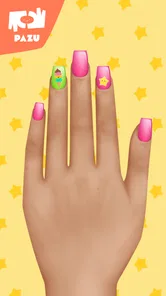
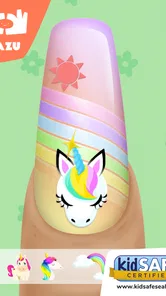
Analysis by Reviewed
When a child wants a creative activity that feels like make-believe rather than a lesson, Girls Nail Salon - Kids Games offers a clear starting point: choosing a look, trying combinations, and making a small design of their own. I see its appeal in those short stretches when a young child wants to do something independently but still enjoys showing the result to an adult. It is a free educational game from Pazu Games, rated for Everyone, and its nail-art theme gives children a focused canvas for playful experimentation.
Where young players may get stuck
The basic idea is easy to grasp, but a child may still need a quick demonstration before using the different design choices confidently. I’d sit beside them for the first session and show how to move from selecting a nail shape to choosing polish and adding decorations. After that, the visual approach can make it easier for a child who is not yet comfortable reading to explore without constant help.
It is also worth setting expectations: this is a virtual styling activity, not a broad collection of different kinds of games. A child who wants a story, levels, or a changing set of challenges may find the salon routine repetitive. Its strength is letting them concentrate on appearance and personal choices; that same narrow focus is the main reason it will not suit every young player.
Unleashing Creativity, One Nail at a Time
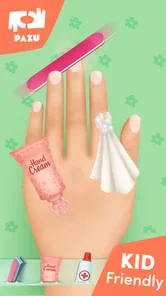
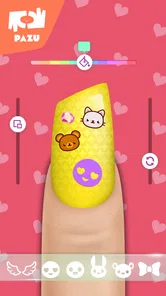
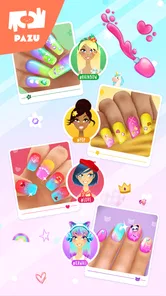
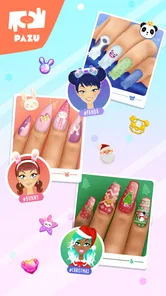
From the moment you open Girls Nail Salon - Kids Games, you’re greeted with a splash of colors, patterns, and endless possibilities. The app is designed to be intuitive, making it super easy for kids to navigate. You’ve got a wide array of nail shapes, polish colors, patterns, and even gems to adorn those little fingers. The best part? Kids can mix and match to their heart’s content, ensuring every design is as unique as their imagination.
Step-by-Step Fun
What’s really cool about this app is how it guides kids through each step of the nail designing process. From choosing the nail shape to picking a polish color and finally adding those finishing touches with stickers and gems, it’s all laid out like a fun-filled journey. It’s like having a mini nail artist workshop at your fingertips!
Not only does this keep the kids engaged, but it also subtly teaches them about color combinations and design aesthetics. Who knew learning could be so glamorous?
Why It Stands Out
One of the standout features of this app is its user-friendly interface. Even if your little one isn’t reading yet, the icons and layout make it super easy for them to understand and enjoy. Plus, the array of design options is truly impressive. Whether they’re into glitzy glitters or simple pastels, there’s something for every mood and occasion.
More From Our News Desk

Weather by Xiaomi Review: Clear at a Glance, Less Clear Up Close

X Under Pressure: Can It Recover When Posting Goes Wrong?

Clash of Clans Is Won Between the Battles

Android Auto Makes the Case for Quieter Car Software

MobiOffice: Transforming Mobile Productivity with Seamless Integration

EA SPORTS FC™ Mobile Soccer: Redefining Mobile Sports Gaming
And let’s not forget the sense of accomplishment it brings. Watching a child proudly show off their customized nails, even if they’re virtual, is just heartwarming. It’s these little moments of joy that make the app so special.
Making a design feel manageable
For a child who tends to tap quickly through choices, I’d turn the activity into a small design exercise: choose a color first, then find one decoration that complements it. Asking “What would make this stand out?” gives them a reason to pause and compare rather than simply adding every available option. This is a practical way to make the game feel more creative without turning play into a lesson.
The same approach works when two children share a device. One can choose the base look and the other can suggest a finishing touch, then they can switch roles for another design. I would keep the turns short and avoid treating the result as a competition; the appeal is experimenting with different tastes, not deciding whose nails look best.
Useful setup checks and smoother sessions
If the game seems slow to open or a selection does not respond, I would first close it and reopen it, then check that the device has enough free storage and that its operating system is compatible. The game’s current version is 1.64 and it requires Android 6.0 or later, so checking those basics before troubleshooting can save time. A restart is a sensible first step for a temporary interface hiccup; it is not a reason to assume the child has lost their designs or that a particular feature is broken.
For a calmer first try, I’d let the child explore one design from start to finish rather than presenting the whole range of choices at once. A useful little workflow is to pick a shape, settle on a base color, and then add only one or two decorations before deciding whether the look needs more. This makes the activity feel manageable and gives a child a chance to notice how a small change affects the overall design.
Workflow recovery without making it a project
If a child changes their mind halfway through, I’d treat that as part of the play rather than a mistake to fix. Invite them to decide whether the current look needs a simpler color or a different finishing detail. The point is not to reconstruct a perfect design from memory, but to help them make the next choice deliberately. That keeps a minor frustration from turning into a long troubleshooting session.
For a session that gets interrupted, such as when it is time to leave or another person needs the device, I’d avoid promising that the design will be waiting later. Instead, let the child finish the current choice if there is time, or agree to start a fresh look next time. This small expectation-setting is useful with any short-form game, especially when a child is absorbed in a design and does not want to stop suddenly.
When the app is not the cause
Some frustrations may come from the device or the setting rather than the game itself. A child using a small screen, sharing a device, or trying to play while the device is busy with other tasks may have a less comfortable session. I’d also check whether the child is tapping where they intend to; younger users sometimes need a little practice with touch controls before they can make precise choices.
The game is free to start, but it includes in-app purchases ranging from $6.49 to $59.99 per item. Since children may be curious about locked or purchasable choices, I recommend an adult checking purchase settings before handing over a device and agreeing on a simple rule about purchases. That practical check helps avoid an awkward interruption while keeping the creative session focused.
Keeping the activity age-appropriate
Its Everyone age rating makes it a broadly accessible choice, but I’d still consider the child’s habits and the family’s device rules. A young player may need an adult nearby at first, not because the design idea is complicated, but because navigating a touch screen and understanding purchase boundaries are separate skills. For a child who can already use simple visual menus, the game is more likely to become an independent activity after that initial introduction.
I would also be clear that the salon theme is pretend play. It offers a digital way to explore color and decoration, not a reason to use real cosmetics or a guide to practical nail care. That distinction can be helpful for younger children who enjoy copying what they see on a screen. If the aim is to introduce art materials, paper, crayons, or washable craft supplies offer a more hands-on experience.
Who will enjoy this kind of play?
I’d choose this for a child who likes colors, pretend beauty play, and making choices without needing a complicated objective. It can work well during a quiet afternoon at home: a child can design a look, show it to a parent, and talk about why they chose a certain shade or decoration. That conversation is where the learning feels most natural. The game can prompt a discussion about contrast and balance, but it should not be mistaken for formal art instruction or a substitute for hands-on drawing and craft materials.
Compared with dress-up games, which usually invite children to coordinate a whole character or outfit, this one keeps attention on nail designs. Compared with open-ended drawing apps, it offers a more guided sequence and a narrower set of creative decisions. That makes it approachable for a child who wants a prompt, while a child who prefers drawing freely or changing many parts of a character may be happier with another option.
A realistic place in the day
I can imagine using it after school while dinner is being prepared, when a child wants something quiet to do nearby but an adult cannot lead a craft activity. I’d set the device up, let the child make one look, and ask them to explain one choice when they are ready to show it. That gives the activity a natural beginning and end, rather than leaving a young player to scroll through options indefinitely.
It is less suitable as a substitute for a longer, shared activity on a day when a child wants conversation or movement. It also may not hold the attention of a player who expects every session to unlock a new objective. In those cases, a physical craft, a drawing app, or a game with a clearer progression may be a better match. The useful distinction is whether the child wants a focused styling canvas or a wider experience.
The Learning Curve
While the app is primarily designed for fun, it does have a subtle educational angle. It encourages creativity, attention to detail, and even a bit of strategic thinking. Kids get to experiment with different styles and see what works best, which is a great way to boost their problem-solving skills without them even realizing it!
Plus, the app doesn’t bombard users with ads, which is a huge plus in maintaining the immersive experience. It’s refreshing to see an app that prioritizes user experience, especially when it’s aimed at children.
How to judge whether it is a good fit
After a couple of sessions, I’d look less at how many designs a child makes and more at how they use the choices. If they enjoy comparing shades, explaining a decoration, or returning to make a different version, the focused format is doing its job. If they quickly ask what comes next or want to change the whole scene, that is a sign they may prefer a game with more variety rather than a problem with the salon itself.
Pazu Games has built a recognizable kind of children’s play around beauty and styling, and this title stays deliberately narrow. That focus is useful for a child who likes the theme and wants to make decisions without learning a complicated control scheme. It is a trade-off, though: a child looking for broader art tools, character customization, or a sequence of goals will probably get more from a different type of app.
My practical verdict
The game has a 4.4 average from around 52,000 ratings, and it has passed 10 million installs, so it has clearly found an audience. Those figures are useful context, but they do not tell me whether a particular child will enjoy repeating a focused salon activity. I’d treat it as a handy option for short creative breaks rather than something that promises a new challenge every time.
If a design option appears unavailable or the game behaves unexpectedly, I’d reopen it and try again before changing device settings or assuming progress has disappeared. For persistent trouble, an adult can check the device’s compatibility and the game’s current update status. I would avoid promising a child that every session will work perfectly, but a simple restart and a little guidance are reasonable first steps.
The version available now is 1.64, and Android devices need to be running at least Android 6.0. The game first appeared on February 11, 2020, so it is not a brand-new release; I’d still check that a device meets the system requirement before expecting it to run comfortably. It is free to download, while the in-app purchase range means I would make the purchase rule clear before a child plays independently.
In conclusion, Girls Nail Salon - Kids Games is more than just a digital pastime. It’s a colorful canvas for creativity, learning, and lots of fun. Perfect for those rainy days or quiet afternoons, it’s bound to keep the little ones entertained and engaged, all while letting their inner nail artist shine. So, if you’re on the lookout for an app that combines entertainment with a sprinkle of education, this one’s definitely worth a download.
Girls Nail Salon - Kids Games Frequently Asked Questions
What does a child do in Girls Nail Salon - Kids Games?
Girls Nail Salon - Kids Games is a creative salon game where children can explore manicure and nail-art styling. Its theme centers on choosing looks and experimenting with color and design, making it suited to children who enjoy imaginative beauty play. The game is educational in category, though its main appeal is hands-on creative expression rather than lessons or quizzes.
Is Girls Nail Salon - Kids Games designed for beginners?
The game is aimed at children and focuses on creative nail styling, so it is a natural fit for young players who want to try a salon-themed activity. A child can approach it as open-ended play, experimenting with manicure ideas at their own pace. An adult can help a younger child get started and decide whether the beauty-salon theme is a good match.
Does Girls Nail Salon - Kids Games have a child-friendly content rating?
Girls Nail Salon - Kids Games has an Everyone content rating, making it suitable for a broad audience. Its salon theme revolves around manicure and nail-art creativity. Parents should still consider their child’s interests and preferences, since the game focuses on beauty styling. The rating can help families assess its general audience suitability, but it is sensible to make that decision in the context of each child.
Can Girls Nail Salon - Kids Games run on my device?
Girls Nail Salon - Kids Games requires Android 6.0 or later, so it is worth checking your device’s operating system before downloading. The game is free to install and is designed as an educational experience for children, with a focus on creative nail styling. If your device meets the minimum requirement, you can explore its manicure and nail-art activities.
Is Girls Nail Salon - Kids Games free to download and play?
The game is free to download, and its central appeal is letting children experiment with manicure and nail-art ideas. It also offers in-app purchases, so some content or options may involve additional spending. Parents may want to review purchase settings before handing over a device, particularly if a child can access the app store account.
Pros
- Fun and creative gameplay for kids.
- Wide variety of nail designs available.
- Encourages creativity and imagination.
- Easy to use interface for young children.
- Colorful and engaging graphics.
Cons
- Contains in-app purchases.
- Advertisements can be intrusive.
- Limited free content available.
- May require internet connection.
- Lacks educational content.













