Who Lite - Video chat now
- 636.00
- 4.5
- Installs
- 10.00M
- Price
- Free

Screenshots

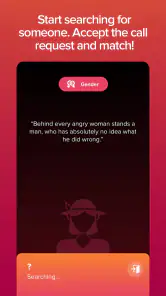
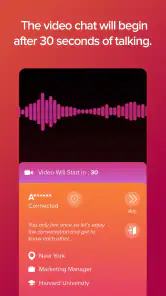

Analysis by Reviewed
I spent time with Who Lite - Video chat now as a social app built around live conversation, and its appeal became clear quickly: it tries to turn a spare moment into a chance to meet someone through video chat. That makes connectivity the center of the experience rather than a background detail. When the connection is stable, the app feels immediate and personal; when it is weak, every pause, blurry image, or delayed response becomes part of the conversation.
That difference matters because Who Lite is not simply another place to scroll through posts. Its purpose is closer to dropping into a live social space where meeting people depends on being ready to interact in real time. I found that more engaging than passive browsing, but also less forgiving. You need a dependable connection, a little privacy, and the willingness to respond in the moment. For the right user, that combination is exciting. For someone who prefers carefully edited profiles or text-first conversations, it may feel demanding.
How Who Lite feels when the network is doing the work
The strongest moments came when the internet connection stayed consistent from the beginning of a chat. Video and conversation felt joined together, so facial expressions, timing, and small reactions carried more meaning than they would in a text exchange. A short response can seem cold in a message, while a live reaction gives it context. That immediacy is the main reason to try this app instead of relying only on ordinary social feeds.
At the same time, live video exposes network problems immediately. A delayed image can make a person appear unresponsive, while a frozen frame can interrupt the natural rhythm of introductions. I learned not to judge a conversation too quickly when the connection became unstable. Sometimes the problem was not the person or the chat itself; it was simply the quality of the moment-to-moment connection.
This is where the app differs from familiar alternatives. A text-based social network lets you answer later, and a conventional messaging service usually gives you time to compose a thought. Who Lite places more value on presence. That can create a more genuine first impression, but it also means the app is less suitable for users who want complete control over how they present themselves.
What a good everyday session looks like
Imagine finishing work or classes and having a short break before heading home. With a stable mobile connection, Who Lite can fit naturally into that gap: open the app, enter the social experience, and see whether a live conversation develops. I would use it in a private room with headphones nearby, rather than on a crowded bus or while walking. The setting affects the quality of the interaction as much as the connection does.
That scenario also reveals a useful trade-off. The app can make a quiet evening feel more social without requiring a long commitment to a public feed. However, a short session can become awkward if you are surrounded by noise, constantly switching between networks, or unable to give the other person your attention. Live conversation rewards focus, so treating it like something to use while multitasking is likely to produce a weaker experience.
More From Our News Desk

Weather by Xiaomi Review: Clear at a Glance, Less Clear Up Close

X Under Pressure: Can It Recover When Posting Goes Wrong?

Clash of Clans Is Won Between the Battles

Android Auto Makes the Case for Quieter Car Software

MobiOffice: Transforming Mobile Productivity with Seamless Integration

EA SPORTS FC™ Mobile Soccer: Redefining Mobile Sports Gaming
I would also avoid opening a conversation when the phone is already struggling with other network-heavy activity. A busy connection can turn an otherwise promising interaction into a sequence of interruptions. Closing unnecessary online activity first is a simple habit, but it makes a noticeable difference in any video-centered app.
Using it comfortably on a phone
Who Lite is naturally suited to short mobile sessions, but “mobile” does not always mean “usable anywhere.” A phone gives you flexibility, yet the camera and microphone also make your surroundings part of the experience. Before starting, I would check the background, reduce nearby noise, and make sure the phone is held steadily enough for the other person to follow the conversation.
Public spaces are a particularly mixed case. A strong connection may be available, but privacy can be poor. Other people may overhear the conversation, appear in the camera view, or make it difficult to concentrate. I found that the app makes more sense in a place where I can control the environment, even if the session itself is brief.
Battery awareness is another practical concern with any live video app. I would not begin a longer session with a nearly empty phone, especially if I am away from a charger. The point is not that every chat will consume the same amount of power, but that video keeps the device working continuously. A sudden low-battery warning can end a conversation more abruptly than a polite goodbye.
Headphones can help when the surroundings are busy, but they are not a complete solution. They may improve what I hear while doing little for the other person’s experience if my own environment remains loud. Speaking clearly and moving to a quieter place is more useful than simply increasing the volume.
What happens when a chat or connection breaks
One of the most important things I noticed is that failure feels more personal in a live social app. If a video feed pauses or a conversation ends unexpectedly, it is easy to wonder whether the other person left intentionally. I try to separate those possibilities instead of assuming the worst. A brief reconnection attempt can clarify the situation, but repeatedly forcing a damaged session usually creates more frustration than value.
My preferred recovery routine is simple: pause, check whether the connection has returned, and then decide whether to continue. If the video remains unreliable, I would end the session rather than struggle through a conversation that neither person can enjoy. Reopening the app later from a steadier connection is often a better test than repeatedly retrying from the same spot.
This is also why I would not use Who Lite as my only way to maintain an important relationship. A conventional messaging app is usually better when the conversation needs a reliable record, delayed replies, or a quick update during a poor signal. Who Lite is strongest for spontaneous social contact, not for replacing every form of communication.
New users may also need to adjust their expectations around first impressions. A technical interruption can happen before either person has had a fair chance to connect. If a session feels awkward, I would try once more in better conditions before deciding that the entire app is unsuitable. On the other hand, if repeated interruptions are common in the places where you normally use your phone, the app’s central format may remain frustrating no matter how much you like the idea.
Keeping mobile data under control
Because the experience centers on video chat, I would be careful about using it freely on a limited mobile plan. I prefer starting sessions on a trusted Wi-Fi connection when possible, especially if I expect to stay for more than a few minutes. That is not just about saving data; a stable Wi-Fi connection can also make the conversation feel less erratic.
There is a practical compromise for people who want to use the app while away from home. Treat mobile sessions as short check-ins rather than open-ended visits, and pay attention to how quickly your connection changes in different locations. A café, train platform, or apartment building may show a strong signal that still performs poorly for live video. Signal bars alone are not a guarantee of a smooth conversation.
I would also keep an eye on in-app spending. Who Lite is free to install and use as a social app, but it includes purchases ranging from under a dollar to amounts that can reach roughly two hundred forty dollars for an individual item. That wide range deserves attention before making any purchase. I would decide in advance whether paid extras are genuinely useful to my way of using the app, rather than buying impulsively during an exciting conversation.
For families, the mature age classification is important. The app is rated for adults, so I would not treat it as a general-purpose social space for younger users. Parents should not assume that a live video environment is appropriate simply because the app is easy to install. Adults should also use ordinary judgment about what personal information they share with people they have just met.
Who Lite compared with slower social alternatives
Compared with a standard social network, Who Lite feels more direct and less curated. A feed gives me time to browse, skip, reread, and choose what to say. Live video asks me to participate now. That can produce a stronger sense of human presence, but it leaves less room to hide nervousness or edit an introduction.
Compared with text messaging, the app is better when tone and expression matter. It is less convenient when one person is busy, traveling through unreliable coverage, or unable to speak privately. Compared with a video meeting tool designed for work or planned calls, it is more spontaneous and socially exploratory, but it does not offer the same feeling of a scheduled conversation with people I already know.
That distinction helped me define its best audience. I would recommend it to adults who enjoy meeting people casually, are comfortable with live interaction, and can provide a reasonably private setting. I would steer away from it if you mainly want a quiet text community, a carefully managed professional network, or a dependable archive of conversations.
The app’s popularity suggests that this format has broad appeal: it has passed ten million installs, carries an average rating of 4.5 from around thirty-five thousand ratings, and comes from Media Republic Apps. Those figures do not replace personal judgment, but they do indicate that the live-chat idea has found a substantial audience. I would still focus more on whether your usual network and social habits match the format than on popularity alone.
Small habits that improve the experience
My first tip is to treat the connection as part of your preparation. Before starting, I would move somewhere with fewer interruptions, check that the phone is not close to running out of power, and avoid beginning a conversation while moving between coverage areas. These steps sound basic, but live video magnifies every small problem.
My second tip is to give a weak session one sensible recovery attempt, not an endless series of retries. If the connection drops, wait briefly and try again once. If the same problem returns, leave and come back later. This protects your time and avoids turning technical friction into an uncomfortable interaction.
My third tip is to separate curiosity from commitment. The free entry point makes it easy to explore, but the presence of in-app purchases means I would not assume that every appealing option is necessary. I would use the core social experience first, decide whether the conversations are genuinely valuable to me, and only then consider spending.
A fourth useful habit is to judge the app across more than one location. If it works well at home but poorly during your commute, that tells you something important about how you will actually use it. Who Lite may be excellent for planned evening sessions and disappointing for spontaneous use outdoors. The best choice depends on your real routine, not an ideal one.
Version, access, and long-term fit
Who Lite is free, and the current version is 1.0.164. It runs on Android devices using version 8.0 or later, which makes it accessible to many existing phones while still leaving some older devices outside its supported range. I would check the phone’s operating system before planning around the app, particularly if the device has not received updates for a long time.
The developer, Media Republic Apps, positions the product in the social category, but the live video focus gives it a narrower personality than a broad community platform. I would not install it expecting a replacement for every social tool on my phone. It is better understood as a dedicated way to meet and talk with people in real time.
That focus is both its identity and its main limitation. A specialized experience can feel more purposeful than a feed full of unrelated posts, yet it also depends on the user being ready for the type of interaction it offers. If you dislike appearing on camera, need conversations to be asynchronous, or often use your phone in noisy and unstable locations, another social option will probably serve you better.
My connectivity verdict
After using Who Lite, I see it as a worthwhile choice for adults who want spontaneous video-based social interaction and understand that connection quality will shape nearly every moment. The app can make meeting people feel immediate, and a good session has a warmth that text alone does not always provide. Its free access lowers the barrier to trying it, while the mature rating and purchase range are reminders to use it thoughtfully.
I would recommend installing it when you have a private place, a stable connection, and enough attention to be present. I would skip it for rushed commutes, limited-data situations, or conversations that need a dependable written record. In those circumstances, ordinary messaging or a more structured video service is the more sensible option.
My final view is positive but conditional: Who Lite is at its best when connectivity, privacy, and willingness to interact line up at the same time. It does not remove the awkwardness of meeting strangers, and it cannot make a weak network feel reliable. What it does offer is a direct social experience for people who prefer real-time contact over endless scrolling. If that sounds like the way you want to meet people, it is worth exploring carefully and keeping your spending and surroundings under control.
Who Lite - Video chat now Frequently Asked Questions
Is Who Lite - Video chat now available for both Android and iOS?
Who Lite - Video chat now is a social app offered through mobile app stores. If you are considering it for a particular phone or tablet, check the official store on that device and confirm that the app is available and compatible before installing. Its Android requirements include Android 8.0 or later; compatibility can vary by device and operating system.
Who develops Who Lite - Video chat now, and how established is it?
Who Lite - Video chat now is developed by Media Republic Apps. It has been available since June 1, 2020, and has more than 10 million installs. Its average rating is 4.5 from around 35,000 ratings, alongside 636 written reviews. These figures can give prospective users a sense of its reach, though individual experiences with a social app can differ.
Who is Who Lite - Video chat now intended for?
Who Lite - Video chat now is a social app for people interested in meeting others and chatting through live video. Its content rating is Mature 17+, so it is intended for adults rather than younger users. Before installing, consider whether you are comfortable with video conversations with people you may not know and review the app’s age guidance.
What does the Lite name mean for the app?
Who Lite - Video chat now is presented as a lightweight social communication app focused on meeting people through video chats. It is designed for users who want to discover new contacts, start conversations, and interact through live video rather than relying only on text messages. The app may include profile browsing, matching or discovery tools, messaging features, and in-app options for managing conversations and connections.
What is Who Lite - Video chat now?
Who Lite - Video chat now is a lightweight social communication app focused on meeting people through video chats. It is designed for users who want to discover new contacts, start conversations, and interact through live video rather than relying only on text messages. The app may include profile browsing, matching or discovery tools, messaging features, and in-app options for managing conversations and connections.
Pros
- Lightweight app that uses less storage and mobile data.
- Quick video calls with a simple
- easy-to-learn interface.
- Useful for keeping in touch on slower or older devices.
- Supports spontaneous conversations without complicated setup.
- Clean layout makes essential calling tools easy to find.
Cons
- Call quality can vary significantly with weak internet connections.
- A smaller user base may make it harder to find active contacts.
- Video calls can drain battery quickly during longer conversations.
- Privacy details and data-handling policies should be reviewed carefully.
- Some features may require permissions users prefer not to grant.
- Category
- Social
- Version
- 1.0.164












