@Voice Aloud Reader (TTS)
- 8.68K
- 4.4
- Installs
- 10.00M
- Price
- Free

Screenshots



Analysis by Reviewed
I see @Voice Aloud Reader as a practical bridge between reading and listening: it turns text you already have into something you can follow while your eyes and hands are busy. That makes it more useful than a novelty voice reader, though it works best when you’re willing to adjust the setup to suit the material. Developed by Hyperionics Technology, it is a free Android app in the books and reference space, with optional in-app purchases listed at $9.99 per item. Its 4.4 average from around 134,000 ratings and over 10 million installs suggest it has found a substantial audience, but the real appeal is the everyday convenience of listening to documents and articles.
Turning saved reading into listening
Ever found yourself drowning in articles, e-books, or any text-heavy content and wished you could just listen to it instead? Let me introduce you to @Voice Aloud Reader (TTS). This app is like having your personal reading assistant, but instead of just reading, it talks to you. And trust me, it’s got a lot to say!
For a realistic routine, I’d send a long article to the reader while preparing dinner, then save a PDF for a walk when I have time to concentrate. The useful distinction is that listening does not make every document equally easy to follow: clean, selectable text is usually a better fit than a page that is mostly a scan or complicated layout. Before committing to a long session, I’d test a few paragraphs and check that the voice and pacing feel comfortable. That small trial can spare you from discovering halfway through that a particular document is awkward to hear.
Compared with reading directly in a browser or a dedicated e-book app, this is better when you want your content to travel with you as audio. A podcast app, by contrast, is designed around recorded shows, not the articles or documents you have already collected. If your priority is polished narration, synchronized highlighting, or a full e-book storefront, a purpose-built alternative may suit you better. Here, the trade-off is flexibility: you bring the text, and the app gives you another way to consume it.
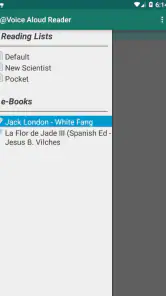
On Android, the share action is a useful starting point, but I’d make a simple habit of checking what arrives before pressing play. A web page can include menus or other clutter alongside the article, and a PDF’s structure can affect how naturally its text is read. For a recurring reading list, keeping a short queue of pieces you genuinely intend to hear is more manageable than sending every interesting link into the app. That turns it into a listening routine rather than another place where unread material piles up.
The app is a strong fit for commuters, people who prefer listening to small text on a screen, and anyone who wants to make routine tasks less visually demanding. It can also help students or professionals review text they already have, though I wouldn’t treat spoken output as a substitute for careful proofreading or close study of complex material. If you mainly read short posts while sitting at a screen, switching to audio may add steps rather than save effort. It is also an Android app, so iPhone users should look for an option made for their platform.
Teen is the stated content rating, and the app’s current version is 37.0.1; it requires Android 8.0 or later. I’d also keep expectations clear around “offline” use: having text available without a connection is one part of the experience, while voice availability can depend on the speech engine and voice installed on the device. If a voice sounds wrong or is unavailable, checking the device’s text-to-speech settings is a sensible first move. The free entry point makes it easy to try, while the listed in-app purchases mean it’s worth checking what an optional purchase offers before paying.
You May Like

Clash of Clans Is Won Between the Battles

Android Auto Makes the Case for Quieter Car Software

MobiOffice: Transforming Mobile Productivity with Seamless Integration

EA SPORTS FC™ Mobile Soccer: Redefining Mobile Sports Gaming

How Microsoft OneDrive Became a Mobile Productivity Giant

How Google Translate Breaks Language Barriers Effortlessly
Listen to Your Texts
Imagine this: You’re in the kitchen whipping up dinner, your hands are busy, but your brain? Totally free to absorb some juicy content. This is where @Voice Aloud Reader (TTS) steps in. With just a few taps, this app reads out loud any text you feed it. Be it a long web article, a PDF, or even those lengthy emails you’ve been postponing. It’s like having a friend who’s always ready to read to you. And the best part? No more screen time headaches!
Customization Galore
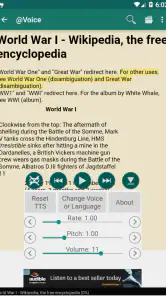
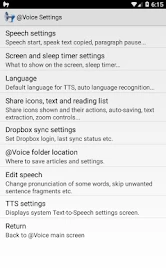
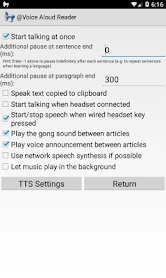
One of the coolest features of this app is its customization. It doesn’t just read to you; it allows you to personalize how it does it. You can choose from a variety of voices and adjust the reading speed to match your pace. Got a favorite voice? Set it up! Want it faster for those quick reads or slower for deep comprehension? You got it. It’s like having a reading experience tailored just for you.
I’d tune speed and voice separately for different material instead of treating one setting as ideal for everything. A brisk pace may work for familiar news, while a slower voice can make dense instructions easier to track. Voice choice also matters more over a long session than during a quick test, so I’d listen to a full minute before deciding. These adjustments are useful, but they do not turn every synthetic voice into expressive narration; people who need characterful performance may prefer an audiobook or human-recorded edition.
Easy Integration
What I really appreciate is how seamlessly it integrates with other apps. Whether you’re using a browser or a document editor, sharing content to @Voice Aloud Reader (TTS) is a breeze. Just a quick share action, and you’re good to go. This ease of use makes it a must-have tool for anyone who’s constantly on the go but doesn’t want to miss out on their reading list.
That handoff is especially handy when you discover an article in the middle of another task: you can send it over rather than lose the page or leave it open as a reminder. I would still review the text before relying on it for a reference-heavy document, because spoken delivery can make headings, tables, and unusual formatting harder to interpret than they are on screen. For editing, comparing figures, or jumping repeatedly between sections, a conventional reader remains the clearer tool; this app is strongest when you can listen through in sequence.
Offline Reading
Ever planned to listen to an article on your commute only to realize you’re out of data? Been there, done that. Thankfully, this app allows offline reading. Just download the content when you’re connected, and you can listen to it anytime, anywhere. It’s a lifesaver, especially during those long flights or when you’re off the grid.
Make listening work for your routine
A useful way to start is to treat listening as a separate pass through material rather than a replacement for every kind of reading. I’d use it first for articles I want to understand broadly, then return to the original page if I need to check a quotation, table, or exact wording. That two-step approach is particularly practical for research: the spoken version helps me decide which pieces deserve closer attention, while the screen remains available for details that audio can blur together.
It can also work as a low-pressure way to revisit information you have already read. For example, I might listen to a saved explainer while walking, then reopen it later if I want to make notes. I would not rely on audio alone for material where a missed number changes the meaning, such as instructions with several steps or a document full of figures. Listening is convenient, but it is easy to lose your place when something interrupts you, and a spoken sentence cannot be scanned as quickly as a paragraph on screen.
For a commuter, the practical question is not simply whether the app can read a file; it is whether the whole routine is comfortable. I’d prepare a couple of pieces before leaving, confirm that the selected voice is available, and start playback while stationary rather than handling the phone while moving. That keeps the app in its proper role: a way to make waiting or travel time useful, not a reason to interact with a screen when attention belongs elsewhere.
Where it fits among reading tools
Compared with the text-to-speech options built into some phones, a dedicated reader makes sense when you regularly collect content from different places and want a single listening workflow. Built-in accessibility speech can be a better choice if you only need occasional read-aloud support or want speech integrated throughout the device. A conventional e-book reader is more comfortable for browsing a library and visually navigating chapters, while an audiobook service is the stronger option when you want finished narration rather than synthesized speech applied to text you supply.
The difference is especially noticeable with books. A clean e-book may be suitable for listening, but the experience is not automatically the same as an audiobook: pronunciation, emphasis, and pacing depend on the voice and the text. For a novel where performance is part of the pleasure, I’d choose a recorded edition. For a manual, a long article, or an e-book I already own and want to revisit hands-free, the reader’s flexibility is more compelling than a polished voice alone.
There is a similar trade-off with web pages. A browser’s own reading view may be enough when I want to simplify one article and stay on screen. Sending it to this app is more useful when I intend to listen while doing something else or build a small queue. If the share result is messy, I would not assume the voice itself is the problem; the text extracted from the page may be the obstacle. Trying a cleaner version of the article is often a better fix than repeatedly changing playback settings.
Who should try it—and who may not need it
I’d recommend it most to people who already have a steady supply of reading and can name moments when listening would fit: a walk, simple chores, or time spent waiting. It is also worth considering if reading on a screen is tiring and you prefer to hear longer passages. The key benefit is not that every page becomes effortless, but that you gain another route into material you might otherwise postpone.
On the other hand, if you mainly consume professionally narrated books, want an elegant visual reading experience, or need precise control over a document’s layout, another tool is likely a better match. It may also feel like needless setup for someone who only wants an occasional web article read aloud. Since this is an Android app, it is not the choice for an iPhone owner looking for a direct install; platform-specific accessibility features or readers are the more relevant place to start.
People using it for study should think carefully about the task. Listening can help with a first pass through an article or a review of familiar material, but dense academic writing often relies on citations, diagrams, and formatting that are easier to inspect visually. I’d use the spoken version to keep moving through prose, then switch back to the source when I need to compare arguments or verify a detail. That division of labor is more realistic than expecting one format to handle every part of studying equally well.
My practical verdict is that @Voice Aloud Reader earns its place when you already have more text than time to sit and read. It is not a replacement for every browser, e-book reader, or audiobook service, and some documents call for a quick cleanup or a screen-based check first. But if you regularly save web pages, PDFs, or e-books and would like to hear them while doing low-attention tasks, it offers a straightforward way to make that backlog more usable. I’d try it with a short, well-formatted article, adjust the voice and pace, and then decide whether listening fits your routine.
In conclusion, @Voice Aloud Reader (TTS) is more than just a text-to-speech app. It’s a tool that transforms the way you consume content. Whether you’re multitasking, relaxing, or on the move, it ensures you never miss out on your reading. So, if you’re looking for a handy companion to read your texts aloud, give this app a try. You might just find it’s exactly what you’ve been needing!
@Voice Aloud Reader (TTS) Frequently Asked Questions
Can I use @Voice Aloud Reader (TTS) to listen to PDFs, websites, and eBooks?
Yes. @Voice Aloud Reader (TTS) is intended for listening to written material, including PDFs, web content, and eBooks. You can share text with the app from another app or open content in its built-in browser, then listen as it reads. It is a Books & Reference app from Hyperionics Technology, designed to make text easier to follow when reading on screen is inconvenient.
Can @Voice Aloud Reader (TTS) help me listen while doing other tasks?
Yes. @Voice Aloud Reader (TTS) is built around listening to text rather than staying focused on a page, so it can be useful when you want to follow written material while doing other things. You can send text to the app from another app or open content in its built-in browser, then listen as it reads. It is a Books & Reference app from Hyperionics Technology.
What does @Voice Aloud Reader (TTS) cost, and are there in-app purchases?
The app is free to download, with in-app purchases listed at $9.99 per item. That makes it possible to try its text-to-speech features before deciding whether to make a purchase. The core idea is straightforward: have the app read text aloud, including documents and web content, so you can listen instead of reading everything on screen.
What is @Voice Aloud Reader (TTS) and how does it work?
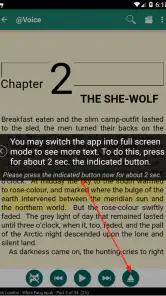
@Voice Aloud Reader (TTS) is an advanced text-to-speech app that reads aloud the text displayed on your device screen. It supports a variety of document types, including PDFs, web pages, and emails. Users can simply share text from any app, or use the built-in browser to open documents, and the app will read the content aloud. It’s perfect for multitasking, studying, or for those with visual impairments.
Is @Voice Aloud Reader (TTS) compatible with all text formats?
@Voice Aloud Reader (TTS) is designed to be compatible with a wide range of text formats. It supports PDFs, ePub, Word documents, web pages, and more. This versatility ensures that users can listen to almost any text content they encounter, making it a highly flexible tool for users who need text-to-speech capabilities across different document types.
Pros
- Supports multiple languages and accents.
- Adjustable speech speed and pitch.
- Easy integration with cloud storage.
- User-friendly interface.
- Works offline for many features.
Cons
- Ads can be intrusive at times.
- Some features require in-app purchases.
- Limited voice options in free version.
- Occasional bugs in text processing.
- May drain battery quickly on older devices.

- Category
- Books & Reference
- Version
- 37.0.1