VistaCreate: Graphic Design
- 1.61K
- 4.4
- Installs
- 5.00M
- Price
- Free
Screenshots

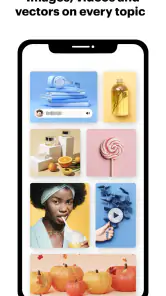
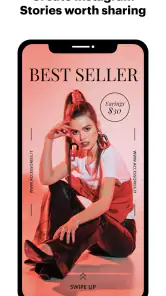
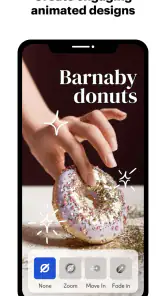
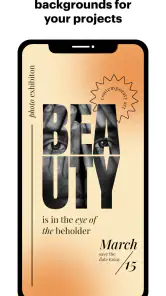
Analysis by Reviewed
In a shared home, a design app can become a surprisingly practical tool. I can see one person making a birthday invitation while someone else prepares a simple announcement for a club or small business, all from a phone rather than waiting for access to a computer. VistaCreate suits those quick, visual jobs especially well: it gives beginners a way into layouts without asking them to start with a blank canvas or learn professional software first.
Sharing a device without sharing every decision
On a family tablet or a phone passed between household members, I’d treat each design as someone’s own project and agree on who is editing before opening it. That simple habit helps avoid accidental changes when two people are working on invitations or social posts around the same time. I would also check whose account is active before making or sharing anything, particularly if the device is used for both personal and school or work projects.
The app is free to download, with optional in-app purchases listed from $3.49 to $120 per item. That makes it easy to try for a one-off task, but I wouldn’t assume every asset or option is included at no cost. Before settling on a design, I’d check whether the elements I want are available to me; it’s frustrating to build a layout around something and only discover a purchase prompt at the end.
Making household projects easier to coordinate
A useful workflow is to decide the purpose and final size before choosing a template. For example, if I’m making a notice for a neighborhood event, I’d first settle the date, location and wording with the other organizers, then choose a layout and keep the text short enough to read on a phone. This reduces the back-and-forth that often comes from designing before the practical details are settled.
For a shared project, I’d also keep a copy of the final wording somewhere separate before making visual edits. That way, if someone changes the layout or tries a different color treatment, the agreed details are easy to restore. The app’s social-ready formats are handy for preparing a post, but the person publishing it should still review the finished image and destination themselves; designing and approving are not quite the same task.
Age, trust, and choosing the right tool
The app is rated Teen, so I’d keep that age context in mind when deciding whether it belongs on a younger person’s device. In a household, I’d talk through purchases and sharing expectations rather than assuming that a shared screen means shared permission. This is a sensible precaution for any creative app where a user can prepare content for public platforms.
VistaCreate is an Art & Design app from Crello Ltd., and its current version is 2.46.13. It has a 4.4 average from around 46 thousand ratings, with over 5 million installs. Those figures suggest it has found a broad audience, but they don’t tell me whether it suits a particular workflow; the best test is whether its editing approach feels comfortable for the kind of design you actually need.
More From Our News Desk

Clash of Clans Is Won Between the Battles

Android Auto Makes the Case for Quieter Car Software

MobiOffice: Transforming Mobile Productivity with Seamless Integration

EA SPORTS FC™ Mobile Soccer: Redefining Mobile Sports Gaming

How Microsoft OneDrive Became a Mobile Productivity Giant

How Google Translate Breaks Language Barriers Effortlessly
Compared with a basic photo editor, this is a better fit when the job involves text, layout and a ready-made format rather than simply cropping or touching up an image. Compared with full desktop design software, it is more approachable for quick posts and flyers, but I’d choose a more specialized tool for intricate illustration, precise print production or complex brand systems. The trade-off is convenience over fine-grained control.
Who will get the most from it
I’d recommend it to people who regularly need polished-looking social graphics, simple invitations, classroom notices or small promotional materials and don’t want to build each layout from scratch. It can also help a household keep a consistent look across a few related pieces: choose a restrained set of colors and fonts, then reuse that visual direction rather than making every post feel unrelated. That’s a practical design habit, not a substitute for a formal brand guide.
It’s less appealing if you want exacting control over every production detail, or if your main goal is to draw and paint freely. A template can speed things up, but it can also make the result feel familiar if you leave its structure untouched. I’d change the headline, remove decorative elements that don’t serve the message, and check contrast and legibility on a small screen before sharing. Those small decisions often matter more than adding another graphic.
For an everyday example, imagine that I need a last-minute reminder for a school bake sale. I’d confirm the essential information with the organizer, pick a suitable format, make the date and location the most prominent details, and keep the rest uncluttered. Then I’d ask someone else in the household to check spelling and readability before posting. That quick second look catches errors a template can’t prevent.
What to check before making a design
For recurring work, I’d make one “master” version only after the wording and visual direction are agreed. Then I’d duplicate the idea mentally rather than repeatedly altering the original: keep the essential hierarchy, but adapt the message for each audience. A school notice, for instance, needs the practical details to lead, while a small shop’s social post may need its product or offer to stand out first. This discipline helps prevent a quick edit from quietly changing the emphasis of the whole design.
One trade-off with template-led work is that a layout can look finished before it is actually ready. I’d check the edges, line breaks, and small text at the size people will see it, not just while zoomed in during editing. If a long venue name wraps awkwardly, shortening the wording may be better than shrinking the font until it becomes hard to read. That’s particularly useful on a phone, where a design that appears spacious on a larger screen can feel cramped in a feed.
When a phone workflow is enough
The mobile format makes sense when I need to produce a single visual quickly, make a small wording change, or prepare a post while away from a computer. It is less comfortable when a project involves many precise revisions or when I need to compare several versions side by side. In that case, I’d use the phone to sketch the direction or handle a quick correction, then move to a larger-screen design tool if the work demands careful alignment and repeated review.
I’d also separate “making the graphic” from “managing the campaign.” A design app can help me prepare the image, but a household or small organization still needs a clear place to keep approved copy, dates, and final files. Naming versions by purpose—such as “event reminder” rather than “final final”—is a small habit that makes shared work less confusing, especially when several people take turns using the same device.
People often ask whether they need design experience to get started. I don’t think so: a template provides a useful starting structure, and moving text or adjusting colors is approachable for a beginner. The harder part is choosing what to leave out. If you are comfortable making those editorial decisions, the app can help you get to a coherent result faster; if you want the software to make every creative choice for you, the first few designs may still take some judgment and experimentation.
Where another kind of design tool is better
If my task is mainly to correct lighting, crop a family photo, or remove a small distraction, I’d reach for a photo editor rather than build a layout. If I’m creating a detailed illustration from scratch, a drawing-focused app is a more natural fit. And if a print job requires strict production specifications or a brand team needs finely controlled reusable systems, desktop publishing or professional design software is the safer choice. VistaCreate’s strength is the middle ground: making a composed visual without the overhead of a full professional workflow.
That distinction also helps set expectations about templates. They are valuable when speed and legibility matter more than originality at every level, but they can lead to a samey result if I keep the default arrangement and wording. I’d use the template as scaffolding: adjust the hierarchy, remove a flourish that competes with the message, and make the color choices serve the information. The aim is not to decorate every empty space but to help the viewer understand the point quickly.
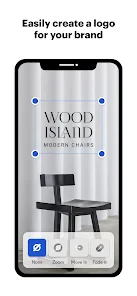
Graphic design can be a daunting task, especially for those of us not born with the talent of Picasso. But, trust me, it has swooped in like a superhero to save the day. Whether you're looking to create a snazzy social media post, an eye-catching flyer, or even a logo that screams professionalism, this app has got your back. I took it for a spin, and here's my take on it.
Unleashing Your Inner Designer
Let me tell you, diving into it is like entering a candy shop for design enthusiasts. With its vast array of templates, you almost feel like a kid in a candy store. The app offers thousands of templates, all neatly categorized to help you find exactly what you need without breaking a sweat. From Instagram stories to business cards, the options are as endless as your imagination. Plus, the interface is as smooth as butter, making it super easy to navigate even for the not-so-tech-savvy among us.
Features That Make You Go "Wow"
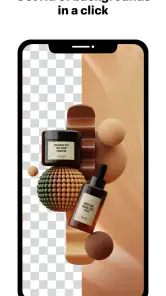
One of the things that genuinely made me go "whoa" was the drag-and-drop feature. It’s as intuitive as it sounds. Just pick an element, drag it to where you want it to go, and voila! You’re a step closer to your masterpiece. And the magic doesn’t stop there. The app allows you to customize every little detail. Want to change the color scheme to match your brand? Go ahead! Need to add some text with a swanky font? Done and done. The sky's the limit with the level of customization it offers.
Why It's Worth Your Time
Alright, let’s talk about why this app is worth downloading. First off, it’s free. Yes, you heard me right! While there are some premium features, the free version is packed with enough goodies to keep you satisfied. And for those who like to design on the go, the mobile version of the app is just as robust as the desktop version. It's like having a portable design studio in your pocket, ready to whip up a stunning design whenever inspiration strikes.
Another thing I absolutely love is how it integrates with social media platforms. You can design directly with the correct dimensions for whichever platform you’re targeting, and then share it directly from the app. It's a time-saver, and who doesn’t love saving time?
Wrapping It Up
In conclusion, if you're on the hunt for a user-friendly, versatile, and downright fun graphic design tool, it is definitely worth checking out. It's perfect for both amateurs dipping their toes into the design world and seasoned designers looking for a quick and efficient solution. So, gear up and let your creativity run wild with this fantastic app. Happy designing!
VistaCreate: Graphic Design Frequently Asked Questions
Can I use VistaCreate without professional design experience?
Yes. VistaCreate is aimed at making graphic design approachable, and its templates can give you a starting point instead of a blank canvas. You can customize a design to suit your project and use the app for visual content even if you are still learning design basics. More experienced users can also use it to streamline routine creative work.
What kinds of projects can I make with VistaCreate?
VistaCreate is intended for visual designs across social media, print, and web. You can use its templates and editing tools to develop graphics for different purposes, then adapt the result to fit your project. The app is in the Art & Design category, making it a tool for creating visual content rather than a general-purpose photo viewer or office app.
Can VistaCreate help me prepare designs for social media, print, and web?
Yes. VistaCreate is built to make graphic design and visual content easier, with a focus on designs for social media, print, and web. Its templates and editing tools can help you shape a visual for different kinds of projects without starting from a blank page. It is useful when you want a polished result but do not have a dedicated design workflow.
What is VistaCreate and how can it enhance my graphic design projects?
VistaCreate is a versatile graphic design app that offers a wide array of pre-designed templates and tools to help users create stunning graphics with ease. It's perfect for both beginners and seasoned designers, providing features such as drag-and-drop editing, customizable templates, and access to a vast library of images, fonts, and animations. Whether you're designing social media posts, marketing materials, or personal projects, VistaCreate streamlines the process, making professional-grade design accessible to everyone.
Is VistaCreate suitable for beginners in graphic design?
Absolutely. VistaCreate is designed with user-friendliness in mind, offering intuitive drag-and-drop features and a wide selection of customizable templates that cater to users of all skill levels. Beginners will find it particularly useful due to its straightforward interface and helpful tutorials, which guide users through the design process step-by-step, allowing them to create professional-looking graphics without needing extensive design experience.
Pros
- User-friendly interface for beginners
- Wide variety of design templates
- Affordable pricing options
- Regular updates with new features
- Strong customer support
Cons
- Limited advanced editing features
- Requires internet connection
- Some features behind paywall
- Occasional app crashes
- Limited stock image library

- Category
- Art & Design
- Version
- 2.46.13











