Video downloader - Story Saver
- 8.79K
- 4.7
- Installs
- 50.00M
- Price
- Free

Screenshots

Analysis by Reviewed
When I want to keep a useful social clip for later, I prefer a quick, deliberate save over trying to rediscover it in a busy feed. Video downloader - Story Saver is built for that narrow job: saving video and stories, with reposting as another possible use. I find it most worthwhile as a personal reference tool, not as a replacement for following creators or a reason to copy their work. Before sharing anything I have saved, I consider permission, attribution, and the context in which it was posted.
A good fit for quick references, not every video
The app makes the most sense when a clip has a practical second life: a recipe step I want to check while cooking, a short exercise demonstration, or a travel tip I may need when planning a route. It is less compelling for casual browsing. If I only want to revisit a post inside the network where I found it, that platform’s own bookmark may be simpler and better connected to the creator and discussion.
Its social category reflects the way it sits beside the services where people find short-form content. The developer is Video Downloader Story Saver. The app is free to install, and it has a 4.7 average from around 1.5 million ratings, alongside over 50 million installs. That scale makes it a familiar option for many users, but I still judge it by whether a particular post can be saved in a usable form on my own device.
The age rating is Everyone, although I would still use ordinary judgement about the posts I save and share. The current version is 3.28.1, and it supports Android 7.0 and newer. If you are deciding whether to install it on an older phone, checking the operating-system requirement first can save an avoidable setup attempt.
A practical routine for saving and revisiting clips
I find a saved clip is most useful when I decide what I want it for before I download it: a recipe to revisit, a movement to practice, or an idea to compare later. I also make a quick note of its source when that context matters, so the file does not become an anonymous video in my camera roll. With that routine in place, the next question is which settings and everyday choices make saving smoother.
Start with one clip and check the result
My recommended first run is deliberately simple: open the social post you want to keep, use the app’s available saving workflow, then check the resulting file before repeating the process. Confirm that the video plays and that you can find it again in the place you expect. That small check helps you catch a failed or incomplete save early, instead of assuming a batch of clips is safely stored.
The app is aimed at people who want a more direct route from seeing a video to keeping a copy. That makes it handy for a recipe demonstration, a workout move, a travel idea, or a short tutorial that would be awkward to search for later. I would not treat it as a substitute for following creators or bookmarking posts: saved files are better for offline reference, while a platform’s own save feature keeps the item connected to its original account and context.
More From Our News Desk

Weather by Xiaomi Review: Clear at a Glance, Less Clear Up Close

X Under Pressure: Can It Recover When Posting Goes Wrong?

Clash of Clans Is Won Between the Battles

Android Auto Makes the Case for Quieter Car Software

MobiOffice: Transforming Mobile Productivity with Seamless Integration

EA SPORTS FC™ Mobile Soccer: Redefining Mobile Sports Gaming
There is also a useful distinction between saving and reposting. A clip you keep for your own reference is not the same as one you publish again. Before reposting, I check whether I have the creator’s permission and whether the original context, attribution, and any platform rules are being respected. That habit matters more than speed, especially with videos made by individual creators.
What the app is like to use
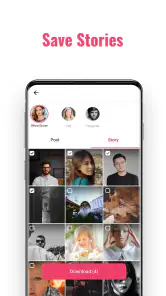
In my experience, the appeal is its focused job rather than a broad suite of social features. The store describes it as a video downloader, and the app’s intended role is clear: help save video and stories, with reposting also in the picture. It is developed by Video Downloader Story Saver, and its social category makes sense for a tool that sits alongside the networks where people discover and share short-form content.
The app is free to install, so trying the basic workflow does not require an upfront purchase. It has a 4.7 average from around 1.5 million ratings, and it has passed 50 million installs. Those figures suggest that many people have found a use for it, but they are not a guarantee that every social platform, post type, or device will behave identically. I judge it by whether it makes my own repeat task easier and whether the saved result is actually usable.
It is rated Everyone, which makes the age label broad, but the material people choose to download still depends on their own judgement. The current version is 3.28.1, and the app is listed for Android 7.0 and newer. If you are considering it on an older device, checking your operating-system version before installing is a sensible first step.
Settings and choices worth checking
Before building a habit around any downloader, I look through its available settings and check what can be controlled: where files go, how downloads are handled, and whether reposting is a separate action from saving. I do not assume a particular option exists until I can see it in the app. This is a practical way to avoid surprises, especially if you are saving enough clips that storage and organization begin to matter.
My first useful adjustment is a personal one: decide where saved videos belong before collecting them. If the app offers a destination choice, use a location you can recognize; if not, make a note of where the finished files appear on your device. Then test with one short clip. A repeatable location is more valuable than a long, unorganized pile of files, and it makes it easier to delete material you no longer need.
I also recommend checking a file immediately if its sound, picture, or playback seems wrong. A downloader cannot improve the source video, and the quality you get can depend on what the original post makes available. If you need a clip for a presentation or editing project, test the actual saved copy before relying on it. For casual viewing, a small imperfection may not matter; for a larger screen or a polished edit, it may be decisive.
There are in-app purchases, with listed item prices ranging from $0.09 to $119.99. I would look carefully at the purchase screen and its terms before paying for anything, rather than assuming that a paid option is necessary for the basic task. If your goal is only to save an occasional video, start with the free experience and decide whether any offered extra solves a real problem for you.
Faster habits without making a mess
Once the basic process works, the best shortcut is usually preparation, not tapping faster. I keep a short mental checklist: choose the post, save it, verify playback, and decide whether it belongs in my long-term collection. Doing those steps in the same order reduces the chance of saving the wrong item or forgetting which clips I have already checked.
A realistic example is planning a weekend trip. I might save a few short clips with walking-route tips or local activity ideas while browsing, then review them later when I have time to compare. Instead of keeping every passing video, I save only the ones with information I expect to use, and I remove anything that turns out to be outdated or redundant. That keeps the archive practical rather than turning it into another feed to manage.
For recurring tasks, I separate “use soon” material from clips I want to retain. If your device’s file tools let you organize saved videos, a small number of clearly named folders can help; otherwise, deleting finished items regularly is a simple alternative. This is not a special app feature, just a way to keep a downloader useful as the collection grows. The trade-off is that sorting takes a little time, but it saves more time when you need to find a particular clip.
I avoid treating repeated saving as permission to repost at scale. A quick workflow can make it tempting to collect and redistribute many clips, but each post still has an owner and context. For my own reference, a private copy can be convenient; for sharing publicly, I pause to consider consent and attribution. That boundary keeps the tool useful without turning convenience into careless copying.
Where it fits beside the usual alternatives
Compared with bookmarking a post inside a social platform, a downloaded file can be easier to access outside that platform and may suit offline reference. The bookmark, however, is often better for returning to the original creator, reading comments, or seeing updates. I use the platform’s own save option when discovery and attribution matter most, and a separate saved copy when I have a legitimate reason to keep the clip available as a file.
Compared with a phone’s built-in screen recording, a dedicated downloader can be a more direct option when the intended save workflow supports the post. Screen recording is a fallback rather than a perfect replacement: it can capture interface elements or require extra trimming, and the result may not match the source cleanly. On the other hand, if a post cannot be saved through the app’s available route, I do not assume that every workaround is appropriate or reliable. Sometimes the best choice is simply to keep the original link or ask the creator for a copy.
People who want a full video-editing suite, a social publishing planner, or a large media library should look elsewhere. This app’s purpose is narrower, and that focus is useful only if saving and reposting are genuinely the tasks you need. Likewise, if you rarely revisit short videos, a platform bookmark may be enough and will involve less file management.
Limits that experienced users should plan around
The biggest practical limitation is dependence on the source post and the social service it comes from. A tool can only work with the material and route available to it; posts may change, disappear, or fail to save as expected. I therefore never make a downloader my only copy of something important. If a clip contains information I cannot afford to lose, I look for a more appropriate, authorized source rather than relying on one saved social post.
Another limit is organization. Downloading is the easy part; keeping track of what a clip shows, where it came from, and whether it is still relevant takes attention. For a handful of personal references, that is manageable. For a large collection, I would choose a dedicated media-management approach with search and clearer cataloguing rather than expecting a focused social downloader to do all of that work.
Finally, reposting is not a neutral technical step. A saved video may include someone’s face, voice, work, or personal moment. I would skip reposting when I cannot establish that sharing is welcome, and I would avoid using the app to copy material in a way that misleads viewers about its source. That is a real limit on what I consider a responsible use, even if a file can be saved successfully.
Who I would recommend it to
I would recommend Video downloader - Story Saver to someone who regularly finds short social videos worth keeping and wants a simple way to revisit them outside a fast-moving feed. It makes the most sense for practical references—ideas, demonstrations, or clips you have a legitimate reason to retain—and for people willing to check their saved files and keep them organized.
I would skip it if you mainly want to browse social content, if platform bookmarks already meet your needs, or if you expect a downloader to manage a large video library or handle every post without friction. It is also not the right choice for anyone who plans to repost other people’s work without permission. In those situations, a platform’s own save tools, a creator-approved download, or a dedicated media organizer is a better fit.
My verdict is that this is a useful, focused social utility when I treat it as one step in a careful routine: save only what I need, verify the result, keep the files findable, and respect the person who made the video. Its free entry point makes it easy to try, while the in-app purchase range is a reason to review any paid option before committing. Used with those expectations, it can turn a fleeting clip into a handy personal reference without pretending to be more than a downloader and story-saving companion.
Video downloader - Story Saver Frequently Asked Questions
What is Video downloader - Story Saver used for?
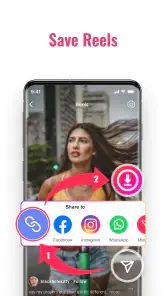
Video downloader - Story Saver is designed to help users save videos and stories from supported social platforms to their device. Depending on the app’s current version and the source platform, it may offer different ways to find or download content, such as sharing a link into the app. Check the listing and in-app instructions to confirm which services and media formats are supported.
How do I download a video or story with the app?
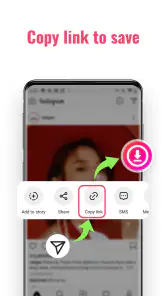
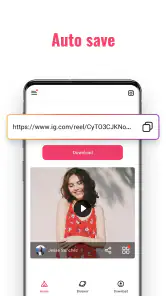
The usual process is to open the source platform, copy or share the link to the video or story, and then follow Video downloader - Story Saver’s on-screen prompts. The exact steps can vary by platform and app version, and some content may not be downloadable. Make sure the app requests only permissions you understand, and avoid entering your social-media password into an unfamiliar downloader.
Is Video downloader - Story Saver free to use?
Pricing and access can depend on the version available in your region. The app may be free to install while displaying advertisements, offering optional purchases, or limiting certain features. Before downloading, review its store listing for in-app purchase details and check the app itself for any usage limits or subscription terms. Confirm the price and renewal conditions before agreeing to a paid option.
Can I save private stories or use downloaded content without permission?
A downloader cannot make private content yours to use, and its technical capabilities may be restricted by the source platform. Only save material you are authorized to access, and ask the creator’s permission before reposting, sharing, or using it commercially. Respect privacy, copyright, and the platform’s terms of service; availability in the app does not necessarily mean you have permission to redistribute a video or story.
Is Video downloader - Story Saver safe, and what permissions should I check?
Safety depends on the specific app listing, developer, version, and permissions requested. Install it from an official app store, review recent user feedback and the privacy information, and keep your device updated. A downloader may need access to files or media to save content, but requests for unrelated access deserve caution. Avoid providing account credentials, and uninstall the app if it behaves unexpectedly.
Pros
- Built-in browser makes it easy to find and save supported videos.
- Simple controls help first-time users get started quickly.
- Saved files can be viewed offline after downloading.
- Story-saving feature adds more than basic video downloads.
- Useful for keeping public content for personal viewing.
Cons
- Downloads may fail when a platform changes its website or policies.
- Private or restricted content may not be available to save.
- Some sites and formats may not be supported.
- Ads can interrupt browsing and downloading.
- Reposting saved content without permission may violate creators’ rights.
- Category
- Social
- Version
- 3.28.1











