Vacation Countdown App
- 5.47K
- 4.6
- Installs
- 5.00M
- Price
- Free

Screenshots


Analysis by Reviewed
So, let’s dive into the world of travel anticipation with the Vacation Countdown App. If you’re anything like me, the thrill of booking a trip is quickly followed by the excitement of counting down the days until your adventure begins. This app has become my go-to tool for keeping that excitement alive and kicking!
When a countdown meets everyday plans
I find this kind of travel app most useful in the stretch between booking a trip and leaving home. A countdown makes an abstract date feel tangible, especially when work, school, or family routines make the departure seem far away. It is a small ritual rather than a planning system: I can glance at the trip, enjoy the anticipation, then return to whatever I was doing.
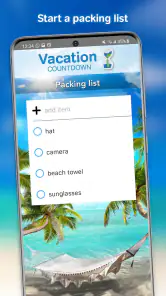
For example, imagine a busy week when you have already booked a family break but still need to finish ordinary errands. A countdown can keep the trip in view, while a note or reminder can help capture a packing thought when it occurs instead of trusting yourself to remember it later. I would still use a dedicated checklist for detailed packing and bookings; the countdown is better as a cheerful companion than as the only place to manage a trip.
A small ritual, not a travel command center
That distinction is useful when deciding whether to install it. I would not open a countdown app expecting it to solve the practical problems of a holiday; its value is that it gives a future date a visible, personal presence. If you already manage bookings in email, transport details in another app, and packing on a checklist, this can sit alongside those tools without asking you to rebuild your whole routine.
A realistic use is to create the countdown shortly after booking, then let it serve as a prompt for occasional preparation. When I notice that the trip is getting close, I can review the packing list or check a document in the place where I actually store those details. That keeps the app’s emotional nudge useful without turning a simple display into a second, incomplete itinerary.
The Ultimate Countdown Companion
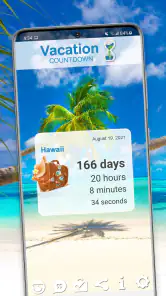
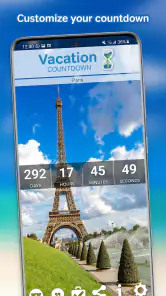
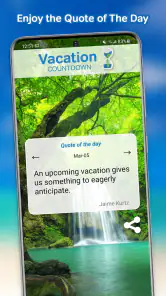
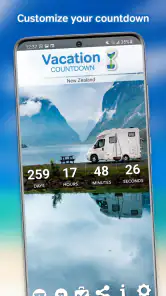
First things first, I’ve got to say, the Vacation Countdown App is incredibly user-friendly. From the moment you open it, the vibrant and engaging interface hooks you. You can customize your countdown screen with beautiful background pictures that get you in the mood for your upcoming getaway. Whether it’s a serene beach view or a bustling cityscape, you get to choose what inspires you as you tick off the days.
Features That Stand Out
The app isn’t just about counting days, though. It offers a plethora of features that make it a travel enthusiast’s dream. One of my favorites is the ability to add personalized notes and reminders. It’s perfect for jotting down those last-minute packing items or travel tips you might forget. Plus, you can even share your countdown with friends and family on social media. I love showing off how many days are left until I’m sipping cocktails by the pool!
More From Our News Desk

Weather by Xiaomi Review: Clear at a Glance, Less Clear Up Close

X Under Pressure: Can It Recover When Posting Goes Wrong?

Clash of Clans Is Won Between the Battles

Android Auto Makes the Case for Quieter Car Software

MobiOffice: Transforming Mobile Productivity with Seamless Integration

EA SPORTS FC™ Mobile Soccer: Redefining Mobile Sports Gaming
Another cool feature is the option to set multiple countdowns. If you’re a frequent traveler or planning several trips, this is a lifesaver. It helps keep everything organized and lets you seamlessly switch between countdowns without losing track. The app also syncs with your calendar, ensuring you never miss a beat on your travel plans.
Keeping the Excitement Alive
What’s really neat about this app is how it keeps the excitement alive. You can set daily or weekly notifications to remind you just how close you are to your vacation. These little nudges are a great way to lift your spirits, especially if you’re having a tough day at work. It’s like having a little piece of your vacation with you at all times!
Share the Joy: I also appreciate how the app encourages sharing. It’s not just about you; it’s about bringing others into the fold. You can send updates and countdown milestones to friends and family, and I’ve found it’s a wonderful way to connect with loved ones who might be joining you on the trip.
Making the features work for you
With more than one trip on the horizon, I’d give each countdown a clear, recognizable name and choose a background that helps me tell them apart at a glance. That small bit of setup matters when one countdown is for a weekend away and another is for a larger holiday. Notes are most helpful when they stay short and actionable: a reminder to check a document or add an item to a packing list is easier to use than a long collection of travel details.
Notifications are a personal trade-off. Daily nudges can be fun when a departure is approaching, but they may become background noise if the trip is still a long way off. I’d choose a cadence that feels encouraging rather than letting alerts compete with messages and calendar reminders. If several people are travelling together, sharing a milestone can build excitement, while private notes are a better place for personal reminders.
Network moments and mobile use
Because the app brings together visual customization, sharing, and calendar syncing, connectivity is most relevant when I’m setting things up or trying to share a countdown. I would prepare the countdown and check its date while I have a dependable connection, rather than waiting until I’m in a station or airport with a rushed connection. Sharing naturally depends on being able to reach the relevant service, so I wouldn’t treat it as a guaranteed way to send an update at a particular moment.
On a phone, the simple glance-at-the-date use is the strongest fit: checking the countdown during a commute or while taking a break takes little effort. But travel days can involve low battery, busy networks, and plenty of other apps competing for attention. I would keep essential details such as booking confirmations and transport information in the tools I already rely on, instead of assuming a countdown app is a substitute for travel documents or a full itinerary.
Using it around changing connections
For a trip planned with a group, I’d treat sharing as a pleasant extra rather than the group’s official source of truth. A countdown post can get everyone talking, but practical changes such as a meeting time or a revised departure belong somewhere the whole group can check reliably. This matters especially when people are travelling from different places or may not see a social update straight away.
If I’m using the app while moving between home, work, and transit, I’d also keep the setup simple. A recognizable event name and a date I have already checked make a quick glance more useful than trying to edit several details while walking or waiting in a crowded place. The phone context is part of the appeal, but it is also a reason not to make the app responsible for urgent decisions.
What to do when plans or access change
Trip dates can move, and sometimes a planned holiday is postponed. In that situation, I’d update the countdown as soon as the new date is settled, and review any related note or reminder rather than leaving an old date in place. A countdown is only reassuring when it reflects the current plan. If a screen or shared update does not behave as expected, checking the date and connection first is a sensible first step; I would avoid relying on an alert as the sole reminder for anything time-critical.
There is also a useful distinction between anticipation and logistics. The app can keep one or more trips visible and make the wait more enjoyable, but it is not the same as a booking manager or a collaborative itinerary. Someone who wants routes, reservations, maps, and live travel changes in one place will probably prefer a broader travel-planning tool. Someone who wants a focused countdown with personal touches may find that broader tools add clutter they do not need.
Comparing countdowns with calendars and planners
A calendar is the more practical choice if you mainly need a date on a screen or want events connected to appointments. It is familiar and better suited to deadlines, but it does not necessarily make a holiday feel like something you can look forward to. A general travel planner can go much further with itinerary details, yet that breadth may be unnecessary if all you want is a visual reminder and a little anticipation.
This app occupies the narrower space between those options. Multiple countdowns can be more inviting than a row of calendar entries when you have several trips ahead, while notes and reminders add a modest planning nudge. The trade-off is that I would not use those touches as a replacement for a proper task list or shared itinerary. It works best when I know exactly what I want it to do and keep the rest of the trip’s information in the right place.
Who will enjoy it—and who may not
I’d recommend this app to people who enjoy looking forward to a trip, especially families or friends who want to share the build-up, and travellers juggling several future departures. It is also a nice fit if a visual reminder gives you a lift during an ordinary week. I’d skip it if you rarely care about countdowns, prefer to keep your phone quiet, or need one app to handle the practical details of a journey from booking through arrival.
Vacation Countdown is a free app from Kulana Media Productions LLC in the travel and local category. It has a 4.6 average from around 62,000 ratings, with more than 5 million installs. The app is rated for everyone, and its current version is 2.781; in-app purchases range from $0.99 to $12.99 per item. I’d treat the free starting point as a chance to see whether the countdown habit suits me before deciding whether any paid extras are worthwhile, rather than assuming I need them to enjoy the basic idea.
Price, age suitability, and trying it out
Because it is free to start, I see little reason to pay before I know whether I will actually enjoy checking a countdown. Optional purchases are available, but I would first try the basic routine: add a trip, choose a background, and see whether the display earns a place on my phone. The app is rated for everyone, which makes the idea easy to share across a household, though parents should still decide what phone use and notifications suit their children.
The app is listed as version 2.781 and supports Android 8.0 or later. Its average rating is 4.6 from around 62,000 ratings, and it has passed 5 million installs. Those figures suggest it has found a sizeable audience, but they do not tell me whether its style will fit my habits. The better test is whether the visual countdown makes the waiting more enjoyable without creating another notification I feel obliged to check.
Final Thoughts
In a nutshell, the Vacation Countdown App is a must-have for anyone who loves to travel. It’s more than just a countdown tool; it’s a way to enhance your travel experience and keep the excitement alive from the moment you book your tickets to the day you depart. Whether you’re planning a solo adventure or a family vacation, this app is your perfect travel companion. Give it a try, and I promise, you’ll find yourself checking it daily, eagerly awaiting your next big adventure!
My connectivity verdict
For me, the appeal is the small, personal ritual of seeing a trip get closer, not an expectation that the app will solve every travel problem wherever I am. I’d set up the countdown in advance, keep important plans in their proper tools, and use sharing when a connection is available. If that modest role sounds useful, this is an easy app to try; if you want a full travel organizer or don’t want another reason to check your phone, a calendar or a more comprehensive planning option may suit you better.
A practical way to decide
If you are unsure whether you need it, try thinking about the moments when you would actually open it. If you would enjoy seeing a holiday get closer during an ordinary lunch break, or if a shared milestone would give your family something fun to talk about, the countdown has a clear purpose. If you only want reliable reminders for reservations, transport, and packing, your calendar and checklist may already be the better fit.
That is why I would describe this as a small companion for the waiting period, rather than an essential travel tool. Its strongest use is personal and lightweight: a chosen image, a date, and perhaps a short reminder can make an upcoming break feel closer. Keep expectations at that level and it can add a welcome spark; expect it to replace trip planning or solve connectivity problems on the road, and you are likely to be disappointed.
Vacation Countdown App Frequently Asked Questions
Does Vacation Countdown work offline once I have set up a trip?
A countdown to a departure date is the app’s main purpose, so it can be a handy way to keep your trip in mind without turning vacation planning into a complicated project. If offline access matters to you, check how the app behaves on your device after installing it and setting a date. You can also review its permissions and settings before deciding how you want to use it.
What should I check before installing Vacation Countdown on my phone or tablet?
Vacation Countdown is a Travel & Local app for people looking forward to a trip. Before downloading, check that your device meets the minimum operating system requirement and that you are choosing the version intended for your platform. It is also sensible to look over the app’s permissions and purchase options, especially if a child or another family member will use the device.
Can I use Vacation Countdown to keep track of more than one upcoming trip?
Vacation Countdown is made to build excitement by showing how long remains until a trip, and setting a countdown around a planned departure date is its central purpose. If you are organizing several trips, consider how you prefer to keep those dates visible and check the app’s available options after installing it. Its Travel & Local focus makes it a simple companion for looking forward to a getaway.
Is Vacation Countdown suitable for children and families?
The app has an Everyone content rating, so its listed age suitability is broad. Families can use a vacation countdown as a shared way to anticipate a trip, and the countdown itself can make the wait feel more engaging. Parents should still review the app and its settings themselves, particularly if children will use a device with access to social sharing or in-app purchases.
What is the Vacation Countdown App and how does it work?
The Vacation Countdown App is a tool designed to build excitement and help you keep track of the days leading up to your vacation. You simply input the date of your upcoming trip, and the app provides a countdown, displaying the number of days, hours, minutes, and seconds left until your vacation begins. Additionally, it offers customization options, such as themes and backgrounds, to personalize your countdown experience.
Pros
- Intuitive and user-friendly interface
- Customizable countdown widgets
- In-app travel tips and guides
- Syncs with calendar events
- Supports multiple countdowns
Cons
- Limited free features
- Ads in free version can be intrusive
- Some widgets are paid
- Lacks integration with travel apps
- No offline mode available
- Category
- Travel & Local
- Version
- 2.781