USAA Mobile
- 62.72K
- 4.7
- Installs
- 10.00M
- Price
- Free

Screenshots




Analysis by Reviewed
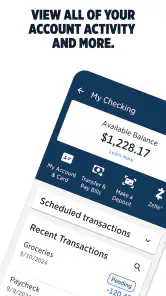
I judge a finance app less by how many buttons it offers than by whether it helps me make a quick, confident decision without turning a small task into a project. USAA Mobile brings banking, insurance, and investment accounts into one mobile experience, which makes it most useful when you already rely on USAA for more than one part of your financial life. The appeal is not simply doing a bank task on a phone; it is having a single place to check several kinds of accounts when you need a practical overview.
Who benefits most from one USAA hub
I would consider this app first if you are already a USAA customer and want to handle routine account checks away from a computer. A household that uses USAA for banking and insurance may value having those relationships close together, while someone who only needs a standalone checking account may find a simpler banking app easier to fit into an existing routine. USAA Mobile is free, and its Everyone age rating makes it broadly accessible, but eligibility for USAA services is a separate question: the app is not a shortcut around becoming a customer.
That distinction matters when deciding whether to install it. The app is a useful companion to an account, not a general-purpose comparison tool for choosing a bank, insurer, or investment provider. If you are shopping across several companies, you will still need to compare their offerings and terms directly. I see the strongest case for this app when the USAA relationship is already part of your finances and mobile access can reduce the number of separate places you check.
A routine where mobile access earns its keep
Picture checking your finances during a lunch break before a household bill is due. You can look over your accounts, review a scheduled payment, and decide whether a transfer is needed without waiting until you get home. If a paper check arrives, mobile deposit may save a separate trip. That is a modest convenience, but it becomes meaningful when small errands are competing with work and family responsibilities.
My practical tip is to use the dashboard as a quick review point rather than treating a glance at balances as a full budget. Before confirming a payment or transfer, check the receiving account and timing carefully; a fast mobile workflow is helpful only if the details are right. For a larger financial decision, I would slow down and review the relevant account information rather than relying on a notification or a single summary screen.
How it compares with separate finance apps
Many people use one app for everyday banking, another for insurance, and perhaps a separate service for investments. USAA Mobile’s advantage is the convenience of bringing USAA accounts together; the trade-off is that it is centered on USAA rather than serving as a neutral dashboard for every provider you use. If most of your financial life is spread across unrelated companies, you may still need other apps, and a dedicated budgeting tool may offer a better fit for detailed spending plans.
I would also avoid assuming that a convenient account overview replaces reading statements or checking transaction details. A dashboard helps with orientation, but careful reconciliation still matters, especially if you are tracking shared household expenses or planning around several due dates. The right choice depends on whether a unified USAA view is valuable enough to make this your regular starting point.
More From Our News Desk

Weather by Xiaomi Review: Clear at a Glance, Less Clear Up Close

X Under Pressure: Can It Recover When Posting Goes Wrong?

Clash of Clans Is Won Between the Battles

Android Auto Makes the Case for Quieter Car Software

MobiOffice: Transforming Mobile Productivity with Seamless Integration

EA SPORTS FC™ Mobile Soccer: Redefining Mobile Sports Gaming
Making the app fit a real household routine
One useful way to get more from a multi-service app is to decide what you want it to handle before you start tapping around. For example, I might use it for a quick morning check of account activity, then reserve a calmer moment to review bills or investment information in context. Separating those habits reduces the temptation to make a consequential choice based on a hurried glance at a balance.
For a household with shared expenses, the app can also be a convenient checkpoint before a payment goes out: confirm which account is funding it, check that the amount and timing make sense, and then return later to verify the transaction. That small sequence is more reliable than relying on memory or a notification alone. It is especially useful when several people coordinate bills but the financial accounts themselves are held by one person.
Getting Started with Ease
First things first, downloading and setting up the USAA Mobile app is a breeze. Available on both Android and iOS, you can find it in the respective app stores. Once you have it installed, logging in is straightforward. If you're already a USAA member, just use your existing credentials. If not, no worries! The sign-up process is user-friendly and guides you through every step.
Sleek and User-Friendly Design
One of the first things you'll notice about the app is its sleek design. The interface is intuitive and uncluttered, making it easy to navigate even for those who aren't tech-savvy. From checking your balance to transferring funds between accounts, everything is just a tap away.
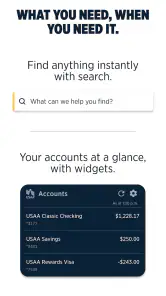
The app's dashboard is personalized to show your accounts at a glance. Need to pay bills? No problem! The bill pay feature is straightforward and allows you to schedule payments, ensuring you never miss a due date. Plus, the app sends notifications for any unusual activity, keeping your finances secure.
Features That Stand Out
The USAA Mobile app goes beyond basic banking. For instance, it offers a handy deposit feature that lets you deposit checks by simply taking a photo. Yes, it's as cool as it sounds! No more trips to the bank for something as simple as a deposit.
Another standout feature is the app’s ability to provide personalized advice based on your spending habits. It’s like having a financial advisor in your pocket, offering tips and insights to help you save more and spend wisely.
Using mobile deposit and advice thoughtfully
Mobile deposit is most valuable when it saves a trip you would otherwise make, but it is not a reason to rush through the capture process. I would take the photo in good light, make sure the check is positioned clearly, and read any on-screen instructions before submitting it. If a deposit is urgent or the check is hard to capture, a different deposit route may be more practical than repeatedly trying on a phone.
Personalized spending advice is best treated as a prompt, not a verdict. A pattern that looks unusual in a summary may reflect a one-off bill, a shared purchase, or a timing issue rather than a habit that needs fixing. I would use suggestions to decide what to inspect next, then look at the underlying transactions before changing a budget or making a larger financial decision.
Security You Can Trust
Security is a big deal when it comes to mobile banking, and USAA doesn’t disappoint. The app uses multi-factor authentication to ensure that only you can access your accounts. Plus, the biometric login feature adds an extra layer of protection, allowing you to log in quickly and securely with your fingerprint or facial recognition.
Not only does the app protect your information, but it also allows you to control your debit and credit cards. You can easily manage your cards, set spending limits, and even lock your card if it's misplaced, all with a few taps.
What I’d check before relying on it
For a new user, the sensible first step is to confirm that you can access the accounts and services you actually need, then take time to learn where the key actions sit. A mobile deposit is convenient, but it does not remove the need to follow the app’s instructions carefully when photographing a check. I would also review notification settings and make sure alerts are useful rather than so frequent that I begin ignoring them.
Security tools work best when they are part of a careful routine. I would use a private device, protect its screen lock, and treat unexpected account alerts as a prompt to check the account directly rather than follow a message blindly. Biometric access can make returning to the app quicker, but it is still worth knowing how to sign in through the normal account process if a phone’s biometric sensor is unavailable.
Current version and what evolution means
The current version is 10.87.4, and USAA Mobile has a 4.7 average from around 413,000 ratings, with about 63,000 written reviews and over 10 million installs. Those figures suggest that the app has reached a large audience, but popularity alone does not tell me whether every feature will suit an individual’s needs. I would treat version numbers as a reason to keep the app current, not as proof that a particular screen or workflow has recently changed.
For existing users, the useful test after an update is whether familiar tasks still feel clear: checking an account, making a payment, or finding card controls. If a screen has moved, taking a moment to explore before a time-sensitive transaction is wiser than assuming the old route still applies. I would watch for clear release notes and changes that improve everyday navigation, while keeping expectations separate from what is actually visible in the version I use.
Questions to settle before making it your main app
If you are wondering whether it can replace every finance app on your phone, my answer is no—not if your accounts and goals extend well beyond USAA. It is a focused way to reach USAA services, while a broad account aggregator or budgeting product may be more useful for seeing unrelated providers together. If you prefer fewer apps, weigh that convenience against the extra work of checking the rest of your finances elsewhere.
If you are asking whether it is suitable for occasional use, it can still make sense when the main need is a quick account check, card control, or bill task. The value is lower if you rarely use USAA services or prefer to do all financial administration on a computer. And if you are new to USAA, first confirm that you can establish the membership and accounts you need; downloading an app by itself does not settle eligibility.
Where it may not be the right fit
The main limitation is the same focus that makes the app convenient: it is built around USAA accounts. People who want one place to monitor balances from many unrelated financial institutions may prefer a broader account-aggregation service, while someone who wants deep category-by-category budgeting may be better served by a dedicated budgeting app. Those alternatives can complement this one, but they may also mean more logins and more places to review.
I would also be cautious about treating spending advice as a substitute for personal financial planning. Suggestions can help prompt a closer look at habits, but major decisions deserve context about goals, obligations, and the full household picture. The app is strongest for practical access and routine management; it is not automatically the best tool for every financial question just because it gathers several USAA services together.
Final Thoughts
In a world where time is money, the USAA Mobile app seems to have struck the perfect balance between convenience and security. Whether it’s managing your daily transactions or providing insights to improve your financial health, this app does it all without breaking a sweat.
If you're looking for a reliable, secure, and feature-rich mobile banking solution, give the USAA Mobile app a shot. Who knows, managing your finances might just become your favorite part of the day.
My recommendation is straightforward: if you already use USAA and want a handy mobile route to your accounts, it is worth trying. If you are choosing a provider from scratch, need one dashboard for many companies, or prefer a dedicated budgeting system, compare those options before making this your main finance app. Used for the tasks it handles well, it can make everyday account management feel less like an errand and more like a quick check-in.
USAA Mobile Frequently Asked Questions
Is USAA Mobile available for iOS and Android?
USAA Mobile is a finance app from USAA for accessing insurance, banking, and investment accounts. Before downloading, check that your phone meets the operating system requirements shown for the version available in your app store. The app is free to download and is rated Everyone, so its content is intended for a broad audience.
Do I need an internet connection to use USAA Mobile?
USAA Mobile provides access to account information and financial tools through the app, so you should expect to need an internet connection when using those features. A reliable connection can help the app load account details and complete tasks more smoothly. Consider connecting through a trusted network when managing sensitive financial information.
Is USAA Mobile free to download, and what devices can run it?
USAA Mobile is a free finance app from USAA for managing insurance, banking, and investment accounts. The current version is 10.87.4, and it requires Android 10 or later. Check your device’s operating system before downloading so you can confirm compatibility. The app is rated for Everyone, making it suitable for a broad audience.
Who is USAA Mobile intended for, and can anyone use its account features?
USAA Mobile brings USAA insurance, banking, and investment account access together in one app. Its account tools are intended for people who have USAA accounts to manage; downloading the app itself does not create or provide an account. If you are considering it, make sure USAA services fit your needs before relying on the app as your account-management option.
What features does the USAA Mobile app offer?
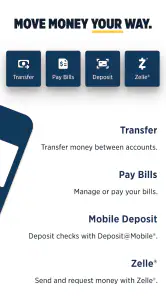
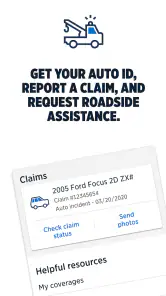
The USAA Mobile app provides a wide range of features for its users, including banking, insurance, investments, and financial advice services. Users can easily manage their bank accounts, transfer funds, deposit checks, pay bills, and access insurance ID cards. Additionally, the app offers investment tracking and financial advice tailored to individual needs, making it a comprehensive tool for managing your finances on the go.
Pros
- User-friendly interface
- easy to navigate
- Comprehensive financial management tools
- Quick access to insurance policy details
- Secure login with biometric options
- Real-time notifications for transactions
Cons
- Limited features for non-USAA members
- Occasional app crashes on updates
- Slow customer support response times
- Some features require stable internet
- Limited customization for alerts
- Category
- Finance
- Version
- 10.87.4