USAA DriveSafe
- 11.45K
- 4.0
- Installs
- 500.00K
- Price
- Free

Screenshots
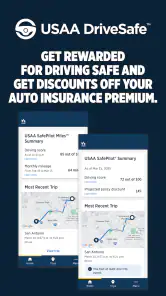

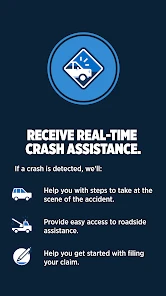
Analysis by Reviewed
I like the idea behind a driving app that makes you pay attention to habits you might otherwise overlook. USAA SafePilot is USAA’s auto-and-vehicle app, built around monitoring trips and encouraging safer choices rather than giving you turn-by-turn directions. It is free, rated for Everyone, and available in select states, so the first practical question is whether you can use it where you live. Its focus is narrow, but that can be useful if you want feedback on your own driving instead of another navigation screen.
What the driving feedback is meant to do
The central appeal is the way trip tracking turns everyday driving into something you can review. Instead of relying only on your general impression—“I’m a careful driver”—the app presents driving habits such as speed, braking, and phone use. I find that kind of feedback most valuable as a prompt to notice patterns, not as a verdict on whether someone is a good driver. A short trip through familiar streets and a stressful commute can feel very different, and context matters when you interpret a score or tip.
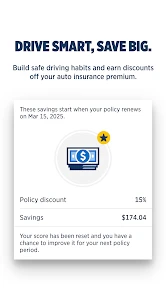
The app is developed by USAA, and its insurance connection shapes the experience: safe driving can earn points that may translate into insurance savings. That gives the coaching a concrete reason to stick with it, though I would treat possible savings as an incentive rather than assume a particular amount. The current version is 3.16.0.134836. With an average rating of 4.0 from around 53,000 ratings, it has attracted a substantial audience, but those figures alone cannot tell you whether its trip tracking suits your routine.
Driving Smarter with USAA SafePilot
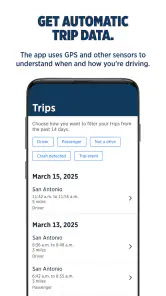
First off, setting up the app was a breeze. I mean, who has the time to deal with complicated setups, right? Once installed, the app seamlessly integrates with your smartphone to monitor your driving habits. It's like having a personal coach who's there to help you improve your driving skills, minus the nagging!
The Features That Steer You Right
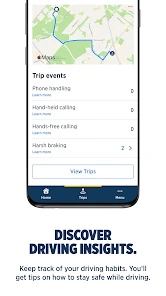
So, what's in it for you? The app tracks a range of metrics such as speed, braking, and even phone usage while driving. I noticed that it gave me gentle nudges to drive more safely, which is a nice touch. It's like a friendly reminder that doesn't get on your nerves. Plus, every safe drive earns you points, which can translate into savings on your insurance. Who doesn't love a good discount?
Latest News
Another cool feature is the in-app feedback. After each trip, I got a summary of my driving performance, complete with tips on how to improve. It's like having a mini driving lesson after every journey. I found this particularly helpful for identifying my weak spots, and it pushed me to become a better driver.
Making trip feedback useful, not distracting
The main benefit is not a single trip score; it is having a record to compare against your own routine. I would treat a summary as a cue to think about what happened, then decide whether there is a practical adjustment worth trying. For instance, if a familiar intersection repeatedly leads to hard braking, the useful response may be to approach it more slowly or leave extra following distance—not to stare at the phone or chase a perfect score. The review belongs after the drive, when the car is parked.
A small habit can make that review more informative: keep your phone in the same place and use the same setup whenever you drive. That gives you a more consistent basis for comparing trips and avoids turning the phone itself into a distraction. If someone else is driving, be clear about who is behind the wheel before relying on the trip record. Shared cars can blur the connection between a driving pattern and the person trying to improve it, so noting the driver in your own routine matters.
What a normal week can reveal
Imagine a week that includes the school run, a grocery stop, and the same commute repeated five times. That is where trip summaries can be more useful than a single dramatic drive: they may help you notice whether abrupt braking crops up on one particular route or whether phone handling is becoming a habit during familiar journeys. I’d review the feedback when parked, then choose one manageable change for the next drive, such as leaving more space in stop-and-go traffic. Trying to correct everything at once is less practical than building one safer habit at a time.
For the fairest picture, keep your phone setup consistent from trip to trip and check summaries only after you have stopped. If you switch between carrying the phone, mounting it, or leaving it in a bag, that can change how convenient the app feels and may complicate your own comparisons. A passenger can also handle music or messages before the car moves, which helps keep the driver’s attention where it belongs. These are simple workflow choices, but they make a driving-feedback tool easier to live with.
A realistic commute, with room for context
Think of a driver who leaves for work at the same time each weekday. One morning, traffic flows and the trip feels calm; another day, a queue forms and several cars cut in. A braking alert or lower-feeling trip summary should not automatically be read as proof that the driver has become careless. The road conditions matter, and the app’s feedback is most useful when the driver can connect it to a specific moment rather than treating it as a complete account of the journey.
I’d use that commute as a prompt to test one change for a few days: increase the gap to the car ahead, for example, then see whether the drive feels less rushed. That is a more realistic goal than trying to manipulate a metric. The same principle applies to errands: a quick stop and a complicated parking lot can produce a different kind of trip from a steady highway journey. Comparing like with like makes the feedback easier to interpret.
Where it fits—and where it doesn’t
SafePilot is not a replacement for a navigation app, vehicle maintenance tools, or a full driving course. Navigation is the better choice when you need route guidance; a mechanic or vehicle-focused app is more appropriate when the concern is a warning light or service schedule. SafePilot’s distinctive role is to make your behavior behind the wheel easier to reflect on, with insurance-related motivation attached. If you want maps, roadside help, or vehicle diagnostics as your main feature, this is the wrong tool for that job.
It is also worth thinking about how often you drive and what kind of trips you take. Someone who makes regular journeys has more opportunity to review recurring patterns than someone who drives only occasionally. And if your routine includes frequent passengers using the phone or complicated shared-car arrangements, you may need to be deliberate about who is driving before interpreting a trip summary. The app is most helpful when the person reviewing the feedback can connect it to the trip they actually made.
How it compares with familiar alternatives
Compared with a standard navigation app, SafePilot asks a different question. A map helps you decide where to go and how to get there; this app is aimed at helping you reflect on how you drive. If your priority is avoiding traffic or finding an unfamiliar address, use navigation for that job. If you already know your routes and want a reason to examine braking, speed, or phone habits, SafePilot has a more relevant focus.
It also differs from simply checking an insurance account or keeping your own notes. A personal driving log depends on remembering to record details, while trip summaries provide a dedicated place to review journeys. That convenience comes with a trade-off: the app’s interpretation is not the same as your own full understanding of traffic, passengers, weather, or a sudden hazard. I would use its feedback as one useful perspective, not as a replacement for judgment or a guarantee that every trip has been assessed perfectly.
Is It Worth Your Time?
Now, I know what you're thinking: "Do I really need another app on my phone?" Trust me, USAA SafePilot is worth considering. Not only does it promote safer driving habits, but it also offers the potential for financial rewards. It's a win-win!
But, like all things, it's not perfect. There were times when the app's GPS seemed a bit off, and I had to manually adjust some entries. However, these minor hiccups were few and far between, and they didn't detract from the overall experience.
That GPS issue is a reason to check a trip summary rather than accept every detail automatically. If a journey looks wrong, review it while parked and make any available correction before using it to judge your habits. I would not let one questionable reading outweigh a broader pattern, but repeated inaccuracies could weaken the usefulness of the coaching. That trade-off matters most to people who expect every trip to be classified perfectly without any attention from them.
Another point to weigh is that tracking works best when you are comfortable making this app part of your driving routine. If you dislike driving-monitoring tools, or simply do not want feedback tied to your insurance experience, a conventional navigation app may feel like a better fit. On the other hand, if you already want to work on smoother driving, the post-trip review gives you a reason to reflect without requiring you to study driving theory or keep a separate log.
Its audience is also limited by availability: it is offered in select states, so check that it applies to your location before building a routine around it. It has over 500,000 installs and around 11,000 written reviews, which suggests many drivers have tried it, but the deciding factor is still whether its approach matches your needs. The app is free, yet the insurance-related benefit is the real reason to consider it; I would compare the terms that apply to you rather than count on a specific saving.
Questions worth settling before you rely on it
Can you use it wherever you live? Availability is limited to select states, so I would check eligibility first rather than assume that being able to install it means the insurance-related experience applies to you. Is it useful if you do not drive every day? It can still offer feedback, but occasional trips give you fewer chances to spot a recurring pattern, which makes the coaching less compelling than it is for a regular commuter.
Does a trip summary tell the whole story? No driving summary can replace the driver’s knowledge of a sudden stop, a detour, or difficult traffic. I would look for repeated signals and treat an isolated result cautiously. And is it worth using solely for a possible insurance benefit? I would not make that decision based on an assumed discount; the app makes most sense when the feedback itself is something you want, with potential savings as an added incentive.
Who gets the most out of it
I’d recommend giving SafePilot a look if you are eligible, drive regularly, and want specific reminders about habits like braking or phone use. It may be especially useful for a driver who is trying to build steadier routines and is willing to review feedback after trips. If you rarely drive, want a general-purpose car dashboard, or prefer not to have driving behavior monitored, you are unlikely to get the same value. The best fit is someone who sees the tracking as a practical coaching aid, not a substitute for judgment on the road.
In conclusion, if you're a USAA member looking to enhance your driving skills while saving a few bucks on insurance, USAA SafePilot is a solid choice. It's user-friendly, provides valuable insights, and encourages safer driving. So why not give it a try? Your wallet and your driving record might just thank you.
USAA DriveSafe Frequently Asked Questions
Who can use USAA SafePilot, and is it available everywhere?
USAA SafePilot is intended for eligible USAA members who want to take part in the insurer’s safe-driving program. Availability is limited to select states, so whether you can enroll depends on where you live. Before downloading, check that the program is offered in your state and that your USAA auto insurance policy is eligible. The app is free to download and is rated for everyone.
What is USAA SafePilot and how does it work?
USAA SafePilot is a telematics-based insurance program designed to encourage safe driving by monitoring driving habits. Once installed, the app tracks your driving behaviors such as speed, braking, and phone usage while driving. By practicing safe driving habits, users can receive discounts on their auto insurance premiums. The app aims to promote safety and provide rewards for responsible driving.
How do I install and set up the USAA SafePilot app?
To install the USAA SafePilot app, you need to be a USAA member with an auto insurance policy. The app can be downloaded from the Apple App Store or Google Play Store. After downloading, log in with your USAA credentials, follow the setup instructions, and allow the app to access necessary permissions such as location and motion sensors to accurately track your driving behaviors.
What kind of driving data does USAA SafePilot collect?
USAA SafePilot collects data on various driving behaviors to assess your driving habits. This includes data on speed, acceleration, braking, cornering, and phone usage while driving. The app uses this data to provide feedback on your driving style and calculate potential discounts on your insurance premiums. All collected data is used in accordance with USAA’s privacy policy.
Can USAA SafePilot affect my insurance rates negatively?
Participating in the USAA SafePilot program will not negatively impact your insurance rates. The app is designed to reward safe driving with discounts, and there are no penalties for poor driving behaviors. However, if unsafe driving habits are detected, the potential discount may be lower or not applied. The program focuses on incentivizing safe driving rather than penalizing drivers.
Pros
- User-friendly interface for all ages
- Real-time feedback on driving habits
- Potential to reduce insurance premiums
- Customizable driving goals and challenges
- Secure
- with strong data privacy measures
Cons
- Requires constant GPS access
- May drain battery quickly
- Limited to USAA insurance members
- Occasional app crashes reported
- Some users find tracking intrusive

- Category
- Auto & Vehicles
- Version
- 3.16.0.134836












