UPS
- 42.32K
- 4.6
- Installs
- 10.00M
- Price
- Free
Screenshots

Analysis by Reviewed
Alright, folks, let’s dive into the world of package tracking with the UPS Mobile App. As someone who frequently orders online, having a reliable app to keep tabs on my deliveries is a godsend. But, is this app the trusty sidekick we all need?
First Impressions and User Interface
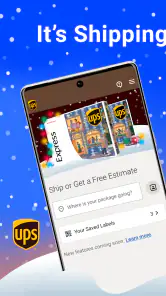
The first thing you notice about the UPS Mobile App is its clean and intuitive design. It’s like walking into a well-organized room—everything is just where it should be. The app sticks to a straightforward color scheme that doesn’t overwhelm your senses, which is a plus in my book.
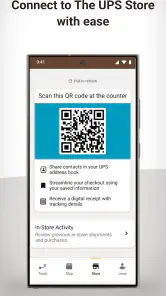
Navigation is a breeze. The menu is tucked away neatly on the side, and you can access your tracking information, shipment history, and even locations of nearby UPS stores with just a few taps. It’s almost like they knew exactly what I wanted before I even opened the app!
Tracking and Notifications
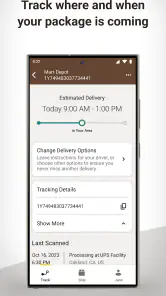
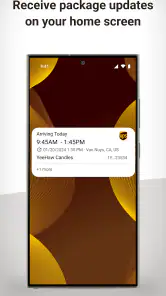
Now, let’s talk about the heart of the app—tracking your packages. The tracking feature is robust, offering real-time updates right at your fingertips. You can see exactly where your package is at any given moment, and that gives me some serious peace of mind. Plus, the push notifications are a lifesaver. No more refreshing the app every five minutes; it keeps you updated without being intrusive.
One thing I found particularly useful is the ability to nickname your shipments. It might sound trivial, but when you’ve got multiple packages coming from different vendors, this feature helps you keep track of everything without a hitch.
Extra Features Worth Noting
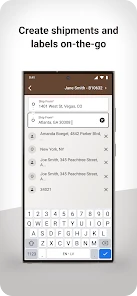
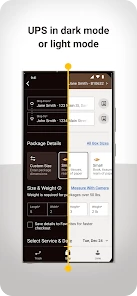
Beyond tracking, the UPS Mobile App offers a few more features that are definitely worth mentioning. You can create shipping labels right from your phone, which is perfect if you’re like me and prefer to handle everything digitally. And if you’re worried about missing a delivery, the app lets you reschedule or redirect shipments with ease.
For those eco-conscious users, the app even provides a carbon impact analysis of your shipments. It’s a small touch, but it’s always nice to see companies thinking about sustainability.
Final Thoughts
So, would I recommend the UPS Mobile App? Absolutely. It’s a reliable, user-friendly app that makes managing your shipments a breeze. Whether you’re a frequent online shopper or just someone who wants to keep better track of their deliveries, this app is a solid choice. With its comprehensive tracking, easy-to-use interface, and handy additional features, it’s got everything you need to stay on top of your packages.
In a world where we’re constantly looking for ways to make life easier, having an app like this feels like a step in the right direction. So go ahead, give it a whirl, and see how it fits into your digital toolkit.
Pros
- Reliable package tracking
- User-friendly interface
- Detailed shipment info
- Easy address management
- Global delivery options
Cons
- Occasional app crashes
- Limited customer support
- Requires frequent updates
- Complex return process
- No dark mode option
- Category
- Business
- Version
- 10.24.1.21











