Unscripted Photography Posing
- 341.00
- 4.3
- Installs
- 500.00K
- Price
- Free

Screenshots


Analysis by Reviewed
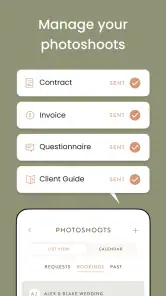
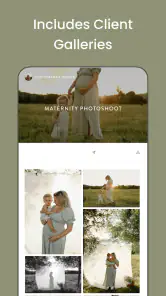
When I first opened Unscripted Photography Posing, I understood its appeal almost immediately: it is built for the moment when a camera is ready, a subject is waiting, and nobody knows what to do with their hands. Rather than treating photography as only a matter of exposure and editing, this free photography app from Unscripted focuses on the practical problem of directing people. Its wider toolkit also touches photoshoot planning, client galleries, payments, and sunlight planning, so it aims to be useful before, during, and after a session.
That combination makes it more interesting than a simple pose-reference collection. I see it as a working companion for photographers who regularly need ideas, structure, and a smoother way to handle parts of the client process. It is available for everyone, runs on Android from version 8.0 onward, and has reached over 500 thousand installs with an average rating of 4.3 from around 1.9 thousand ratings. Those figures suggest that it has found a real audience, but the more important question is whether it remains useful after the first burst of inspiration disappears.
From instant posing help to a repeatable photography routine
The first-week appeal is easy to understand
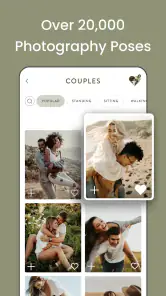
The strongest early experience comes from using the posing material when a session feels stuck. A new photographer can arrive with a vague plan, open the app, and find a starting point instead of improvising every instruction. That matters because directing a person is a separate skill from operating a camera. Even someone who understands composition can lose confidence when a portrait subject asks, “What should I do?”
I particularly like the way a pose reference can change the photographer’s role. You are not simply showing a picture and asking someone to copy it. You can use the reference as a prompt, then adjust the shoulders, hands, weight, gaze, or distance to suit the person in front of you. That small distinction keeps the result from feeling completely mechanical. The app is most helpful when it gives you a vocabulary for direction rather than replacing your judgement.
For a first portrait session, I would use it before leaving home rather than constantly scrolling while the subject waits. I would save a small mental sequence: a relaxed standing pose, a seated variation, a movement prompt, and a close-up setup. That creates enough structure to avoid the familiar problem of taking several similar frames and then panicking. The app becomes a preparation tool, not just a rescue button.
Its broader workflow is also part of the first impression. The product is presented as a place for photography poses, photoshoot organization, gallery delivery, payment-related work, and a sun tracker. For a working photographer, having those needs associated with one service is more convenient than jumping among a pose board, a planning app, a gallery provider, and a separate sunlight tool. For a hobbyist, however, that breadth may feel less focused than a dedicated posing guide.
One realistic session shows where it helps
Imagine photographing an engagement session in a public garden after work. The couple arrives slightly nervous, the light is changing, and you have only a loose route in mind. I would begin with a few simple prompts from the posing material, then move them through walking, standing, and closer interactions instead of demanding perfect still poses. If the sunlight tracker helps me think about the direction and timing of the light, I can choose the next location with more intention rather than wandering until the background looks acceptable.
Afterward, the gallery and payment-related tools become relevant. The value is not that every part of the job magically happens in one tap; the value is reducing the number of separate places where I need to remember what comes next. A photographer who already has trusted systems may not want to change them. Someone building a more organized routine may appreciate the chance to connect inspiration, shooting, and delivery around the same account or workspace.
There is also a useful confidence benefit that is easy to overlook. When I have a few prompts ready, I can pay more attention to expression and comfort. That is better than staring at the camera screen while trying to invent directions. The best use of the app is therefore not copying poses exactly. It is freeing enough mental space to notice whether a subject looks natural.
What makes the novelty fade
The first week can make any reference-based photography app feel essential. Every swipe offers another possibility, and a beginner may discover gaps in their own directing skills quickly. The novelty fades when the same familiar pose families begin appearing in different sessions. That is not necessarily a flaw; portrait photography has recurring patterns. The question is whether the app helps you adapt those patterns to different people, locations, clothing, and moods.
In my view, it earns continued attention only when used as a planning library. If I open it at random during every quiet moment, it can become another source of visual noise. If I use it to build a short session outline, identify transitions, and prepare alternatives for difficult situations, it has a much better chance of becoming part of my routine.
Month-to-month value depends on your kind of photography
For a photographer who works with people regularly, the recurring value is clearer. Portraits, couples, families, personal branding sessions, and lifestyle work all involve direction. Even experienced photographers can run into repetitive habits, especially when shooting in the same locations or with similar lighting. Revisiting a posing reference can help me design a different flow rather than relying on the first sequence that comes to mind.
The app is less compelling for someone who mainly photographs landscapes, architecture, products, or wildlife. Those genres do not need human posing guidance in the same way. A wedding photographer may find the planning and delivery side more relevant than a landscape photographer, while a casual phone photographer may use the pose ideas only occasionally. The value is therefore tied to how often people are the subject of your work.
One non-obvious advantage is that pose references can be used to plan energy, not just body position. I might begin with low-pressure prompts for a camera-shy person, move into walking or interaction once they relax, and finish with more composed portraits. That sequence is more useful than choosing images because they look attractive in isolation. It turns the library into a session-management aid.
Another practical approach is to create a personal shortlist outside the pressure of a live shoot. I would group ideas by situation: narrow spaces, seated portraits, two-person sessions, movement, and moments when the subject has no experience in front of a camera. This reduces browsing time and makes the app easier to use month after month. The strongest long-term benefit comes from converting general inspiration into a personal directing system.
Where the wider tools can save time
The photoshoot side of the app matters most when a photographer is moving from informal sessions toward paid work. Planning details can easily become scattered across notes, messages, calendars, and memory. A tool that brings parts of the process together may help me maintain a clearer sequence: prepare the shoot, guide the subject, deliver the result, and handle the business follow-up.
The gallery function is potentially useful when clients need a cleaner way to view finished images than receiving a large collection of attachments. The payment-related capability also points toward photographers who want to manage more of the client relationship around their photography work. I would still judge these tools by how naturally they fit my existing process. Convenience is only real if the app reduces duplicate entry instead of creating another system to maintain.
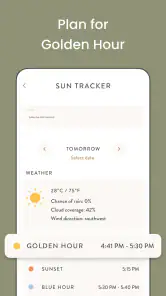
The sun tracker has a narrower but valuable use. It is not a replacement for understanding weather, shadows, or the actual scene, but it can support a location decision before a shoot. For example, if I am choosing between two sides of a building for a portrait session, knowing how the sun will move can help me avoid arriving with a beautiful idea that becomes unusable at the planned time. This is the kind of feature that may be used briefly but still prevent avoidable mistakes.
The maintenance burden is moderate, not invisible
Any app that combines creative references with client workflow asks for regular upkeep. Pose inspiration needs to be filtered so that it remains relevant to the photographer’s style. Planning details must be kept current. Galleries and payment tasks require attention after the camera is packed away. The app may reduce tool switching, but it cannot remove the work itself.
I would not recommend treating it as a complete business operating system without first testing whether its workflow matches the way you already communicate with clients and store files. A photographer with established gallery delivery, invoicing, and scheduling tools may gain more from the posing and sunlight features while leaving the rest untouched. That is perfectly reasonable. You do not have to adopt every part for one part to be useful.
The free price makes trying it less intimidating, but in-app purchases range from $14.99 to $349.99 per item. That is a significant spread, and it means I would examine the paid boundaries carefully before building my entire workflow around features I might later need to unlock. The right approach is to test the free experience during an actual planning cycle, not merely browse it for a few minutes and assume every useful function will remain available without extra cost.
There is also a maintenance cost in attention. If I keep opening the app during a shoot, I risk making the session feel interrupted or over-directed. A subject may become self-conscious if I am visibly searching for the next pose after every frame. Preparing a sequence in advance is not only faster; it protects the human connection that makes portraits work.
Sources of fatigue for regular users
The main fatigue comes from repetition. Pose references can encourage photographers to chase a recognizable arrangement instead of responding to the actual person. A tall subject, a person with limited mobility, a couple who dislikes public affection, or a family with restless children may all need adaptations that a polished reference cannot explain. If I use the app as a rulebook, the results can become stiff. If I use it as a prompt bank, it remains flexible.
Another source of friction is the gap between an attractive reference and a real location. A pose that works in a spacious studio may be awkward beside a busy street, on uneven ground, or in clothing that restricts movement. I need to translate the idea into the available environment, which takes experience. The app can shorten the creative search, but it cannot judge comfort, safety, privacy, or whether a person genuinely enjoys the direction.
The all-in-one ambition can also feel heavy. Someone who only wants quick portrait prompts may not care about galleries, payments, or planning. Conversely, a professional may expect deeper business controls than a broad photography app can provide. This is where a dedicated alternative can be better: a specialist gallery service may offer a more refined delivery experience, a calendar may be simpler for scheduling, and a focused posing resource may feel faster when inspiration is the only need.
There is a mental cost to keeping too many options open. When I have dozens of possible directions, I can delay making a decision. A practical limit helps: choose a few starting ideas, one or two transitions, and a fallback for the location. The app should narrow choices, not make every shoot feel like a catalogue review.
Who should make it part of a regular workflow?
I would recommend it most strongly to beginner and intermediate portrait photographers, couples and family photographers, personal branding shooters, and freelancers who want one place to support several parts of a client session. It is especially suitable for people who know how to take a technically acceptable photograph but still feel uncertain about directing subjects. The prompts can provide a bridge between learning and confident improvisation.
It may also help experienced photographers who mentor others or who want to refresh a familiar approach. The benefit is not necessarily discovering a revolutionary pose. It can be as simple as remembering to change height, distance, movement, or interaction during a session. Small variations often make a larger difference than collecting increasingly elaborate poses.
I would tell a specialist landscape or product photographer to skip it unless the planning, gallery, or business features solve a separate need. I would also hesitate to recommend it to someone who dislikes subscription-style ecosystems or wants a single-purpose tool with no broader workflow. Since purchases can become expensive at the upper end, cautious testing is sensible for anyone who is price-sensitive.
Does it earn lasting space after the novelty?
For me, the answer is yes, but only when I use it deliberately. Its lasting value is not in endlessly scrolling through attractive examples. It comes from preparing better sessions, giving clearer directions, planning around sunlight, and reducing some of the friction between photographing a client and delivering the result. Those benefits recur whenever I work with people, which gives the app a stronger foundation than a one-time inspiration download.
At the same time, it is not a substitute for learning how bodies move, how light changes, or how to communicate respectfully. A pose reference cannot tell me when a subject is uncomfortable, when a suggestion clashes with their personality, or when a simple candid moment is better than a carefully arranged frame. The photographer still has to observe and adapt.
Unscripted was released on May 6, 2019, and the current version is 4.10.2. It remains an accessible option for Android users on version 8.0 or later, with an Everyone age rating. The developer is Unscripted, and the app is free to start, although its in-app purchase range deserves attention before committing to advanced use.
My final judgement is that this is a practical companion rather than a magic solution. I would keep it installed if portrait direction, shoot planning, or client delivery regularly appears in my work. I would prepare with it before sessions, use the sunlight tool for location decisions, and treat the business features as optional parts of a larger workflow. Used that way, Unscripted Photography Posing has a reasonable chance of surviving beyond its first-week novelty.
If you want a huge library to browse casually, it may eventually feel repetitive. If you want help turning uncertain direction into a repeatable process, it offers more lasting value. The best reason to keep it is not the number of poses, but the confidence and structure it can add to a real shoot.
Pros
- Clear posing guidance helps reduce awkwardness during photo sessions.
- Useful for photographers working with individuals
- couples
- and small groups.
- Visual examples make the instructions easy to understand and follow.
- Can help beginners direct subjects with greater confidence.
- Practical tips encourage more natural-looking portraits.
Cons
- Some advice may feel repetitive for experienced portrait photographers.
- Pose suggestions may not suit every body type
- style
- or shooting location.
- The app may offer limited guidance for complex lighting setups.
- Users may need to adapt poses rather than follow them exactly.
- Certain content or features may require payment or an in-app purchase.

- Category
- Photography
- Version
- 4.10.2











